This issue tracker has been migrated to GitHub ,
and is currently read-only.
For more information,
see the GitHub FAQs in the Python's Developer Guide.
Created on 2019年05月25日 01:15 by terry.reedy, last changed 2022年04月11日 14:59 by admin. This issue is now closed.
| Files | ||||
|---|---|---|---|---|
| File name | Uploaded | Description | Edit | |
| image.png | aroberge, 2019年05月25日 22:42 | |||
| image.png | aroberge, 2019年05月25日 22:42 | |||
| image.png | aroberge, 2019年05月25日 22:42 | |||


| Pull Requests | |||
|---|---|---|---|
| URL | Status | Linked | Edit |
| PR 13576 | merged | terry.reedy, 2019年05月25日 21:59 | |
| PR 13602 | merged | miss-islington, 2019年05月27日 23:25 | |
| PR 13678 | merged | taleinat, 2019年05月30日 10:00 | |
| PR 14167 | merged | miss-islington, 2019年06月17日 19:49 | |
| PR 14168 | merged | miss-islington, 2019年06月17日 19:52 | |
| Messages (26) | |||
|---|---|---|---|
| msg343450 - (view) | Author: Terry J. Reedy (terry.reedy) * (Python committer) | Date: 2019年05月25日 02:04 | |
Restore Height restores to default, not previous size. This is a bit surprising, but is documented. "Toggles the window between normal size and maximum height. The initial size defaults to 40 lines by 80 chars unless changed on the General tab of the Configure IDLE dialog." AFAIK, this has always been the case. The switch from 'normal size' to 'initial size' might make this a little less clear than sticking to 'normal'. Also, only height, not width is relevant. It could be noted that 'normal' != 'previous'. This entry is above the code context entry in the doc, but the changed menu entry is below the code context menu entry (at my request, I believe). Both were moved from the Window menu in #22703. The doc entry needs to be moved down. Side note: this is an example of where a popup menu hint would be helpful. I will make a PR. |
|||
| msg343468 - (view) | Author: Andre Roberge (aroberge) * | Date: 2019年05月25日 11:08 | |
As reported on the idle-dev list, on my system (Windows 10, display resolution 3200 x 200, scaling of text at 200% as recommended), the Zoom Height changes the height of the window and Idle's status bar is no longer visible. Clicking on Restore Height does nothing: Idle's window does not return to the default (the size it had when it was open); it stays the same with the status bar either hidden behind the task bar. |
|||
| msg343469 - (view) | Author: Andre Roberge (aroberge) * | Date: 2019年05月25日 11:27 | |
I have tried on another computer (Windows 10, screen resolution 1920 x 1080, text scaling 100%) and it works as expected: clicking on Restore Height restores the window's height to its original value. Back to the computer where I reported the problem: changing the scaling from 200% to 100% (which makes everything nearly unreadable) does not solve the problem. Both tests were done with Python 3.7.3 (32 bit). |
|||
| msg343490 - (view) | Author: Terry J. Reedy (terry.reedy) * (Python committer) | Date: 2019年05月25日 16:35 | |
Andre Roberge reported on idle-dev that Restore Height has no effect for him with Python 3.7.3, 32 bit, on Windows 10. Since it works for me on Win 10, 3.7.3-32 bit local debug build and 3.7.3-64 bit installed and ditto for 3.8, I am initially baffled. Andre, the only way I know to debug this is for you to add debug prints to zoomheight.py and start IDLE in a console, to see the print output, with 'py -m idlelib' (add -3.7 if needed). The first thing I can think of is 'print(geom)' and 'print(newgeom)' in zoom_height() after they are fetched and defined near the top and bottom. |
|||
| msg343507 - (view) | Author: Terry J. Reedy (terry.reedy) * (Python committer) | Date: 2019年05月25日 19:58 | |
I have a 27" 2560X1440 screen. For me:
>>> import tkinter; tkinter.Tk().tk.call('tk', 'scaling')
1.333...
I presume 3200x200 should be 3200x2000 and that the diagonal size is small enough that the screen is a HiDPI screen, making tk's scaling above 1.4, so that run.fix_scaling() adjusts font sizes.
I am not sure what you mean by 'scaling at 100%/200%' other than tk scaling <, >= 1.4 or HiDPI no/yes, or how you changed the scaling. I grepped idlelib for 'scaling' and only found references to the function and the tk call.
In any case, tcl/tk does not properly support HiDPI screens. Serhiy Storchaka contributed fix_scaling to make IDLE readable on a HiDPI Linux laptop. The 1.4 and .75 values are empirical. With help from Windows experts, I added the SetProcessDpiAwareness call near the top of pyshell when a Windows user with a HiDPI screen reported a problem on idledev. I believe that the call tells Windows that IDLE already makes a scaling adjustment, so it should not also do so.
zoomheight.zoom_height() restores by calling top.wm_geometry('').
https://www.tcl.tk/man/tcl8.6/TkCmd/wm.htm#M42 says
 "If newGeometry is specified as an empty string then any existing user-specified geometry for window is cancelled, and the window will revert to the size requested internally by its widgets."
This works for normal screens but somehow not for your HiDPI Windows screen. Can you do the print experiment I suggested previously?
I will experiment to see how much '22' needs to be increased for Windows to accomodate the task bar. What is really needed is to determine the size and orientation of the taskbar, or rather the remaining 'full-screen' height.
Serhiy, do you still have a HiDPI screen? If so, does Options => Zoom/Restore Height work for you? Do Linux desktop managers have bottom panels or taskbars that can cover part of a zoomed window?
Ignore any task bar over status bar issue.)
|
|||
| msg343517 - (view) | Author: Terry J. Reedy (terry.reedy) * (Python committer) | Date: 2019年05月25日 22:07 | |
Tal, how is zoom/restore height working on your Mac? On my updated Macbook Air Mohave, the zoom bottom margin of 88 is too large. Since IDLE starts fully zoomed on this small screen, I determined this by shrinking Shell and then zooming it. The result leaves a margin between IDLE and the app panel, which goes away when restoring to initial state. But I want to know if 88 is too large on other machines before I change it. |
|||
| msg343518 - (view) | Author: Terry J. Reedy (terry.reedy) * (Python committer) | Date: 2019年05月25日 22:11 | |
The current patch fixed the hidden status bar on Windows. I just had to increase the margin reserved for the taskbar from 76 to 114. This will also work if the taskbar is moved to the top of the screen. If the taskbar is moved to either side or if it is less high for previous versions of Windows, a visible margin is better than a hidden status bar. |
|||
| msg343521 - (view) | Author: Andre Roberge (aroberge) * | Date: 2019年05月25日 22:42 | |
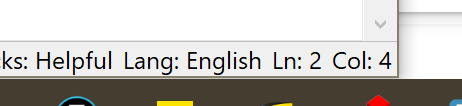
Thanks. I did a quick check. 114 solves the problem of the Restore Height not working, but the status bar is still hidden. To me, the crucial part of the problem was the restore height not working, so I'd be happy with this. At 164, I can see parts of the status bar [image: image.png] At 180, there is a tiny gap [image: image.png] 178 seems to be just touching. [image: image.png] With the vertical resolution of my screen being 2000 px, tiny gaps are essentially invisible. Because of this huge resolution, most display elements (text, icons ... and the taskbar) are set up to be twice as big - this is the 200% factor I was referring to. So, in pixel terms, the taskbar on my computer is likely twice as high as yours. Using a measuring tape, the physical size of my screen is 183 mm; the taskbar is 8 mm high. I can add these comments (and screenshots?) on the bug tracker if you'd like. Thanks for finding the solution to this problem. André P.S. I *just* started using IDLE again as I want to use it as a basis for my project. The last time I had used IDLE was with Python 2.4 - I quickly moved on to using other editors. There's been tremendous progress since and I want to thank you for all your work. On Sat, May 25, 2019 at 7:11 PM Terry J. Reedy <report@bugs.python.org> wrote: > > Terry J. Reedy <tjreedy@udel.edu> added the comment: > > The current patch fixed the hidden status bar on Windows. I just had to > increase the margin reserved for the taskbar from 76 to 114. This will > also work if the taskbar is moved to the top of the screen. If the taskbar > is moved to either side or if it is less high for previous versions of > Windows, a visible margin is better than a hidden status bar. > > ---------- > > _______________________________________ > Python tracker <report@bugs.python.org> > <https://bugs.python.org/issue37039> > _______________________________________ > |
|||
| msg343526 - (view) | Author: Terry J. Reedy (terry.reedy) * (Python committer) | Date: 2019年05月26日 00:49 | |
Thank you. Along with your path browser report, things are much clearer. With variable pixel densities and custom settings, we cannot use fixed pixel or even mm numbers. 114 is right for me because I have Display Setting "Change the size of text, apps, and other apps, and other items" to 125%. My taskbar is 11+mm high. 78 or something near that is right for 100%. 150% would need more than 114. Under 'Advanced scaling settings', one can enter a custom scaling size. Is this what you meant when you said you set scaling to 200% or 100%. No need to post what you wrote. Let me summarize the numbers I want along with mine for comparison. What I need to do now is examine the tk screen sizing system and functions and see if the needed numbers (max usable height for zoom) are available. If not, I might add a 'Calibrate screen' item under Options. On 5/25/2019 6:42 PM, Andre Roberge wrote: > > Andre Roberge <andre.roberge@gmail.com> added the comment: > > Thanks. > > I did a quick check. 114 solves the problem of the Restore Height not > working, but the status bar is still hidden. To me, the crucial part of > the problem was the restore height not working, so I'd be happy with this. > > At 164, I can see parts of the status bar > [image: image.png] > > At 180, there is a tiny gap > > [image: image.png] > > 178 seems to be just touching. > > [image: image.png] > > With the vertical resolution of my screen being 2000 px, tiny gaps are > essentially invisible. Because of this huge resolution, most display > elements (text, icons ... and the taskbar) are set up to be twice as big - > this is the 200% factor I was referring to. So, in pixel terms, the taskbar > on my computer is likely twice as high as yours. > > Using a measuring tape, the physical size of my screen is 183 mm; the > taskbar is 8 mm high. > > I can add these comments (and screenshots?) on the bug tracker if you'd > like. > > Thanks for finding the solution to this problem. > > André > > P.S. I *just* started using IDLE again as I want to use it as a basis for > my project. The last time I had used IDLE was with Python 2.4 - I quickly > moved on to using other editors. There's been tremendous progress since and > I want to thank you for all your work. > > On Sat, May 25, 2019 at 7:11 PM Terry J. Reedy <report@bugs.python.org> > wrote: > >> >> Terry J. Reedy <tjreedy@udel.edu> added the comment: >> >> The current patch fixed the hidden status bar on Windows. I just had to >> increase the margin reserved for the taskbar from 76 to 114. This will >> also work if the taskbar is moved to the top of the screen. If the taskbar >> is moved to either side or if it is less high for previous versions of >> Windows, a visible margin is better than a hidden status bar. >> >> ---------- >> >> _______________________________________ >> Python tracker <report@bugs.python.org> >> <https://bugs.python.org/issue37039> >> _______________________________________ >> > > ---------- > Added file: https://bugs.python.org/file48358/image.png > Added file: https://bugs.python.org/file48359/image.png > Added file: https://bugs.python.org/file48360/image.png > > _______________________________________ > Python tracker <report@bugs.python.org> > <https://bugs.python.org/issue37039> > _______________________________________ > |
|||
| msg343528 - (view) | Author: Andre Roberge (aroberge) * | Date: 2019年05月26日 01:05 | |
On Sat, May 25, 2019 at 9:49 PM Terry J. Reedy <report@bugs.python.org> wrote: > > Terry J. Reedy <tjreedy@udel.edu> added the comment: > > Thank you. Along with your path browser report, things are much > clearer. With variable pixel densities and custom settings, we cannot > use fixed pixel or even mm numbers. 114 is right for me because I have > Display Setting "Change the size of text, apps, and other apps, and > other items" to 125%. Yes, that's the settings I was talking about (my OS is in French, so I couldn't quote you the exact text.) Mine is set at 200%, as recommended by Windows - and which makes the text just large enough to be readable for me. My taskbar is 11+mm high. 78 or something near > that is right for 100%. 150% would need more than 114. > > Under 'Advanced scaling settings', one can enter a custom scaling size. > Is this what you meant when you said you set scaling to 200% or 100%. > Yes, see above. > No need to post what you wrote. Let me summarize the numbers I want > along with mine for comparison. > > What I need to do now is examine the tk screen sizing system and > functions and see if the needed numbers (max usable height for zoom) are > available. If not, I might add a 'Calibrate screen' item under Options. > > I think that would possibly work out best - people could customize to their liking. With so many different display, including 4k monitors, it makes sense to just make it user-configurable. André > On 5/25/2019 6:42 PM, Andre Roberge wrote: > > > > Andre Roberge <andre.roberge@gmail.com> added the comment: > > > > Thanks. > > > > I did a quick check. 114 solves the problem of the Restore Height not > > working, but the status bar is still hidden. To me, the crucial part of > > the problem was the restore height not working, so I'd be happy with > this. > > > > At 164, I can see parts of the status bar > > [image: image.png] > > > > At 180, there is a tiny gap > > > > [image: image.png] > > > > 178 seems to be just touching. > > > > [image: image.png] > > > > With the vertical resolution of my screen being 2000 px, tiny gaps are > > essentially invisible. Because of this huge resolution, most display > > elements (text, icons ... and the taskbar) are set up to be twice as big > - > > this is the 200% factor I was referring to. So, in pixel terms, the > taskbar > > on my computer is likely twice as high as yours. > > > > Using a measuring tape, the physical size of my screen is 183 mm; the > > taskbar is 8 mm high. > > > > I can add these comments (and screenshots?) on the bug tracker if you'd > > like. > > > > Thanks for finding the solution to this problem. > > > > André > > > > P.S. I *just* started using IDLE again as I want to use it as a basis for > > my project. The last time I had used IDLE was with Python 2.4 - I > quickly > > moved on to using other editors. There's been tremendous progress since > and > > I want to thank you for all your work. > > > > On Sat, May 25, 2019 at 7:11 PM Terry J. Reedy <report@bugs.python.org> > > wrote: > > > >> > >> Terry J. Reedy <tjreedy@udel.edu> added the comment: > >> > >> The current patch fixed the hidden status bar on Windows. I just had to > >> increase the margin reserved for the taskbar from 76 to 114. This will > >> also work if the taskbar is moved to the top of the screen. If the > taskbar > >> is moved to either side or if it is less high for previous versions of > >> Windows, a visible margin is better than a hidden status bar. > >> > >> ---------- > >> > >> _______________________________________ > >> Python tracker <report@bugs.python.org> > >> <https://bugs.python.org/issue37039> > >> _______________________________________ > >> > > > > ---------- > > Added file: https://bugs.python.org/file48358/image.png > > Added file: https://bugs.python.org/file48359/image.png > > Added file: https://bugs.python.org/file48360/image.png > > > > _______________________________________ > > Python tracker <report@bugs.python.org> > > <https://bugs.python.org/issue37039> > > _______________________________________ > > > > ---------- > > _______________________________________ > Python tracker <report@bugs.python.org> > <https://bugs.python.org/issue37039> > _______________________________________ > |
|||
| msg343534 - (view) | Author: Terry J. Reedy (terry.reedy) * (Python committer) | Date: 2019年05月26日 05:22 | |
Andre, we need to severely trim quotes when posting by email. A summary with added info. Andre: 2000 pixels / 183 mm = 10.9 pixels / mm Terry: 1440 pixels / 336 mm = 4.3 pixels / mm Andre: Windows Display setting text size, custom scaling = 200%, 200% Terry: " " = 125%, none Andre: 8 mm tall taskbar needs zoom 'margin' of 178. Terry: 11 mm tall taskbar needs zoom 'margin' of 114. I don't see now to get from px/mm, settings, and bar height to the needed zoom correction. Conclusion 1: The previous Windows zoom margin of 78 is likely better for people with stock Windows (text size = 100%), making the change to 114 in PR 13575 wrong for them. Conclusion 2: No value is right for all Windows users. I assume this is also true for Linux and Windows. Conclusion 3: We need to somehow calculate a specific correction from information available from tkinter. If necessary, add a 'Configurtion' button to the Options menu or Settings dialog. Display a maximized text window, have user verify that it fits properly, and get geometry. |
|||
| msg343545 - (view) | Author: Serhiy Storchaka (serhiy.storchaka) * (Python committer) | Date: 2019年05月26日 11:35 | |
I do not have "Zoom/Restore Height". I have only "Restore Height" which maximizes the height. The result looks identical with and without PR 13576 applied. There is no overlapping nor gap between the IDLE windows and the bottom panel. |
|||
| msg343565 - (view) | Author: Terry J. Reedy (terry.reedy) * (Python committer) | Date: 2019年05月26日 16:45 | |
When you start, it should say 'Zoom Height', then 'Restore Height' after you maximize. But if on a screen small enough that the initial height is the same as zoomed, IDLE might get confused. No change on Linux in the PR is the intention, so that is good. |
|||
| msg343689 - (view) | Author: Tal Einat (taleinat) * (Python committer) | Date: 2019年05月27日 20:28 | |
To get the maximum available height, does Tk's wm_maxsize() not work? https://www.tcl.tk/man/tcl8.6/TkCmd/wm.htm#M54 Answering my own question above: No, it gives the total screen height, which doesn't ignore e.g. taskbars. The best way to get the actual available height appears to be: 1. create a hidden window 2. maximize it with wm_state("zoomed") 3. get its height with winfo_height() Testing on Windows, this does respect the taskbar, as well as scaling in the display settings. (Also note that Tk window heights appear not to include the window manager's title bar.) I've yet to test on other OSs, but I've seen this method recommended before, and it has the potential to be robust. Terry, would you like to see a PR with such an implementation? |
|||
| msg343690 - (view) | Author: Andre Roberge (aroberge) * | Date: 2019年05月27日 20:43 | |
I volunteer to do some testing. In addition to the problem I noted on my computer where the status bar disappeared behind the task bar, I noticed that on my secondary 4k monitor (resolution: 3840 x 2160), clicking Zoom Height resulted in a window stretched only about 2/3 of the maximum screen height - so, the opposite "problem". |
|||
| msg343702 - (view) | Author: Terry J. Reedy (terry.reedy) * (Python committer) | Date: 2019年05月27日 23:16 | |
New changeset df9b032f47e4edaf306d95449370e565ee470018 by Terry Jan Reedy in branch 'master': bpo-37039: IDLE - zoomheight fixes (GH-13576) https://github.com/python/cpython/commit/df9b032f47e4edaf306d95449370e565ee470018 |
|||
| msg343703 - (view) | Author: Terry J. Reedy (terry.reedy) * (Python committer) | Date: 2019年05月27日 23:23 | |
Tal, please go ahead after updating your repository. I just merged PR 13576 after reverting the change from 72 to 114 that only works for me and adding Skip News. Include a blurb with your patch. It only needs to include something like "Fix zoom height calculation so that it should work on all monitors, regardless of resolution, pixel density, and display setting." Besides replacing the newheight calculation, the patch will need a a reduced conditional expression new_y = 22 if macosx.isAquaTk() else 0 unless we can get it also from the maximized window geometry. "potential to be robust"> I hope so. Your suggestion is part of my 'Conclusion 3 above, but I feared that it might not work at all on a withdrawn window, let alone give us numbers that work. I was unaware of others trying it. Andre, yes, before merging, we should test on multiple (different) Windows systems, as well as other OSes. |
|||
| msg343711 - (view) | Author: miss-islington (miss-islington) | Date: 2019年05月27日 23:48 | |
New changeset abdda3ae2a19326bb10bb6e54400c5d3a904b742 by Miss Islington (bot) in branch '3.7': bpo-37039: IDLE - zoomheight fixes (GH-13576) https://github.com/python/cpython/commit/abdda3ae2a19326bb10bb6e54400c5d3a904b742 |
|||
| msg343751 - (view) | Author: Tal Einat (taleinat) * (Python committer) | Date: 2019年05月28日 09:15 | |
I haven't found a way to maximize a hidden window; being "zoomed" and "withdrawn" are both considered "states" by Tk, and apparently a window cannot be in both states simultaneously. An alternative is, when zooming the height: 1. save the current window position and size 2. maximize the current window 3. set the horizontal position and width to their original values There is a visual artifact when doing so - the window is seen to maximize and then return to its original width. |
|||
| msg343963 - (view) | Author: Tal Einat (taleinat) * (Python committer) | Date: 2019年05月30日 10:01 | |
See an implementation in PR GH-13678. |
|||
| msg343965 - (view) | Author: Andre Roberge (aroberge) * | Date: 2019年05月30日 10:22 | |
As I wrote on Github: On my computer (Windows 10, resolution: 3000 x 2000, scaling of UI elements set to 200%), clicking on Zoom Height makes Idle go full screen. Clicking on the same menu (now called Restore Height) does absolutely nothing: Idle stays in full screen mode. If I run the program on a secondary monitor (4k), the height only changes, but nowhere enough to be equal to the height of the screen. |
|||
| msg345891 - (view) | Author: Terry J. Reedy (terry.reedy) * (Python committer) | Date: 2019年06月17日 19:41 | |
New changeset 5bff3c86ab77e9d831b3cd19b45654c7eef22931 by Terry Jan Reedy (Tal Einat) in branch 'master': bpo-37039: Make IDLE's Zoom Height adjust to users' screens (GH-13678) https://github.com/python/cpython/commit/5bff3c86ab77e9d831b3cd19b45654c7eef22931 |
|||
| msg345895 - (view) | Author: miss-islington (miss-islington) | Date: 2019年06月17日 20:06 | |
New changeset 0f31a2d3e85d3644de30626a00439ab3c7424105 by Miss Islington (bot) in branch '3.7': bpo-37039: Make IDLE's Zoom Height adjust to users' screens (GH-13678) https://github.com/python/cpython/commit/0f31a2d3e85d3644de30626a00439ab3c7424105 |
|||
| msg345899 - (view) | Author: Terry J. Reedy (terry.reedy) * (Python committer) | Date: 2019年06月17日 20:15 | |
New changeset 4b68a8eb0df7317d6c57b021d40cc0b31e3f1cd3 by Terry Jan Reedy (Miss Islington (bot)) in branch '3.8': bpo-37039: Make IDLE's Zoom Height adjust to users' screens (GH-13678) (GH-14168) https://github.com/python/cpython/commit/4b68a8eb0df7317d6c57b021d40cc0b31e3f1cd3 |
|||
| msg345900 - (view) | Author: Terry J. Reedy (terry.reedy) * (Python committer) | Date: 2019年06月17日 20:17 | |
Thank you Andre for the reports and followup and Tal for the research. I can start using this now. |
|||
| msg345902 - (view) | Author: Tal Einat (taleinat) * (Python committer) | Date: 2019年06月17日 20:32 | |
Hey, I did the implementation too! :) I'm really happy to see this fixed in time for 3.8. |
|||


| History | |||
|---|---|---|---|
| Date | User | Action | Args |
| 2022年04月11日 14:59:15 | admin | set | github: 81220 |
| 2019年06月17日 20:32:18 | taleinat | set | messages: + msg345902 |
| 2019年06月17日 20:17:35 | terry.reedy | set | status: open -> closed resolution: fixed messages: + msg345900 stage: patch review -> resolved |
| 2019年06月17日 20:15:57 | terry.reedy | set | messages: + msg345899 |
| 2019年06月17日 20:06:43 | miss-islington | set | messages: + msg345895 |
| 2019年06月17日 19:52:07 | miss-islington | set | pull_requests: + pull_request14010 |
| 2019年06月17日 19:49:04 | miss-islington | set | pull_requests: + pull_request14009 |
| 2019年06月17日 19:41:21 | terry.reedy | set | messages: + msg345891 |
| 2019年06月16日 21:36:36 | terry.reedy | set | versions: + Python 3.9 |
| 2019年05月30日 10:22:08 | aroberge | set | messages: + msg343965 |
| 2019年05月30日 10:01:18 | taleinat | set | messages: + msg343963 |
| 2019年05月30日 10:00:00 | taleinat | set | pull_requests: + pull_request13566 |
| 2019年05月28日 09:15:31 | taleinat | set | messages: + msg343751 |
| 2019年05月27日 23:48:08 | miss-islington | set | nosy:
+ miss-islington messages: + msg343711 |
| 2019年05月27日 23:25:20 | miss-islington | set | stage: needs patch -> patch review pull_requests: + pull_request13508 |
| 2019年05月27日 23:23:11 | terry.reedy | set | messages: + msg343703 |
| 2019年05月27日 23:16:49 | terry.reedy | set | messages: + msg343702 |
| 2019年05月27日 20:43:27 | aroberge | set | messages: + msg343690 |
| 2019年05月27日 20:28:44 | taleinat | set | messages: + msg343689 |
| 2019年05月26日 16:45:47 | terry.reedy | set | messages: + msg343565 |
| 2019年05月26日 11:35:55 | serhiy.storchaka | set | messages: + msg343545 |
| 2019年05月26日 05:22:09 | terry.reedy | set | messages: + msg343534 |
| 2019年05月26日 01:05:53 | aroberge | set | messages: + msg343528 |
| 2019年05月26日 00:49:29 | terry.reedy | set | messages: + msg343526 |
| 2019年05月25日 22:42:27 | aroberge | set | files:
+ image.png, image.png, image.png messages: + msg343521 |
| 2019年05月25日 22:11:21 | terry.reedy | set | messages: + msg343518 |
| 2019年05月25日 22:07:02 | terry.reedy | set | nosy:
+ taleinat messages: + msg343517 stage: patch review -> needs patch |
| 2019年05月25日 21:59:16 | terry.reedy | set | keywords:
+ patch stage: needs patch -> patch review pull_requests: + pull_request13483 |
| 2019年05月25日 19:58:45 | terry.reedy | set | nosy:
+ serhiy.storchaka messages: + msg343507 title: IDLE: Zoom Height Restore restores to default, not previous size -> IDLE: Improve zoomheight doc and behavior. |
| 2019年05月25日 16:35:09 | terry.reedy | set | messages: + msg343490 |
| 2019年05月25日 11:27:44 | aroberge | set | messages: + msg343469 |
| 2019年05月25日 11:08:30 | aroberge | set | nosy:
+ aroberge messages: + msg343468 |
| 2019年05月25日 02:04:46 | terry.reedy | set | versions:
+ Python 3.7, Python 3.8 title: IDLE: Zoomheight restores to default, not previous size -> IDLE: Zoom Height Restore restores to default, not previous size messages: + msg343450 assignee: terry.reedy components: + IDLE stage: needs patch |
| 2019年05月25日 01:16:24 | terry.reedy | set | -> (no value) messages: - msg343448 |
| 2019年05月25日 01:15:52 | terry.reedy | create | |