File manager's mouse icon is distracting...
| Affects | Status | Importance | Assigned to | Milestone | |
|---|---|---|---|---|---|
| Ayatana Design |
Invalid
|
Undecided
|
Unassigned | ||
| Humanity |
Won't Fix
|
Undecided
|
Unassigned | ||
| One Hundred Papercuts |
Invalid
|
Low
|
Unassigned | ||
| Unity |
Invalid
|
Undecided
|
Unassigned | ||
| humanity-icon-theme (Ubuntu) |
Fix Released
|
Undecided
|
Unassigned | ||
| unity (Ubuntu) |
Invalid
|
Undecided
|
Unassigned | ||
Bug Description
every once in awhile in the unity launcher (usually when i leave from my computer for awhile and come back) i mistaken the file manager icon's pointer as the mouse's pointer.This temporarily confuses me and i believe people can infer that its the file manager without the pointer. I recommend changing the file manager icon to that of the home icon or editing the existing one ... just saying :P
Related branches
I agree that the existence of a pointer icon as a part of the file manager icon is needlessly distracting, and I can envisage a situation where the pointer has moved off the screen, or is otherwise obscured and the user can mistake the icon atop the file manager icon for the actual pointer. I propose the adoption of one of the following solutions:
- The removal of the pointer icon from the file manager icon.
- The replacement of the current file manager icon with home folder icon as has been proposed in the bug description.
Whenever I click Unity it goes to hundredpapercuts. If someone could please set NULL back to hundredpapercuts, and Unity to NULL? I don't know what's going on with my browser, sorry for the confusion.
Alex, why was the Unity task removed from this report?
how about we move this bug to humanity-
Invalid for unity, icon theme issue
This is not humanity-icon theme bug. Unity needs to use an appropriate icon for representing "Folders" , (which ever it sees better) That icon is similar to the generic icon for web-browser (globe with pointer).
There are other icons of simple folder or the home icon which can be used instead, if required.
Unless I am mistaken, the icon in question is system-
Yes, I am aware of the icon name used there.
But, simply using a "folder" alone is not appropriate for a "system-
We have discussed this , dont have any better alternate ideas here and dont intend to spend time on this. So even for docky we wont change it unless someone else has other better new idea.
Wont fix, unless someone shows us a better idea. :-)
This bug was fixed in the package humanity-icon-theme - 0.5.3.5
---------------
humanity-icon-theme (0.5.3.5) natty; urgency=low
* Network-manager icons for network-indicator; (LP: #700626)
* Update mail-action icons to be consistent with universe; (LP: #523466)
* Update 64px user-trash-full closer to 48px icon; (LP: #594177)
* Update 16px search icon to not look like a radio menu dot; (LP: #662575)
* Differentiate Root Terminal from Terminal icon; (LP: #688443)
* File manager's mouse icon is distracting; (LP: #689486)
-- K Vishnoo Charan Reddy <email address hidden> 2011年3月08日 21:30:12 -0530
- unity-launcher-nautilus.png Edit (8.9 KiB, image/png)
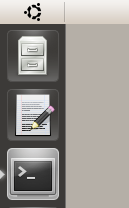
I'm now getting the system-file-manager icon from the GNOME theme, which really looks out of place (see attachment) in the Unity launcher (launcher item = nautilus.desktop). Is this on what you agreed now?
It's really inconsistent now...
> I'm now getting the system-file-manager icon from the GNOME theme
that's because your user configuration was made from the old default and there is no migration code for unstable to unstable upgrades, just reset your launcher config or replace the nautilus launcher manually to workaround it
All sorted out now. At first, starting Nautilus (unpinned) from the command line showed the file cabinet in the launcher, but now it's showing the house too, so it's easy to fix. :-)
Forget the last comment - I manually changed the icon in '/usr/share/
It's not just an unstable-