Build status Go Report Card Coverage Status GoDoc License Mentioned in Awesome Go
Go package to make lightweight ASCII line graphs ╭┈╯.
go get -u github.com/guptarohit/asciigraph@latest
package main
import (
 "fmt"
 "github.com/guptarohit/asciigraph"
)
func main() {
 data := []float64{3, 4, 9, 6, 2, 4, 5, 8, 5, 10, 2, 7, 2, 5, 6}
 graph := asciigraph.Plot(data)
 fmt.Println(graph)
}
Running this example would render the following graph:
 10.00 ┤ ╭╮
 9.00 ┤ ╭╮ ││
 8.00 ┤ ││ ╭╮││
 7.00 ┤ ││ ││││╭╮
 6.00 ┤ │╰╮ ││││││ ╭
 5.00 ┤ │ │ ╭╯╰╯│││╭╯
 4.00 ┤╭╯ │╭╯ ││││
 3.00 ┼╯ ││ ││││
 2.00 ┤ ╰╯ ╰╯╰╯
package main
import (
 "fmt"
 "github.com/guptarohit/asciigraph"
)
func main() {
	data := [][]float64{{0, 1, 2, 3, 3, 3, 2, 0}, {5, 4, 2, 1, 4, 6, 6}}
	graph := asciigraph.PlotMany(data)
	fmt.Println(graph)
}
Running this example would render the following graph:
 6.00 ┤ ╭─
 5.00 ┼╮ │
 4.00 ┤╰╮ ╭╯
 3.00 ┤ │╭│─╮
 2.00 ┤ ╰╮│ ╰╮
 1.00 ┤╭╯╰╯ │
 0.00 ┼╯ ╰
package main
import (
 "fmt"
 "github.com/guptarohit/asciigraph"
)
func main() {
	data := make([][]float64, 4)
	for i := 0; i < 4; i++ {
		for x := -20; x <= 20; x++ {
			v := math.NaN()
			if r := 20 - i; x >= -r && x <= r {
				v = math.Sqrt(math.Pow(float64(r), 2)-math.Pow(float64(x), 2)) / 2
			}
			data[i] = append(data[i], v)
		}
	}
	graph := asciigraph.PlotMany(data, asciigraph.Precision(0), asciigraph.SeriesColors(
		asciigraph.Red,
		asciigraph.Yellow,
		asciigraph.Green,
		asciigraph.Blue,
	))
	fmt.Println(graph)
}
Running this example would render the following graph:
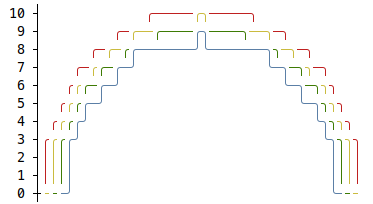
The graph can include legends for each series, making it easier to interpret.
package main
import (
	"fmt"
	"github.com/guptarohit/asciigraph"
	"math"
)
func main() {
	data := make([][]float64, 3)
	for i := 0; i < 3; i++ {
		for x := -12; x <= 12; x++ {
			v := math.NaN()
			if r := 12 - i; x >= -r && x <= r {
				v = math.Sqrt(math.Pow(float64(r), 2)-math.Pow(float64(x), 2)) / 2
			}
			data[i] = append(data[i], v)
		}
	}
	graph := asciigraph.PlotMany(data,
		asciigraph.Precision(0),
		asciigraph.SeriesColors(asciigraph.Red, asciigraph.Green, asciigraph.Blue),
		asciigraph.SeriesLegends("Red", "Green", "Blue"),
		asciigraph.Caption("Series with legends"))
	fmt.Println(graph)
}
Running this example would render the following graph:

This package also brings a small utility for command line usage.
Assuming $GOPATH/bin is in your $PATH, install CLI with following command:
go install github.com/guptarohit/asciigraph/cmd/asciigraph@latest
or pull Docker image:
docker pull ghcr.io/guptarohit/asciigraph:latest
or download binaries from the releases page.
> asciigraph --help
Usage of asciigraph:
 asciigraph [options]
Options:
 -ac axis color
 	y-axis color of the plot
 -b buffer
 	data points buffer when realtime graph enabled, default equal to `width`
 -c caption
 	caption for the graph
 -cc caption color
 	caption color of the plot
 -d delimiter
 	data delimiter for splitting data points in the input stream (default ",")
 -f fps
 	set fps to control how frequently graph to be rendered when realtime graph enabled (default 24)
 -h height
 	height in text rows, 0 for auto-scaling
 -lb lower bound
 	lower bound set the minimum value for the vertical axis (ignored if series contains lower values) (default +Inf)
 -lc label color
 	y-axis label color of the plot
 -o offset
 	offset in columns, for the label (default 3)
 -p precision
 	precision of data point labels along the y-axis (default 2)
 -r realtime
 	enables realtime graph for data stream
 -sc series colors
 	comma-separated series colors corresponding to each series
 -sl series legends
 	comma-separated series legends corresponding to each series
 -sn number of series
 	number of series (columns) in the input data (default 1)
 -ub upper bound
 	upper bound set the maximum value for the vertical axis (ignored if series contains larger values) (default -Inf)
 -w width
 	width in columns, 0 for auto-scaling
asciigraph expects data points from stdin. Invalid values are logged to stderr.
Feed it data points via stdin:
seq 1 72 | asciigraph -h 10 -c "plot data from stdin"
or use Docker image:
seq 1 72 | docker run -i --rm ghcr.io/guptarohit/asciigraph -h 10 -c "plot data from stdin"
Output:
 72.00 ┤ ╭────
 64.90 ┤ ╭──────╯
 57.80 ┤ ╭──────╯
 50.70 ┤ ╭──────╯
 43.60 ┤ ╭──────╯
 36.50 ┤ ╭───────╯
 29.40 ┤ ╭──────╯
 22.30 ┤ ╭──────╯
 15.20 ┤ ╭──────╯
 8.10 ┤ ╭──────╯
 1.00 ┼──╯
 plot data from stdin
Example of real-time graph for data points stream via stdin:
Realtime graph for data points via stdin (google ping) using asciigraph
command for above graph
ping -i.2 google.com | grep -oP '(?<=time=).*(?=ms)' --line-buffered | asciigraph -r -h 10 -w 40 -c "realtime plot data (google ping in ms) from stdin"
Example of multi-series real-time graph for data points stream via stdin:
Ping latency comparison: Google (Blue) vs. DuckDuckGo (Red) with asciigraph
command for above graph
{unbuffer paste -d, <(ping -i 0.4 google.com | sed -u -n -E 's/.*time=(.*)ms.*/1円/p') <(ping -i 0.4 duckduckgo.com | sed -u -n -E 's/.*time=(.*)ms.*/1円/p') } | asciigraph -r -h 15 -w 60 -sn 2 -sc "blue,red" -c "Ping Latency Comparison" -sl "Google, DuckDuckGo"This package started as golang port of asciichart.
Feel free to make a pull request! :octocat: