Showing posts with label Internet. Show all posts
Showing posts with label Internet. Show all posts
Saturday, June 28, 2014
Hard data
Make up your own numbers!
My in-box is an unending source of delights. I really should unsubscribe from right-wing mailing lists, but how else would I learn shocking facts about the Muslim Marxist Dictator in the White House? For example, The Political Insider breathlessly informed me that Speaker John Boehner has boldly moved to bring President Obama to account—by filing a lawsuit accusing him of exercising his executive authority. In the comments section the most common response ran along the lines of “about time!” and “I'd rather have impeachment!” Of course, these comments were accompanied by solid, reality-based arguments and supporting evidence:
Whence came Jim's egregiously wrong but confidently cited numbers? It was as easy to discover that as it would have been for Jim to learn that he was ridiculously incorrect, but that would have ruined his argument. I got the details from Snopes, the indefatigable debunker of Internet nonsense:
I think it's fair to quote Ronald Reagan, that great conservative icon, in this context: “The trouble with our liberal friends is not that they're ignorant; it's just that they know so much that isn't so.” Turnabout is fair play, right? Reagan said this in 1964 while campaigning on behalf of Barry Goldwater (who in retrospect doesn't look half so insane as today's teabaggers).
Of course, Reagan stole it from Josh Billings.

My in-box is an unending source of delights. I really should unsubscribe from right-wing mailing lists, but how else would I learn shocking facts about the Muslim Marxist Dictator in the White House? For example, The Political Insider breathlessly informed me that Speaker John Boehner has boldly moved to bring President Obama to account—by filing a lawsuit accusing him of exercising his executive authority. In the comments section the most common response ran along the lines of “about time!” and “I'd rather have impeachment!” Of course, these comments were accompanied by solid, reality-based arguments and supporting evidence:
Jim: He has what well over 1,000 executive orders now? While the most any president before him had like what 45? Which I think was FDR, in his 16 year term.. It took congress long enough.. Talk about being asleep behind the wheel…Since I am aware that Obama has been remarkably self-restrained in his use of executive orders, I knew immediately that “Jim” was full of crap. I clarified the matter for him:
Zeno: The reality is a little different. Obama has issued fewer executive orders than any president in the 20th century except for one-term presidents Ford and Bush. Obama has 180 to date. Reagan, for example, issued 381. More recently, George W. Bush had 291.I included a link to the Wikipedia page where a tally of presidential executive orders is displayed. Nevertheless, I was quickly put in my place:
Mitch: Wrong Zeno.(I presume he meant “Wrong, Zeno,“ but the appositive comma has fallen on hard times, so perhaps “Mitch” was merely being conventionally illiterate.) A most excellent and compelling refutation, no?
Whence came Jim's egregiously wrong but confidently cited numbers? It was as easy to discover that as it would have been for Jim to learn that he was ridiculously incorrect, but that would have ruined his argument. I got the details from Snopes, the indefatigable debunker of Internet nonsense:
The President signed 923 Executive Orders in 40 Months. It is all over the net. These sites include commentary on what the executive order is for and what it does. If this is the truth, I'm scared to think about it. Most of the past presidents have allegedly signed around 30 of them. At the end of the day an executive order circumvents the congress and senate. Fill in the blanks. Someone credible needs to research and report on this.This is exactly the sort of Internet spam that credulous right-wingers like my father immediately swallow whole and proceed to pass it along to their e-mail lists of fellow travelers and family members (although usually not me anymore, since I tend to respond with unappreciated but detailed refutations that irk my male parental unit). Although it's a tissue of lies, this denunciation of the president appeals enormously to those who have already decided that he is some kind of evil mastermind and would-be dictator, so it is not subject to any sort of critical examination before being further disseminated via the Intertubes. And thus the lies spread.
[Here follows a list of specific executive orders attributed to Obama, but almost all of them were actually issued by John F. Kennedy in 1962. —Z]
Feel free to verify the "executive orders" at will ... and these are just the major ones ...
EXECUTIVE ORDERS ISSUED:
Teddy Roosevelt: 3
Others Prior To FDR: NONE
FDR: 11 in 16 years
Truman: 5 in 7 years
Ike: 2 in 8 years
JFK: 4 in 3 years
LBJ: 4 in 5 years
Nixon: 1 in 6 years
Ford: 3 in 2 years
Carter: 3 in 4 years
Reagan: 5 in 8 years
Bush 1: 3 in 4 years
Clinton: 15 in 8 years
Bush 2: 62 in 8 years
Obama: 923 in 3+ years!
During my lifetime, all Presidents have issued Executive Orders, for reasons that vary, some more than others.
When a President issued as many as 30 Executive Orders during a term in Office, people thought there was something amiss.
WHAT DO YOU THINK ABOUT 923 EXECUTIVE ORDERS IN ONE PART OF ONE TERM?????? YES, THERE IS A REASON.
IT IS THAT THE PRESIDENT IS DETERMINED TO TAKE CONTROL AWAY FROM THE HOUSE AND THE SENATE.
Even some Democrats in the House have turned on him, plus a very small number of Democrat Senators question him.
HE SHOULD BE QUESTIONED. WHAT IS HE REALLY TRYING TO ACCOMPLISH????
DOES THIS SCARE YOU AS MUCH AS IT DOES ME?

I think it's fair to quote Ronald Reagan, that great conservative icon, in this context: “The trouble with our liberal friends is not that they're ignorant; it's just that they know so much that isn't so.” Turnabout is fair play, right? Reagan said this in 1964 while campaigning on behalf of Barry Goldwater (who in retrospect doesn't look half so insane as today's teabaggers).
Of course, Reagan stole it from Josh Billings.
Labels:
extremism,
family,
Internet,
propaganda,
spam,
urban legend
Sunday, February 26, 2012
Nobody here but us chickens
“I'm not a bigot, but ...”
The president of the United States is taking full advantage of social media to promote his political initiatives and his campaign for re-election. It's a natural evolution of his successful 2008 strategy, which included a strong Internet presence. The Obama campaign has an extremely active Facebook page titled “I will vote for Obama in 2012.” The site is routinely updated with miscellaneous items covering a wide range of topics—from supposed general interest to specific campaign pitches. The site's wall attracts comments from supporters and the occasional dyspeptic opponent. The Republican candidates come in for a generous portion of abuse and ridicule, but that's understandable when they constitute such easy targets.
There is, of course, a diametrically opposed Facebook page. Someone was inspired to create the highly original “I will NOT vote for Obama in 2012.” The limitation of ALL CAPS to only one word shows a restraint not always displayed by the site's enthusiasts. You can find the usual sludge pile of birth certificate nonsense, crypto-Muslim speculation, wounded religious privilege, and shallow anti-government rhetoric. Overt racism, of course, is all but absent. It's merely the pervasive subliminal backdrop to the entire site, occasionally visible when the mask slips.
Consider the state of mind that prompts an American citizen to write this complaint (with multiple uses of [sic] understood):
“Negro”? She really thought it necessary and appropriate to insert a parenthetical Negro to explain the meaning of “African American”?
Can you say crazy-ass racist white bitch? Not that you would, of course. Nor would I. I'm sure it was just a tiny Freudian slip at the keyboard. I mean, it's not as though she wrote the dreaded N-word. Still, it speaks volumes.
Did the other commenters on the site call her out? Did they gently say, “Oh, sweetie pie, you shouldn't use an outdated racial term like that. It'll cause unnecessary offense and distract from our political message”? Heck, no. They immediately piled on with a string of complaints about how they're upset as being viewed as racists.
Hmm. There could be a reason they're viewed that way.

The president of the United States is taking full advantage of social media to promote his political initiatives and his campaign for re-election. It's a natural evolution of his successful 2008 strategy, which included a strong Internet presence. The Obama campaign has an extremely active Facebook page titled “I will vote for Obama in 2012.” The site is routinely updated with miscellaneous items covering a wide range of topics—from supposed general interest to specific campaign pitches. The site's wall attracts comments from supporters and the occasional dyspeptic opponent. The Republican candidates come in for a generous portion of abuse and ridicule, but that's understandable when they constitute such easy targets.
There is, of course, a diametrically opposed Facebook page. Someone was inspired to create the highly original “I will NOT vote for Obama in 2012.” The limitation of ALL CAPS to only one word shows a restraint not always displayed by the site's enthusiasts. You can find the usual sludge pile of birth certificate nonsense, crypto-Muslim speculation, wounded religious privilege, and shallow anti-government rhetoric. Overt racism, of course, is all but absent. It's merely the pervasive subliminal backdrop to the entire site, occasionally visible when the mask slips.

Consider the state of mind that prompts an American citizen to write this complaint (with multiple uses of [sic] understood):
This man just today put out a call for all African Americans (Negro) to vote for hime because he is black. Can we say white people should vote for white people because they re white.
“Negro”? She really thought it necessary and appropriate to insert a parenthetical Negro to explain the meaning of “African American”?
Can you say crazy-ass racist white bitch? Not that you would, of course. Nor would I. I'm sure it was just a tiny Freudian slip at the keyboard. I mean, it's not as though she wrote the dreaded N-word. Still, it speaks volumes.
Did the other commenters on the site call her out? Did they gently say, “Oh, sweetie pie, you shouldn't use an outdated racial term like that. It'll cause unnecessary offense and distract from our political message”? Heck, no. They immediately piled on with a string of complaints about how they're upset as being viewed as racists.
Hmm. There could be a reason they're viewed that way.

Wednesday, January 11, 2012
Teenage sex fiend!
Dear Abby says, “Flee!”
Jeanne Phillips received an urgent query from a distraught teenage girl. What will Dear Abby advise a 14-year-old who discovers that her boyfriend is an addict? In this case, the boy is an addict to ... Internet pornography!
We can fairly safely conclude (again, assuming Innocent isn't exaggerating) that her boyfriend confessed to masturbating to on-line images or videos. However, I have heard—and vaguely recall—that masturbation is a common—and damned-near universal—hobby among teenage boys. In fact, Seinfeld would go further, omitting the age qualification: “We have to do it. It's part of our lifestyle.”
Unless Kyle's “addiction” has (shall we say) gotten out of hand, it's really a non-issue. Nevertheless, Dear Abby goes off half-cocked and advised Innocent to drop her boyfriend now. In the absence of more substantive information, this is clearly an example of premature consultation.

Jeanne Phillips received an urgent query from a distraught teenage girl. What will Dear Abby advise a 14-year-old who discovers that her boyfriend is an addict? In this case, the boy is an addict to ... Internet pornography!
Dear Abby: I have been dating “Kyle” for more than six months, but I have loved him for more than two years. I always thought we had a wonderful relationship and that Kyle was a sweet, innocent guy. Well, he just confided to me that he has an Internet porn addiction! I'm very hurt by this and don't want to lose him. What should I do? (By the way, we're both 14.) —Innocent Teen in Michigan(The emphasis is Abby's own.) Okay, perhaps Dear Abby has more information than we do, but the evidence she provides us is scanty. All we really know is that a 14-year-old girl reports that her 14-year-old boyfriend admitted to being an “addict” to Internet porn. What does that actually mean? Even assuming that Innocent's report is accurate, what did her boyfriend Kyle mean by his confession? What constitutes “addiction”? Does he spend twelve hours a day sitting in front of a computer monitor with his pants down around his ankles? That seems rather unlikely.
Dear Innocent Teen: You should urge Kyle to get help for his addiction. Addiction, by definition, is behavior that is compulsive and out of control.
The problem with teenage boys getting involved with Internet porn is it gives them an unrealistic expectation of how regular, normal women look and act. Although you don't want to lose him, becoming more involved could lead to his wanting to try out his sexual fantasies with you—and if you go along with it, it will land you in a world of trouble. The smart thing to do is end this relationship now.
We can fairly safely conclude (again, assuming Innocent isn't exaggerating) that her boyfriend confessed to masturbating to on-line images or videos. However, I have heard—and vaguely recall—that masturbation is a common—and damned-near universal—hobby among teenage boys. In fact, Seinfeld would go further, omitting the age qualification: “We have to do it. It's part of our lifestyle.”

Unless Kyle's “addiction” has (shall we say) gotten out of hand, it's really a non-issue. Nevertheless, Dear Abby goes off half-cocked and advised Innocent to drop her boyfriend now. In the absence of more substantive information, this is clearly an example of premature consultation.
Wednesday, August 10, 2011
Root, kit, or die
Don't go there!
You might not realize the extent to which you're living the Google lifestyle until suddenly you can't any longer. It happened to me over a week ago. Google stopped working. The search engine seemed okay, but clicking on a result entailed unpredictable consequences. Most of the time I would not get the webpage I had selected. The results seemed random. It was perplexing. More than perplexing. It was maddening.
If you're technologically savvy, you know that weird computer behavior is a good indication of a viral infection. It wasn't long before I realized that some weird bug was affecting the way Google behaved. Naturally, I quickly resorted to ... Google to figure out what was wrong!
Damn.
It took a few moments to find a work-around. Google was, after all, doing a perfectly fine job of finding websites related to search-engine viruses. Instead of clicking on an individual result and trusting Google to take me there, I instead copied and pasted the URL directly into the browser. Success! After visiting several sites, I learned that my computer had contracted a form of the “Google redirect virus.” Google referrals were being hijacked and directed to sites that were benefiting from extra hits from infected computers.
Some of the rogue pages that popped up were plausibly connected to the original Google search, even if it they weren't the pages you asked for. But tell me, would you trust a supposedly anti-virus program that offers itself as a solution to the Google redirect virus if the virus itself suggests it to you? Sorry, Stopzilla, there is no way that I am trying you!
The virus in question creates a “rootkit” problem, where a “rootkit” is a program that gives privileged access to the functions of a computer. Rootkits can be damnably elusive. I've tried ferreting out my computer's infection with utilities from Norton, AVG, Sophos, Zookaware (SpyZooka), Enigma Softweare (SpyHunter), and Kaspersky. Lots of adware cookies were demolished in the process of scanning my computer, but the redirect virus was not caught. Damn. I was especially disappointed when Kaspersky's vaunted TDSSKiller did not track down and kill the lurking rootkit.
My new problem was keeping track of which anti-virus scanner I had used and then disabling or uninstalling those that wanted to fight each other. (You can definitely have too much of a good thing, and anti-virus programs are not fond of polygamy.) I've discovered that Anti-Malware from Malwarebytes is the most active combatant in the battle with the rootkit virus. It often (but not always!) detects attempts to redirect my clicks on Google results and prevents them. I'd much rather, of course, expunge the rootkit entirely and go back to clicking with abandon. But so far it is not to be.
Suggestions, anyone, on the best way to smash a rootkit virus on a PC running Windows 7?

You might not realize the extent to which you're living the Google lifestyle until suddenly you can't any longer. It happened to me over a week ago. Google stopped working. The search engine seemed okay, but clicking on a result entailed unpredictable consequences. Most of the time I would not get the webpage I had selected. The results seemed random. It was perplexing. More than perplexing. It was maddening.
If you're technologically savvy, you know that weird computer behavior is a good indication of a viral infection. It wasn't long before I realized that some weird bug was affecting the way Google behaved. Naturally, I quickly resorted to ... Google to figure out what was wrong!
Damn.
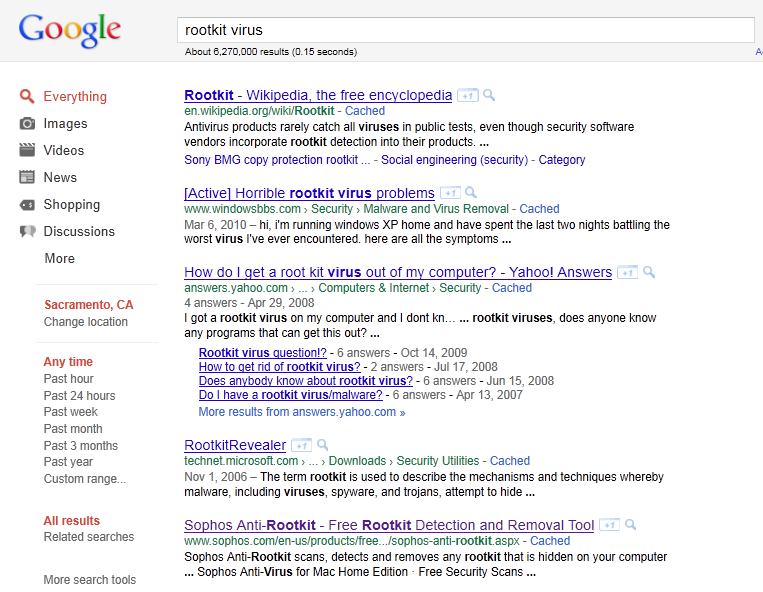
It took a few moments to find a work-around. Google was, after all, doing a perfectly fine job of finding websites related to search-engine viruses. Instead of clicking on an individual result and trusting Google to take me there, I instead copied and pasted the URL directly into the browser. Success! After visiting several sites, I learned that my computer had contracted a form of the “Google redirect virus.” Google referrals were being hijacked and directed to sites that were benefiting from extra hits from infected computers.

Example of a rogue page from a redirected Google item
Some of the rogue pages that popped up were plausibly connected to the original Google search, even if it they weren't the pages you asked for. But tell me, would you trust a supposedly anti-virus program that offers itself as a solution to the Google redirect virus if the virus itself suggests it to you? Sorry, Stopzilla, there is no way that I am trying you!

The virus in question creates a “rootkit” problem, where a “rootkit” is a program that gives privileged access to the functions of a computer. Rootkits can be damnably elusive. I've tried ferreting out my computer's infection with utilities from Norton, AVG, Sophos, Zookaware (SpyZooka), Enigma Softweare (SpyHunter), and Kaspersky. Lots of adware cookies were demolished in the process of scanning my computer, but the redirect virus was not caught. Damn. I was especially disappointed when Kaspersky's vaunted TDSSKiller did not track down and kill the lurking rootkit.
My new problem was keeping track of which anti-virus scanner I had used and then disabling or uninstalling those that wanted to fight each other. (You can definitely have too much of a good thing, and anti-virus programs are not fond of polygamy.) I've discovered that Anti-Malware from Malwarebytes is the most active combatant in the battle with the rootkit virus. It often (but not always!) detects attempts to redirect my clicks on Google results and prevents them. I'd much rather, of course, expunge the rootkit entirely and go back to clicking with abandon. But so far it is not to be.
Suggestions, anyone, on the best way to smash a rootkit virus on a PC running Windows 7?

Sunday, June 12, 2011
Victory over Google!
I slash my hit rate!
This must be how BP felt after capping the blown-out oil well in the Gulf of Mexico. The Google tsunami is over!
For now, anyway.
As I reported in an earlier post, my blog had become the “beneficiary” of a tidal wave of visitors (speaking in relative terms, of course). My hit rate suddenly doubled or even tripled. According to Sitemeter data, as much as 72% of the new visits were to Where's my money?, a snarky observation on the inanities that characterize San Francisco's KSFO talk radio. It was all Google's fault. People who searched for “money” were being treated to a strip of “Images for money” that included a clip I had used to illustrate my post. That was enough to divert hundreds of people every day to look at an image of a guy carrying an oversized money bag.
Ordinarily, I would be happy to welcome more visitors. In this instance, however, I grew weary of the flood. Sitemeter reports acquired a deadly monotony as the horde of picture-seekers swamped those who had come to Halfway There to read actual words. I could no longer keep track of who came to see what. Last week I took steps.
First I deleted the image from the post in question. Days passed without Google noticing. The deluge continued. Then I made the post unavailable by saving it as a draft. Success! Traffic returned to normal. After a couple of days, I restored the post. The mob was instantly back. The sought-for image was gone, but Google was still lagging. I took the post off-line again and the hit rate dropped accordingly.
A few days ago I felt brave enough to repost the article. It was still without the attractive nuisance of the money-bag illustration, but now it was also missing the stress of Google's regard. The search giant had found another source for Mr. Money-Bag and the stampede was quelled. My victory was complete.
I got rid of over half of my traffic and I'm happy about it. Should I be concerned about this happiness? Oh, oh. Confused now.

This must be how BP felt after capping the blown-out oil well in the Gulf of Mexico. The Google tsunami is over!
For now, anyway.
As I reported in an earlier post, my blog had become the “beneficiary” of a tidal wave of visitors (speaking in relative terms, of course). My hit rate suddenly doubled or even tripled. According to Sitemeter data, as much as 72% of the new visits were to Where's my money?, a snarky observation on the inanities that characterize San Francisco's KSFO talk radio. It was all Google's fault. People who searched for “money” were being treated to a strip of “Images for money” that included a clip I had used to illustrate my post. That was enough to divert hundreds of people every day to look at an image of a guy carrying an oversized money bag.
Ordinarily, I would be happy to welcome more visitors. In this instance, however, I grew weary of the flood. Sitemeter reports acquired a deadly monotony as the horde of picture-seekers swamped those who had come to Halfway There to read actual words. I could no longer keep track of who came to see what. Last week I took steps.
First I deleted the image from the post in question. Days passed without Google noticing. The deluge continued. Then I made the post unavailable by saving it as a draft. Success! Traffic returned to normal. After a couple of days, I restored the post. The mob was instantly back. The sought-for image was gone, but Google was still lagging. I took the post off-line again and the hit rate dropped accordingly.
A few days ago I felt brave enough to repost the article. It was still without the attractive nuisance of the money-bag illustration, but now it was also missing the stress of Google's regard. The search giant had found another source for Mr. Money-Bag and the stampede was quelled. My victory was complete.

I got rid of over half of my traffic and I'm happy about it. Should I be concerned about this happiness? Oh, oh. Confused now.

Saturday, March 05, 2011
Browser bigamy
Double your pleasure
Firefox knows that I am Zeno, remembers all kinds of things about me in its cookies, and enables me to post blog comments under that name with a minimum of difficulty. I can go traipsing through the ScienceBlogs and the Discover blogs and Facebook with my Internet identity firmly established (an on-line identity, by the way, that actually dates back to the pre-Internet era—no kidding!). My browser's memory preserves my preferences and smooths my on-line excursions.
Except when it doesn't. I need my real-life identity when I check into my faculty website or my personal Facebook page (not to be confused with my blogger Facebook page). Before I hit on a convenient solution, I found myself having to log out of various accounts and log into others. It was a minor nuisance. I especially didn't like it when I would be finishing up a post or comment, only to discover upon trying to publish it that I was operating under the wrong handle. (My students really don't need comments from some stranger named Zeno.)
The solution arose rather naturally. My school district has (big surprise!) standardized on Microsoft Office products, so all of our computers default to Internet Explorer. On my campus computer, therefore, I became accustomed to accessing the college's website using IE. When I finally prevailed upon our microcomputer support people to give me installation rights on my own office computer (not a particularly easy task, by the way), I promptly installed Firefox. While beginning to use it to log in to my favorite sites (like the aforementioned ScienceBlogs, for example), I paused to consider whether to use my real-life persona or my blog identity. Soon I realized it was easy to let Firefox be Zeno's browser while retaining IE as the real-life math professor's browser.
I set up a similar configuration at home. These days it's not unusual for me to have two different browser windows simultaneously open on my desktop. Google Reader tracks my favorite blogs in Firefox while IE keeps an eye on my college pages. Depending on which browser I'm using at the moment, I'm either real-life me or Internet me. I am such a power user!
Um. Not really. A genuine power user would configure different personalities within the same browser program and toggle back and forth at need, but I've never taken the time to learn how to do that. This is as much a story of “good enough for now” as it is a story of browser bigamy. It reminds me of the glory days of Lotus 1-2-3 (remember that?). One of the officers of my local computer club revealed that he didn't have a word processing program. He was using the 1-2-3 spreadsheet to do the job. He'd create wide cells, format them as text, enable word-wrapping, and type each paragraph of his document into different cells. He was very proud of himself, even though it sounded like a cumbersome and jury-rigged system. But what the heck. It worked, and he was comfortable with it. My computer-club colleague and I aren't quite Rube Goldbergs, but we have our delusions of adequacy.
Speaking of which, now it's time for me to pop over to my IE window. I just graded an exam and discovered that one of my chronic underachievers didn't bother to show up to take it. Zeno can't drop him from the class roster, but real-life math professor can!

Firefox knows that I am Zeno, remembers all kinds of things about me in its cookies, and enables me to post blog comments under that name with a minimum of difficulty. I can go traipsing through the ScienceBlogs and the Discover blogs and Facebook with my Internet identity firmly established (an on-line identity, by the way, that actually dates back to the pre-Internet era—no kidding!). My browser's memory preserves my preferences and smooths my on-line excursions.
Except when it doesn't. I need my real-life identity when I check into my faculty website or my personal Facebook page (not to be confused with my blogger Facebook page). Before I hit on a convenient solution, I found myself having to log out of various accounts and log into others. It was a minor nuisance. I especially didn't like it when I would be finishing up a post or comment, only to discover upon trying to publish it that I was operating under the wrong handle. (My students really don't need comments from some stranger named Zeno.)
The solution arose rather naturally. My school district has (big surprise!) standardized on Microsoft Office products, so all of our computers default to Internet Explorer. On my campus computer, therefore, I became accustomed to accessing the college's website using IE. When I finally prevailed upon our microcomputer support people to give me installation rights on my own office computer (not a particularly easy task, by the way), I promptly installed Firefox. While beginning to use it to log in to my favorite sites (like the aforementioned ScienceBlogs, for example), I paused to consider whether to use my real-life persona or my blog identity. Soon I realized it was easy to let Firefox be Zeno's browser while retaining IE as the real-life math professor's browser.
I set up a similar configuration at home. These days it's not unusual for me to have two different browser windows simultaneously open on my desktop. Google Reader tracks my favorite blogs in Firefox while IE keeps an eye on my college pages. Depending on which browser I'm using at the moment, I'm either real-life me or Internet me. I am such a power user!
Um. Not really. A genuine power user would configure different personalities within the same browser program and toggle back and forth at need, but I've never taken the time to learn how to do that. This is as much a story of “good enough for now” as it is a story of browser bigamy. It reminds me of the glory days of Lotus 1-2-3 (remember that?). One of the officers of my local computer club revealed that he didn't have a word processing program. He was using the 1-2-3 spreadsheet to do the job. He'd create wide cells, format them as text, enable word-wrapping, and type each paragraph of his document into different cells. He was very proud of himself, even though it sounded like a cumbersome and jury-rigged system. But what the heck. It worked, and he was comfortable with it. My computer-club colleague and I aren't quite Rube Goldbergs, but we have our delusions of adequacy.
Speaking of which, now it's time for me to pop over to my IE window. I just graded an exam and discovered that one of my chronic underachievers didn't bother to show up to take it. Zeno can't drop him from the class roster, but real-life math professor can!

Sunday, December 26, 2010
Internet service preventer
Zapped by the Death Star
My day began. It was still dark, but that's winter for you. I tend to wake up rather slowly, so I dragged myself to my computer to check my e-mail. Hmm. Nothing since 1:30 in the morning. Slightly unusual.
Then I noticed the error messages from my e-mail program. They indicated that both my personal and school in-boxes could not be accessed. I looked at the modem.
Rats. The Internet light was out. I rebooted my computer and watched the modem lights start to blink as the operating system reloaded and began polling the computer's peripherals. I relaunched Firefox, which splashed my home page on the screen very nicely, but I soon saw that it was just the cached version. No new information was being downloaded. The modem lights were flickering between red and green. It wasn't settling down to the nice steady green I was used to.
Time for breakfast. Let the modem fuss with its DSL access while I scan the morning newspapers and take on some fuel.
When I returned, my Internet connection was still on the fritz. I powered down the modem, powered it back up, and rebooted the computer again. The very Christmasy red-and-green light show returned, but no DSL.
I called the AT&T support line. A very friendly recorded voice told me the number I was calling from. “Is your call related to service on this phone number?” I replied in the affirmative and entered the maze of twisty little passages, all alike, that constitutes AT&T's automated help system. By answering several questions, I eventually managed to get the system to understand that the problem involved my DSL service.
“I need to run some tests on your DSL line,” it said. “Please wait. This may take a few minutes.” I muttered to myself that “DSL line” was surely a redundancy—like “ATM machine” or “PIN number.” The voice ignored me, of course. A different voice thanked me for my patience and various commercial messages assured me that AT&T could sell me services that were much better than anything I currently had from them. I believed the voices.
“I have finished the tests,” announced the original friendly recorded voice at last. Despite our long-established friendship—or at least working relationship—it could not be troubled to tell me what was wrong with my line. Instead it informed me that one in five connection problems could be resolved by powering down the modem and rebooting my system. Had I done that recently?
Yes.
It suggested I try it again. Grudgingly, I did. With mechanical patience, the disembodied voice waited for me while various commercial messages assured me that AT&T could sell me services that were much better than anything I currently had from them. But I was already quite sure of that.
And it was still no-go. No green Internet light. My life as a denizen of the computer world was in jeopardy.
The recordings suggested visiting a local AT&T store or rebooting my computer. (I did that already! More than once!) It suggested that after visiting a local AT&T store and/or rebooting my computer, I could call back the help line in 24 hours if the problem persisted. Considering the length of time I had been on the line, I wondered if calling back in 23 hours would be considered a trifle hasty.
I hung up the phone and immediately redialed. (Actually, I hit the Redial button on a phone that doesn't even have a dial. Modern life is weird.) The whole process started again, but this time I mashed the zero key for Operator and was rewarded with the digital miracle of a live human voice.
The young woman ascertained that I was having a DSL problem and ran some line tests. She asked me if I had reset the modem and rebooted the computer.
Oh my yes.
She got her test results. She was getting a null response from my modem. She asked which of the display lights were lit up. I looked at the modem again and did a double-take.
Whoa! None of them.
Not even the power light?
Not even that. They're dark. All of them. No red. No green. Nothing.
My modem had gone completely dead. Stone cold. Perhaps the problem was now identified.
The young woman suggested I switch the power cord to a different power source. I did. Still no lights. I reported the same back to her, wondering whether she had put me down as one of those goofballs who don't even notice when they're unplugged. But there were lights earlier. I swear! (The modem had died while waiting in AT&T's emergency room.)
The young woman asked for my Zip code and gave me the addresses of the two nearest AT&T stores, suggesting I take the modem and its power adapter to one of them for testing.
I disconnected the modem from the computer, unplugged the power cord from the power strip, and conveyed the modem and power adapter to the nearer of the two AT&T shops. The assistants looked at my modem with goggle eyes and said, “Oh, we only do cell phones here!”
Uh, thanks.
I went to the second AT&T store. It was a much bigger facility. I took the modem and power adapter up to the counter and explained the situation to a company rep. She carried my distressed equipment to the inner sanctum where they keep their technicians sequestered. A few minutes later she came back out.
“Your modem is fine. The power adapter has failed.”
I felt a sense of relief. Just the power adapter!
“Okay, good. How much is a replacement adapter.”
“Oh, we don't carry those. Power adapters are only sold in a bundle with a modem. Would you like to see our latest modems?”
“You're kidding!”
“Sorry. We don't carry separate power adapters.”
“Thank you for your help. I think it's time for a visit to Radio Shack.”
“Oh, that's probably a good idea,” she admitted.
Soon I had a Radio Shack replacement power adapter, matched to the specs of the original device. Instead of spending 100,ドル I had spent under 20ドル. (I later discovered that the AT&T on-line shop carries the adapter as a separate replacement item for a list price of 10,ドル but the company's fancy service center in my town can't be troubled to have it in inventory.)
Back home, I reconnected the old modem with the new power adapter and was soon rewarded with bright green lights. Hurray! Problem over!
No.
AT&T had reset my password after my service call. After all, my modem had failed and it would be necessary for me to log in as a new user with a new modem and initiate my service anew. When I opened my browser, it informed me that additional log-in information was required before I could access my Internet service. It switched me to an automatic log-in system on the AT&T support page that offered a swift and sure re-initiation process—which failed multiple times. (Perhaps it was upset when it discovered I was using the same old modem.)
I tried one more time, choosing the “manual” mode over the “automatic.” It had me punch in the access code on the bottom of my modem. It asked me for my new password. Did I have one? Was it in the support e-mail that the on-line technician had told me she was sending me (that I couldn't access until after I was logged in)? I dug out my steno pad, where I had been scribbling notes all during the on-line support sessions. (This is one of my very best habits.)
Aha!
In the midst of all the hassles, the young woman had had me write down a six-character network access code. Was that it? I wasn't starting a new account, so I had not worried too much about it at the time. I didn't really expect to need it. But I tried it.
It was only six hours after the original discovery that my connection was down. Life was good again.

My day began. It was still dark, but that's winter for you. I tend to wake up rather slowly, so I dragged myself to my computer to check my e-mail. Hmm. Nothing since 1:30 in the morning. Slightly unusual.
Then I noticed the error messages from my e-mail program. They indicated that both my personal and school in-boxes could not be accessed. I looked at the modem.
Rats. The Internet light was out. I rebooted my computer and watched the modem lights start to blink as the operating system reloaded and began polling the computer's peripherals. I relaunched Firefox, which splashed my home page on the screen very nicely, but I soon saw that it was just the cached version. No new information was being downloaded. The modem lights were flickering between red and green. It wasn't settling down to the nice steady green I was used to.
Time for breakfast. Let the modem fuss with its DSL access while I scan the morning newspapers and take on some fuel.
When I returned, my Internet connection was still on the fritz. I powered down the modem, powered it back up, and rebooted the computer again. The very Christmasy red-and-green light show returned, but no DSL.
I called the AT&T support line. A very friendly recorded voice told me the number I was calling from. “Is your call related to service on this phone number?” I replied in the affirmative and entered the maze of twisty little passages, all alike, that constitutes AT&T's automated help system. By answering several questions, I eventually managed to get the system to understand that the problem involved my DSL service.
“I need to run some tests on your DSL line,” it said. “Please wait. This may take a few minutes.” I muttered to myself that “DSL line” was surely a redundancy—like “ATM machine” or “PIN number.” The voice ignored me, of course. A different voice thanked me for my patience and various commercial messages assured me that AT&T could sell me services that were much better than anything I currently had from them. I believed the voices.

“I have finished the tests,” announced the original friendly recorded voice at last. Despite our long-established friendship—or at least working relationship—it could not be troubled to tell me what was wrong with my line. Instead it informed me that one in five connection problems could be resolved by powering down the modem and rebooting my system. Had I done that recently?
Yes.
It suggested I try it again. Grudgingly, I did. With mechanical patience, the disembodied voice waited for me while various commercial messages assured me that AT&T could sell me services that were much better than anything I currently had from them. But I was already quite sure of that.
And it was still no-go. No green Internet light. My life as a denizen of the computer world was in jeopardy.
The recordings suggested visiting a local AT&T store or rebooting my computer. (I did that already! More than once!) It suggested that after visiting a local AT&T store and/or rebooting my computer, I could call back the help line in 24 hours if the problem persisted. Considering the length of time I had been on the line, I wondered if calling back in 23 hours would be considered a trifle hasty.
I hung up the phone and immediately redialed. (Actually, I hit the Redial button on a phone that doesn't even have a dial. Modern life is weird.) The whole process started again, but this time I mashed the zero key for Operator and was rewarded with the digital miracle of a live human voice.
The young woman ascertained that I was having a DSL problem and ran some line tests. She asked me if I had reset the modem and rebooted the computer.
Oh my yes.
She got her test results. She was getting a null response from my modem. She asked which of the display lights were lit up. I looked at the modem again and did a double-take.
Whoa! None of them.
Not even the power light?
Not even that. They're dark. All of them. No red. No green. Nothing.
My modem had gone completely dead. Stone cold. Perhaps the problem was now identified.
The young woman suggested I switch the power cord to a different power source. I did. Still no lights. I reported the same back to her, wondering whether she had put me down as one of those goofballs who don't even notice when they're unplugged. But there were lights earlier. I swear! (The modem had died while waiting in AT&T's emergency room.)
The young woman asked for my Zip code and gave me the addresses of the two nearest AT&T stores, suggesting I take the modem and its power adapter to one of them for testing.
I disconnected the modem from the computer, unplugged the power cord from the power strip, and conveyed the modem and power adapter to the nearer of the two AT&T shops. The assistants looked at my modem with goggle eyes and said, “Oh, we only do cell phones here!”
Uh, thanks.
I went to the second AT&T store. It was a much bigger facility. I took the modem and power adapter up to the counter and explained the situation to a company rep. She carried my distressed equipment to the inner sanctum where they keep their technicians sequestered. A few minutes later she came back out.
“Your modem is fine. The power adapter has failed.”
I felt a sense of relief. Just the power adapter!
“Okay, good. How much is a replacement adapter.”
“Oh, we don't carry those. Power adapters are only sold in a bundle with a modem. Would you like to see our latest modems?”

“You're kidding!”
“Sorry. We don't carry separate power adapters.”
“Thank you for your help. I think it's time for a visit to Radio Shack.”
“Oh, that's probably a good idea,” she admitted.
Soon I had a Radio Shack replacement power adapter, matched to the specs of the original device. Instead of spending 100,ドル I had spent under 20ドル. (I later discovered that the AT&T on-line shop carries the adapter as a separate replacement item for a list price of 10,ドル but the company's fancy service center in my town can't be troubled to have it in inventory.)
Back home, I reconnected the old modem with the new power adapter and was soon rewarded with bright green lights. Hurray! Problem over!
No.
AT&T had reset my password after my service call. After all, my modem had failed and it would be necessary for me to log in as a new user with a new modem and initiate my service anew. When I opened my browser, it informed me that additional log-in information was required before I could access my Internet service. It switched me to an automatic log-in system on the AT&T support page that offered a swift and sure re-initiation process—which failed multiple times. (Perhaps it was upset when it discovered I was using the same old modem.)
I tried one more time, choosing the “manual” mode over the “automatic.” It had me punch in the access code on the bottom of my modem. It asked me for my new password. Did I have one? Was it in the support e-mail that the on-line technician had told me she was sending me (that I couldn't access until after I was logged in)? I dug out my steno pad, where I had been scribbling notes all during the on-line support sessions. (This is one of my very best habits.)
Aha!
In the midst of all the hassles, the young woman had had me write down a six-character network access code. Was that it? I wasn't starting a new account, so I had not worried too much about it at the time. I didn't really expect to need it. But I tried it.
Log-on successfulIt was only six hours after the original discovery that my connection was down. Life was good again.
Subscribe to:
Comments (Atom)