HackRF Pro Updates: Sensitivity and Noise Figure Measurements + Free Stuff Program

Over on the Great Scott Gadgets blog, Mike Walters, one of the team behind the HackRF Pro has uploaded a post detailing the HackRF Pro's sensitivity and noise figure measurements.

If you are unaware, the HackRF One has long been a core staple in the SDR community. While it is not classed as a high-performance SDR for optimized reception, it is one of the most versatile hacker/experimenter SDR's on the market with a wide frequency range, wide bandwidth and RX and TX capability. The soon-to-be-released HackRF Pro is an upgrade from the original HackRF One.

The measurements by Mike show that the HackRF Pro has significantly lower noise figure across all frequencies compared to the HackRF One. A lower noise figure equates to improved receiver sensitivity. However, although improved, the noise figure is still high enough that you'll probably want to use a low-noise amplifier (LNA) for optimizing reception of weaker signals.
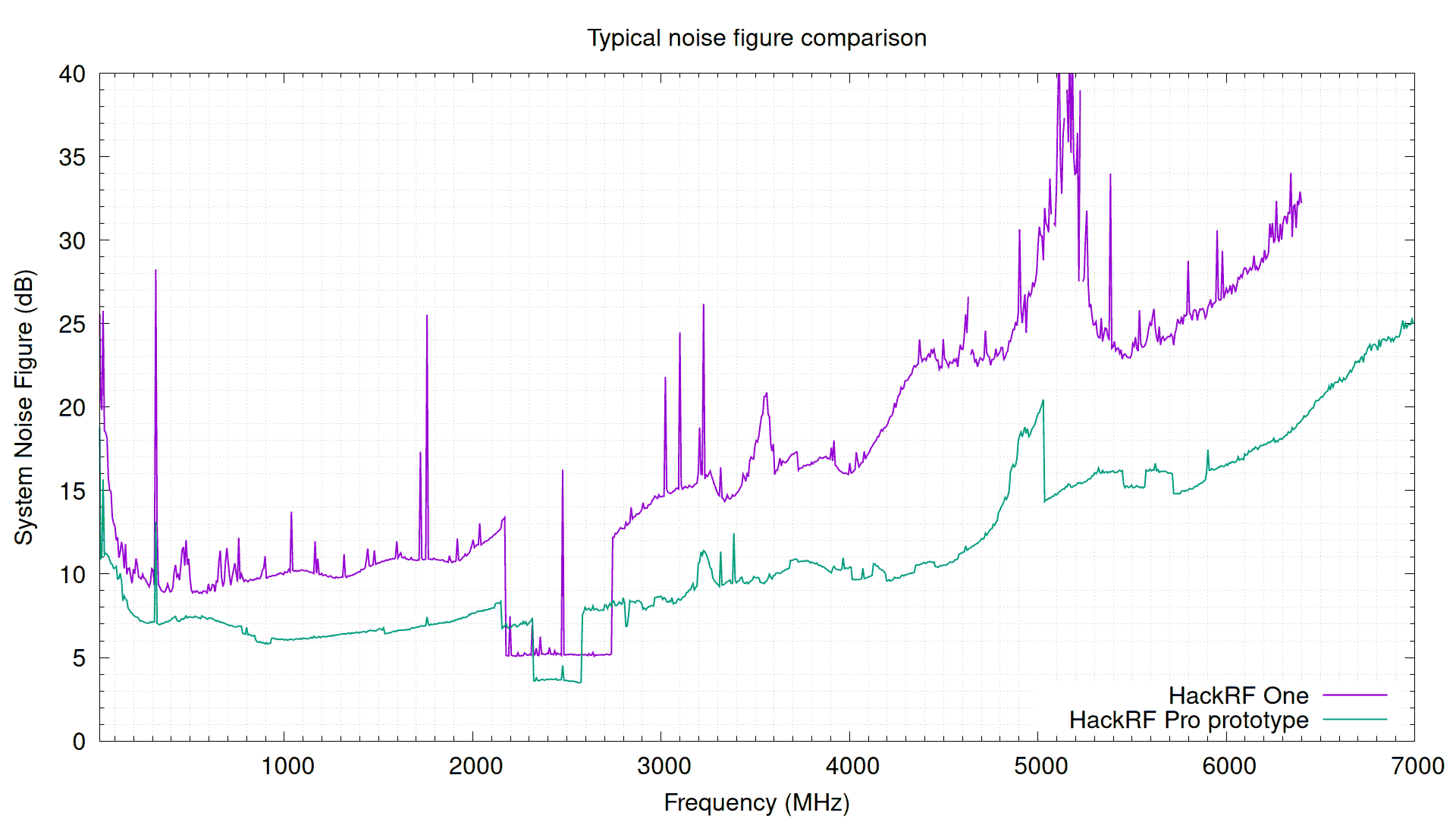
HackRF Pro vs HackRF One Noise Figure Measurements

Mike also confirms the noise figure improvements equate to improved real world performance by receiving ADS-B signals from aircraft, with the HackRF Pro showing increased range and doubling the number of messages received.
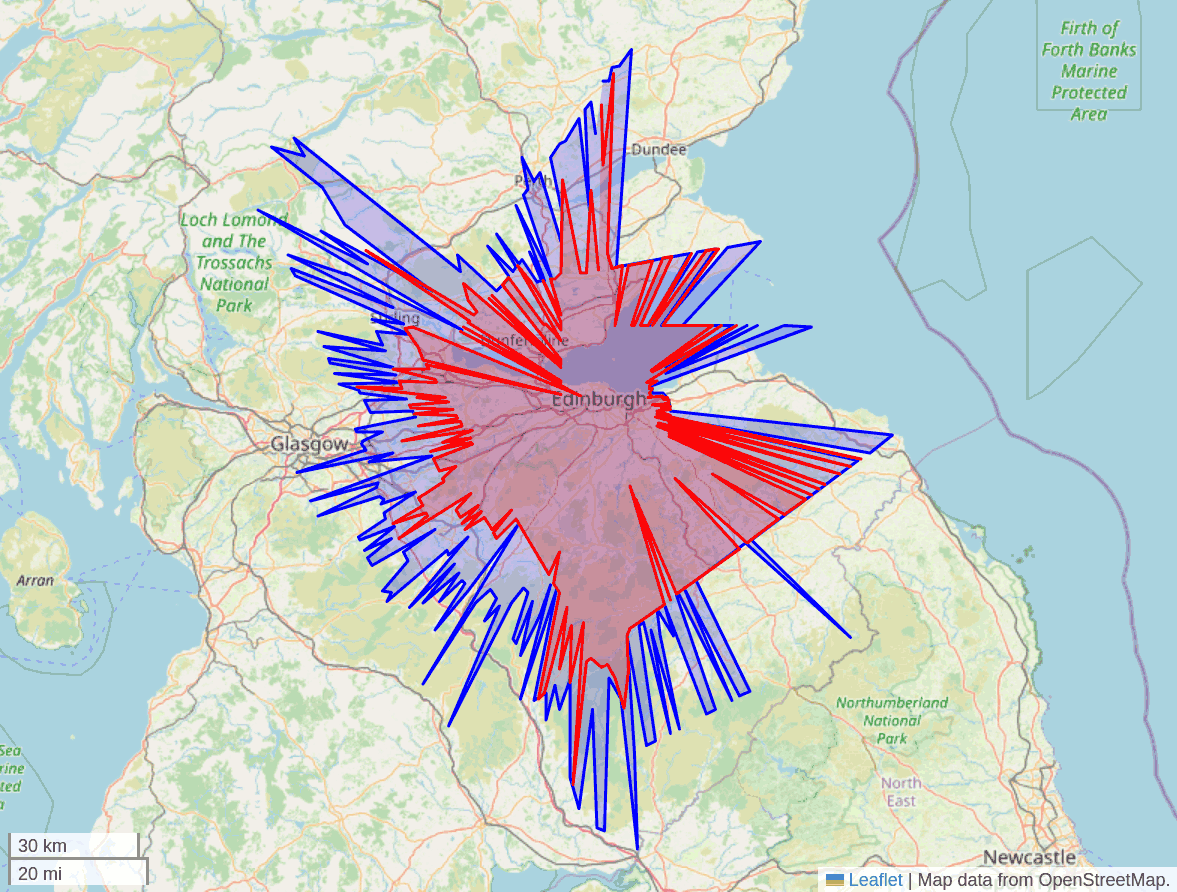
HackRF Pro (Blue) vs HackRF One (Red) ADS-B Range Comparison

Also, in related news from a post a few days earlier, Maggie Way wrote about the Great Scott Gadgets free stuff program. This program allows people in the open source hardware community to submit a request for free hardware from Great Scott Gadgets if they have intentions to use the hardware to spread education, support community projects, or contribute to open source projects or research
DSDPlus Public Release Updated & Fast Lane Changes

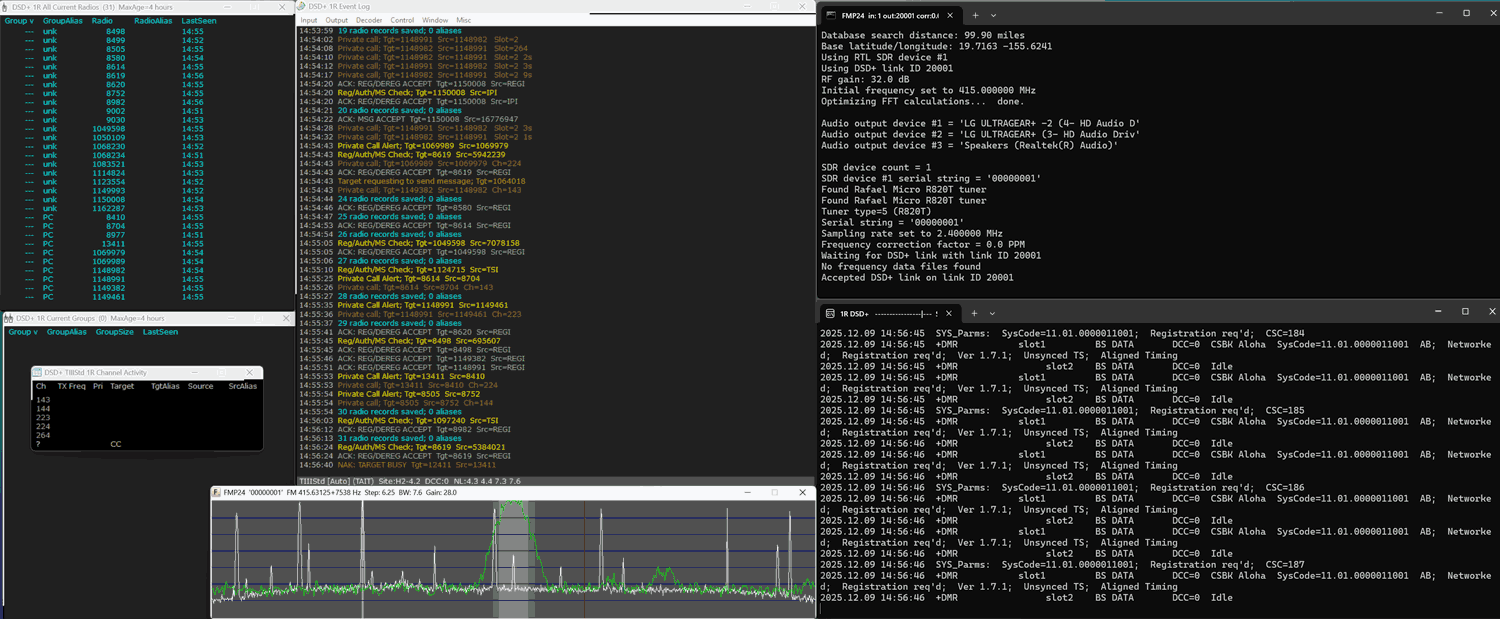
The team behind DSDPlus has recently uploaded a new public release version 2.547. The last public release was version 1.101, released several years ago. Up until now, only DSD+ Fastlane customers have had access to the new version.

The new version adds new programs like FMP, which can be used to receive the FM signal from an RTL-SDR, Airspy or SDRplay SDR and transfer it to DSD+ over TCP. Previously, a program like SDR#, or SDR++ would have to be used along with audio piping software like VB Cable.

Also introduced are numerous enhancements, including a single-receiver trunk-tracking mode that eliminates the need for dual SDR setups, a site loader GUI for rapid tuning and system selection, significantly expanded digital protocol support such as full P25 Phase II TDMA voice following, encryption algorithm and key ID detection, and GPS/AVL location and mapping capabilities. Hardware integration has also improved with features like bias-tee control for RTL-SDR Blog dongles, serial-targeted device selection, and smoother TCP-linked operation between DSD+ and FMP components.

The full list of changes can be found in the "Notes.txt" file in the DSDPlus zip file. The Radio Reference Wiki also has a summarized changelog.

The team also notes that they are now closing new signups to the DSD Fastlane program. FastLane was a program that allowed users to pay a small fee to receive the latest updates. They note that the program will remain active for users who have already signed up.

DSD Plus V2 Public Release with FMP24

rtl_haos: An rtl_433 to Home Assistant Bridge

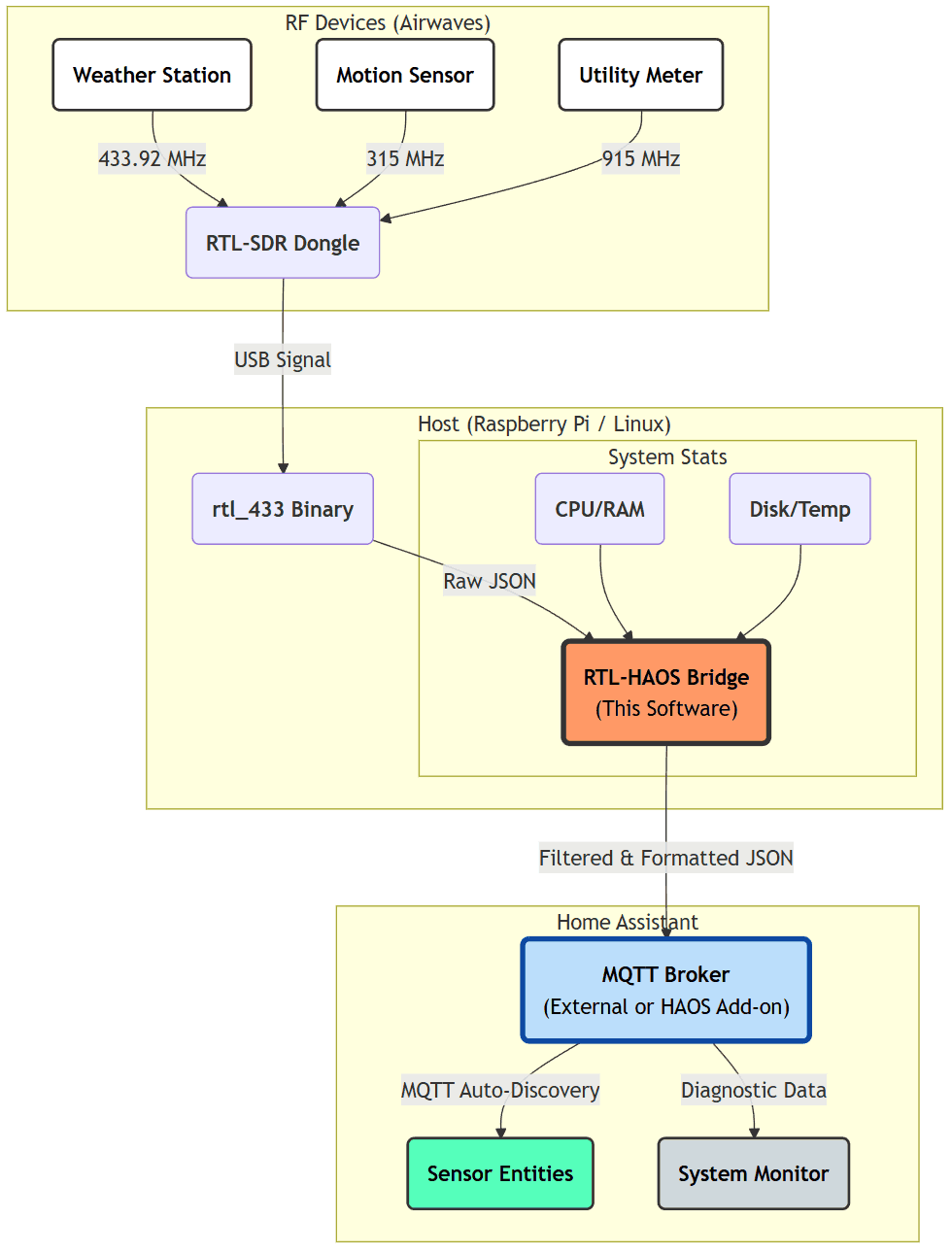
Thank you to Jaron McDaniel for writing in and sharing with us the release of his open source software called "rtl_haos". rtl_haos is a 'drop-in' bridge that turns one or more RTL-SDR dongles into Home Assistant friendly sensors via rtl_433 and MQTT. Jaron writes:

I just finished a tool that that bridges data received from rtl_433 into Home Assistant friendly entities. Basically allowing you to integrate anything rtl_433 can see into Home Assistant.

Basically you clone the git to a Rasberry PI, configure it for your MQTT server, plug in a RTL-SDR or two and you'll see entities with icons and units automatically assigned to whatever rtl_433 discovers.

This tool allows you to connect older and cheap non-Wi-Fi connected sensors to Home Assistant, which typically communicate to a base station via wireless ISM band signals. Home Assistant is an open-source home automation platform that integrates and controls household devices such as lights, sensors, and actuators.

rtl_haos Overview
rtl_haos Overview

Frugal Radio: Using a 25 Dollar PC for Decoding with SDRs

Over on YouTube, Rob from the Frugal Radio channel has uploaded a video showing that you don't need to shell out thousands for a capable PC to run your SDR. Robs finds five second-hand Dell Optiplex 9020 PCs advertised for just 25ドル each, and shows how each PC is powerful enough to run multiple SDR decoders at once, and run three monitors.

He notes that these PCs are a bargain as they come with a 4th gen Intel i5, 8GB RAM, and a 256 GB SSD. And they even come with Windows 10 Professional pre-installed.

Later in the video Rob shows what each of his 25ドル PCs is doing. He shows how PC1 decodes five digital trunk systems with RTL-SDRs and runs SDR++ with an Airspy. And how PC2 decodes P25 trunk systems and runs the PDW pager decoder.

Rob notes that deals on these second-hand Dell Optiplex 9020 PCs are easy to find on eBay as these are common ex-corporate PCs.

An Overview of 2025 SDR Black Friday Deals

Below, we're collating the best Black Friday sales we could find on SDR and related products.

If you find any other good sales for SDR or related products, please post in the comments!

RTL-SDR Blog

We're currently offering 5ドル of V3 dongles (including the V3c) on Amazon. The sale will last until Monday 1 December, and only while stocks last.

RTL-SDR Blog V3 Dongle + Antenna Kit: (削除) US47ドル.95 (削除ここまで) US42ドル.95 (Link)
RTL-SDR Blog V3 Dongle Only: (削除) US37ドル.95 (削除ここまで) US32ドル.95 (Link)
RTL-SDR Blog V3c Dongle Only: (削除) US39ドル.95 (削除ここまで) US34ドル.95 (Link)

We also want to add that in December, the price of V4 dongles will be raised, due to rising chip costs, and dwindling R828D stockpiles, so buying now is purchasing while essentially on sale.

We're also participating in the Airspy 25% sale with the YouLoop listing on our store. The sale takes the price down from 39ドル.95 to 29ドル.96.

Airspy

Airspy offers low-cost RX-only SDRs. Airspy is holding a 25% off Black Friday sale. Black Friday is usually their biggest discount of the year. The sale is offered by their official iTead store and by most resellers. Links to their sales are platforms available here https://airspy.com/purchase

Airspy R2: (削除) US169ドル.00 (削除ここまで) 126ドル.75
Airspy Mini: (削除) US99ドル.00 (削除ここまで) US74ドル.25
Airspy HF+ Discovery: (削除) US169ドル.00 (削除ここまで) US126ドル.75
Airspy SpyVerter R2: (削除) US49ドル. (削除ここまで)00 US36ドル.75

SDRPlay

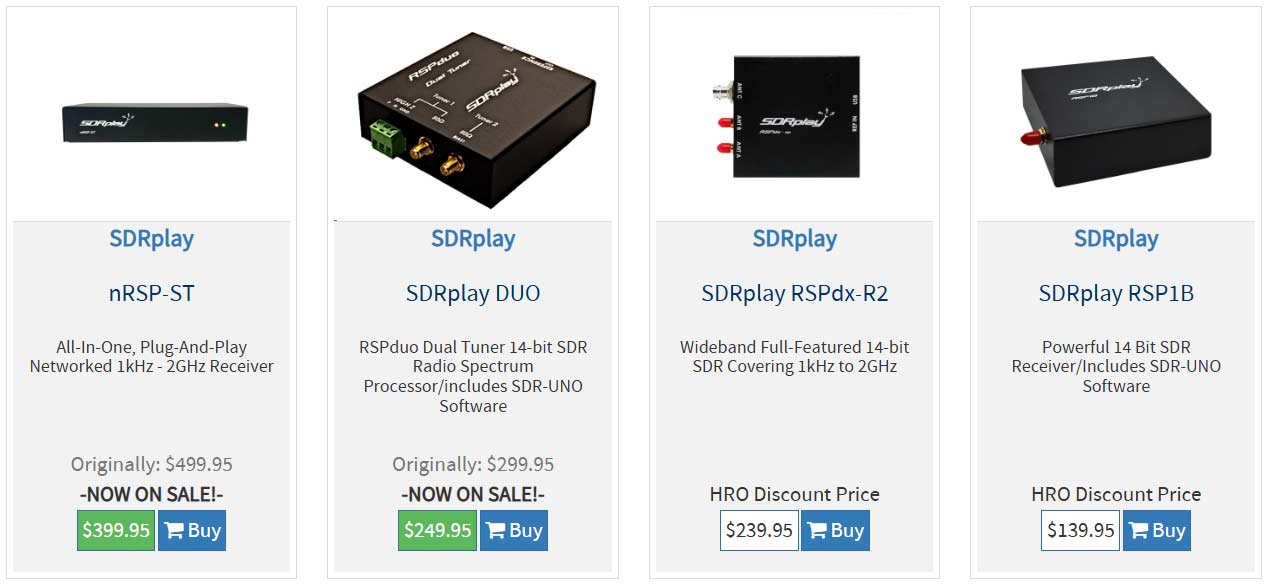
SDRplay offers low-cost RX-only SDRs. There do not appear to be any direct Black Friday deals from SDRplay, but on Ham Radio Outlet, the SDRplay nRSP-ST and DUO units are on sale. The RSPdx-R2 and RSP1B appear not to be on sale.

SDRplay nRSP-ST: (削除) 499ドル.95 (削除ここまで) 399ドル.95
SDRplay DUO: (削除) 299ドル.95 (削除ここまで) 249ドル.95

FlexRadio

FlexRadio offers high-end SDRs aimed at ham radio users. They are currently running a Black Friday deal as shown in the screenshot. https://www.flexradio.com/products/categories/black-friday/

Ham Radio Prep Course

While not physical SDRs, some people interested in getting their amateur radio licence in the US may be interested in this study course, which is discounted for Black Friday. https://hamradioprep.com/black-friday

They have various course bundles on sale, but this screenshot is of the full bundle.

Using the Don’t Look Up Tool to Eavesdrop on Insecure Private Satellite Communications

Over on YouTube, Rob VK8FOES has uploaded a video showing how to install and use the "dontlookup" open-source Linux Python research tool for evaluating satellite IP link security. Back in October, we posted about a new Wired article that discussed how many geostationary satellites are broadcasting sensitive, unencrypted data in the clear and how a cheap DVB-S2 receiver and satellite dish can be used to eavesdrop on them.

In the video, Rob discusses the new dontlookup tool, which is an excellent one-stop shop open-source tool for parsing IP data from these satellites. He goes on to show the full steps on how to install and use the tool in Linux. The end result is private internet satellite data being visible in Wireshark (blurred in the video for legal reasons). In the video description, Rob writes:

I thought I would make a video showcasing this new open-source Python tool for Linux. 'Don't look up' is the result of a research campaign conducted by a group of cyber security researchers from the USA for decoding DVB-S2 satellite data transponders.

Geostationary communications satellites are somewhat of a 'perfect target' to malicious threat actors, due to their downlink signals covering large portions of earth surface. This gives attackers are large attack surface to intercept IP traffic being transmitted from space. To most peoples surprise, little-to-no security, such as encryption, are being used on these data transponders!

This is all old news to myself, and the fans of my YouTube channel that have been following my TV-satellite hobby for the past couple of years. Most of this was already possible with consumer-grade satellite equipment and a Python application called GSExtract. However, the scope of GSExtract was a lot more narrower than that of DontLookUp, with the developers claiming to have achieved an exponential packet recovery rate compared to GSExtract.

Join me in this video today where I will be showing my users how to patch and build the TBS5927 USB satellite receiver drivers for RAW data capturing. I'll also be showcasing the software application called 'DVBV5-Zap' which interfaces with our satellite receiver to capture RAW data from a satellite. And finally, I will finish-off the video by demonstrating the actual usage of DontLookUp itself. To make the tutorial as accessible as possible, I'm doing the entire process inside a Linux virtual machine!

This tutorial will probably only work in DragonOS FocalX R37 Linux by the wonderful @cemaxecuter. You are welcome to try on other Linux distributions, but your mileage will vary! Also, due to the TBS5927 using something called a 'Isochronous Endpoint', it's only possible to use this satellite receiver via USB Passthrough in VMWare versions 17.5 and above. VirtualBox does not support Isochronous USB Endpoints in any version. It's always best to run Linux on 'bare-metal' by installing it directly to your PC's internal SSD, or running it from a bootable USB thumb drive.

Please understand that if you own an internal PCI-E satellite receiver card from TBS, it is not possible to 'pass it through' to Linux running inside in a Type-2 Hypervisor (VMware, VirtualBox etc.) Installing Linux on bare-metal is the only hope for PCI-E card owners. Thanks very much for watching!

HARDWARE:
TBS5927 USB Satellite Receiver
90cm 'Foxtel' Satellite Dish
Golden Media GM202+ LNB
Hills RG-6 Coaxial Cable (F-Type Connectors, 75 Ohm)

SOFTWARE:
VMWare Workstation 17.6.2
DragonOS FocalX R37 Linux
TBS 'Linux_Media' Drivers
'RAW Data Handling' Patch
DVBV5-Zap
DontLookUp

If you're interested in this topic, Rob's YouTube channel has many videos on this topic that are worth checking out.

Don't Look Up (No, Not The Movie): A New Research Tool To Evaluate Satellite IP Link Security!
Watch this video on YouTube

halow_scanner: An RTL-SDR Based 802.11aH HaLow Channel Scanner

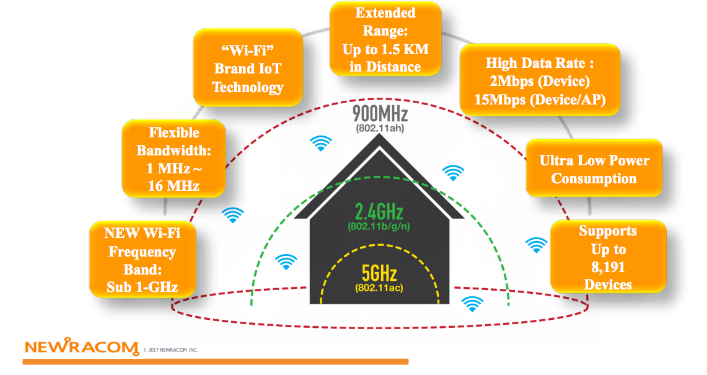
Over on GitHub we've recently noticed the release of halow_scanner, a Python script that uses an RTL-SDR to scan the 802.11ah (WiFi HaLow) channels in the sub-GHz spectrum to determined which channels have the least noise/interference.

Unlike standard WiFi, which operates outside of the RTL-SDRs range at 2.4 GHz+, 802.11ah operates in the sub-GHz ISM bands, which RTL-SDRs can easily receive.

Use of these lower frequencies gives 802.11ah HaLow excellent signal penetration, making it useful for long-range, low-power IoT devices. With 802.11ah HaLow links, several kilometers can be achieved.

The software's features include:

  • 🔍 Scans all 802.11ah HaLow channels in the US 902-928 MHz band
  • 📊 Supports multiple channel bandwidths: 1, 2, 4, and 8 MHz
  • 📡 Uses RTL-SDR for spectrum analysis
  • 🎯 Identifies the cleanest channel with lowest noise floor
  • 📈 Provides detailed power spectrum measurements
  • ⚡ Fast scanning with averaging for accuracy
Comparison Between regular WiFi and 802.11ah HaLow. Source: https://www.gateworks.com/802-11ah-halow-long-range-low-power-wireless-for-iot/
Comparison Between regular WiFi and 802.11ah HaLow. Source: https://www.gateworks.com/802-11ah-halow-long-range-low-power-wireless-for-iot

Software Defined Toolkit: A DIY Radio Reconnaissance Device with RTL-SDR and EvilCrow RF Inside

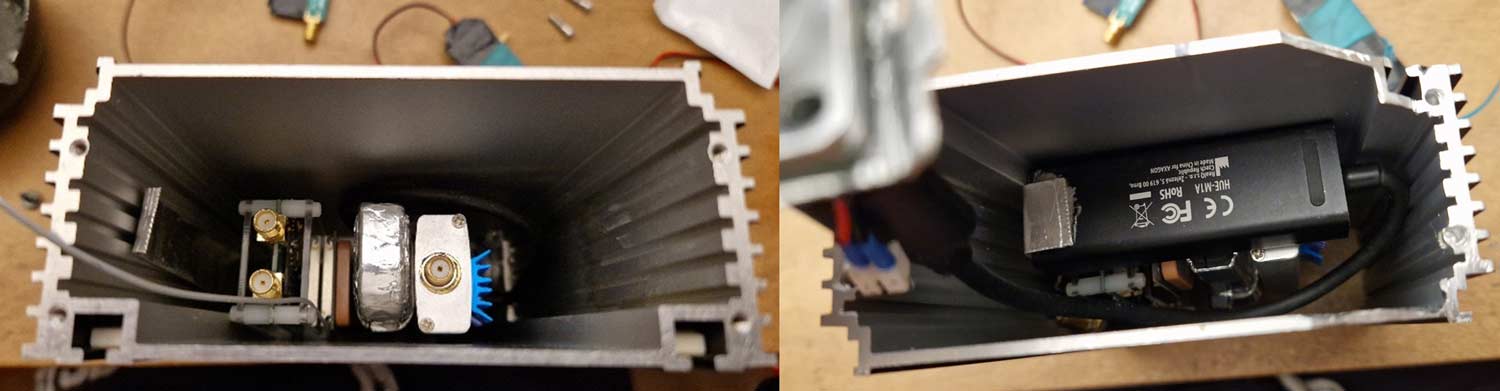
Thank you to "p3rp0ul" for writing in and sharing his neat-looking build of a "Software Defined Toolkit," which consists of two RTL-SDRs, EvilCrow RF, and other RF signal conditioning hardware, all in a ruggedized metal enclosure. He writes:

It’s a compact, field-ready SDR platform that consolidates two RTL-SDR receivers (one acquired via your site), a GPS timing/position module, an LNA with adjustable biasing, and an integrated ESP32-based ISM-band transceiver subsystem into a single rugged enclosure. The project explores how far low-cost SDR hardware can be pushed when carefully packaged, powered, filtered, and shielded as a coherent tool rather than a loose bench setup.

The design focuses on field usability: modular power distribution, fully externalized RF and antenna connectivity, thermal management for the dongles, and internal coax routing optimized with ferrite suppression. The addition of the ESP32 subsystem brings replay, sniffing, jamming, and remote-operation capabilities, extending the utility of RTL-SDR hardware in practical RF reconnaissance and experimentation.

P3rp0ul has shared full details about his build on both Hackaday.io and Hackster.io.

P3rp0ul's DIY Software Defined Toolkit
Inside the Enclosure