The Ultimate Guide to Using the Google UTM Builder (with Free Tools & Examples)
Need a reliable way to track your marketing campaigns and prove ROI? The Google UTM builder helps you create tracking links that work seamlessly with tools like Google Analytics, Adobe Analytics, and more. In this article, you’ll learn how UTM builders work, why they matter, and what modern alternatives exist to save you time and boost your reporting accuracy.
- What is Google UTM Builder?
- Other UTM Builder Options
- What Are Long UTM Tracking Links?
- What Code Do Long Links Contain?
- Simple UTM Builders: Pros & Cons
- Spreadsheet UTM Builders: Pros & Cons
- Automated UTM Builders: Pros & Cons
- How Automated Tools Fix Under-reporting
- Top 6 UTM Builder Tools (With Links)
What is Google UTM Builder?
Google UTM builder, also known as Google Campaign URL builder, is a tool provided by Google for free that uses pre-programmed formulas to append unique UTM tracking code snippets to the URLs of website pages, articles, and blogs.
When these UTM code snippets are being added to the URL of a web page, the result is a long tracking link. It contains key tracking information encoded in the snippets.
When marketers promote this link on Instagram, Tiktok, LinkedIn or other places, the minute a web visitor clicks the long link, he or she is taken to the desired marketing landing page, along with key intelligence, enabling the analytics tool that tracks the page to collect insights and display them in reports or visualizations.
Without this information it will be impossible for marketers to tell how many visits a particular promotional campaign generated, how many conversions it drove, and more.
Are There Other UTM Builder Options?
Yes. Due to the drastic increase in digital campaigns in recent years – digital advertising is a 256ドルB industry – marketing and analytics specialists today are moving towards automated UTM builders.
Businesses choose automation to replace their manual or Excel spreadsheet-based tracking link creation. The part of the industry dealing with automating the process of marketing campaign link tagging, shortening and tracking, as well as managing UTM tags [UTM parameters] is called link management.
When UTM code snippets are being added to the URL of a web page, the result is a long tracking link*. It contains key tracking information enabling the analytics tool that tracks the page* to collect the insights and display them in its reports or visualizations.
What Are Long UTM Tracking Links?
- Long or UTM tracking links are used by marketing specialists only when they promote certain web pages on "external" media like Facebook, Instagram, or any other website not owned by their organization. External, in this case, means that the promotion is carried outside of the website on which the page resides.
UTM Builder and the Purpose of Tracking Links
Tracking links help marketers answer important questions, such as how many users came to the event registration page from a link included in the weekly newsletter versus a tweet; how many people who came from that newsletter actually registered for the event, etc.
The insights that are collected as a result of tracking marketing assets help measure the effectiveness of promotions and channels. Most importantly, this information is used for optimization, where “a marketer can improve marketing campaigns, website creative content, and information architecture” (Wikipedia).
Basic, Non-tagged Link
https://www.companyname.com/productsTagged Link
www.companyname.com/products/?utm_medium=email &utm_source=my_email_provider &utm_campaign=15Q1_Horizontal_Big Five_Invite_Email_EMEA_UK
Tagged Long Link
www.companyname.com/products/?utm_medium=email &utm_source=my_email_provider &utm_campaign=15Q1_Horizontal_Big Five_Invite_Email_EMEA_UKShortened Link
https://ctrly.io/dMyUR
Shortened Link
https://ctrly.io/dMyURQR Coded Link
https://ctrly.io/dMyUR/qr
UTM Builder Generated UTM Codes Found in Long Links
Typical UTM codes or tags include:
utm_source– the traffic source (e.g. twitter)utm_medium– type of channel (email, social-paid)utm_content– ad/CTA variationutm_campaign– campaign namecustom metadata– additional information like GEO, Regions, Product Category, etc. – note that these codes are usually not available in simple UTM builders
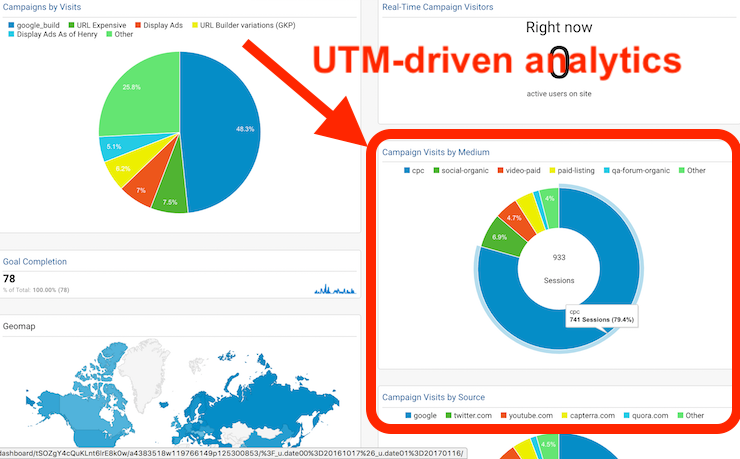
UTM Analytics Report
UTM Campaigns Dashboard Report Showcasing Link Intelligence from UTM Tags
Manual/Simple UTM Builder Tools
The term UTM builder is often used synonymously to URL builder, although, technically, it could be argued that the former enables marketers to create and store custom and standard UTM parameters, while the latter can refer to building URLs by using any kind of parameters.
UTM builders could be as simple as the manual and free Google UTM Builder a Google sheet, MS Excel spreadsheet, or a very simplified web page.
Here is a link to a sample Google Sheets Google-inspired UTM Builder. You can use to store your campaign web addresses, add to them select tags, and even shorten them into Bitly links. Just save a copy of the document in your Google Sheets and you can start using right away.
Simple UTM Builders: Pros & Cons
Google’s manual UTM builder tool and any of its look-alikes are fine for occasional links.
- Pros: Free, simple, one link at a time
- Cons: Manual, repetitive, no consistency, no recorded history, no references
Sample campaign performance tracking excel document with UTMs and custom tracking - Google UTM builder via spreadsheet
Spreadsheet UTM Builders: Pros & Cons
Excel or Google Sheets can mass‐generate links—and even integrate with Bitly.
- Pros: Free, track history, customizable
- Cons: Requires manual setup, no auto‐shortening unless scripted, difficult to manage with time as volume increases, challenging to share, update and keep error-free
Automated UTM Builders
SaaS tools like CampaignTrackly automate link creation, tracking, and shortening.
- Because marketers create so many different promotional campaigns every single day, it is not feasible to expect that they will type the tracking codes manually every single time.
- Manual processing results in errors, inconsistencies, and under-reported campaign performance.
- Hence, the need for automated URL or UTM builders – tools that originated from the Google URL builder or Google campaign URL builder and got enhanced with the help of technology to relieve marketers by doing the tedious manual work of creating and adding tags, and generating long tracking URLs for them.
- The most significant benefit of these automated URL Builder tools is that they save time, boost productivity and reduce mechanical errors that affect the reporting of marketing results.
Automated UTM Builders – Pros & Cons
Pros:
As a busy marketer with so many other to-dos on your list and dealing with multiple content and social media campaigns on a daily basis, setting up campaign tracking poses the following challenges – which automated UTM builders solve in seconds:
-
- identifying one single place to keep all tracking link and campaign data, so it can be shared, re-used, verified and reported on as needed,
- remembering the right Excel file version where all the latest tracking links are being kept,
- having an easy-to-use mechanism for applying the right conventions for naming of tags and campaigns in order to prevent duplication or reporting errors,
- simplifying the whole tagging, URL building and shortening process instead of having to go back and forth between multiple spreadsheets and tools.
- finding out how to shorten and automate the process and eliminate the tedious manual work
Cons:
- These tools are not free
- There is a large number of available resources making it hard to select the best tool available, which is where software directories like G2 and SourceForge come handy.
How Automated UTM Builder Tools Fix Under-reporting
Automated tools solve key pain points:
- Centralized link repository for team access
- Minimal learning curve due to automation
- Auto-controlled tag templates, taxonomies, link checks and naming conventions to avoid duplicates
- Bulk creation + shortening and QR code creation in one pass
- Error-checking before campaign and link deployment
Find Out Why CampaignTrackly is a Momentum Builder
International Software Directory G2 Rates CampaignTrackly as Momentum Builder
Five UTM Builder Tools (With Links) to Review
Today, there are quite a few URL building and UTM tracking automation tools available on the market. They pretty much extend the classical Google URL builder by giving it wings and integrating it with numerous apps and solutions to fuel marketers’ productivity.
Deciding which tool to use very much depends on your company size, analytics software, as well as what you are looking to achieve. Here are a few tools (listed alphabetically) that you might want to look into:
- CampaignTail – Offers automated UTM tagging as well as URL generation and shortening automation features. Offers multi-user management, .gov dedicated link shortener, and Google Analytics integration. Its free version does not include Bitly shortening or custom tag use.
- CampaignTrackly (Disclaimer – this is our automated tracking app) We provide four distinct Google UTM and Adobe Analytics building experiences – through a browser extension, Excel add-in, a platform builder and completely programmatically run integrated layer connecting to up to 100 apps. We cater to the SMb to Enterprise customers focused on innovation and automation. With our tools you can bulk-create 1, 100, or 1000 UTM tag links, QR codes and Short URLs in seconds. For a full list of all features, please visit this page.
- Effinamazing or UTM.io started as a Chrome extension only and has recently developed into a platform specializing in supporting solo and small business teams. It auto-integrates with Bitly and GA4 and lets you export your tags to Google Docs.
- Terminusapp is an enterprise solution. It fully automates custom and standard UTM tag generation, long URL creation, and shortens your links. Has a weekly email that updates you on your campaign status. It has a 21-day free trial requiring credit card, no free version, and caters to the larger enterprise businesses and agencies with multi-user and project management. Works great for very structured large teams and required significant training due to how complex it is.
- Trackingplan provides tracking for Adobe Analytics users. It supports both UTMs and Adobe analytics metadata for its enterprise customers.

