Powering the World’s Best Teams
Join 5m+ users who rely on Zight to increase their productivity
Automate The Pain Out Of Making Videos
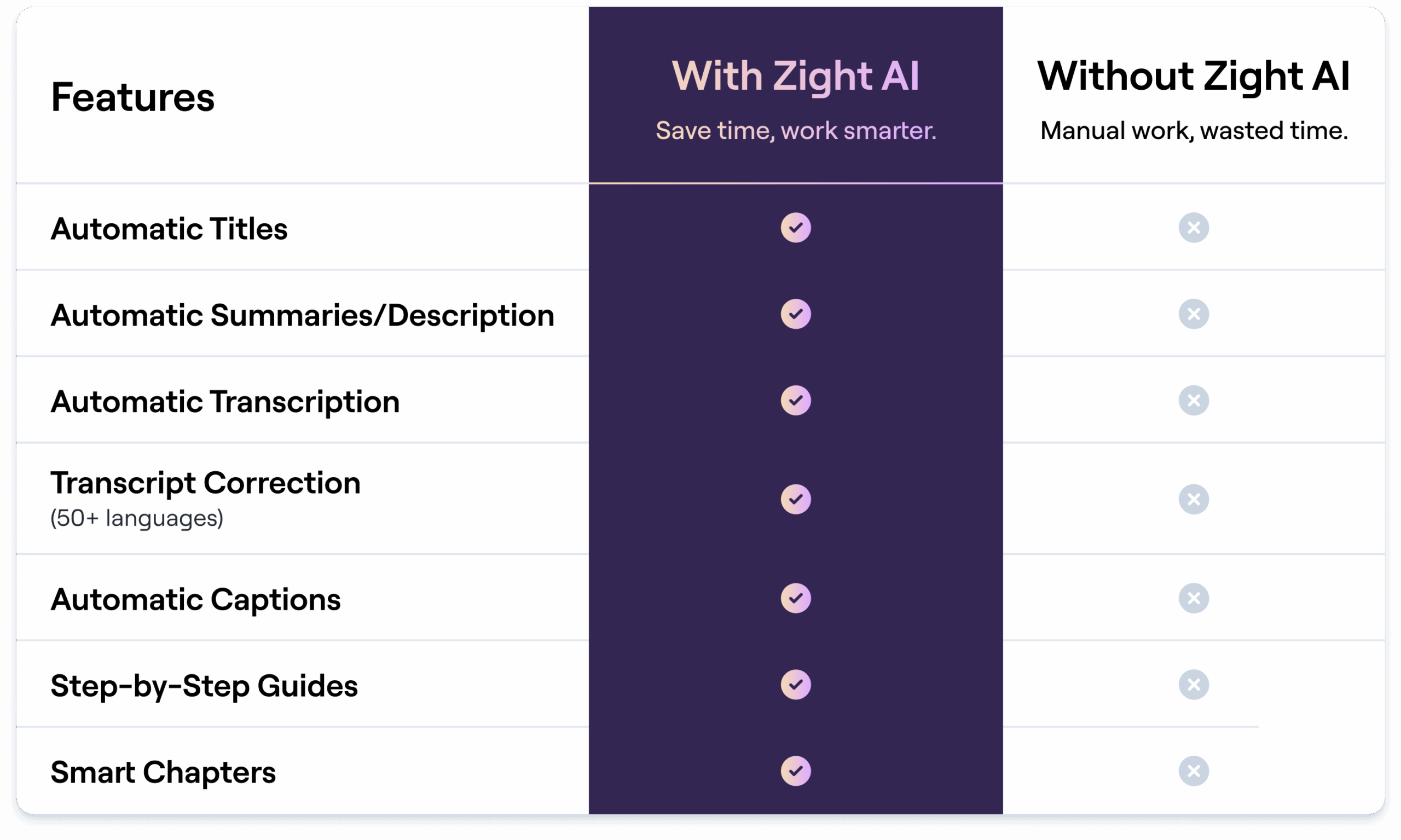
Smart Titles
Give our AI your video, and we’ll near instantly give you back a title that’s relevant based on the content you recorded & discussed in the video
Auto-Transcribe with Captions
Lost your headphones? Not in a place where you can listen to a video? Now you can watch videos with magically applied captions and an easy to read transcription. These videos are much more accessible now!
AI Translation (50+ Languages)
If you think transcribing English is cool, we’ve got the power to take 50+ other languages and apply those same powers too!
Step-by-Step Guides
Turn any video into a step-by-step guide. Our AI breaks down your walkthrough into clear, actionable instructions.
Step-by-Step Guides with Inline Screenshots
Zight’s AI automatically transforms your screen recordings into clear, actionable step-by-step guides with screenshots from your video. Whether you’re filing a bug report, building an SOP, or creating a tutorial, Zight breaks your recording into organized instructions that are easy to follow and ready to share. No manual formatting. No wasted time. Just polished, visual documentation, delivered instantly.
Shareable Chapters
Zight’s AI automatically turns long recordings into clear, scannable chapters, each with its own shareable link. Instead of scrubbing through video, your team can jump straight to the moments that matter.
Word Dictionary
Zight’s AI Word Dictionary lets you expand your AI’s vocabulary for more accurate, on-brand results. Define your own terms and acronyms so content stays consistent across platforms. Ensure unique names, product terms, or industry jargon are always recognized and spelled correctly in transcripts and captions.
AI Personalization: Custom Instructions for Smart Actions
Zight’s AI Personalization lets you fine-tune outputs to match your voice, tone, and workflows. Set custom instructions for tone, style, and context so your content stays on brand. Automate Smart Actions while reducing edits, giving you polished results that are ready to share.
Export AI-Generated Content Anywhere You Work
Export Zight-generated summaries, guides, or transcripts into your existing tools like Notion, Google Docs, or Confluence. Use the new Export button or copy formatted content to paste directly into any workflow.
For teams using AI assistants outside Zight, Zight MCP Server lets compatible tools use the visual context behind Zight links, including recordings, transcripts, OCR, and logs.
Smart Chapters & Titles
With Zight AI, instantly generate clear chapters and titles for your videos. No more manual editing—Zight AI automatically breaks down your content into easy-to-navigate sections, enhancing viewer experience and saving you time. Perfect for product demos, training sessions, and more.
Transform your workflow with Zight AI today!
TLDW: Video Summarizer
Tired of getting sent videos without any context? Or painstakingly making your own descriptions? Now every video you make can have a short description that is automatically created without your input to provide instant context to your coworker or teammate. Saving you both time.
AI Search
Zight’s AI-Powered Search helps you instantly locate videos, images, and files with precision. With Smart Titles, Zight automatically generates descriptive file names, making it simple to find your content without endless scrolling. Whether it’s a screen recording, annotated image, or shared file, Zight brings it to your fingertips in seconds.
"The AI features you guys built are amazing for my use case, as I send a lot of videos to my team. It makes it nicer for them on the receiving end."
- Daniel R. Odio, CEO, Storytell.aiWant to know how Zight AI keeps your data secure?
Learn more about our compliance, privacy, and AI governance standards.
Visit our Trust CenterTime Is Money—Zight AI Saves You Both
Unlock the tools that shave hours off your weekly workload.
Explore Other Zight Features
Explore other Zight features by clicking the buttons.
Frequently Asked Questions
- Smart Titles: Automatically generates relevant titles for your videos.
- Video Summaries: Creates concise summaries to provide instant context.
- Auto-Transcribe with Captions: Automatically generates transcriptions and captions for videos, making them more accessible.
- AI Translation: Supports over 50 languages for transcription and translation.
- Smart Chapters: Automatically organizes videos into clear, navigable sections with chapter titles.
- Transcription Correction: Make edits to your summary and transcription. Correct spelling errors, regenerate transcriptions, restore original version, edit within specific time stamps, and more.
Zight AI is available as a paid add-on starting at 4ドル/user/month.
Yes! You will be able to access auto titles, summaries, transcriptions, and smart chapters when opening all videos, regardless of when they are recorded.
Yes. Zight is SOC 2 Type 2 compliant, ensuring your data is secure. User data is not used to train the AI models, and all content is securely stored on Zight’s servers.
No, Zight AI does not use user data to train its models. We prioritize your privacy and ensure that all your content remains secure and confidential.
Zight AI uses advanced natural language processing (NLP) techniques, including supervised and unsupervised learning, to generate titles, summaries, transcriptions, and more.
Zight AI is pre-trained on large datasets before deployment. It does not use customer data for additional training or learning.
Zight regularly updates its AI algorithms and incorporates user feedback to improve accuracy. Our models undergo rigorous testing and refinement to ensure reliable results.
Zight AI supports over 50 languages, allowing you to transcribe and translate videos into multiple languages, making communication seamless across global teams.
Zight AI saves time by automating repetitive tasks like transcriptions, captions, and content organization. It enhances collaboration, making content more accessible and easier to navigate.
Zight AI instantly provides a summary, title, and transcription of your videos.
Zight AI is designed to support teams across various functions, including:
- Sales: Streamline personalized video outreach.
- Marketing: Organize campaigns with automated summaries and captions.
- Customer Support: Create searchable knowledge bases with transcriptions.
- Engineering/Product: Document processes and demos efficiently.