How to Transfer Files on a Network Using a Python Server on Windows
A person holding an orange and blue Python sticker
Img By: Pexels ---- No attribution required
img src: https://www.pexels.com/photo/person-holding-an-orange-and-blue-python-sticker-11035474/
Chioma is a passionate systems engineer and ethical hacker with a strong focus on security. With 4 years of experience in technical writing, she uses her skills to educate readers about security and Linux.
Through her writing, Chioma emphasizes the importance of cybersecurity best practices and provides practical tips on how to implement them. Her articles cover a range of topics including Linux administration, web application security, and penetration testing.
As a writer, Chioma is committed to breaking down complex security and Linux concepts into easy-to-understand language that readers can apply in their daily lives.
Have you ever wanted to transfer files to other devices, but you didn't have access to a flash drive or other storage device? With Python, you can create a temporary server that lets you transfer files between devices using just your web browser.
In this article, we'll walk you through the process of setting up a Python server on your Windows operating system using the Command Prompt with just a few simple commands.
What Is a Python Server?
A Python server is an in-built web server that comes prepackaged with the Python library. You can implement a simple Python web server using the web server module in Python, such as the SimpleHTTPServer module or the HTTPServer module.
It is important to note that the web server we will create here can only be accessed on your local network via a private IP address, for example, 192.168.xx.xx or 10.10.xx.xx. But you can use this server to easily download files from one device to another as long as you are on the same network.
How to Set Up a Python Web Server for File Transfer on Windows
Setting up a Python web server is very easy. Before you start setting up, make sure you have Python installed. If you don't, you can easily install Python on Windows in a few minutes.
Once you have Python installed, to set up your Python server, just follow these steps:
Open File Explorer and navigate to the location of the folder or file you want to share.
In the Address Bar, double-click the file path and type cmd. This would open a Command Prompt window in that location.
Alternatively, you can open the Command Prompt by pressing Win + R and typing cmd in the Run dialog box. Then navigate to your desired file or folder using the cd command in Windows.
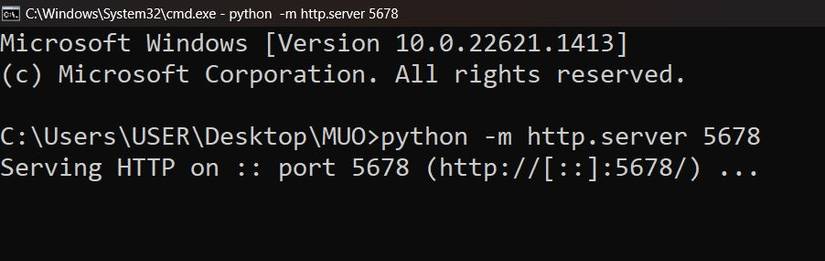
This would use the default port 8000. To specify a different port just type the port number next to the command. For example, to run the Python web server on port 5678, execute this command:
Now, you have a simple Python web server for file transfer up and running on your Windows device. To end the server, just press Ctrl + C.
How to Download the Files From the Python Server
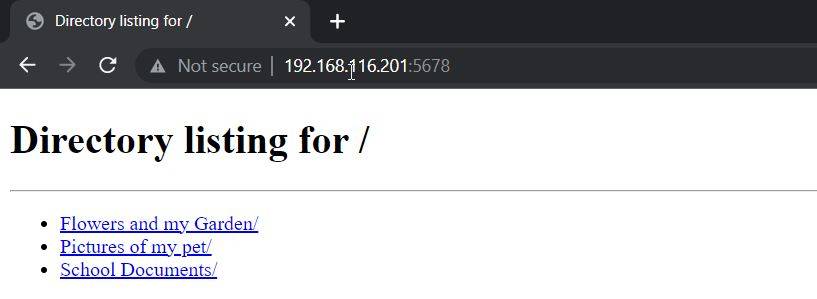
On the devices that you want to share the files to, open the browser and just type in the IP address of the device with the file. If you specified a port number, do this: ip_address:portnumber. For example, 192.168.116.201:5678. The result should look like a list of files and directories.
Setting up a Python server for file transfer can be a powerful tool for streamlining your workflow and improving efficiency. Whether you are working on a small team or a large project, the ability to quickly and easily transfer files can make all the difference. Python is an easy-to-learn programming language that can be used to automate tasks and make you more efficient in your everyday life.
With a little bit of practice and experimentation, you can easily create scripts to automate repetitive tasks such as file organization, data analysis, web scraping, and much more.