Trying to retrieve data from an object and seeing an "object is not subscriptable" error instead? The problem is, you're indexing the wrong data type.
Find out all about subscriptable types and how to resolve this error.
What Does "Subscriptable" Mean in Python?
The term "subscriptable" in Python means a data type that stores multiple values that you can access individually. You can access a specific value from a subscriptable data type via its index, using square bracket ([]) notation.
If you try to access the items in a data type that isn't indexable, Python raises a "TypeError: object is not subscriptable" exception.
The following data types are subscriptable in Python: lists, strings, tuples, and dictionaries.
list_example = [1, 3, 5, "Idowu"]
string_example = "Idowu Omisola"
tuple_example = (1, 3, 5, "Idowu")
dict_example = {"name": "Idowu", "Language": "Yoruba"}
print(list_example[0]) # 1
print(string_example[3]) # w
print(tuple_example[1]) # 3
print(dict_example["name"]) # Idowu
However, sets, integers, floats, and Booleans, are inaccessible via indexing, so they're not subscriptable:
float_example = 12.45
int_example = 12367
bool_example = True
set_example = {1, 3, 5, "Python"}
print(float_example[1])
print(bool_example[2])
print(int_example[2])
print(set_example[2])
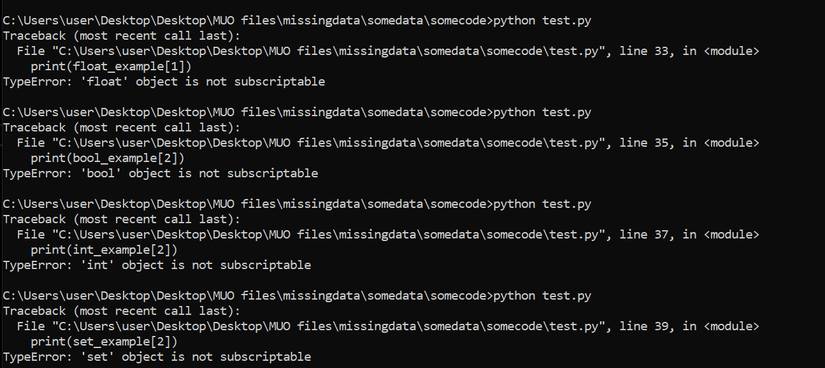
Attempting to run each of these statements outputs the "object is not subscriptable" exception:
Resolving the Exception
Resolving the "object is not subscriptable" exception is easier once you understand the rules for accessing each data type. So start your Python debugging by checking the data type of the object you're trying to index.
float_example = 12.45
int_example = 12367
bool_example = True
set_example = {1, 3, 5, "Python"}
print(type(float_example)) # <class 'float'>
print(type(int_example)) # <class 'int'>
print(type(bool_example)) # <class 'bool'>
print(type(set_example)) # <class 'set'>
Once you determine that the data type isn't subscriptable, converting it to an indexable type resolves the problem. This is handy if the data is from a third-party API. Converting data types like integer, float, and Boolean into a string makes them subscriptable:
print(str(float_example)[:2]) # 12
print(str(int_example)[:2]) # 12
print(str(bool_example)[:2]) # Tr
You can even manipulate the resulting Python strings as you want. If dealing with integer and float, you might want to retain the original data type in the output. To do this, convert the resulting value into their original data type after indexing them as strings:
converted_float = float(str(float_example)[:2])
converted_int = int(str(int_example)[:2])
# 12.0 Data type:<class 'float'>
print(converted_float, f'Data type:{type(converted_float)}')
# 12 Data type:<class 'int'>
print(converted_int, f'Data type:{type(converted_int)}')
As for a set, you can transform it into a list. Although you can convert a set object into a list using the list(set) Python one-liner, this doesn't preserve the item positions in the resulting list. To ensure you get a list with preserved item positions, use Python's lambda function like so:
set_example = {1, 3, 5, "Python"}
converted = sorted(set_example, key=lambda x: (isinstance(x, str), x))
print(converted[3]) # Python
Master Python Debugging
Python has a smooth learning curve. But simple exceptions can throw you off if you don't know how to tackle them. Learning to debug your code and taking your time with problem-solving goes a long way to fixing Python coding errors and exceptions.