In game development, adding time-based events can greatly enhance gameplay mechanics and make games more engaging for players. By incorporating timers, you can introduce challenges, create time-limited objectives, or add a sense of urgency to certain game elements.
Create a Simple Game
Start by creating a simple game to understand the basics. Build a game where the player can move left and right, and there will be a single platform. Create a new file named simple-game.py and import the arcade module, which provides the necessary functionalities for creating the game.
The code used in this article is available in this GitHub repository and is free for you to use under the MIT license.
Next, define the GameWindow class, which is a subclass of arcade.Window. Inside the GameWindow class, define the __init__ method, which initializes the window with the specified width, height, and title.
The on_key_press method detects left or right arrow key presses. Pressing left decreases player_x by 10 units while pressing right increases it by 10 units. This allows the player to move horizontally within the game window.
To run the game, define the main function, create an instance of the GameWindow, call the setup method to set up the game window, and finally, start the game loop using arcade.run().
Designing the Timer Class Structure
To implement timers in your game, you can create a Timer class with the necessary attributes and methods. This class will provide functionalities for starting the timer, stopping it, retrieving the elapsed time, and checking if the timer has expired. Here's the basic structure for the Timer class:
import time
class Timer:
 def __init__(self, duration):
 self.duration = duration
 self.start_time = 0
 self.is_running = False
 def start(self):
 self.start_time = time.time()
 self.is_running = True
 def stop(self):
 self.is_running = False
 def get_elapsed_time(self):
 if self.is_running:
 return time.time() - self.start_time
 return 0
 def is_expired(self):
 return self.get_elapsed_time() >= self.duration
The Timer class takes a duration parameter in seconds during initialization. The class contains attributes such as start_time to store the time when the timer started, and is_running to track the timer's state.
The start() method sets the start_time to the current time using time.time() and sets is_running to True. The stop() method simply sets is_running to False. The get_elapsed_time() method calculates the elapsed time by subtracting the start_time from the current time.
If the timer is running, it returns the elapsed time; otherwise, it returns 0. The is_expired() method checks if the elapsed time is greater than or equal to the duration, indicating that the timer has expired.
Implementing Countdown Timers
To demonstrate a countdown in your game, you can start the timer when the player presses a specific key, such as the space bar. Print the countdown to the console using Python's print command. Create a new file named timer.py and add the code with these updates:
import time
class GameWindow(arcade.Window):
 def __init__(self):
 super().__init__(WIDTH, HEIGHT, "Simple Game")
 self.player_x = WIDTH // 2
 self.player_y = HEIGHT // 2
 self.timer = Timer(10)
 def on_key_press(self, key, modifiers):
 if key == arcade.key.SPACE:
 self.timer.start()
 def on_draw(self):
 # Existing code
 if self.timer.is_running:
 elapsed_time = self.timer.get_elapsed_time()
 r_time = self.timer.duration - elapsed_time
 remaining_time = max(r_time, 0)
 print(f"Countdown: {remaining_time:.1f} seconds")
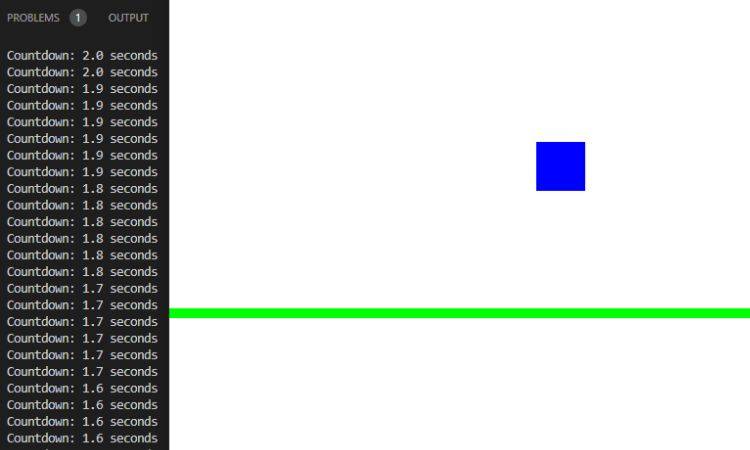
Make sure you can see the terminal window and the game window at the same time. Then press space and you'll see the timer count down:
Handling Timer Events and Triggering Actions
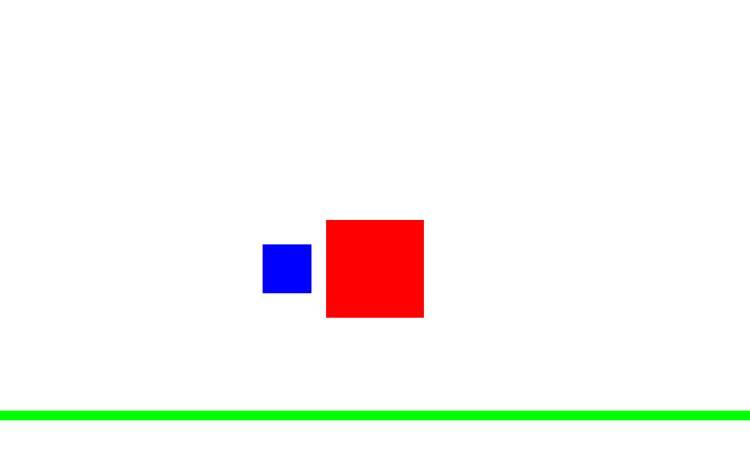
You can also trigger a function that draws a rectangle when the countdown timer expires. Create a new file named handle-event.py and add the code with the below updates:
def on_draw(self):
 # Existing code
 if self.timer.is_expired():
 self.draw_rectangle()
def draw_rectangle(self):
 arcade.draw_rectangle_filled(WIDTH // 2, HEIGHT // 2, 100, 100, red)
Below is the output:
Pausing, Resetting, and Resuming the Timer
To add functionality for pausing, resetting, and resuming the timer, you can extend the Timer class with appropriate methods. Here's an example:
class Timer:
 # Existing code
 def pause(self):
 self.duration -= self.get_elapsed_time()
 self.is_running = False
 def reset(self):
 self.start_time = 0
 self.is_running = False
 def resume(self):
 self.start_time = time.time()
 self.is_running = True
Adding Visual Feedback to the Timer
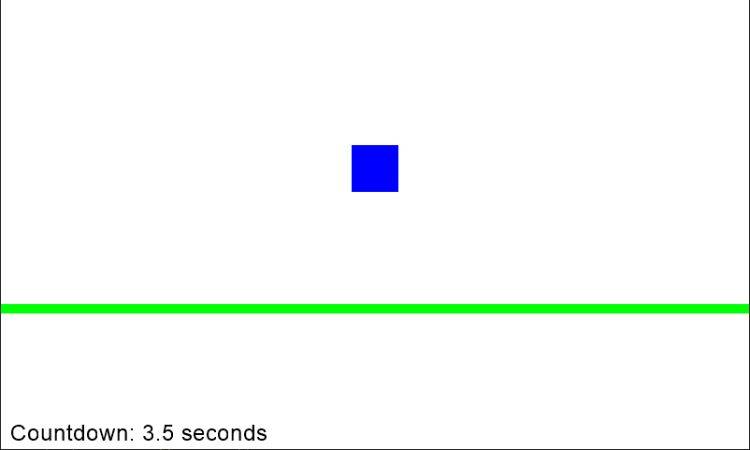
To provide visual feedback for the timer, you can incorporate text or graphical elements on the game screen. Create a new file named visual.py and add the code with the below updates:
def on_draw(self):
 # Existing code
 if self.timer.is_running:
 text = f"Countdown: {remaining_time:.1f} seconds"
 arcade.draw_text(text, 10, 10, black, 18)
You'll now see the timer directly in the game window instead of the console:
Including Additional Features
To further enhance time-based events, you can consider implementing the following additional features in your games.
Time-Based Power-Ups or Bonuses
Introduce power-ups or bonuses that appear periodically throughout the game. These power-ups could provide temporary abilities, extra points, increased speed, or enhanced weapons.
By making them time-limited, players must strategically collect them within a specific time frame to gain an advantage. This adds excitement and rewards quick thinking.
Time-Limited Challenges
Create time-limited challenges where players must complete a task within a certain timeframe. For example, a puzzle or platforming section that requires solving within a given time.
This challenges players to think and act quickly, adding a thrilling sense of urgency to the gameplay. Successful completion of these challenges can unlock rewards or progress the story.
Timed Obstacles or Enemies
Implement timed obstacles or enemies that pose a threat to the player. For instance, moving platforms that appear and disappear at regular intervals, or enemies that become invincible for a limited time.
Players must time their actions and movements correctly to navigate these obstacles or defeat enemies before the time runs out. This adds a layer of strategy and coordination to the gameplay.
Best Practices for Time-Based Events
When implementing time-based events in your games, it's essential to follow these best practices.
Test and Balance
Test your time-based events thoroughly to ensure they are fair and balanced. Fine-tune the duration, difficulty, and rewards to create enjoyable gameplay experiences.
User Feedback
Provide clear and intuitive feedback to players regarding the timer's status and any time-based events. Adding sound effects, visual indicators, or textual cues can help players understand the time constraints and the consequences of their actions.
Consistent Time Measurement
Use a consistent time measurement system throughout your game. For example, use seconds as the unit for all timers and time-related calculations. This ensures consistency and ease of understanding for both the players and the developers.
Handle Edge Cases
Consider scenarios where the game may be paused, minimized, or running in the background. Handle these situations gracefully to maintain accurate timing and prevent unintended behavior when the game resumes.
By following these best practices, you can create time-based events that enhance gameplay, challenge players, and provide a balanced and enjoyable experience.
Making Games More Fun With Time-Based Events
By incorporating time-based events into your games, you can create a dynamic and engaging experience for players. Time-limited challenges add excitement and urgency, while timed power-ups or obstacles can create strategic decision-making opportunities.
Experiment with different time-based mechanics to find the right balance for your game, and remember to playtest and iterate to maximize fun and enjoyment.