Sai Ashish is a highly skilled software engineer with industry experience in coding, designing, deploying, and debugging development projects.
He is a former Google Developer Students Club lead and also held the position of Technical Head during his studies at the esteemed University of Mumbai, India.
He is certified in C++, Java, and Python. Since 2018, he has shared his technical knowledge via his passion for writing, speaking at sessions, and online tutorials.
Even if your password gets stolen, OTP verification systems serve as a crucial factor for security. It eliminates the need to remember passwords, serves as an extra layer of security, and reduces the risks of phishing.
Learn to build an OTP verification system using Python that sends you an OTP to your mobile number, is only valid for two minutes and your account gets locked if you enter the wrong OTP three times in a row.
Install Tkinter, Twilio, and Random Modules
Tkinter allows you to create desktop applications. It offers a variety of widgets like buttons, labels, and text boxes that make it easier to develop applications.
Twilio module helps you to integrate communication functionalities like SMS, MMS, phone calls, and verification right into your application. It has a cloud-based infrastructure along with amazing features such as number provisioning, message templates, and call recording.
To install the Twilio and Tkinter modules, run the following command in the terminal:
pip install twilio tk
The Random module is a built-in Python module used for generating pseudo-random numbers. With this, you can generate random numbers, choose random elements from a list, shuffle the contents of a list, and more. You can use it to build a die roll simulation, a list shuffler, or a random password generator.
Generate the Twilio API and Get a Phone Number
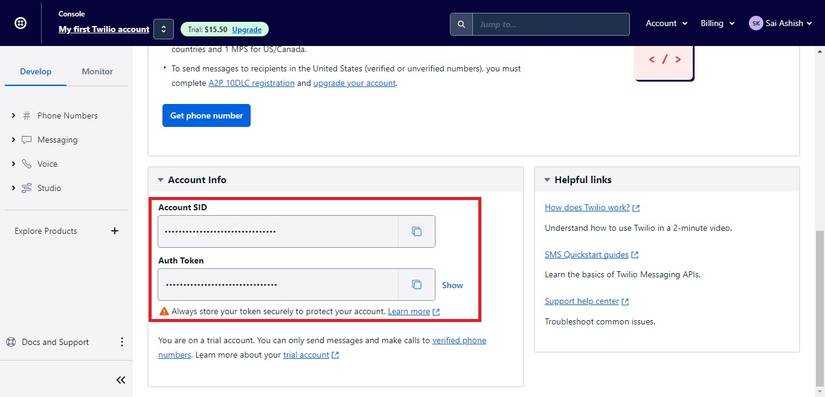
To use Twilio and send OTP requests to your mobile phone, you require authentication credentials along with a Twilio phone number. To achieve this:
Sign up for a Twilio account and visit the Twilio console.
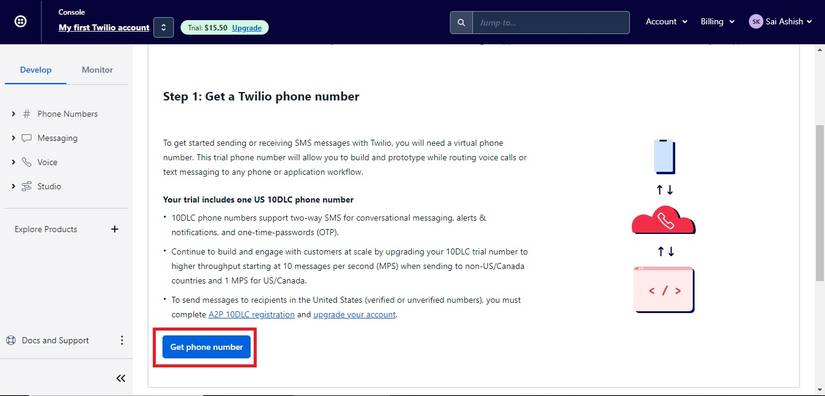
Scroll down and click on the Get phone number button. Copy the generated phone number.
You can find the entire source code for building an OTP Verification System using Python in this GitHub repository.
Import the necessary modules and set the authentication credentials. Initialize the Twilio client to authenticate and be the entry point for API calls. Set the expiration time to two minutes.
Define a class, OTPVerification, and initialize the constructor to set the default values of variables along with initializing the root window, and setting the title, and dimensions of the application.
import tkinter as tk
from tkinter import messagebox
from twilio.rest import Client
import random
import threading
import time
account_sid = "YOUR_ACCOUNT_SID"
auth_token = "YOUR_AUTH_TOKEN"
client = Client(account_sid, auth_token)
expiration_time = 120
class OTPVerification:
 def __init__(self, master):
 self.master = master
 self.master.title('OTP Verification')
 self.master.geometry("600x275")
 self.otp = None
 self.timer_thread = None
 self.resend_timer = None
 self.wrong_attempts = 0
 self.locked = False
 self.stop_timer = False
Define three labels to ask for a mobile number, and an OTP, and to display a timer after the program sends an OTP. Set the parent element, the text it should display, and the font styles it should possess. Similarly, create two entry widgets to get input from the user. Set its parent element, its width, and its font styles.
Create three buttons to send OTP, resend OTP, and Verify OTP. Set its parent element, the text it should display, the command it should execute when clicked, and its font styles. Organize these elements using the pack method.
Define a method, timer_countdown(). Record the starting time and run an infinite loop that takes the current time and calculates the elapsed and remaining time. If stop_timer is true, terminate the loop. If the remaining time is less than or equal to zero, display an error message box saying the OTP expired.
Activate the resend OTP button, set the OTP to none, and terminate. Otherwise, calculate the minutes and seconds remaining, display it on the timer label, and sleep for one second.
Define a method, send_otp(). If locked is true, display the appropriate message. Otherwise, extract the phone number, validate it, and generate a random OTP. Pass the mobile phone you got earlier and use the client to send the OTP to your phone number. Display a message box, start the timer, disable the buttons, and clear the entry completely.
 def send_otp(self):
 if self.locked:
 messagebox.showinfo('Account Locked', 'Your account is locked. Try again later.')
 return
 mobile_number = self.mobile_number_entry.get()
 if not mobile_number:
 messagebox.showerror('Error', 'Please enter your mobile number.')
 return
 self.otp = random.randint(1000, 9999)
 message = client.messages.create(
 body=f'Your OTP is {self.otp}.',
 from_='TWILIO_MOBILE_NUMBER',
 to=mobile_number
 )
 messagebox.showinfo('OTP Sent', f'OTP has been sent to {mobile_number}.')
 self.start_timer()
 self.send_otp_button.config(state=tk.DISABLED)
 self.resend_otp_button.config(state=tk.DISABLED)
 self.otp_entry.delete(0, tk.END)
Define a method, resend_otp(). If locked, display the appropriate message. Otherwise, get the phone number, validate it, regenerate a random OTP, resend the OTP, display the message box, start the timer, and disable the resend OTP button.
 def resend_otp(self):
 if self.locked:
 messagebox.showinfo('Account Locked', 'Your account is locked. Try again later.')
 return
 mobile_number = self.mobile_number_entry.get()
 if not mobile_number:
 messagebox.showerror('Error', 'Please enter your mobile number.')
 return
 self.otp = random.randint(1000, 9999)
 message = client.messages.create(
 body=f'Your OTP is {self.otp}.',
 from_='TWILIO_MOBILE_NUMBER',
 to=mobile_number
 )
 messagebox.showinfo('OTP Sent', f'New OTP has been sent to {mobile_number}.')
 self.start_timer()
 self.resend_otp_button.config(state=tk.DISABLED)
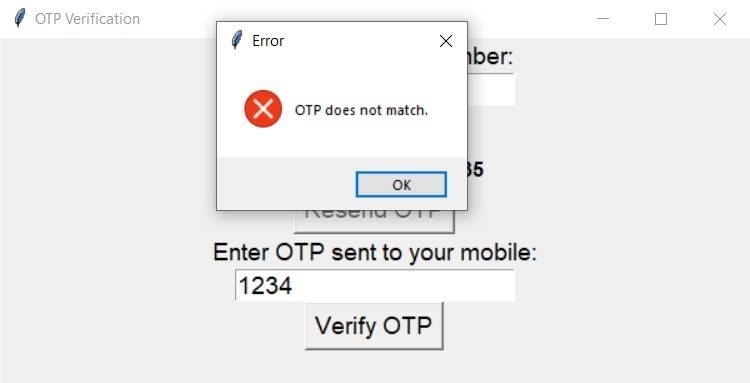
Define a method, verify_otp(). Get the OTP, and check if the user has not entered anything. If the stored OTP is None, ask the user to generate the OTP first. If the OTP the user entered matches the stored one, display the successful OTP verification message, stop the timer, and exit the program. Otherwise, check for wrong attempts. If the wrong attempts exceed three, lock the account.
 def verify_otp(self):
 user_otp = self.otp_entry.get()
 if not user_otp:
 messagebox.showerror('Error', 'Please enter OTP.')
 return
 if self.otp is None:
 messagebox.showerror('Error', 'Please generate OTP first.')
 return
 if int(user_otp) == self.otp:
 messagebox.showinfo('Success', 'OTP verified successfully.')
 self.stop_timer = True
 exit()
 else:
 self.wrong_attempts += 1
 if self.wrong_attempts == 3:
 self.lock_account()
 else:
 messagebox.showerror('Error', 'OTP does not match.')
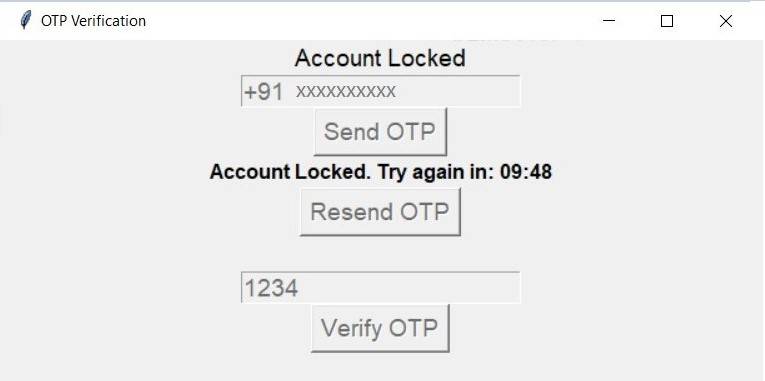
Define a method, lock_account(). Set the locked status to true and display the label as Account Locked. Disable all the labels, entries, and buttons. Stop the existing timer and start a new one for ten minutes.
Define a method start_countdown(). If the remaining time is less than or equal to zero, reset the account. Otherwise, display that the program has locked the account and try again in the remaining time using a callback.
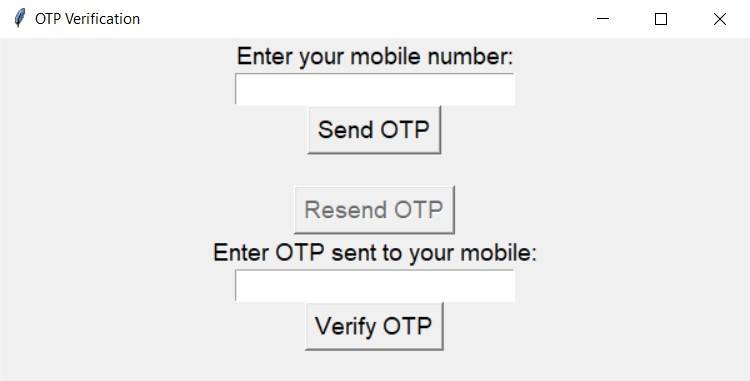
On running the OTP Verification program, you get a window asking you to enter your mobile number. Enter it along with your country code and hit the Send OTP button. You get a message that the program has sent the OTP successfully and the button deactivates for two minutes. Check your phone for OTP and enter it before it expires.
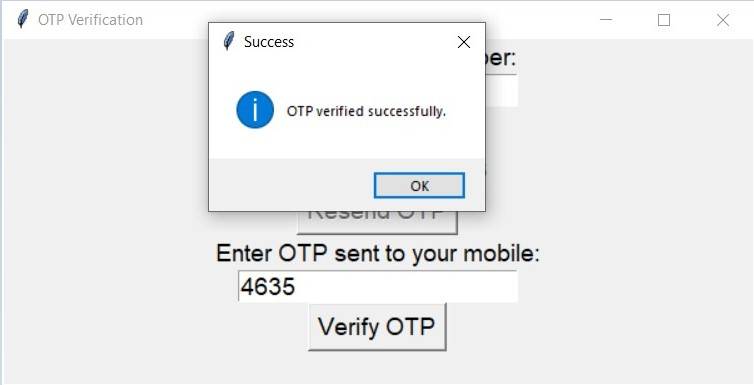
On entering the correct OTP before the timer runs out, you get a message that the program has verified the OTP successfully, and the program exits. In case you did not enter it on time, you will get a message box saying the OTP has expired. You can click on the Resend OTP button to generate a new OTP and send it to your phone.
Using Twilio, you can build an SMS notification system for various events. You can use it with IoT devices to trigger SMS when something falls above or below a certain threshold or when you detect an intruder. You can build secure login systems with two-factor authentication, build a WhatsApp chatbot, and an appointment reminder system.
Apart from this, you can use it for phone number verification, marketing campaigns, sending surveys, and collecting feedback. While building any application, always be mindful of Twilio API pricing to avoid unexpected costs.