When you’re writing a unit test suite, there may be some non-test-related activities that you need to perform. These activities can take any form. You might need to connect to a database or gather resources before you perform a test. After each test case executes, you might need to release some resources.
Performing any of these non-test-related activities outside the scope of a unit test class might be tedious if not impossible. The successful execution of your test class may depend on these activities, so JUnit provides two pairs of annotations to address this problem.
The @BeforeAll Annotation
A JUnit test class can have one or more test methods. The @BeforeAll annotation signals that a specific method should execute before all the test methods in a test class. The method associated with this annotation only executes once (at the start of the test) regardless of the number of test methods in the test class.
Any method that uses the @BeforeAll annotation must follow a few stipulations. These methods must have a void return type, must be public, and must not be private. The @BeforeAll annotation is ideal for establishing a connection to a database or creating a new file. This article uses a calculator test class to show how you can use the @BeforeAll annotation.
The Calculator Class
package com.app;
public class Calculator {
 public static int add(int num1, int num2) {
 return num1 + num2;
 }
 public static int subtract(int num1, int num2) {
 return num1 - num2;
 }
 public static int multiply(int num1, int num2) {
 return num1 * num2;
 }
 public static int divide(int num1, int num2) {
 return num1 / num2;
 }
}
The CalculatorTest Class
import static org.junit.jupiter.api.Assertions.*;
import org.junit.jupiter.api.BeforeAll;
import org.junit.jupiter.api.Test;
import org.junit.jupiter.api.DisplayName;

@DisplayName("Test class demonstrating how to use the before and after annotations.")
class CalculatorTest {
 @BeforeAll
 public static void powerOnCalculator() {
 System.out.println("The calculator is on");
 }

 @Test
 @DisplayName("Testing method that adds two integer values.")
 public void testAdd() {
 assertEquals(7, Calculator.add(3, 4));
 }

 @Test
 @DisplayName("Testing method that subtracts one integer value from another.")
 public void testSubtract() {
 assertEquals(6, Calculator.subtract(9, 3));
 }

 @Test
 @DisplayName("Testing method that multiplies two integer values")
 public void testMultiply() {
 assertEquals(10, Calculator.multiply(5, 2));
 }

 @Test
 @DisplayName("Testing method that divides one integer value by another")
 public void testDivide() {
 assertEquals(2, Calculator.divide(4, 2));
 }
}
In this class, the @BeforeAll annotation works with the powerOnCalculator() method, which prints “The calculator is on” before any test run. The successful test execution prints the following test report:

As you can see the method associated with the @BeforeAll annotation does not appear in the test report. However, if there is an error in the @BeforeAll annotation method, the test report results will indicate this with a failure.
The @BeforeEach Annotation
Like the @BeforeAll annotated method, the @BeforeEach annotated method will not appear in the test report. The @BeforeEach annotated method executes before each test method in a test class. So, if a test class contains two test methods, then the @BeforeEach annotation will execute twice.
import static org.junit.jupiter.api.Assertions.*;
import org.junit.jupiter.api.BeforeAll;
import org.junit.jupiter.api.BeforeEach;
import org.junit.jupiter.api.Test;
@DisplayName("Test class demonstrating how to use the before and after annotations.")
class CalculatorTest {
 @BeforeAll
 public static void powerOnCalculator() {
 System.out.println("The calculator is on");
 }
 @BeforeEach
 public void clearCalculator() {
 System.out.println("The calculator is ready");
 }
 @Test
 @DisplayName("Testing method that adds two integer values.")
 public void testAdd() {
 assertEquals(7, Calculator.add(3, 4));
 }
 @Test
 @DisplayName("Testing method that subtracts one integer value from another.")
 public void testSubtract() {
 assertEquals(6, Calculator.subtract(9, 3));
 }
 @Test
 @DisplayName("Testing method that multiplies two integer values")
 public void testMultiply() {
 assertEquals(10, Calculator.multiply(5, 2));
 }
 @Test
 @DisplayName("Testing method that divides one integer value by another")
 public void testDivide() {
 assertEquals(2, Calculator.divide(4, 2));
 }
}
Adding the @BeforeEach annotation to the CalculatorTest class produces the following output:
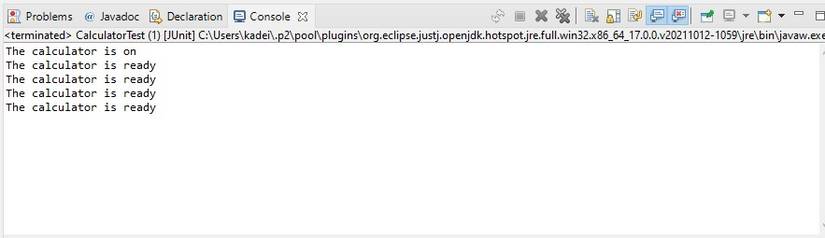
The method associated with the @BeforeEach annotation executes four times, once before each test method. You should note that the @BeforeEach method is not static, has a void return type, and is not private, as these are mandatory stipulations. It’s also important to note that the method associated with the @BeforeEach annotation runs after the @BeforeAll method.
The @AfterAll Annotation
A method with the @AfterAll Annotation will execute after all the test methods in the test class completes their execution. The @AfterAll annotation is ideal for basic file operations, like closing a file, or disconnecting from a database. The @AfterAll annotation is the counterpart to the @BeforeAll annotation. Like the @BeforeAll annotation, the @AfterAll annotation must be static, must return void, and much not be private.
@AfterAll
public static void powerOffCalculator() {
 System.out.println("The calculator is off");
}
Adding the @AfterAll annotated method to the existing CalculatorTest class prints the following output to the console:

Note that the powerOffCalculator() method, which uses the @AfterAll annotation, prints at the end of the test class, after all the test methods execute.
The @AfterEach Annotation
The @AfterEach annotation is the counterpart to the @BeforeEach annotation. They have the same mandatory stipulations, which are slightly different from that of the @BeforeAll and @AfterAll annotations. What distinguishes the @AfterEach annotation from the @BeforeEach annotation (other than their names) is that the @AfterEach method runs after each test method.
@AfterEach
public void returnResults() {
 System.out.println("The results are ready");
}
Executing the CalculatorTest class prints the following output to the console:
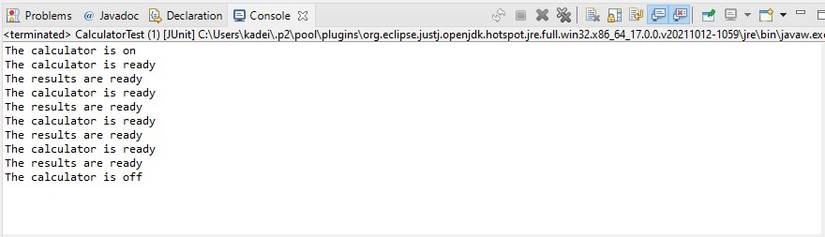
The output shows that the method associated with the @AfterEach annotation (returnResults) prints four times. Each execution of the returnResults() method only happens after the execution of each unit test. This is evident by the fact that the returnResults() method output appears after each output from the method associated with the @BeforeEach annotation.
Polish Your Test Suites Using Annotations
JUnit allows you to handle non-test related processes using the before and after pair annotations. These four annotations belong to a list of several other annotations which add value to your tests. Another of JUnit’s annotations is @DisplayName.
The two code examples that display the complete CalculatorTest class use the @DisplayName annotation. The @DisplayName annotation helps you to create more meaningful names for your test classes and test methods.