Web development is always changing to serve a competitive market that is quick to adopt new technologies. Although the HTML specification moves fairly slowly, HTML5 introduced many new semantic elements that have improved accessibility and SEO.
If you’re not already using these newer HTML5 elements, there’s no time to waste in getting started.
What Are HTML5’s Semantic Elements?
Semantic elements are those that convey a specific meaning. These HTML tags provide a better understanding of a web page's structure to both humans and machines.
For instance, the header tag represents a page header, the nav tag denotes a navigation area, and the section tag signifies a distinct content section.
By incorporating semantic elements, you can improve code organization and readability. They also help search engines understand your content, boosting SEO.

The Importance of Semantic HTML
Semantic HTML plays a crucial role in web development for several reasons.
- Improved user experience: Elements such as <header> and <nav> enhance page structure, making navigation easier for users.
- Accessibility: Semantic HTML improves the experience for screen reader users, promoting inclusivity on the web.
- SEO benefits: Well-structured content ranks higher in search results, boosting visibility.
- Future-proofing: HTML5 semantics ensure compatibility with evolving web technologies.
How Semantic Elements Improve SEO
Semantic HTML5 elements offer a strong SEO advantage. They enhance your site's structure, making it easier for search engines to index content. They provide the following benefits.
- Clearer structure: Semantic elements create a hierarchical page structure, aiding search engine indexing.
- Meaningful content: You can accurately categorize content using elements like <article> and <section>.
- Rich snippets: A clear content structure can lead to rich snippets, making your results more appealing.
- Mobile-friendly: Elements like <header> and <footer> help create mobile-friendly sites, positively impacting SEO.
Common HTML5 Semantic Elements
HTML5 introduced a range of semantic elements, each designed for a specific purpose. These are some of the most frequently used semantic elements.
<header>
- Represents introductory content or a set of navigational links at the top of a webpage.
- Contains the website's logo, site title, and primary navigation menu.
<nav>
- Defines a section of a webpage housing navigation links.
- Can encompass the main menu, side menu, or footer navigation.
<main>
- Encapsulates the primary content of a webpage.
- Should be unique to each page and exclude repetitive elements like headers and footers.
<section>
- Groups-related content within a webpage.
- Aids in organizing content for better understanding.
<article>
- Used for any standalone content that you might distribute or reuse.
- Can represent blog posts, news articles, or forum posts, among others.
<aside>
- Represents content related to the main content but considered separate.
- Often used for sidebars, pull quotes, or advertising.
<footer>
- Might contain details about the author, copyright, contact information, and links to related documents.
- Positioned at the bottom of a webpage, it provides closure to the content, indicating the end of the page.
<figure>
- Used to encapsulate visual content such as images, illustrations, diagrams, or videos.
- Helps in associating a caption or description with the content it wraps.
<time>
- Represents a specific time or a range of time.
- Often used for dates, times, or durations, and can include machine-readable attributes for accessibility and SEO.
How to Use Semantic Elements
Here are some tips on how to use semantic HTML elements in your web projects.
- Organizing your page: Maintain a natural hierarchy. Use <header> for branding and navigation, <main> for primary content, <section> for divisions, <article> for standalone pieces, and <aside> for related content.
- Make informed choices: Carefully select the appropriate element that best conveys the content's meaning to avoid confusion for both readers and search engines.
- Focus on accessibility: Place emphasis on accessibility. Organize content logically, provide alt text for images, and use aria attributes when necessary. Conduct tests with screen readers to ensure usability.
Here’s an example wireframe diagram that shows one way of organizing a webpage using semantic HTML5 elements:
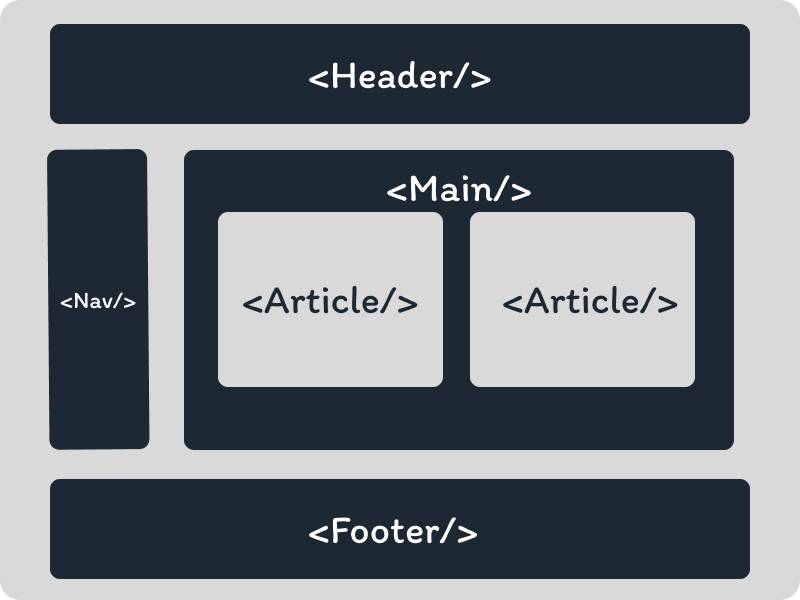
Improving Your Website With Semantic HTML
As you incorporate semantic elements into your web development work, it’s important to recognize that their advantages extend beyond SEO and accessibility. Semantic HTML plays a crucial role in creating a resilient and forward-looking website.
By using semantic elements, you can elevate the user experience, making your website more intuitive and easier to use.