Random moving objects can bring excitement and unpredictability to games. It makes them more engaging and challenging for players. Python's Arcade library provides a simple and efficient way to incorporate random moving objects into your games.
Create a Simple Game
Before starting, make sure you have pip installed on your device. Use this command to install the arcade library:
pip install arcadeAfter that, create a window using the arcade.Window class and set the background color to white.
The code used in this article is available in this GitHub repository and is free for you to use under the MIT license.
Set the player's position to the middle of the screen horizontally and add a small distance from the top. You can control the player's movement using the arrow keys.
Here's the code for our basic game:
import arcade
SCREEN_WIDTH = 800
SCREEN_HEIGHT = 600
PLAYER_RADIUS = 15
class MyGame(arcade.Window):
 def __init__(self, width, height):
 super().__init__(width, height)
 arcade.set_background_color(arcade.color.WHITE)
 self.player_x = SCREEN_WIDTH // 2
 self.player_y = PLAYER_RADIUS + 10
 def on_draw(self):
 arcade.start_render()
 arcade.draw_circle_filled(self.player_x, self.player_y, PLAYER_RADIUS, arcade.color.BLUE)
 def update(self, delta_time):
 pass
 def on_key_press(self, key, modifiers):
 if key == arcade.key.LEFT:
 self.player_x -= 5
 elif key == arcade.key.RIGHT:
 self.player_x += 5
if __name__ == "__main__":
 game = MyGame(SCREEN_WIDTH, SCREEN_HEIGHT)
 arcade.run()
Adding Multiple Objects
To add random moving objects to your game, create a list to store the object's positions and update them every frame. You can also use sprites as objects.
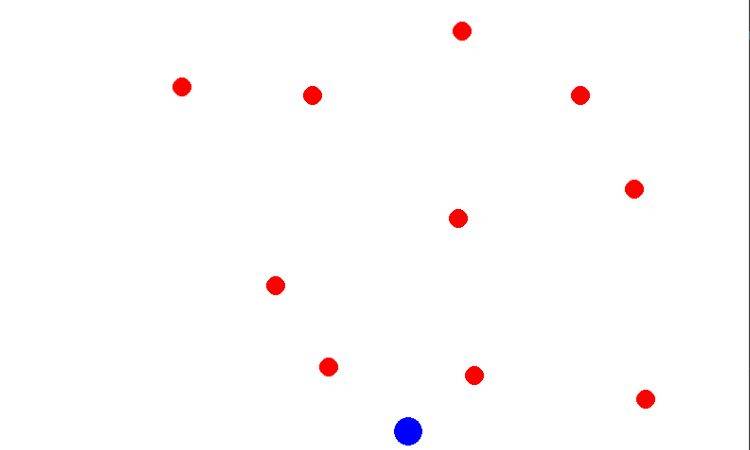
In your game code, add a list called objects to store the positions of the random moving objects. After that, generate the number of objects (NUM_OBJECTS) with random x and y coordinates within the screen boundaries. The objects are drawn as red circles using the arcade.draw_circle_filled function.
import arcade
import random
SCREEN_WIDTH = 800
SCREEN_HEIGHT = 600
PLAYER_RADIUS = 15
OBJECT_RADIUS = 10
NUM_OBJECTS = 10
class MyGame(arcade.Window):
 def __init__(self, width, height):
 super().__init__(width, height)
 arcade.set_background_color(arcade.color.WHITE)
 self.player_x = SCREEN_WIDTH // 2
 self.player_y = PLAYER_RADIUS + 10
 self.objects = []
 for _ in range(NUM_OBJECTS):
 x = random.randint(0, SCREEN_WIDTH)
 y = random.randint(0, SCREEN_HEIGHT)
 self.objects.append((x, y))
 def on_draw(self):
 arcade.start_render()
 arcade.draw_circle_filled(self.player_x, self.player_y, PLAYER_RADIUS, arcade.color.BLUE)
 for obj in self.objects:
 x, y = obj
 arcade.draw_circle_filled(x, y, OBJECT_RADIUS, arcade.color.RED)
 def update(self, delta_time):
 pass
 def on_key_press(self, key, modifiers):
 if key == arcade.key.LEFT:
 self.player_x -= 5
 elif key == arcade.key.RIGHT:
 self.player_x += 5
if __name__ == "__main__":
 game = MyGame(SCREEN_WIDTH, SCREEN_HEIGHT)
 arcade.run()
Below is the output:
Implementing Random Movement Algorithm
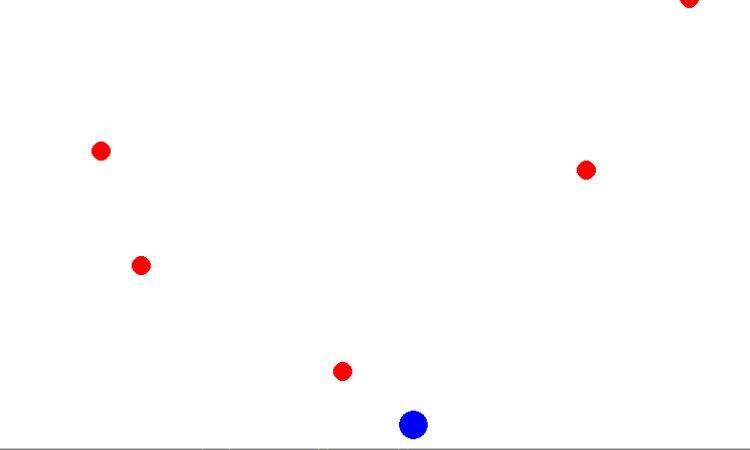
To make the objects move randomly, update their positions in the update method using a random movement algorithm.
Iterate through each object and generate random values for dx and dy, representing the change in x and y coordinates. Then update the object's position by adding these values. Here's the modified code:
def update(self, delta_time):
 for i in range(NUM_OBJECTS):
 x, y = self.objects[i]
 dx = random.randint(-5, 5)
 dy = random.randint(-5, 5)
 x += dx
 y += dy
 self.objects[i] = (x, y)
Below is the output:
Objects Moving Towards Player
To add more interaction, make the objects move toward the player. You can achieve this by calculating the direction vector between the object and the player and adjusting the object's position accordingly.
For this, calculate the differences in x and y coordinates between the object and the player. By normalizing these values, you obtain a direction vector. Then multiply this vector by a speed factor (3 in this case) and add it to the object's position. Here's the updated update method:
def update(self, delta_time):
 for i in range(NUM_OBJECTS):
 x, y = self.objects[i]
 dx = self.player_x - x
 dy = self.player_y - y
 distance = math.sqrt(dx ** 2 + dy ** 2)
 dx /= distance
 dy /= distance
 x += dx * 3
 y += dy * 3
 self.objects[i] = (x, y)
Below is the output:

Objects Start to Move When the Player Enters Surrounding
To add further dynamics, modify the code so that the objects start moving only when the player enters their surrounding area. Add the code for the player's movement and define a radius within which the objects become active.
def update(self, delta_time):
 for i in range(NUM_OBJECTS):
 x, y = self.objects[i]
 dx = self.player_x - x
 dy = self.player_y - y
 distance = math.sqrt(dx ** 2 + dy ** 2)

 if distance < 100: # Adjust the radius as needed
 dx /= distance
 dy /= distance
 x += dx * 3
 y += dy * 3
 self.objects[i] = (x, y)
Collision Detection and Interaction
Now, add collision detection between the player and the objects, and define behavior when a collision occurs. Modify the update method to handle collisions:
def update(self, delta_time):
 for i in range(NUM_OBJECTS):
 x, y = self.objects[i]
 dx = self.player_x - x
 dy = self.player_y - y
 distance = math.sqrt(dx ** 2 + dy ** 2)

 if distance < PLAYER_RADIUS + OBJECT_RADIUS:
 # if collision occurred, handle it here
 self.objects.pop(i)
 self.objects.append((random.randint(0, SCREEN_WIDTH), random.randint(0, SCREEN_HEIGHT)))

 elif distance < 100:
 dx /= distance
 dy /= distance
 x += dx * 3
 y += dy * 3
 self.objects[i] = (x, y)
Balancing Randomness
To create a balanced gameplay experience, it's important to fine-tune the random movement and spawning of objects. Here are a few examples of how you can adjust the code to achieve a better balance in your game:
Limiting Maximum Speed
To prevent objects from moving too fast, you can introduce a maximum speed limit. Modify the update method to include speed constraints:
def update(self, delta_time):
 for i in range(NUM_OBJECTS):
 x, y = self.objects[i]
 dx = self.player_x - x
 dy = self.player_y - y
 distance = math.sqrt(dx ** 2 + dy ** 2)
 if distance < PLAYER_RADIUS + OBJECT_RADIUS:
 self.objects.pop(i)
 self.objects.append((random.randint(0, SCREEN_WIDTH), random.randint(0, SCREEN_HEIGHT)))
 elif distance < 100:
 dx /= distance
 dy /= distance
 speed = 3 # Adjust the speed value as needed
 dx = min(max(dx * speed, -MAX_SPEED), MAX_SPEED)
 dy = min(max(dy * speed, -MAX_SPEED), MAX_SPEED)
 x += dx
 y += dy
 self.objects[i] = (x, y)
Controlling Spawn Rate
You can also control the rate at which new objects spawn in the game. Adjust the code to include a delay between spawning new objects:
import time
class MyGame(arcade.Window):
 def __init__(self, width, height):
 super().__init__(width, height)
 arcade.set_background_color(arcade.color.WHITE)
 self.player_x = SCREEN_WIDTH // 2
 self.player_y = PLAYER_RADIUS + 10
 self.objects = []
 self.last_spawn_time = time.time()
 def update(self, delta_time):
 # control the spawning rate here
 if time.time() - self.last_spawn_time > SPAWN_DELAY:
 if len(self.objects) < MAX_OBJECTS:
 self.objects.append((random.randint(0, SCREEN_WIDTH), random.randint(0, SCREEN_HEIGHT)))
 self.last_spawn_time = time.time()
 for i in range(len(self.objects)):
 x, y = self.objects[i]
 dx = self.player_x - x
 dy = self.player_y - y
 distance = math.sqrt(dx ** 2 + dy ** 2)
 if distance < PLAYER_RADIUS + OBJECT_RADIUS:
 self.objects.pop(i)
 self.objects.append((random.randint(0, SCREEN_WIDTH), random.randint(0, SCREEN_HEIGHT)))
 elif distance < 100:
 dx /= distance
 dy /= distance
 x += dx * 3
 y += dy * 3
 self.objects[i] = (x, y)
Adjust the SPAWN_DELAY and MAX_OBJECTS values to find the right balance for your game. A longer delay or a smaller maximum number of objects will make the game less crowded. Whereas, a shorter delay or a larger maximum will increase the difficulty.
Make Games More Fun Using Moving Objects
Adding random moving objects to games can significantly enhance the overall experience. They introduce unpredictability and challenge, making the gameplay more engaging and dynamic. Players will have to adapt and react quickly to avoid collisions or catch objects, and that will provide a sense of excitement and accomplishment.