17 Best Software Testing Tools Reviewed in 2026
[画像:Best Software Testing Tools]

Ever felt lost trying to choose the right tool for testing your app? It’s easy to pick one that looks great on paper but fails in practice. The wrong testing tool can cause missed bugs, false test passes, unstable builds, security loopholes, poor collaboration, and inflated reports. These issues waste time, inflate costs, and erode user trust. Using unverified or incompatible tools often hides real defects and gives a false sense of quality. But with reliable, well-tested software testing tools, you gain clarity, faster releases, and dependable performance every single time.
I have spent over 142 hours researching and testing 36+ software testing tools to bring you the most accurate and unbiased recommendations. Every tool featured here is backed-by real hands-on experience, ensuring insights come from practical use, not theory. This guide covers key features, pros and cons, and transparent pricing for each option. My goal is to help you make informed choices with confidence. Take your time to read the complete breakdown before deciding which tool fits your workflow best.
👍 Top Software Testing Tools Compared (Full List & Features)
| Name | Best for | Free Trial | Link |
|---|---|---|---|
| Zephyr Enterprise Zephyr Enterprise |
Mid to Enterprise | 14 Day Free Trial | Learn More |
| Tuskr Tuskr |
Small – Mid Size Companies | 30-Day Free Trial | Learn More |
| TestpadTestpad Testpad |
Small, Medium, or Agile teams | 30 Day Free Trial | Learn More |
| TestmoTestmo Testmo |
Startups, SMBs | 21 Day Free Trial | Learn More |
| SpiraTestSpiraTest SpiraTest |
Agile QA Teams | 30 Day Free Trial (No Credit Card Required) | Learn More |
| QA SphereQA Sphere QA Sphere |
AI-Powered Test Case Creation & Bulk Generation | 30 Day Free Trial | Learn More |
| testRigortestRigor testRigor |
AI-based Test Automation Tool | 14-Day Free Trial | Learn More |
| TestinyTestiny Testiny |
Easily create and organize test cases | Lifetime Free Basic Plan | Learn More |
| Global App TestingGlobal App Testing Global App Testing |
Teams needing real-world testing at global scale | Contact Sales | Learn More |
1) Zephyr Enterprise
Zephyr Enterprise is one of the most comprehensive test management tools I’ve used, designed to support enterprise-scale teams with precision and clarity. It integrates deeply with Jira, providing complete visibility into test planning and execution. The customizable dashboards and real-time analytics helped me keep large-scale testing cycles under control with ease.
When I used Zephyr to align automation metrics across multiple frameworks, I was struck by how seamlessly it handled continuous updates. The end-to-end traceability and RESTful API access made integrating with CI/CD pipelines effortless, helping streamline test management and maintain complete audit readiness.
Premium Enterprise Support
Integrations: Katalon, TestComplete, ReadyAPI, Atlassian JIRA, Jenkins, and Selenium
Supported Platforms: Windows, Linux, Web
Free Trial: 14-Day Free Trial - No Credit Card Required
Features:
- Agile test management and planning: This feature streamlines agile project testing through customizable dashboards and sprint-aligned workflows. It supports multi-release planning with drag-and-drop reprioritization. You can tailor metrics to visualize blockers, velocity trends, and sprint health easily. I often use its sprint-centric view to balance test load across teams.
- Automation framework compatibility: Zephyr Enterprise integrates seamlessly with frameworks like Selenium, JUnit, and Robot for unified reporting. It normalizes outputs across tools, ensuring consistent stability metrics. You can map flaky tests and automate cross-suite comparisons. I rely on this to reduce noise and track real automation ROI.
- Enterprise-grade security & audit: It provides single-tenant deployment, detailed audit trails, and strong permission hierarchies. You can trace every change with timestamps for strict compliance. This feature is ideal for regulated sectors such as healthcare or finance. It ensures full transparency during audit cycles with minimal manual intervention.
- RESTful API access:You can extend functionality using RESTful APIs for CI/CD orchestration and test automation pipelines. It supports programmatic execution, metadata sync, and automated test scheduling. I connected it with Jenkins to update dashboards post-build automatically. This helps keep visibility continuous during nightly regressions.
- Advanced Analytics and Predictive Insights: This feature uses historical defect and test cycle data to forecast high-risk modules. It visualizes test effectiveness and identifies bottlenecks proactively. You can adjust test strategy using predictive trends. I recommend it for teams pursuing continuous improvement and risk-based testing.
- Requirements-to-defect traceability: It links requirements, cases, runs, and defects with live metrics for end-to-end oversight. You can generate coverage views that highlight untested or orphaned items. I have relied on trace matrices during release go/no-go reviews. It strengthens auditability and risk control.
Pros
- Zephyr Enterprise gave me seamless integration with Jira and other tools
- I could easily generate custom test reports for detailed project insights
- This provided me scalable test management for enterprise-level software testing needs
Cons
- I experienced a learning curve when setting up advanced configurations
Pricing:
| Plan Name | Price |
|---|---|
| Paid Plan | Pricing upon request. |
Free Trial: It offers a 14-day free trial.
14-Day Free Trial
2) Tuskr
Tuskr brings a refreshing, modern approach to test management, merging AI-powered insights with flexible manual and automated workflows. What impressed me most was its ability to detect coverage gaps and risky areas automatically, helping improve QA efficiency. The BI-grade dashboards transformed test data into actionable intelligence that simplified complex decision-making.
I once used Tuskr’s AI-driven reporting to identify hidden defects early in a sprint, saving my team hours of rework. Its seamless integration with Jira, CI/CD tools, and Slack kept collaboration smooth, while its secure environment and real human support made it feel both professional and approachable.
Modern test management software with an easy UI
Integrations: Jira, Jenkins, GitLab, GitHub, Playwright, Cypress, Slack, and other CI/CD tools
Supported Platforms: Web
Free Trial: 30-Day Free Trial (No Credit Card Required)
Features:
- Intuitive Test Case Management: This feature allows you to create well-structured test cases quickly using a WYSIWYG editor that supports visuals, tables, and tags. You can import test cases easily from spreadsheets or other systems. I have leveraged this to establish organized, reusable libraries across teams.
- Unified Manual + Automated Testing: Tuskr lets you view manual and automated results within one unified dashboard. You can connect to Jenkins, GitHub, or GitLab for automated runs. This feature bridges the gap between development and QA effortlessly. It eliminates duplicated effort during hybrid testing workflows.
- AI-Powered Failure Analysis: Tuskr can enhance its AI module with pattern-based root-cause detection. It could analyze historical results to flag recurring defects or brittle components. This would empower teams to focus on stability first. It adds predictive power to QA optimization.
- BI-Grade Dashboards & Reports: This feature enables teams to visualize key performance metrics, run comparisons, and monitor release health. You can customize charts to track defects, pass rates, or coverage trends. I used its live dashboards during retrospectives to communicate progress clearly. It fosters data-driven decision-making.
- Enterprise-Grade Security: Tuskr adheres to SOC 2 Type II and ISO 27001 standards, ensuring rigorous data protection. It encrypts data both in transit and at rest. You can rely on its role-based access for secure collaboration. It is a perfect fit for enterprises with strict compliance needs.
- Built-In Essentials: It provides core tools like role-based permissions, audit logs, recycle bins, and strong API access. These capabilities support governance and traceability effortlessly. I have found its built-in logs invaluable during external audits. It strengthens both transparency and accountability in QA workflows.
- Human Support by Real Engineers: You can get direct, fast assistance from experienced engineers instead of bots or ticket queues. I once contacted their support and received practical debugging advice within minutes. This personalized approach minimizes downtime. It builds confidence for teams new to enterprise QA tools.
Pros
- Combines manual and automated testing together giving testers unified control of the workflow
- I love how AI smartly identifies missing tests duplicates and risk-prone areas during analysis
- Provides seamless integrations with Jira CI/CD pipelines and Slack improving team collaboration speed
Cons
- Cloud-only setup limits usability for teams needing offline or on-premise testing accessibility
Pricing:
| Plan Name | Price |
|---|---|
| Standard Plan | Starts at 9ドル/user/month |
Free Trial: Full-feature 30-day trial with no credit card required.
30-Day Full-Feature Trial
3) Testpad
Testpad is a lightweight yet powerful exploratory testing tool built around flexible checklist-style test management. I appreciated its free trial, which allowed me to explore its structured yet simple interface without any setup hassle. It’s perfect for teams transitioning from spreadsheets to a more organized and transparent test environment.
When I used Testpad to gather real-time feedback from non-testers, it provided remarkable clarity into test coverage. Its instant reports and mind-map-style planning made it effortless to visualize progress. I find Testpad ideal for quick, efficient testing cycles where agility and simplicity matter most.
Add new tests during testing, as you think of new ideas
Integrations: Jira, Pivotal, GitHub, etc.
Supported Platforms: Windows, Linux, Web
Free Trial: 30-Day Free Trial
Features:
- Instant reports: This feature gives live, shareable reports immediately after a run. It makes stakeholder updates fast with print, archive, and export options. You can attach reports to emails for quick sign‐offs without extra tooling. I have used this to maintain audit trails effortlessly.
- Mind-map style structure: It supports outline-style, 1D mind‐map authoring for hierarchical scripts. You can start high-level and iteratively deepen coverage with drag‐and‐drop reordering. This helps reveal gaps early and keep plans nimble during sprints. It speeds comprehensive coverage on complex projects.
- Tags and filtering: Testpad lets you tag tests by feature, risk, or permission for targeted runs. You can quickly include or exclude subsets for smoke or sanity passes. This reduces noise before release gates and improves cycle focus. I’ve filtered by module to isolate regressions efficiently.
- Version control in‐place: With Testpad, you can store results beside scripts, keeping runs tied to exact versions. You can copy prior plans for new releases and archive old plans with results. This simplifies audits and avoids mismatched artifacts in compliance reviews. It keeps historical context intact across cycles.
- Test templates & libraries: It enables reusable script templates and libraries for fast rollout. You can drag templates into projects and clone last results to repeat runs. This standardizes authoring across teams and saves setup time. I’ve scaled similar suites across products using this.
Pros
- It allowed me to create flexible test plans for multiple scenarios
- I could access checklist-style testing which simplified complex processes easily
- Reusable test steps help teams maintain consistency throughout ongoing projects
Cons
- Some advanced features require extra configuration or third-party integrations
Pricing:
| Plan Name | Price |
|---|---|
| Essential | 49ドル |
| Team | 99ドル |
| Team 15 | 149ドル |
| Department | 249ドル |
Free Trial: It offers a 30-day free trial.
30-Day Free Trial
4) Testmo
Testmo is a unified, modern test management platform that brings together manual, automated, and exploratory testing in one place. I found its free trial intuitive and quick to set up, and its fast interface made managing test runs surprisingly effortless. The real-time dashboards and rich analytics gave me clear insights into team progress and testing coverage.
During one of my regression testing cycles, I used Testmo to sync results from CI pipelines directly into its dashboards. That experience showed me how efficiently it consolidates all test data—manual and automated—making it ideal for teams who value clarity, speed, and control in their QA workflows.
Unified testing to track your entire QA in one tool
Integrations: Jira, GitHub, GitLab and many more
Supported Platforms: Windows, Mac, Web
Free Trial: 21-Day Free Trial
Features:
- Test case management: Testmo’s test case management lets you create, organize, and customize templates, tags, folders, custom fields, and workflows for your team. The tool is flexible enough for both structured and agile teams. You can enforce review gates and reuse steps effectively. I have tailored custom fields per project successfully.
- Exploratory testing sessions: It lets teams plan, assign, run, and track charters with notes, timers, and screenshots. You can capture evidence in context and timebox efforts neatly. I have shared findings quickly to speed bug triage.
- Test automation integration: You can submit results from any framework via a cross‐platform CLI. It aggregates suites, failures, and flakiness across tools and languages. Enable notifications for failures to catch regressions fast.
- CI/CD integration: Testmo plugs into Jenkins, GitLab CI, CircleCI, GitHub Actions, and Bitbucket Pipelines seamlessly. You can map runs to builds and trace failures to commits. I have wired pipelines to report directly for instant feedback.
- Rich reporting & metrics: This feature delivers actionable charts, live metrics, forecasts, coverage, workload, and milestone tracking. You can build custom reports by stakeholder role. Dashboards clarify trends and highlight risk areas clearly.
- QA team productivity tools: It adds keyboard shortcuts, bulk edits, inline notes, screenshot attachments, and a fast UI. You can cut repetitive admin and accelerate updates safely. I have seen turnaround times drop during regressions.
Pros
- Seamless integration with CI tools helped me streamline my workflow easily
- It allowed me to organize test cycles and track coverage efficiently
- I benefited from using its fast test plan creation and assignment options
Cons
- I received limited customization in workflow steps compared to some competitors
Pricing:
| Plan Name | Price |
|---|---|
| Team | 99ドル/month |
| Business | 329ドル/month |
| Enterprise | 549ドル/month |
Free Trial: It offers a 21-day free trial.
21-Day Free Trial
5) SpiraTest
SpiraTest is a robust test management solution that unifies requirements, test cases, and defect tracking within a single, structured environment. Its free trial allowed me to explore its powerful traceability and compliance features without risk. I was particularly impressed by its detailed dashboards that highlight QA metrics and project health.
In one of my review phases, I linked requirements to test cases and defects seamlessly, which made audit preparation far more efficient. The traceability matrices and real-time reporting kept me confident that no critical coverage was missed, making SpiraTest an excellent choice for teams in regulated or high-stakes industries.
Effortlessly generate tests from requirements, and bugs from tests
Integrations: Over 45 Integrations
Supported Platforms: Windows, Android, Mac, Web
Free Trial: 30-Day Free Trial - No Credit Card Required
Features:
- Test case management: This feature centralizes reusable test steps, parameters, and configurations for scale. It supports custom fields, templates, and workflows for strict governance. You can mirror product hierarchies with nested folders. Linked steps reduce duplication and maintenance overhead dramatically.
- Exploratory testing sessions: It lets testers plan, timebox, and capture notes and screenshots during sessions. You can write and execute steps on the fly. This accelerates ad‐hoc discovery. I have embedded screenshots in-session to speed defect triage and developer handoffs.
- Test automation integration: SpiraTest ingests results from any framework through its CLI and plugins. You can visualize suites, failures, flakiness, and performance metrics. It unifies manual and automated outcomes. I used Selenium integration to prioritize unstable tests via flakiness trend views.
- CI/CD integration: You can connect Jenkins, GitLab CI, CircleCI, GitHub Actions, and Bitbucket. Each build links back to releases, tests, and incidents. This ensures full traceability. Jenkins plugins and GitLab webhooks streamline reporting into QA dashboards automatically.
- Rich reporting & metrics: This feature generates charts, live trends, forecasts, coverage, workload, and milestones. Stakeholders get actionable dashboards instantly. You can tailor XML-based templates for audits. Coverage insights often exceed 95% when traceability is enforced.
- QA team productivity tools: It boosts throughput with bulk edits, shortcuts, inline notes, and fast UI loads. You can attach screenshots and artifacts quickly. Optimized workflows cut admin time in regressions. I have used bulk updates to standardize priorities across suites faster.
Pros
- I could access test management and requirements tracking in a single dashboard
- Powerful reporting features let me generate detailed analytics on demand
- Traceability matrices ensure every requirement links directly to its related tests
Cons
- I noticed interface responsiveness sometimes lagged with heavy projects
Pricing:
| Plan Name | Price | Users |
|---|---|---|
| Cloud | 43ドル.66/user per month | 3 |
| Cloud | 42ドル/user per month | 5 |
| Cloud | 38ドル/user per month | 10 |
| Cloud | 36ドル.65/user per month | 20 |
Free Trial: It offers a 30-day free trial with no credit card required.
30-Day Free Trial
6) QA Sphere
QA Sphere is an intelligent AI-powered test management platform designed to automate and simplify QA workflows. During its free trial, I was impressed by how its AI Test Case Creation turned screenshots into complete test suites within minutes. It’s a perfect blend of innovation and usability for fast-moving testing environments.
In one project, I used its AI-assisted issue reporting to generate structured bug reports automatically after failed runs. That feature alone reduced my reporting time drastically while improving consistency. With its traceability analytics and seamless integrations with tools like Jira and GitHub, QA Sphere delivers enterprise-grade intelligence without the complexity.
AI-Powered Test Case Creation & Bulk Generation
Integrations: Jira, GitHub PRs, or tasks in Asana, Trello, Azure DevOps, etc.
Supported Platforms: Web and Android
Free Trial: 30-Day Free Trial
Features:
- AI-Powered Test Creation & Automation: This feature automatically generates comprehensive test suites directly from UI screenshots. You can create bulk cases instantly using AI’s layout analysis. I have used it to accelerate regression coverage during high-frequency UI changes. It reduces manual effort and ensures consistency across versions.
- Intelligent Issue Reporting: It automatically builds detailed bug reports with context, steps, and data from failed runs. You can maintain standardized reporting quality across teams without manual rework. I found it particularly effective for minimizing duplicate defect entries. It saves hours during triage and audit reviews..
- Flexible Test Run Management: This feature supports multiple test execution modes, including live, fixed, and milestone-based runs. You can align test cycles with sprint goals or release plans. I often leverage version-locked runs to ensure repeatable comparisons. It provides precise control for agile and continuous testing environments.
- Advanced Traceability & Analytics: It offers comprehensive traceability and analytics through real-time dashboards. You can identify coverage gaps, defect density, and performance trends quickly. I use these insights during retrospectives to refine test strategy. It transforms scattered test data into clear, actionable intelligence.
- Seamless Integration Capabilities: QA Sphere integrates natively with Jira and GitHub for synchronized issue tracking. You can automate workflows using its REST API and CLI. I integrated test triggers directly into CI pipelines successfully. This seamless connectivity strengthens collaboration between QA and development teams.
- Parameterized Testing Framework: It supports complex, data-driven testing with parameters and custom field configurations. You can efficiently execute the same test under multiple conditions. I have used it to validate API endpoints across environments. It enables robust validation without duplicating test cases.
Pros
- AI-powered test creation saved me significant time with screenshot-to-test-case generation
- Intuitive workflow design made test organization and execution remarkably straightforward
- Strong reporting and traceability features provided valuable insights for quality metrics
Cons
- Limited integration options currently available
Pricing:
| Plan Name | Price |
|---|---|
| Standard | 12ドル |
| Business | 24ドル |
Free Trial: It offers a 30-day free trial with no credit card required.
30-Day Free Trial
7) testRigor
testRigor is an AI-powered test automation platform that lets teams create end-to-end tests using plain English. I tried its free trial and was amazed by how quickly I could build reliable test cases without writing any code. The tool automatically adapts to UI changes, which reduces maintenance headaches during frequent design updates.
In one sprint, I used testRigor to validate complex checkout flows across browsers. It handled visual regressions and API checks seamlessly, helping me identify layout inconsistencies in minutes. With its smart AI locators and cross-platform coverage, testRigor makes automation fast, accurate, and remarkably beginner-friendly.
All possible types of testing are built-in, including web, mobile etc.
Integrations: TestRail, Zephyr, XRay, Jira, etc.
Supported Platforms: Windows, iOS, MacOS
Free Trial: 14-Day Free Trial
Features:
- Generative AI Test Creation: This feature converts plain-English steps into executable tests. It speeds up authoring by minimizing scripting effort. I have refined outputs immediately to align with naming conventions. It keeps suites readable as teams scale.
- Cross-Platform Web & Mobile Testing: It validates flows across 3,000+ browser and device combinations. This ensures coverage on desktop, mobile web, and hybrid apps. You can surface layout and touch issues early. It reflects real usage environments reliably.
- API Testing & Mocking: This feature embeds HTTP calls directly within UI scenarios. It lets teams mock bodies, headers, and status codes easily. You can isolate flaky services during sprints. It accelerates regression runs under unstable backends.
- Visual Regression Testing: It compares UI snapshots against baselines to spot drift. You can catch subtle spacing, color, and layout changes. Set thresholds to ignore benign pixel noise. It reduces false positives during frequent redesigns.
- AI-Based Value Extraction: This feature captures dynamic values from shifting UIs. It uses context-aware AI instead of brittle locators. You can reliably grab IDs, totals, or messages. I have extracted order numbers from the changing tables successfully.
Pros
- I could automate end-to-end tests without writing a single script
- Maintenance effort is reduced due to intelligent element detection
- It allowed me to generate tests quickly for multiple browsers and devices
Cons
- I faced occasional delays with test result notifications in larger suites
Pricing:
| Plan Name | Price |
|---|---|
| Public Open Source | Free forever |
| Private Linux Chrome | 300ドル/month |
| Private Complete | 900ドル/month |
Free Trial: It offers a 14-day free trial for a Private Linux Chrome.
14-Day Free Trial
8) Testiny
Testiny offers an intuitive and collaborative test case management experience that’s easy to set up, even for beginners. Its free plan helped me explore features like real-time dashboards and customizable fields without barriers. I found its drag-and-drop organization and structured hierarchy perfect for managing large regression suites efficiently.
During one of my agile cycles, I used Testiny to streamline test execution across modules and instantly spot regressions. Its seamless CI/CD integrations and real-time collaboration kept my team aligned throughout the release cycle. Testiny truly simplifies QA workflows while maintaining strong traceability and speed.
Easily create and organize test cases.
Integrations: Jira, Azure DevOps, GitHub, GitLab, etc.
Supported Platforms: Windows and macOS
Free Trial: 14-Days Free Trial
Features:
- Test case organization: This feature lets teams structure cases in nested folders. It keeps sprawling suites tidy and discoverable. You can apply tags and custom fields for quick filtering. I have split monolith suites into modules, and navigation stayed effortless.
- Test plans: It supports manual and dynamic plans with query-based inclusion. You can track coverage, pass rates, and failure trends over time. It helps highlight flaky areas before release. Link plans to tags like “smoke” or “recent failures” for focus.
- CI/CD integration: It ingests automated results via CLI, npm, or REST API. You can stream Playwright, Cypress, and JUnit outputs into dashboards. This enables code-first or QA-led automation equally well. Pipeline feedback lands fast for rapid triage.
- Real-time collaboration: It updates cases, comments, and statuses instantly for teams. You can @mention owners during test design and execution. It reduces context lost in email threads. Collaboration feels fluid, like editing in a shared doc.
- On-premise option: It offers Docker-based self-hosting for regulated teams. You can retain full data control and meet compliance needs. Backup scripts simplify disaster recovery routines. I have deployed it on-prem and found the setup straightforward.
- Audit log & permissions: It provides granular roles, SSO, and two-factor security. You can enforce least-privilege access by project or module. Complete audit trails strengthen compliance posture. I have reviewed logs during audits with clear traceability.
Pros
- Collaboration features provided me seamless teamwork even on remote projects
- Integrates well with popular CI/CD tools making workflow much smoother
- Test execution is fast, providing instant feedback for my test cycles
Cons
- Initial setup required me to adjust some processes in my workflow
Pricing:
| Plan Name | Price |
|---|---|
| Free | Free forever Up to 3 users |
| Advanced | 17ドル per user/month |
| Enterprise | Contact sales |
Free Trial: It offers lifetime free basic plan and 14-day free trial on paid plan. No credit card required.
Lifetime Free Basic Plan
9) Global App Testing
Global App Testing is a scalable, real-world testing platform designed for teams that need rapid, high-quality feedback across global markets. With a worldwide community of professional testers, fast turnaround times, and detailed reporting, the service helps organisations validate releases under real device, network, and user conditions. Its broad tester coverage makes it particularly effective at identifying issues that surface only in real-world environments, helping teams ship with greater confidence.
When I leveraged Global App Testing for cross-regional validation, I was impressed by how quickly their distributed tester network could identify localization bugs and device-specific issues that our internal QA missed. The platform’s ability to deliver comprehensive test results within 48 hours, complete with detailed reproduction steps and supporting media, significantly accelerated our release cycles while maintaining quality standards.
Crowd-based QA and user experience testing across real devices
Integrations: Jira, TestRail, GitHub, Zephyr
Supported Platforms: Web, iOS and Android
Free Trial: Contact Sales for Free Trial
Features:
- Real-world testing at global scale: Global App Testing enables teams to run tests across real users, devices, and environments worldwide—something difficult to replicate with in-house QA alone. This global reach helps uncover issues related to localization, device fragmentation, user experience, and network variability. I’ve found this invaluable for identifying region-specific bugs that only surface under authentic user conditions.
- Fast, on-demand exploratory & structured testing: The platform supports both exploratory sessions and step-based test execution with results often returned within hours. Tests can be launched quickly, making it well-suited for teams working in agile or CI/CD pipelines. I regularly use this for urgent hotfix validation and pre-release checks without scheduling delays.
- Seamless integration with development tools: Global App Testing integrates with major tools such as Jira, TestRail, Slack, and Asana. Bugs and test results are delivered directly into existing workflows, complete with clear reproduction steps, screenshots, and videos to support efficient triage. This eliminates manual reporting overhead and accelerates bug resolution.
- Scalable regression testing:Teams can offload large or repetitive regression suites to Global App Testing, allowing internal QA resources to focus on higher-value tasks such as automation, root-cause analysis, or strategic testing. I’ve used this to maintain comprehensive coverage while optimizing team productivity during sprint cycles.
- High-quality defect reporting:Reported defects include detailed environment information, consistent reproduction steps, and supporting media, helping reduce debugging time and improve communication between QA and engineering teams. The standardized format ensures developers can quickly understand and address issues without back-and-forth clarification.
- 24/7 global tester availability: With a distributed community of testers available around the clock in 190+ countries, teams can validate hotfixes, run pre-release checks, or test in multiple regions without running into scheduling bottlenecks. This continuous availability has been crucial for maintaining rapid deployment schedules across time zones.
Pros
- Access to professional testers in 190+ countries for comprehensive coverage
- Integrates seamlessly with modern QA and development tools
- Helps internal QA teams focus on strategic work by handling routine testing
Cons
- Large exploratory cycles benefit from clearly defined scopes for optimal results
Pricing:
| Plan Name | Price |
|---|---|
| On-Demand Testing | Contact Sales |
| Annual Packages | Contact Sales |
Free Trial: Contact sales for trial options and custom pricing.
Contact Sales for Free Trial
10) Jira Software
Jira Software is a powerful project and issue tracking tool that keeps QA workflows organized through Agile boards and dashboards. I tested its free basic plan and appreciated how well it integrates with popular tools like Zephyr and GitLab. Its automation rules helped me reduce manual triage work and maintain consistent release tracking.
In a release cycle, I used Jira dashboards to visualize blockers and automatically assign critical defects to developers. The real-time reporting and REST API integrations made traceability effortless from issue creation to resolution. Jira Software is an essential tool for structured and transparent QA management.
Visualize data with advanced dashboards and reports
Integrations: Figma, Miro, Power BI, Zephyr, GitLab, etc.
Supported Platforms: Windows, Linux, and macOS
Free Trial: Lifetime Free Basic Plan
Features:
- Issue & Bug Tracking: This feature centralizes issue creation, assignment, and tracking with full audits. It helps teams keep context intact across discussions and attachments. I have depended on notification tuning during hotfix windows. It improved accountability and speed during releases.
- Scrum & Kanban Boards: They let teams visualize test tasks and defect flow in real time. It supports drag-and-drop updates for quick standups and triage. You can tailor swimlanes by priority or assignee to reduce clutter. It keeps QA aligned across releases.
- Real-time Dashboards: Jira’s real-time dashboard feature surfaces cycle time, open issues, and pass-rate metrics instantly. You can add gadgets for blocker counts and trend snapshots. It reduces manual status reporting for stakeholders. It makes decision-making faster during critical releases.
- REST & SOAP APIs: This feature connects Jira with Selenium, Postman, and CI systems for traceability. You can push results, statuses, and metadata from pipelines directly. Bulk API updates save hours otherwise lost to manual edits. It tightens feedback loops after commits.
- No-code Automation Rules: It automates transitions, assignments, and alerts without scripting. You can trigger rules by severity, labels, or comment text. I have reduced triage time with targeted auto-assignment rules. Start with templates and refine triggers gradually.
Pros
- It allowed me to customize agile workflows for my unique project needs
- Supports granular permission controls for team collaboration and data security
- Easy to scale for both small teams and complex enterprise software testing
Cons
- As per my experience, initial setup for testing environments can be time-consuming
Pricing:
| Plan Name | Price |
|---|---|
| Free | Free forever Up to 10 users |
| Standard | 8ドル per user / month |
| Premium | 14ドル per user / month |
Free Trial: It offers a lifetime of free basic access for up to 10 users and get premium plan 30-day free trial.
Lifetime Free Basic Plan
11) Selenium
Selenium is a free and open-source automation framework designed for testing web applications across multiple browsers and operating systems. I found its modular structure, including WebDriver, IDE, and Grid, to be incredibly versatile for creating scalable and maintainable test suites. The ability to run parallel tests across browsers drastically improved testing efficiency.
While automating a multi-browser checkout process, I used Selenium Grid to execute parallel test runs that revealed layout inconsistencies on Safari. The WebDriver’s native browser interaction and cross-language compatibility make Selenium an essential tool for developers aiming to build stable, cross-platform automated testing workflows.
Features:
- Selenium WebDriver: Selenium WebDriver drives browsers natively using the W3C WebDriver protocol. I have used it across Chrome, Firefox, Edge, and Safari to ensure consistent behavior. It simulates real user interactions like clicks and typing with high accuracy.
- Selenium Grid: It allows parallel execution of tests across different browsers, operating systems, and machines. You can scale test coverage efficiently while reducing runtime significantly. I achieved up to 70% faster execution using distributed nodes. It is a must-have for teams automating regression suites at scale.
- Automatic WebDriver Management: Selenium Manager automates driver setup for all major browsers and platforms. It detects browser versions, downloads compatible drivers, and caches them. You can focus on writing tests instead of configuration overhead. I found this feature particularly useful in CI pipelines where consistency is critical.
- Selenium IDE:This feature supports quick record-and-playback testing through a browser extension. You can build reusable test scripts without deep programming knowledge. It exports code in multiple languages and supports conditional logic. I used it to debug flaky steps efficiently and teach new testers automation basics.
- Improved Logging & Debugging: Selenium offers detailed browser logs, enhanced stack traces, and fine-grained debug levels across different languages. Enabling debug logs helped me diagnose complex issues like race conditions that are hard to spot otherwise.
- Cross-Platform & Multi-Language: It supports Java, Python, C#, Ruby, JavaScript, Scala, PHP, and Perl. It runs seamlessly on Windows, Linux, and macOS. This flexibility lets you reuse test scripts across different environments without modification.
Pros
- It lets me automate repetitive browser tasks with impressive accuracy and speed
- I benefitted from using multiple programming languages for scripting test scenarios
- It allowed me to conduct parallel testing, saving a significant amount of time
Cons
- Limited support for advanced image-based testing or visual validations
Pricing:
- Price: Free to use.
Free to Use
12) OpenText Functional Testing
OpenText Functional Testing (UFT One) is an advanced test automation tool that supports both GUI and API testing across desktop, web, and mobile applications. I was impressed by how seamlessly it integrates with CI/CD pipelines and AI-driven object recognition, making complex UI automation much faster. Its codeless automation features help beginners automate without deep scripting knowledge.
In a recent enterprise scenario, I used UFT One’s smart object detection to handle dynamic elements within a financial web app. The test flow adapted smoothly as the UI changed, reducing maintenance time significantly. Its AI-powered insights and integration flexibility make it perfect for large-scale, cross-technology test automation.
OpenText Functional TestingOpenText Functional Testing
Features:
- Cross-Platform Test Automation: OpenText Functional Testing uses AI-driven machine learning and advanced OCR to simplify test creation, execution, and maintenance. It reduces manual effort and increases test accuracy through intelligent object recognition and natural language scripting.
- Reusable Test Component Libraries: It promotes modular, reusable assets to reduce duplication across projects and releases. You can standardize components with naming conventions for faster navigation and review. This improves maintainability during frequent UI changes. I have cut maintenance cycles significantly using shared libraries.
- Cross-Browser Compatibility Testing: You can run automated tests across Chrome, Firefox, Safari, Edge, and mobile browsers simultaneously. This feature ensures consistent behavior across environments. I used it to uncover browser-specific rendering issues early. It accelerates validation for multi-platform application releases.
- Parallel Test Execution: It executes suites concurrently across environments to compress regression windows dramatically. You can isolate environment configs to avoid cross‐test contamination. This reduces queue times and surfaces failures earlier in sprints. I have pushed 200+ cases under an hour during release crunches.
- Built-In API Testing Support: This feature unifies REST and SOAP validation within the same UI automation workspace. You can assert contracts, payloads, and workflows end‐to‐end in one suite. It helps catch breaking changes during backend updates mid‐sprint. Map responses early to stabilize critical paths.
- Continuous Integration Compatibility: It integrates with Jenkins and Azure DevOps for automated gates and fast feedback loops. You can trigger runs on commits and route results to collaboration channels. This reduces manual orchestration and human error across pipelines. It strengthens release readiness with consistent signals.
Pros
- AI-driven object recognition helped me reduce script maintenance significantly
- Reusable actions provided me collaborative consistency across team test suites
- Excel data import accelerated my data‐driven test creation with ease
Cons
- Consumes excessive memory and CPU, causing slower performance sometimes
Pricing:
- Free Trial: 30-Day Free Trial. No credit card required
- Price: Request a quote from sales.
30-Day Free Trial
13) Applitools
Applitools is a visual AI testing platform that automates visual validation across browsers, devices, and screen sizes. I was fascinated by its Visual AI engine, which detects even subtle UI differences that traditional tests often miss. With its free trial, I could experience firsthand how it simplifies regression testing while improving coverage.
In one case, I used Applitools Eyes during a responsive design update to validate visual consistency across dozens of devices. It quickly flagged misaligned elements that would’ve gone unnoticed in functional tests. For teams focused on visual accuracy, Applitools ensures pixel-perfect interfaces with unmatched precision.
Features:
- Visual AI Engine: This feature uses advanced Visual AI to automatically detect visual and functional regressions. You can compare entire application screens across browsers and devices. I have used it to catch subtle layout shifts early. It dramatically reduces false positives in visual validations.
- Cross-Browser and Cross-Device Testing: Applitools tests your UI across multiple browsers, viewports, and devices simultaneously. You can validate responsive designs without manually setting up test environments. I relied on this to ensure consistent user experiences on Chrome, Safari, and iOS devices. It simplifies multi-platform testing workflows.
- Ultrafast Test Cloud: This feature executes tests in parallel across dozens of browsers and devices in the cloud. It speeds up visual testing by 30x compared to local runs. You can scale instantly without infrastructure setup. It helps large QA teams reduce bottlenecks and gain faster feedback.
- Smart Region Exclusions: It allows testers to define dynamic regions to ignore elements like ads, timestamps, or animations. You can focus validation only on relevant UI sections. I used it to minimize noise from changing banners. It enhances test stability during frequent UI updates.
- Root Cause Analysis (RCA): This feature automatically identifies the specific CSS or DOM differences causing a visual mismatch. You can pinpoint issues faster without manual inspection. It reduces debugging time drastically during UI regressions. I found this invaluable for pinpointing rendering bugs in complex layouts.
- Integration with Popular Frameworks: Applitools integrates seamlessly with Selenium, Cypress, Playwright, WebdriverIO, and Appium. You can extend your existing automation to include visual checks easily. I have plugged it into existing CI/CD workflows without refactoring code. It adds visual intelligence to functional automation seamlessly.
Pros
- AI-powered visual validation accurately detects subtle UI changes every time
- It helped me reduce tests maintenance with smart self-healing locators
- It allowed me to integrate seamlessly into CI/CD pipelines effortlessly
Cons
- I received occasional false positives on minor pixel rendering differences
Pricing:
| Plan Name | Price |
|---|---|
| Starter | 969ドル/month billed annually |
| Enterprise | Request a quote from sales |
Free Trial: It offers a 14-day free trial.
14-Day Free Trial
14) SauceLabs
SauceLabs is a leading cloud-based testing platform that enables cross-browser and cross-device automation for web and mobile apps. I found its cloud infrastructure particularly useful for running parallel tests at scale without worrying about local setup. The platform integrates easily with Selenium, Appium, and Cypress, making automation seamless for both beginners and advanced teams.
While testing a multi-device eCommerce flow, I used SauceLabs to identify inconsistent rendering issues between Android and iOS browsers. Its real-time debugging and video recording features made reproducing and fixing bugs much easier. SauceLabs is ideal for ensuring consistent app quality across diverse environments with minimal maintenance effort.
Features:
- Front-End Performance Testing: SauceLabs measures rendering and interaction speeds in JavaScript‐heavy apps precisely. It focuses on real user experience, not just backend metrics. I have used it on React projects with actionable insights. Use these metrics during UX‐focused sprints.
- Integration with Selenium Tests: It integrates smoothly with existing Selenium suites using minor config tweaks. You can parallelize functional and performance runs to accelerate CI/CD. I have linked it in pipelines without brittle rewrites. This approach scales coverage safely.
- Automated Baseline Establishment: This feature auto‐creates a performance baseline per tested URL. It tracks trends across deployments and flags regressions early. I’ve relied on its alerts to catch slowdowns pre‐release. You can prioritize fixes with data‐driven confidence.
- Visual Speed Index: SauceLabs reports Speed Index for every page load event. It expresses when pages feel visually complete to users. You can communicate wins to non‐technical stakeholders clearly. It moves discussions beyond raw technical timings effectively.
- Input Latency Measurement: It monitors the Estimated Input Latency to expose sluggish interactions. You can spotlight UI bottlenecks missed by load tests. I have used these readings during major UI changes. Teams resolve micro‐lags to protect perceived speed.
- DOM Content Loaded Tracking: This feature separates DOM Content Loaded from full load for clarity. You can pinpoint where render or resource delays occur. I have guided teams to optimize specific assets using this. It reduces time‐to‐interactive on critical pages.
Pros
- It allowed me integrate seamlessly with CI/CD pipelines for automated testing
- Real device testing enabled me validate mobile apps under realistic conditions
- Public and private device cloud coverage offered me flexible test scaling
Cons
- Support ticket responses sometimes delayed my issue resolution and debugging
Pricing:
| Plan Name | Price |
|---|---|
| Live Testing | 39ドル per month, billed annually |
| Virtual Cloud | 149ドル per month, billed annually |
| Real Device Cloud | 199ドル per month, billed annually |
Free Trial: It offers a 28-day free trial.
28-Day Free Trial
15) OpenText Professional Performance Engineering
OpenText Professional Performance Engineering (formerly LoadRunner) is a robust performance and load testing tool built to simulate real-world user activity across systems. I was impressed by how effectively it identified bottlenecks across APIs, databases, and web servers under heavy load. Its AI-driven analytics and correlation engine help pinpoint performance issues faster.
In a large-scale testing cycle, I used LoadRunner to simulate thousands of concurrent users on a payment gateway. The detailed response-time metrics and transaction breakdowns gave me precise insight into latency hotspots. For teams focusing on enterprise-grade performance testing, LoadRunner provides unmatched scalability and reliability.
Features:
- Intuitive User Interface: This feature helps newcomers design multi-step scenarios quickly. It uses a clean layout that reduces configuration missteps. You can drag and drop to speed test the design. It makes complex workloads approachable for novices and pros alike.
- Broad Protocol and Technology Support: It supports over 50 protocols and environments out of the box. You can test web, mobile, packaged apps, and legacy stacks. Coverage includes SAP, Citrix, Java, and .NET. This breadth reduces tool sprawl and setup risk significantly.
- High Scalability with Low Overhead: It emulates hundreds or thousands of virtual users efficiently. You can run high-scale tests using minimal hardware resources. Public cloud burst capacity is available on demand. That keeps load generation affordable and predictable.
- Continuous Testing Integration: It connects to IDEs, CI/CD, monitoring, and source control. You can trigger tests from pipelines and surface fast feedback. Developers can engage earlier to fix regressions. This bridges Agile and DevOps practices effectively.
- End-to-End Data Visualization: It integrates with Dynatrace, Broadcom APM, Grafana, and InfluxDB. You can correlate test runs with system telemetry. Bubble-up and comparative graphs speed root cause analysis. This shortens the mean time to resolution under pressure.
- Flexible Deployment Options: You can deploy on-prem, virtualized, or in public clouds. AWS and Azure marketplace images simplify provisioning. Teams can scale regions closer to users. It adapts to security and compliance constraints easily.
Pros
- I could quickly scale complex test scenarios with minimal infrastructure
- It allowed me to integrate seamlessly into my CI/CD pipelines and workflows
- It helped me identify root causes swiftly via its patented auto-correlation analytics engine
Cons
- It provided complex setup which challenged my less‐technical team members
Pricing:
- Free Trial: 30-Day Free Trial. No credit card required
- Price: Request a quote from sales.
30-Day Free Trial
16) JMeter
Apache JMeter is a free, open-source tool for load and performance testing web and API applications. I liked how its intuitive GUI and CLI options made creating and executing test plans straightforward, even for beginners. It supports multiple protocols like HTTP, JDBC, and SOAP, enabling both functional and non-functional testing.
In one project, I used JMeter to benchmark API response times during a database upgrade. The visual reports and throughput graphs provided a clear performance baseline. With its extensive plugin support and community-driven extensions, JMeter remains a go-to choice for teams wanting flexibility and control in performance testing.
Features:
- Wide Protocol Support: This feature lets JMeter exercise many protocol types reliably. It supports HTTP/HTTPS, SOAP/REST, FTP, JDBC, LDAP, JMS, Mail, TCP, and Java. You can model end‐to‐end workflows across tiers. It reduces tool sprawl during system testing.
- Full-Featured Test IDE: It provides a fast test IDE for building and debugging plans. You can record flows from browsers or native apps easily. Correlate variables and verify responses quickly. I have used it to accelerate complex scenario authoring.
- Command-Line/Headless Mode: JMeter runs in CLI mode for efficient, headless execution. You can schedule jobs on Linux, Windows, or macOS. Integrate into CI runners without opening the GUI. This keeps pipelines fast and reproducible across environments.
- Dynamic HTML Reporting: It generates ready‐to‐present HTML reports automatically. You can review percentiles, throughput, and errors quickly. Share results with stakeholders without extra tooling. It shortens feedback loops after each performance run significantly.
- Multi-Threaded Testing: JMeter supports concurrent sampling across many thread groups. You can model different user cohorts simultaneously. Vary arrival patterns using timers and schedulers. This helps expose resource contention and queuing behavior.
- Scripting Support: It enables advanced control through JSR223 scripting. You can encapsulate business rules and utilities. Replace complex beanshell with performant Groovy. This keeps tests concise and maintainable at scale.
Pros
- It allowed me to simulate complex load scenarios without heavy setup
- I benefitted from using custom scripting for diverse test case execution
- I could access detailed performance metrics through intuitive result listeners
Cons
- UI feels outdated and sluggish when handling large-scale test plans
Pricing:
- Price: Free to use.
Free to Use
17) MantisHub
MantisHub is a cloud-based bug and issue tracking tool that offers simplicity, flexibility, and strong collaboration features for QA and development teams. I found its free trial helpful for quickly setting up projects, defining workflows, and tracking issues without technical setup. The intuitive dashboard and customizable fields made it easy to manage defects and maintain visibility across multiple testing phases.
When I used MantisHub in a release cycle, the real-time notifications and team collaboration tools ensured no bug slipped through. Its powerful reporting, role-based access, and seamless integration with tools like GitHub and Slack make it ideal for teams looking for efficient, cloud-ready defect management with minimal overhead.
Features:
- Issue Tracking: It helps teams quickly log, assign, and track issues end-to-end. It streamlines triage with statuses, priorities, and real-time updates. You can automate notifications to keep stakeholders aligned. I have managed critical defects smoothly using its clear workflows.
- Test Case Management: MantisHub lets teams create, organize, and execute structured test cases for better coverage. You can link failed cases directly to bugs for an audit trail. Mapping tests to issues simplifies root-cause analysis. I have used this linkage to accelerate defect handoffs.
- Custom Workflows: You can tailor statuses, transitions, and fields to match team processes. It supports permission-driven flows for compliance-heavy projects. Configure role-based rules to reduce errors and rework. I have set this up quickly without scripting effort.
- Kanban Board: This board gives a visual flow of testing tasks across stages. You can spot bottlenecks and rebalance work in real time. Swimlanes help group by assignee or status for clarity. It keeps stand-ups focused and actionable.
- Built-in Time Tracking: It records time spent on issues for reporting and chargeback. You can export logs to analyze workload and estimates. Break entries by type for granular insights. It reduces spreadsheet tracking and improves forecasting.
- Analytics & Reporting: This feature provides workload, status, and resolution-time dashboards. You can track project health and SLA trends visually. Export charts for stakeholder reviews or deeper analysis. It supports continuous improvement through measurable metrics.
Pros
- It supports role-based access control which enhances project security management
- Built-in time tracking helped me streamline developer performance monitoring
- As per my experience, collaboration features reduced team communication overhead
Cons
- Mobile experience feels outdated compared to its desktop counterpart
Pricing:
| Plan Name | Price |
|---|---|
| Gold | 35ドル.95/month |
| Platinum | 74ドル.95/month |
| Enterprise | Pricing upon request |
Free Trial: It offers a 14-day free trial.
14-Day Free Trial
Feature Comparison Table
Other Best Software Testing Tools
- WebLOAD: WebLOAD is an excellent testing tool which offers many powerful scripting capabilities, that is helpful for testing complex scenarios. The tool supports hundreds of technologies from Selenium to mobile, enterprise application to web protocols. It is possible to generate load both in the cloud and on-premise using this tool.
Link: http://www.radview.com/webload-download/ - Wapt: Wapt is a load, and stress testing tool works for all Windows. It provides an easy and cost-effective way to test all types of websites. It works with the same efficiency on secure HTTPS websites, dynamic content and RIA applications under data-driven mode. This testing tool also provides supports for RIA applications in the data-driven mode.
Link: https://www.loadtestingtool.com/download.shtml - Loadfocus: LoadFocus is the best cloud testing tool for Load Testing and Performance Testing. It also offers cloud testing services like Website Speed Testing, Mobile Applications, APIs testing, and Mobile Emulation on different types of Mobile Devices.
Link: https://loadfocus.com/ - BlazeMeter: BlazeMeter is a Load testing tool which ensures delivery of high-performance software to quickly run performance tests for mobile apps, website or API to check the performance at every stage of its development.
Link: https://www.blazemeter.com/ - k6 Open Source: k6 is the best open source load testing tool which widely used by enterprises all over the world to develop their websites, mobile applications, web-based apps, and APIs by performing all types of test.
Link: https://k6.io/ - Bugzilla: Bugzilla is one of the best defect Tracking System. The tool allows individual or groups of developers to keep track of outstanding bugs in their system. It is the best open source software used in the market by small scale as well as large-scale organizations.
Link: https://www.bugzilla.org/download/ - Perfecto: Perfecto is a SaaS platform that allows app developers to perform web, mobile & IoT software testing. This tool also allows customers to select the deployment options that are best for the specific project.
Link: https://www.perfecto.io/ - SoapUI: SoapUI is one of the best testing tools which is cross-platform open source tool for functional testing of SOAP and REST, written use the Java language. It is primarily used to perform functional and load testing on API.
Link: https://www.soapui.org/downloads/download-readyapi-trial/ - Tricentis: Tricentis is an Api Testing tool which helps to manage test cases reduces testing time, manual effort and costs by building up and executing test cases.
Link: https://www.tricentis.com/software-testing-tool-trial-demo/ - Invicti: Invicti is a security testing tool which automatically scans websites, web applications and web services for vulnerabilities. It is the only scanner that automatically identified and verifies vulnerabilities with a proof of concept.
Link: https://www.invicti.com/ - Acunetix Vulnerability Scanner: Acunetix Web Vulnerability Scanner is the leading security testing tool. It can find various types of security vulnerabilities than any other scanners and displays the fewest number of false positives.
Link: https://www.acunetix.com/download/fullver14/
What are Software Testing Tools?
Software testing tools are applications that help teams check code quality. They speed up checks and catch errors early. I have seen projects improve when the right tool is chosen. These tools can run tests automatically or support manual checks. They guide developers and testers to spot bugs and performance issues. My experience shows that clear reports and easy setup matter most. A good tool fits your team size and project needs. This keeps testing smooth and reliable. Simple tools serve small apps. Advanced suites work for complex systems. Comparing options helps find the best match.
- Automation: Tools like Selenium run scripts in browsers automatically.
- Performance: Apps such as JMeter measure speed and load capacity.
- Security: Scanners like OWASP ZAP find vulnerabilities in web apps.
- Code Quality: Linters such as ESLint enforce style and catch mistakes.
- Integration: Frameworks like Jenkins link tests into your workflow.
What exactly are software testing tools used for?
Software testing tools are designed to automate, manage, and streamline the process of checking whether software works as intended. They help identify bugs, measure performance, validate functionality, and ensure overall quality before release. By simulating user interactions and stress-testing systems, these tools enable teams to catch issues early and deliver reliable, high-performing software efficiently.
How can I evaluate which testing tool suits my needs?
To evaluate which testing tool suits your needs, start by defining your testing goals—automation, performance, security, or usability. Identify must-have features like CI/CD integration, scripting languages, or reporting capabilities. Compare tools based on scalability, ease of use, learning curve, and community support. Check compatibility with your tech stack and budget constraints. Run a pilot project or free trial to gauge real-world performance. Finally, assess long-term maintenance, vendor support, and how well the tool adapts to your team’s workflow.
What features should I prioritize when comparing testing tools?
When comparing testing tools, start by focusing on what truly impacts performance, scalability, and team workflow. A great testing tool doesn’t just "run tests" — it accelerates confidence in your code.
Key features to prioritize:
- Test coverage: Ensure it supports multiple types — unit, integration, UI, API, and performance testing.
- Automation power: Look for tools that make continuous testing easy across CI/CD pipelines like Jenkins or GitHub Actions.
- Reporting and analytics: Clear, visual dashboards that highlight failures and trends save hours of guesswork.
- Cross-environment support: Cross-browser and cross-platform compatibility ensures reliability everywhere.
- Usability: A clean interface or low-code options make adoption faster.
- Scalability & Speed: Parallel test execution and consistent reliability are game changers.
Lastly, weigh cost, licensing, and community support — a tool’s value is only as strong as its ecosystem and how smoothly it grows with your team.
How do testing tools help reduce bugs and time-to-market?
Testing tools automate repetitive and complex testing processes, helping teams detect bugs early in the development cycle. By simulating real-world scenarios, they identify issues before release, reducing the risk of costly post-launch fixes. Continuous testing integration also speeds up feedback loops, allowing developers to resolve problems faster. As a result, testing tools improve software quality, streamline workflows, and significantly shorten time-to-market while ensuring a more reliable and user-friendly final product.
How Is AI Changing Software Testing in 2025?
Artificial Intelligence has begun transforming how software testing is performed. Tools like Zephyr Enterprise and Tuskr use AI to generate test cases automatically, detect coverage gaps, and reduce manual maintenance. These innovations save time and improve accuracy in detecting hidden bugs. In 2025, AI-driven automation is becoming a standard for modern QA teams that need to deliver faster, more reliable releases. Let us explore how these tools are reshaping the testing landscape.
How Did We Choose Best Software Testing Tool?
Choose Best Software Testing ToolChoose Best Software Testing Tool
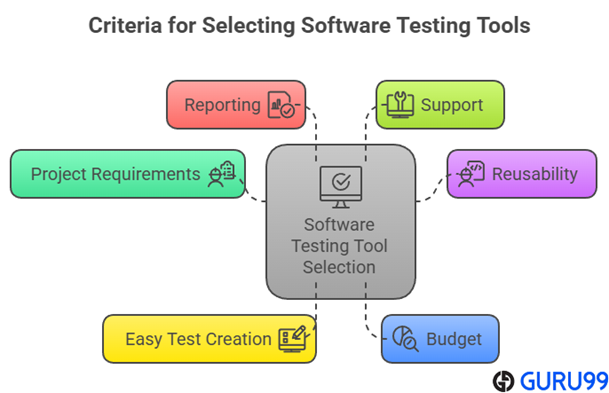
At Guru99, we prioritize delivering trustworthy, accurate, and relevant information to guide your decisions. Our team spent over 90 hours analyzing 40 software testing tools to ensure developers and QA teams receive practical, high-quality insights. When choosing the best software testing tool, consider your project requirements first. Reusability, easy test creation, automation, data-driven features, and self-healing capabilities are essential. Evaluate pricing based on features and long-term value, and prioritize tools that offer detailed reporting and 24/7 support. We focus on the following factors while reviewing a tool based on.
- Projects requirements: Understand your project requirements, as this is the first factor to consider before you purchase testing tools.
- Reusability: Look for software that has a test reusability feature. This means you won’t have to rewrite testing steps repeatedly.
- Easy test creation: Get a trial version and examine its automation features to check the test creation functionality. Additionally, look for tools that are data-driven and have self-healing capabilities.
- Budget: Always consider your budget and select the tool as per your project and requirement. It is also better to get a paid tool as they have reliable features, support, and advanced functionalities.
- Reporting: Make sure the software testing tools provide accurate and several ways of reporting, like clear signs of failed test cases or steps, screenshots for failed steps, and more.
- Support: The code testing tools must offer proper training and support 24/7. The provider must also include support for collaboration and integrations. As per our review, tools like Zephyr Xray, Testpad, and Testmo are highly recommended.
What are the Types of Software Testing Tools?
In my work with software testing, I have seen many tool categories form over time. Each type targets a different stage of development. Unit testing tools check small code pieces. Integration tools verify how modules work together. Functional tools simulate user actions and compare results. Performance tools stress the system under load. Security tools scan for vulnerabilities in code and configuration. Usability tools collect feedback on interfaces. Test management tools track plans, cases, and results. This mix helps teams cover all angles. I find that combining several types gives a clear view of quality.
- Unit Testing Tools: Test individual functions or methods early in the cycle.
- Integration Testing Tools: Ensure different modules connect and share data correctly.
- Functional Testing Tools: Automate real user scenarios for validation.
- Performance Testing Tools: Measure speed, stability, and resource use under stress.
- Security Testing Tools: Identify weak spots before attackers can exploit them.
- Usability Testing Tools: Gather user feedback on design and ease of use.
- Test Management Tools: Organize test cases, schedules, and reports in one place.
What are the Benefits of using Software Testing Tools?
The benefits of using application testing software are:
High product quality: Using testing tools in software engineering increases the accuracy of tests and boosts the testing speed. It also creates compatibility with multiple OS and browsers, provides feedback to the developer’s team in the early stage, and overall produces high-quality products.
Cost-effective development: As QA testing tools help discover defects and bugs in the early development stage, engineers can fix them in the first lifecycle. This saves time and money instead of trying to fix issues toward the end of the building process.
Improved security: Using application testing software, you can ensure your products have reliable security. These tools identify vulnerabilities that hackers and threats can target.
Customer satisfaction: Using software testing tools help developers pay attention to user requirements and build features accordingly. Thus, it increases customer satisfaction.
Verdict:
In this review, you got acquainted with some of the most popular Software Testing Tools. Each one brings impressive functionality yet also shows limitations depending on your workflow complexity. To help you decide, I have created this verdict.
- Zephyr Enterprise : A robust solution integrated with Jira, making it the top-rated choice for enterprises needing deep traceability and enterprise-level coordination.
- Tuskr : It is a unified, modern test management platform designed to consolidate manual, exploratory, and automated testing workflows.
- Testpad : A lightweight, customizable tool that shines with its checklist-driven test runs—excellent for agile teams wanting flexible and rapid test sessions.
FAQs
AI-powered testing tools use smart algorithms to speed up and improve how we find bugs. They learn from past project data and spot patterns that human eyes may miss. These tools can create test cases on their own. They also predict where defects are most likely to appear. I have seen teams cut testing time in half and boost confidence in each release. Integration with development pipelines makes testing part of every code update. Results show up in clear dashboards. Teams can focus on fixing issues instead of writing repetitive scripts.
- Pattern Recognition: AI scans code history to identify common error trends.
- Test Generation: The tool auto-builds test scripts for new features.
- Defect Prediction: Machine learning models rank functions by risk level.
- Continuous Learning: The system adapts as it processes feedback from each run.
Understanding the difference between manual and automated testing tools is essential for choosing the right approach in software testing. Over the years, I have seen teams waste both time and resources by not picking the right tool for the job. Knowing when to use manual or automated testing can improve test coverage, accuracy, and delivery speed.
Manual testing tools are used when tests are performed by a human without the use of scripts. These are ideal for exploratory, usability, or ad hoc testing. On the other hand, automated testing tools run test scripts automatically and are best for repetitive, large-scale, or regression testing.
- Speed: Automated tools run tests much faster than manual methods, especially in large projects.
- Human Insight: Manual testing brings human intuition and real-time feedback, which automation can’t provide.
- Cost & Setup: Manual tools need less initial setup, while automated tools require more upfront time but offer long-term savings.
- Maintenance: Automated tests need regular updates when software changes. Manual tests are more flexible but time-consuming.
- Best Use Case: I usually recommend manual tools for early-stage testing and automated tools for stable, repetitive tasks.
Software testing tools play a major role in improving the quality of applications. They help automate repetitive tasks, increase test coverage, and reduce human error. Over the years, I have seen how the right tools can shorten release cycles and boost team productivity. But like any solution, they also come with certain drawbacks.
- Advantages:
– Automated tools save time by executing test cases faster than manual testing.
– They help identify bugs early in the development process, reducing the cost of fixes.
– Test coverage improves as tools can run thousands of test cases across different environments.
– Consistency and accuracy increase since automation reduces the risk of missing critical test steps.
– Integration with CI/CD pipelines makes the development cycle smoother and faster. - Limitations:
– High initial setup cost and learning curve, especially for complex tools.
– Some tools lack flexibility and may not fit all types of testing scenarios.
– Maintenance of test scripts becomes a challenge as the application evolves.
– Over-reliance on tools can cause teams to miss exploratory testing opportunities.
– Not all defects can be detected automatically—human judgment is still vital.
Choosing the right software testing tool can feel overwhelming, especially with so many options out there. Over the years, I’ve seen teams waste time and money because they rushed the decision or focused only on flashy features. To avoid that, you need to think beyond surface-level benefits and dig into how well the tool fits your project’s real needs.
A tool that works well for one team may not suit another. Always consider your team’s experience, the type of applications you test, and integration with your current development setup. Sometimes, people forget to test the tool in real-world conditions before committing. That’s a mistake I have personally learned from.
- Ignoring compatibility: Don’t pick tools that don’t support your tech stack or CI/CD environment.
- Overlooking skill gaps: Avoid tools that require heavy coding if your team lacks programming knowledge.
- Skipping trial runs: Always run a pilot project to see how the tool performs with your workflow.
- Focusing only on cost: A cheaper tool may cost more in the long run if it leads to inefficiencies or bugs slipping through.
- Neglecting support and updates: Tools with poor customer support or rare updates can create long-term risks.
Yes. Basic scripting helps, but many platforms offer low-code or codeless authoring. Start with record-and-playback, parameterization, and assertions, then gradually learn scripting to handle dynamic locators and edge cases.
No. Most teams assemble a toolkit: management, UI automation, API, performance, and security. Choose best-of-breed tools, integrate via CI/CD, and avoid forcing a single platform beyond its strengths.
No. Security depends on vendor practices and your configuration. Review certifications, data residency, encryption, SSO, and backups. For compliance, prefer SOC 2/ISO 27001 vendors and enable least-privilege access controls.
Yes. AI can suggest test cases, stabilize flaky locators, and flag risky changes. Expect gains when models learn your app patterns; still review outputs and maintain critical paths manually.
Yes. Exploratory, usability, and edge-case checks need human judgment. Use automation for repetitive regression and data-driven scenarios, and schedule regular exploratory sessions to uncover real-world behaviors automation misses.
Yes. Free software testing tools can be quite reliable for small projects. They offer essential testing features without heavy costs, though they may lack advanced integrations, scalability, and dedicated support that premium tools provide for larger environments.
Absolutely. Automated testing tools minimize repetitive manual work and the fatigue-driven mistakes that come with it. They execute test cases consistently, ensuring accurate results, better coverage, and fewer overlooked defects across development cycles.
Yes. They significantly accelerate delivery. Automated testing shortens regression cycles, identifies issues earlier, and allows developers to focus on innovation rather than debugging—streamlining the entire development-to-deployment pipeline for faster releases.
Most modern testing tools are designed with CI compatibility in mind. They integrate seamlessly with pipelines like Jenkins, GitHub Actions, or GitLab CI, enabling automatic test execution, rapid feedback, and smoother continuous delivery workflows.