
C++ Programming: From Problem Analysis to Program Design
C++ Programming: From Problem Analysis to Program Design
8th Edition
ISBN: 9781337102087
Author: D. S. Malik
Publisher: Cengage Learning
expand_more
expand_more
format_list_bulleted
Bartleby Related Questions Icon
Related questions
Question
THIS IS NOT A GRADING ASSIGNMENT:
Please only do lab 2.2 (bottom part of the first picture)
For that Lab 2.2 do:
*Part 1
*Part 2
*Part 3
I also attached Section 2.5.2 which is part of the step 1 so you can read what is it about.
Thank you!
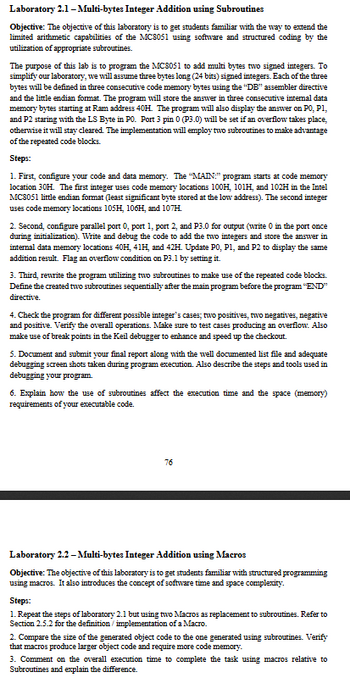
Transcribed Image Text:Laboratory 2.1-Multi-bytes Integer Addition using Subroutines
Objective: The objective of this laboratory is to get students familiar with the way to extend the
limited arithmetic capabilities of the MC8051 using software and structured coding by the
utilization of appropriate subroutines.
The purpose of this lab is to program the MC8051 to add multi bytes two signed integers. To
simplify our laboratory, we will assume three bytes long (24 bits) signed integers. Each of the three
bytes will be defined in three consecutive code memory bytes using the "DB" assembler directive
and the little endian format. The program will store the answer in three consecutive internal data
memory bytes starting at Ram address 40H. The program will also display the answer on PO, P1,
and P2 staring with the LS Byte in P0. Port 3 pin 0 (P3.0) will be set if an overflow takes place,
otherwise it will stay cleared. The implementation will employ two subroutines to make advantage
of the repeated code blocks.
Steps:
1. First, configure your code and data memory. The "MAIN:" program starts at code memory
location 30H. The first integer uses code memory locations 100H, 101H, and 102H in the Intel
MC8051 little endian format (least significant byte stored at the low address). The second integer
uses code memory locations 105H, 106H, and 107H.
2. Second, configure parallel port 0, port 1, port 2, and P3.0 for output (write 0 in the port once
during initialization). Write and debug the code to add the two integers and store the answer in
internal data memory locations 40H, 41H, and 42H. Update P0, P1, and P2 to display the same
addition result. Flag an overflow condition on P3.1 by setting it.
3. Third, rewrite the program utilizing two subroutines to make use of the repeated code blocks.
Define the created two subroutines sequentially after the main program before the program "END"
directive.
4. Check the program for different possible integer's cases; two positives, two negatives, negative
and positive. Verify the overall operations. Make sure to test cases producing an overflow. Also
make use of break points in the Keil debugger to enhance and speed up the checkout.
5. Document and submit your final report along with the well documented list file and adequate
debugging screen shots taken during program execution. Also describe the steps and tools used in
debugging your program.
6. Explain how the use of subroutines affect the execution time and the space (memory)
requirements of your executable code.
76
Laboratory 2.2-Multi-bytes Integer Addition using Macros
Objective: The objective of this laboratory is to get students familiar with structured programming
using macros. It also introduces the concept of software time and space complexity.
Steps:
1. Repeat the steps of laboratory 2.1 but using two Macros as replacement to subroutines. Refer to
Section 2.5.2 for the definition/implementation of a Macro.
2. Compare the size of the generated object code to the one generated using subroutines. Verify
that macros produce larger object code and require more code memory.
3. Comment on the overall execution time to complete the task using macros relative to
Subroutines and explain the difference.
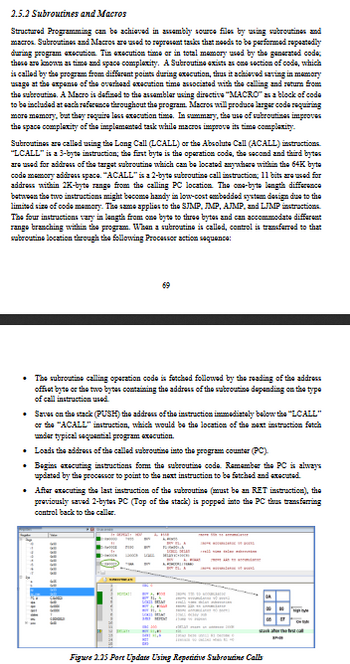
Transcribed Image Text:2.5.2 Subroutines and Macros
Structured Programming can be achieved in assembly source files by using subroutines and
macros. Subroutines and Macros are used to represent tasks that needs to be performed repeatedly
during program execution. Tin execution time or in total memory used by the generated code;
these are known as time and space complexity. A Subroutine exists as one section of code, which
is called by the program from different points during execution, thus it achieved saving in memory
usage at the expense of the overhead execution time associated with the calling and return from
the subroutine. A Macro is defined to the assembler using directive "MACRO" as a block of code
to be included at each reference throughout the program. Macros will produce larger code requiring
more memory, but they require less execution time. In summary, the use of subroutines improves
the space complexity of the implemented task while macros improve its time complexity.
Subroutines are called using the Long Call (LCALL) or the Absolute Call (ACALL) instructions
"LCALL" is a 3-byte instruction; the first byte is the operation code, the second and third bytes
are used for address of the target subroutine which can be located anywhere within the 64K byte
code memory address space. "ACALL" is a 2-byte subroutine call instruction; 11 bits are used for
address within 2K-byte range from the calling PC location. The one-byte length difference
between the two instructions might become handy in low-cost embedded system design due to the
limited size of code memory. The same applies to the SJMP, JMP, AJMP, and LJMP instructions.
The four instructions vary in length from one byte to three bytes and can accommodate different
range branching within the program. When a subroutine is called, control is transferred to that
subroutine location through the following Processor action sequence:
69
⚫ The subroutine calling operation code is fetched followed by the reading of the address
offset byte or the two bytes containing the address of the subroutine depending on the type
of call instruction used.
• Saves on the stack (PUSH) the address of the instruction immediately below the "LCALL"
or the "ACALL" instruction, which would be the location of the next instruction fetch
under typical sequential program execution.
• Loads the address of the called subroutine into the program counter (PC).
• Begins executing instructions form the subroutine code. Remember the PC is always
updated by the processor to point to the next instruction to be fetched and executed.
• After executing the last instruction of the subroutine (must be an RET instruction), the
previously saved 2-bytes PC (Top of the stack) is popped into the PC thus transferring
control back to the caller.
Figure 2.25 Port Update Using Repetitive Subroutine Calls
06
Expert Solution
Check MarkThis question has been solved!
Explore an expertly crafted, step-by-step solution for a thorough understanding of key concepts.
bartleby
Step by stepSolved in 2 steps

Knowledge Booster
Background pattern image
Recommended textbooks for you
- Text book imageC++ Programming: From Problem Analysis to Program...Computer ScienceISBN:9781337102087Author:D. S. MalikPublisher:Cengage LearningText book imageC++ for Engineers and ScientistsComputer ScienceISBN:9781133187844Author:Bronson, Gary J.Publisher:Course Technology PtrText book imageSystems ArchitectureComputer ScienceISBN:9781305080195Author:Stephen D. BurdPublisher:Cengage Learning
- Text book imageEBK JAVA PROGRAMMINGComputer ScienceISBN:9781337671385Author:FARRELLPublisher:CENGAGE LEARNING - CONSIGNMENTText book imageMicrosoft Visual C#Computer ScienceISBN:9781337102100Author:Joyce, Farrell.Publisher:Cengage Learning,Text book imageNew Perspectives on HTML5, CSS3, and JavaScriptComputer ScienceISBN:9781305503922Author:Patrick M. CareyPublisher:Cengage Learning
Text book image
C++ Programming: From Problem Analysis to Program...
Computer Science
ISBN:9781337102087
Author:D. S. Malik
Publisher:Cengage Learning
Text book image
C++ for Engineers and Scientists
Computer Science
ISBN:9781133187844
Author:Bronson, Gary J.
Publisher:Course Technology Ptr
Text book image
Systems Architecture
Computer Science
ISBN:9781305080195
Author:Stephen D. Burd
Publisher:Cengage Learning
Text book image
EBK JAVA PROGRAMMING
Computer Science
ISBN:9781337671385
Author:FARRELL
Publisher:CENGAGE LEARNING - CONSIGNMENT
Text book image
Microsoft Visual C#
Computer Science
ISBN:9781337102100
Author:Joyce, Farrell.
Publisher:Cengage Learning,
Text book image
New Perspectives on HTML5, CSS3, and JavaScript
Computer Science
ISBN:9781305503922
Author:Patrick M. Carey
Publisher:Cengage Learning