Document Viewer
Simple document viewer app.
Contents
Goals
- Simple viewer that gets out of the way
- Optimized for quick document viewing
- Work well in conjunction with Files
- Functionality:
- Jump to a page number
- Search
- Zoom
- Present PDF slideshows
- Zoom
- Rotate
- Bookmarks
- View tables of contents
- Fill forms?
- Highlight?
- Annotate?
Relevant Art
GNOME
evince-3-26.png
Firefox
http://ffp4g1ylyit3jdyti1hqcvtb-wpengine.netdna-ssl.com/futurereleases/files/2013/01/pdfjs1.png
Chrome
https://i.stack.imgur.com/YaP0P.jpg
All the chrome, including the toolbar, is hidden unless you move the cursor close to it.
Edge
https://www.windowscentral.com/sites/wpcentral.com/files/styles/xlarge/public/field/image/2017/09/edge-pdf-rotate.jpg?itok=CSZEm8ZY
Toolbar is transient - it is shown and hidden on click (hidden by default).
Mac
https://www.imore.com/sites/imore.com/files/styles/xlarge/public/field/image/2016/11/preview-macos-highlight-example.png?itok=2Ojm7Gud
Controls comparison
Toggle Sidebar
Search
Previous/Next
Page Jump
Zoom In/Out
Zoom Levels
Fullscreen
Bookmark
Rotate
TOC
Layout Options*
Annotate
Firefox
✓
✓
✓
✓
✓
✓
✓
✓
Chrome
✓
✓
✓
✓
✓
✓
Edge
✓
✓
✓
✓
✓
✓
✓
✓
Preview
✓
✓
✓
✓
✓
* Single/dual page, continuous on/off
Discussion
Some old design work:
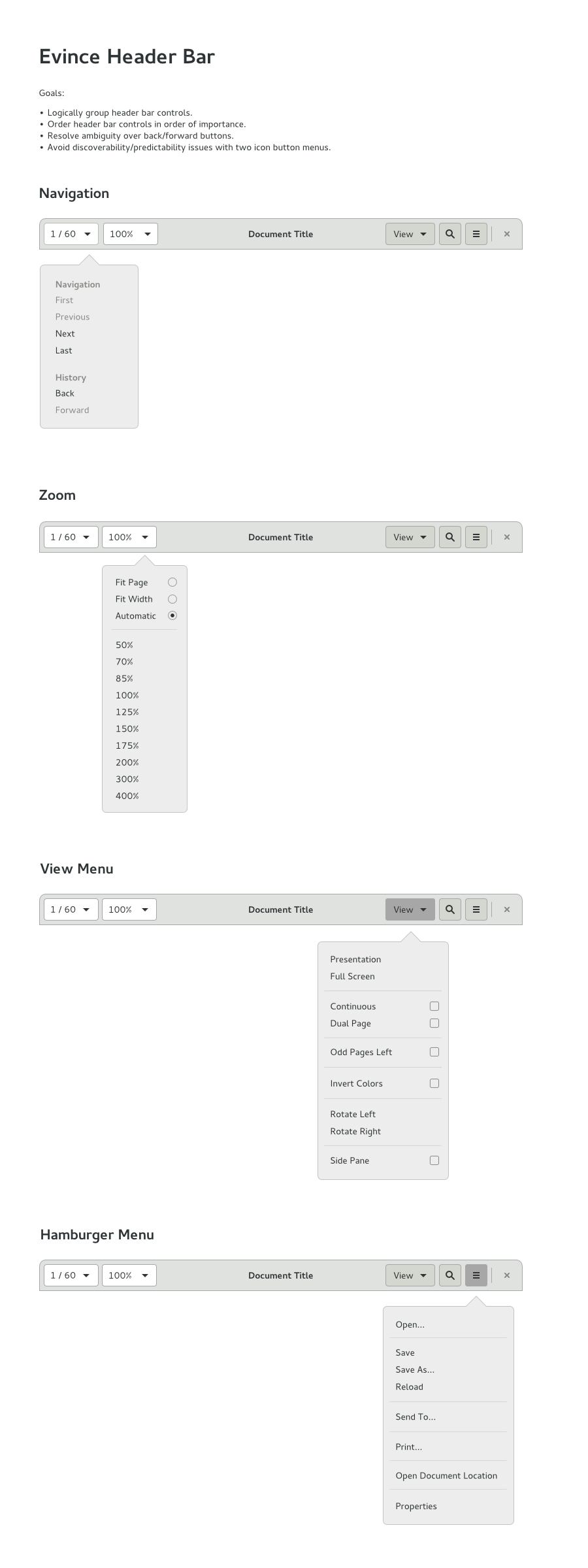
Tentative Design
https://gitlab.gnome.org/Community/Design/app-mockups/raw/master/document-viewer/document-viewer.png
See Also