How to Learn Faster with the Feynman Technique
Everyone has their own style of studying. But if you want to get along with the quick-paced world, you will want to learn all the stuff you can within the shortest possible time....
These 50 Slack hacks, Slack tips and tricks will help you use Slack like a pro and get the most out of it in 2025.
Priority planning
Priority Planner for Effective People
Priority Planner for Highly Effective People
Written by December 05, 2018
Slack is arguably the most popular software to communicate on tasks within your team.
Launched in 2013, Slack has now over 45 million active monthly users in 2025 globally and is the fastest growing app for entrepreneurs and businesses of all sizes.
Although, for being super popular in the workplace, still many people are unable to use it to its full potential. It has tons of Slack features that are normally unknown to the bulk of its users.
From app integration, usage flexibility to customization, Slack has a lot to offer to its users.
Either you are a regular Slacker or have just started using it, there are many ways to do more on Slack easily and quickly.
We have compiled a list of 50 Slack hacks, tips and tricks to help you get the most out of it.
For entrepreneurs and businesses on the run or working remotely, it is extremely important to be connected all the time. With Slack, you have no restriction of devices to access your account.
You can use it easily on Windows, Linux, Mac, iOS, and Android and can view all your essential messages and connect with team members, wherever you are.
device compatibility slack
Messaging is the most common way of communication on Slack. To make this process quicker, Slack provides a wide range of keyboard shortcuts so that you can save your time while typing your messages.
To access those lists of keyboard shortcuts, you simply need to press (Ctrl) along with slash (/).
Slack Keyboard Shortcuts
Slack supports integration with 100’s of apps, which enables in viewing all the key data and services, in a single platform.
Slack allows you to integrate many well-known third-party apps like Dropbox, Google Drive, Mailchimp etc with it. All apps can be added from the Slack App Directory.
Slack Integrations
You can make use of forward slash ( / ) while messaging in the text box to get a complete list of commands. There are many slashes that you need to use almost every day like;
Slack shortcut
You can instantly view all the activities that belong to your account on a single window by clicking @ icon from your desktop/laptop and three dot menus from mobile apps.
This will provide you with all the current messages and activities that is associated with your account.
slack mentions
You can set the notification of each channel separately by clicking the name of it and choosing the notification preference tab. A pop-up window will appear by which you can adjust separate notifications for desktop and mobile, also can mute them as well if you don’t like to get any of them.
This helps in muting-off notifications from non-essential channels or vice versa for important channels.
slack notifications
If you are busy with some urgent work and don’t want anyone to disturb you for a precise time, then you can easily activate do not disturb till the period you want.
You can do that by clicking the bell-shaped icon on the top of the left sidebar and set your desired time to it.
Slack DND scheduling
Slack gives you the ability to customize its Slack-bot according to your preference.
For example, if you want to get all the relevant passwords related to a service or app, then you can set password keyword with all the data. It will let the Slack-bot respond by showing all the passwords when typed.
Slackbot
Pretty handy for storing passwords.
If you like to view only necessary messages and avoid other unnecessary messages, then you can set specific keywords to let Slack notified you once these messages are received.
Slack tips and tricks
For example, if you are the head of the marketing department and want to notice all marketing related messages then you can set terms like marketing data, marketing performance report, etc. to get all the key messages easily.
Slack reminders are no doubt a great way to bring your attention towards any important task or message that you don’t want to miss out at any cost.
Slack allows you to set reminders around all your important messages and essential tasks to manage so nothing important goes unnoticed on time.
Slack reminders
It’s not always possible to notice a message instantly because there are many things that you need to take care of at the same day.
Slack keeps all the unnoticed messages as unread so that you can check them once you get free.
Slack tips and tricks
If you haven’t checked too many messages from a long time and are not sure about how many messages are there to be read, you don’t need to worry about them.
Slack enables you to easily get all of them in a single page by clicking Ctrl + Shift+ A.
Slack unread messages
Sometimes, you don’t want to get involved with old messages because they can waste your time.
Slack Tips and Tricks
If you like to keep away from all the messages and notification that you haven’t read on Slack, then you just require hitting Shift + Esc from your keyboard to get it done.
Want to add some fun or creativity at workspace?
Integrate your Slack account with Slacker website that has built-in characters and let you send replies by selecting your favorite celebrity or cartoon character.
Slack hacks
You can also add any other character that you don’t find in the list.
Slack gives you the option to arrange all your unread messages in alphabetical order or by oldest or newest messages to make things stress-free for you.
Slack hacks
It will help you save your time by only viewing the message you are interested in instead of going through a huge list of messages.
You can leave an important message for yourself such as essential ID’s related to your work or the link of any useful data etc. It serves as your place for leaving notes for yourself, and can also be used for creating a schedule or quick reminder.
Sometimes, you are not interested in viewing all the GIFs and videos because you instantly like to see the important messages.
slack tips
Slack allows you to use /collapse so that you can view the important messages quickly.
Sound customization feature can be utilized on any channel or group you want. You can minimize the sound of notifications and messages that you receive in Slack by simply setting the notification preference tab.
slack tips and tricks
You also have the option to mute the sound so that you can get messages and notification without any noise.
The sidebar is packed with all the groups and channels that you have joined since you make an account on Slack. A large number of these groups and channels makes your sidebar quite messy.
slack tips
Slack allows you to set a limited number of them in your sidebar by setting the sidebar option under the preference tab.
You can not only make use of emoji that are already in Slack to send an emoji-response but can also easily customize an emoji according to your choice.
Slack tips
Slack also gives the choice of including a default tone with your emoji.
To enable this, you have to choose an emoji and click the Skin Tone tab to view all the accessible skin tones related to your emoji.
Slack Emoji Skin Tone
You can keep the defined emoji to use in future, and also have the option to change it as well.
You can easily convert your important messages into a to-do list by clicking the star button on the message tab.
Slack to do list
It is also a nice way to spot out all essential messages that you might need to reference in the future or check later.
If you like all the members of your channel to pay attention to any essential message, then you can pin it.
slack tips and tricks
This will ensure that every person of your channel can see the message without sending it separately to all of them. Moreover, you can also pin a message in one-to-one direct conversations as well.
Slack allows you to pin up to 100 messages per channel.
To get any important message revisited by your members, you have to copy the link of the message from the ellipsis menu and then paste it to any conversation or channel.
slack hacks
Slack enables you to set up an email posting option with your channels. This will enable in;
slack hacks
All emails sent to that specific channel will be imported to Slack
Post email content to any channel you want
To get these emails on Slack, you have to integrate the email app for Slack and hit configuration tab to set emails among groups and channels.
Some business still uses fax to receive data even though it’s an old method.
But worries not as Slack provides you with the option to receive faxes, right inside any channel.
slack tips
To do that, you have to register for a fax service on the Slack supported app and start receiving faxes.
Jumping and searching among conversation is not a problem in Slack.
slack tips and tricks
If you are using Slack for Windows, you only need to push Ctrl + K and type the name of group/channel you want to switch in, and hit return / enter move to that channel.
You can set an energetic and motivating welcome message on Slack to give a charging welcome to your staff members. This message will be displayed during the loading time of Slack.
slack hacks
You have up to 150 characters to express yourself so try to keep your message short and impressive.
To keep your account protected from hackers, Slack provides two-factor authentication.
By utilizing this feature, you have to enter a specific code that will be sent to your mobile number every time you want to log on using any other device to ensure that you are the owner of that account.
slack two-factor authentication
Moreover, you can also generate pre-available codes , which you can distribute to your team for any future use.
Though text snippets might be popular among Content or Marketing teams, code snippets is one of the most commonly shared types of messages between development teams.
slack tips
Luckily for programmers, Slack supports sharing of code snippets across multiple programming languages. You can make it effortlessly by clicking code or text snippet inside the plus sign of the message box.
As an owner/sender of the message, you can edit any of your messages you have sent, directly or within a channel.
slack tips and tricks
To edit a message, click the edit message tab under more actions and edit it completely the way you like.
Some words are extremely significant in your conversations. Give special attention to them using the highlight feature.
Slack allows you to highlight any set of words in your sentences like you can make use of bold by clicking Ctrl + B, can make use of italics by hitting Ctrl + I, etc.
To discuss any precise post further or including some more data to it, you can make use of thread. Threads enable you to create sub-conversations within a conversation.
This can be enabled by clicking "start a thread" icon.
slack tips
Like other conversations, you can also tag other team members to invite them to that thread.
Video conference is another attractive feature of Slack that makes the communication process easier and productive. It can be done on Mac, Linux, and Windows.
You can start a video call by clicking the phone icon on the top right of the screen.
slack video calls
Slack not only offers messaging feature but also allows you to make a post as well.
This can be done by clicking the + sign from message box and choosing Post.
Slack hacks
You can make it creative by using bullet list, adding headlines, using hyperlinks, creating a check-box list for tasks assigning and many more.
If you lost your mobile with Slack logged in or have used any public device to get into your Slack account and just forgot to sign out, then you don’t need to worry.
Slack is equipped with one-click sign out feature that will instantly log you out from all your sessions, regardless of device location.
slack tips and tricks
Want to send a message to your remote team in different time zones or to all your members in one go?
You can use @here or @all command in a channel, and your message notification will be sent to all the members of that channel at once.
Slack team chat
This is particularly good for company wide announcements or when need to send the message to all the stakeholders in a project.
Whether the message was direct to a person or sent to a channel, you can find all past discussions in Slack.
(This is available only Paid versions of Slack)
Moreover, if you need to customize your search process to include or exclude a specific thing, you can do that too using search modifiers. These search modifiers enable you to include/exclude a specific person or channel in the search and more.
Sometimes, while working on your tasks, you stumble upon to an interesting article or information.
By using Slack’s chrome extension, you can instantly share that article or link with any person or in any channel.
slack tips, tricks and hack
Slack enables you to integrate and power up Slack with tons of other services. Most of these apps are available as native applications and can be instantly integrated and powered up with Slack.
slack app integrations
However, if you can’t find your app, you can still use third-party webhooks like Zapier and IFTTT to connect almost any app or service with Slack.
Slack gives owners / Admins of the account the right to remove any user from a group or channel.
Just by typing / remove or / kick along with the name of the user to remove them from a channel.
remove users from slack
If you don’t feel good displaying your email id on your Slack profile or any of your group member having issues with its visibility, then the admins of the group have access to hide it by locating the email display tab in the settings and turning it off.
slack privacy tip
With Slack, you can join and switch between multiple accounts at a time.
slack tips and tricks
This is particularly useful if you want workspaces for different activities like work, home, and friends or work as a freelancer or manage multiple companies.
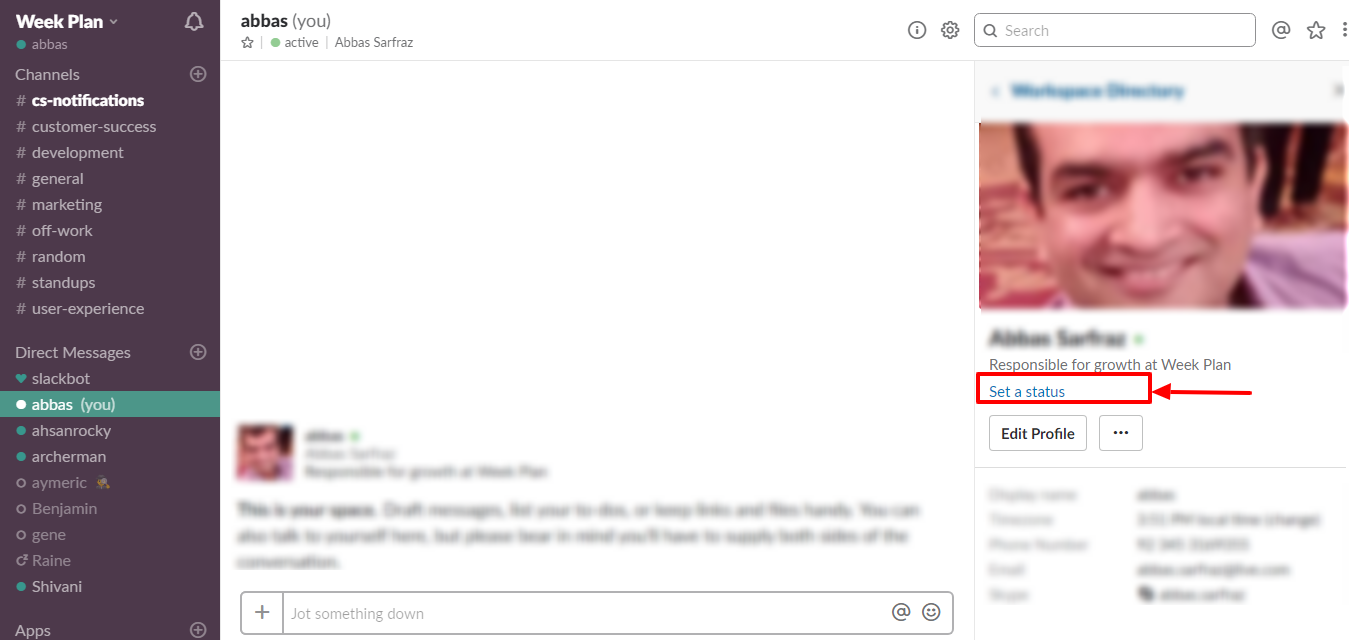
You can set your current status to let the people know what you are currently working on what’s your mood.
To set the status on the desktop device click on your name whereas, for mobiles, you have to click the triple-dot icon to set your status.

Slack has built-in time-based reminders that can remind you of an essential activity or task at a later time.
slackbot tricks
Suppose you have an urgent business meeting at 3 pm and you are extremely busy in your working schedule, then instead of thinking towards it all the time, you can set your meeting schedule on Slackbot and get reminded at the right time.
GIFs are a nice way to add some fun in work.
They are considered more appealing than a picture and shares an instant visual message.
You can easily access them by typing /giphy along with a phrase, emotion or word.
(You need to integrate Giphy app to make this work)
Want to share an image from internet instantly on any Slack conversation or channel?
Just drag and drop or use Ctrl + C and Ctrl + V (on Slack for Windows) to copy and paste an image into the Slack conversation.
Slack has no restriction on theme customization and new theme creation. You can easily customize the theme according to your choice and also can build your theme as well.
To change the theme, you need to go to the sidebar theme and select a theme among a wide range of themes.
slack themes
Slack is undoubtedly the best and fastest growing team communication app, with tons of customization’s and extensible Slack features.
Mastering all these best Slack tips and tricks will help you automate your tasks, save time, improve overall work efficiency and get the right balance of team communication.
Do you have any Slack tips or Slack hacks to share with us? Let us know in your comment.
Call to action to Week PlanEveryone has their own style of studying. But if you want to get along with the quick-paced world, you will want to learn all the stuff you can within the shortest possible time....
CEOs tackle big challenges that need great time skills to manage many roles. Studies by Harvard Business School experts like Michael E. Porter and Nitin Nohria show CEOs work around 62.5 hours every...
It's key to have good financial planning for your future and to stay stable. But many make mistakes in their monthly plans. A good plan needs clear goals and review to fit new...