You can subscribe to this list here.
| 2000 |
Jan
|
Feb
|
Mar
|
Apr
|
May
(14) |
Jun
(29) |
Jul
(51) |
Aug
(40) |
Sep
(35) |
Oct
(58) |
Nov
(64) |
Dec
(70) |
|---|---|---|---|---|---|---|---|---|---|---|---|---|
| 2001 |
Jan
(111) |
Feb
(75) |
Mar
(85) |
Apr
(62) |
May
(56) |
Jun
(65) |
Jul
(67) |
Aug
(73) |
Sep
(46) |
Oct
(64) |
Nov
(55) |
Dec
(76) |
| 2002 |
Jan
(119) |
Feb
(74) |
Mar
(101) |
Apr
(128) |
May
(124) |
Jun
(138) |
Jul
(114) |
Aug
(63) |
Sep
(54) |
Oct
(135) |
Nov
(92) |
Dec
(127) |
| 2003 |
Jan
(129) |
Feb
(164) |
Mar
(129) |
Apr
(131) |
May
(181) |
Jun
(136) |
Jul
(118) |
Aug
(220) |
Sep
(116) |
Oct
(177) |
Nov
(206) |
Dec
(114) |
| 2004 |
Jan
(175) |
Feb
(222) |
Mar
(245) |
Apr
(209) |
May
(112) |
Jun
(104) |
Jul
(77) |
Aug
(115) |
Sep
(175) |
Oct
(141) |
Nov
(154) |
Dec
(190) |
| 2005 |
Jan
(198) |
Feb
(171) |
Mar
(164) |
Apr
(113) |
May
(104) |
Jun
(151) |
Jul
(107) |
Aug
(190) |
Sep
(142) |
Oct
(116) |
Nov
(113) |
Dec
(111) |
| 2006 |
Jan
(147) |
Feb
(103) |
Mar
(102) |
Apr
(75) |
May
(110) |
Jun
(82) |
Jul
(119) |
Aug
(77) |
Sep
(103) |
Oct
(188) |
Nov
(132) |
Dec
(155) |
| 2007 |
Jan
(169) |
Feb
(110) |
Mar
(113) |
Apr
(162) |
May
(107) |
Jun
(116) |
Jul
(159) |
Aug
(135) |
Sep
(135) |
Oct
(105) |
Nov
(96) |
Dec
(100) |
| 2008 |
Jan
(122) |
Feb
(93) |
Mar
(57) |
Apr
(80) |
May
(119) |
Jun
(85) |
Jul
(59) |
Aug
(73) |
Sep
(250) |
Oct
(146) |
Nov
(121) |
Dec
(72) |
| 2009 |
Jan
(193) |
Feb
(96) |
Mar
(102) |
Apr
(66) |
May
(99) |
Jun
(130) |
Jul
(206) |
Aug
(308) |
Sep
(117) |
Oct
(99) |
Nov
(170) |
Dec
(232) |
| 2010 |
Jan
(104) |
Feb
(127) |
Mar
(86) |
Apr
(111) |
May
(66) |
Jun
(44) |
Jul
(253) |
Aug
(120) |
Sep
(178) |
Oct
(220) |
Nov
(153) |
Dec
(157) |
| 2011 |
Jan
(80) |
Feb
(85) |
Mar
(129) |
Apr
(232) |
May
(236) |
Jun
(73) |
Jul
(53) |
Aug
(38) |
Sep
(23) |
Oct
(32) |
Nov
(25) |
Dec
(24) |
| 2012 |
Jan
(23) |
Feb
(43) |
Mar
(29) |
Apr
(50) |
May
(25) |
Jun
(15) |
Jul
(26) |
Aug
(26) |
Sep
(4) |
Oct
(10) |
Nov
(17) |
Dec
(18) |
| 2013 |
Jan
(12) |
Feb
(17) |
Mar
(15) |
Apr
(22) |
May
(29) |
Jun
(16) |
Jul
(15) |
Aug
(9) |
Sep
(45) |
Oct
(18) |
Nov
(21) |
Dec
(11) |
| 2014 |
Jan
(35) |
Feb
(34) |
Mar
(13) |
Apr
(14) |
May
(86) |
Jun
(23) |
Jul
(6) |
Aug
(18) |
Sep
(16) |
Oct
(36) |
Nov
(98) |
Dec
(62) |
| 2015 |
Jan
(27) |
Feb
(14) |
Mar
(5) |
Apr
(49) |
May
(27) |
Jun
(9) |
Jul
(11) |
Aug
(20) |
Sep
(26) |
Oct
(71) |
Nov
(2) |
Dec
(7) |
| 2016 |
Jan
(42) |
Feb
(3) |
Mar
(15) |
Apr
(34) |
May
(25) |
Jun
(39) |
Jul
(20) |
Aug
(85) |
Sep
(14) |
Oct
(82) |
Nov
(10) |
Dec
(34) |
| 2017 |
Jan
(29) |
Feb
(88) |
Mar
(78) |
Apr
(4) |
May
(7) |
Jun
(30) |
Jul
(4) |
Aug
(47) |
Sep
(14) |
Oct
(47) |
Nov
(5) |
Dec
(3) |
| 2018 |
Jan
(18) |
Feb
(13) |
Mar
(6) |
Apr
(8) |
May
(11) |
Jun
(1) |
Jul
(11) |
Aug
(1) |
Sep
(4) |
Oct
|
Nov
|
Dec
(23) |
| 2019 |
Jan
(5) |
Feb
(15) |
Mar
(11) |
Apr
(4) |
May
(15) |
Jun
(12) |
Jul
(4) |
Aug
(5) |
Sep
(14) |
Oct
(3) |
Nov
(10) |
Dec
|
| 2020 |
Jan
|
Feb
(5) |
Mar
(23) |
Apr
(7) |
May
|
Jun
|
Jul
|
Aug
(7) |
Sep
|
Oct
(3) |
Nov
|
Dec
|
| 2021 |
Jan
(2) |
Feb
(2) |
Mar
|
Apr
(8) |
May
|
Jun
|
Jul
(4) |
Aug
(5) |
Sep
(7) |
Oct
|
Nov
|
Dec
|
| 2022 |
Jan
|
Feb
(3) |
Mar
(1) |
Apr
|
May
|
Jun
|
Jul
|
Aug
|
Sep
(4) |
Oct
|
Nov
(2) |
Dec
(13) |
| 2023 |
Jan
|
Feb
|
Mar
|
Apr
|
May
|
Jun
|
Jul
|
Aug
|
Sep
(4) |
Oct
(1) |
Nov
(1) |
Dec
(1) |
| 2024 |
Jan
|
Feb
|
Mar
(4) |
Apr
(3) |
May
(2) |
Jun
(4) |
Jul
(3) |
Aug
|
Sep
(5) |
Oct
(1) |
Nov
|
Dec
|
| 2025 |
Jan
|
Feb
|
Mar
(4) |
Apr
|
May
(2) |
Jun
(5) |
Jul
|
Aug
|
Sep
(12) |
Oct
|
Nov
|
Dec
|
On Sun, Sep 15, 2024 at 01:48:19PM +0200, Mariusz Ferdyn wrote:
> On 9/15/2024 10:12 AM, Sean Young wrote:
> > Hi,
> >
> > On Sat, Sep 14, 2024 at 10:43:35PM +0200, Mariusz Ferdyn wrote:
> > > Using command mode2 -d /dev/lirc0 I received:
> > >
> > >
> > > Using driver devinput on device /dev/lirc0
> > > Trying device: /dev/lirc0
> > > Using device: /dev/lirc0
> > > code: 0xfd695000a94d50001f23000182110000
> > > code: 0x54020001740600005b02000182060000
> > > code: 0x4f0200010302000063020001ff010000
> > > code: 0x64020001030200005c0200010a020000
> > > code: 0x5d020001740600005902000171060000
> > > Partial read 4 bytes on /dev/lirc0
> > I think you need to run `mode2 -H default -d /dev/lirc0`, driver devinput
> > is not the right one.
> >
> > > and now I would like to send these ad-hock mode without writing them to the
> > > config file etc. How to do it?
> > Please get the right codes first.
> >
> >
> > Sean
> >
> The captured codes are:
>
>
> mf@pi1:~ $ mode2 -H default -d /dev/lirc0
> Using driver default on device /dev/lirc0
> Trying device: /dev/lirc0
> Using device: /dev/lirc0
> pulse 8985
> space 4468
> pulse 617
> space 1651
> pulse 601
> space 1652
> pulse 604
> space 499
-snip-
This looks good, this is probably the nec protocol.
Put all the pulse/space lines into a file. Then you can send it with
ir-ctl -s file
I don't know that this can be done easily with the lirc tooling. Maybe it
can be put into lircd.conf raw_codes remote definition, but this might be
too heavyweight for what you're looking for.
Sean
On 9/15/2024 10:12 AM, Sean Young wrote:
> Hi,
>
> On Sat, Sep 14, 2024 at 10:43:35PM +0200, Mariusz Ferdyn wrote:
>> Using command mode2 -d /dev/lirc0 I received:
>>
>>
>> Using driver devinput on device /dev/lirc0
>> Trying device: /dev/lirc0
>> Using device: /dev/lirc0
>> code: 0xfd695000a94d50001f23000182110000
>> code: 0x54020001740600005b02000182060000
>> code: 0x4f0200010302000063020001ff010000
>> code: 0x64020001030200005c0200010a020000
>> code: 0x5d020001740600005902000171060000
>> Partial read 4 bytes on /dev/lirc0
> I think you need to run `mode2 -H default -d /dev/lirc0`, driver devinput
> is not the right one.
>
>> and now I would like to send these ad-hock mode without writing them to the
>> config file etc. How to do it?
> Please get the right codes first.
>
>
> Sean
>
The captured codes are:
mf@pi1:~ $ mode2 -H default -d /dev/lirc0
Using driver default on device /dev/lirc0
Trying device: /dev/lirc0
Using device: /dev/lirc0
pulse 8985
space 4468
pulse 617
space 1651
pulse 601
space 1652
pulse 604
space 499
pulse 622
space 505
pulse 618
space 501
pulse 625
space 500
pulse 623
space 1652
pulse 580
space 1676
pulse 599
space 1652
pulse 601
space 1663
pulse 601
space 1649
pulse 567
space 1672
pulse 602
space 1651
pulse 601
space 1667
pulse 587
space 1653
pulse 600
space 500
pulse 626
space 498
pulse 601
space 523
pulse 599
space 525
pulse 600
space 524
pulse 624
space 500
pulse 620
space 1658
pulse 599
space 1652
pulse 576
space 1676
pulse 578
space 525
pulse 624
space 503
pulse 597
space 525
pulse 610
space 525
pulse 597
space 521
pulse 623
space 503
pulse 602
space 515
pulse 608
space 522
pulse 598
space 517
pulse 619
space 501
pulse 601
space 522
pulse 599
space 525
pulse 607
space 519
pulse 623
space 1661
pulse 568
space 1677
pulse 598
space 500
pulse 599
space 525
pulse 599
space 547
pulse 585
space 530
pulse 625
space 490
pulse 596
space 527
pulse 598
space 523
pulse 600
space 524
pulse 600
space 524
pulse 600
space 524
pulse 600
space 524
pulse 601
space 525
pulse 606
space 527
pulse 599
space 523
pulse 597
space 1683
pulse 576
space 518
pulse 594
space 578
pulse 553
space 517
pulse 599
space 524
pulse 603
space 523
pulse 599
space 529
pulse 595
space 525
pulse 598
space 525
pulse 600
space 525
pulse 598
space 525
pulse 600
space 524
pulse 600
space 524
pulse 597
space 526
pulse 577
space 549
pulse 576
space 555
pulse 570
space 548
pulse 599
space 526
pulse 599
space 526
pulse 603
space 523
pulse 598
space 524
pulse 600
space 523
pulse 602
space 522
pulse 602
space 524
pulse 609
space 1681
pulse 570
space 523
pulse 629
space 499
pulse 609
space 508
pulse 601
space 521
pulse 678
space 450
pulse 604
space 516
pulse 596
space 526
pulse 599
space 523
pulse 601
space 528
pulse 600
space 512
pulse 598
space 1675
pulse 584
space 526
pulse 591
space 1681
pulse 573
space 527
pulse 611
space 534
pulse 574
space 528
pulse 595
space 1678
pulse 575
space 550
pulse 575
space 1682
pulse 572
space 1678
pulse 587
space 1679
pulse 573
space 542
pulse 581
space 545
pulse 577
space 544
pulse 572
space 554
pulse 569
space 558
pulse 571
timeout 21604
^C
mf@pi1:~ $ mode2 -H default -d /dev/lirc0
Using driver default on device /dev/lirc0
Trying device: /dev/lirc0
Using device: /dev/lirc0
pulse 9000
space 4463
pulse 601
space 1670
pulse 601
space 1653
pulse 588
space 515
pulse 626
space 499
pulse 622
space 502
pulse 624
space 502
pulse 623
space 1664
pulse 601
space 1653
pulse 588
space 1659
pulse 592
space 1652
pulse 600
space 1669
pulse 582
space 1661
pulse 598
space 1654
pulse 599
space 1653
pulse 600
space 1653
pulse 579
space 531
pulse 616
space 500
pulse 623
space 501
pulse 623
space 501
pulse 624
space 501
pulse 602
space 522
pulse 623
space 1636
pulse 619
space 1642
pulse 615
space 1641
pulse 617
space 495
pulse 618
space 499
pulse 625
space 503
pulse 625
space 504
pulse 616
space 499
pulse 624
space 501
pulse 623
space 517
pulse 608
space 501
pulse 623
space 501
pulse 601
space 525
pulse 602
space 519
pulse 624
space 500
pulse 624
space 500
pulse 602
space 1653
pulse 624
space 1635
pulse 617
space 500
pulse 623
space 501
pulse 623
space 501
pulse 624
space 502
pulse 601
space 524
pulse 611
space 514
pulse 601
space 527
pulse 624
space 518
pulse 600
space 526
pulse 584
space 523
pulse 601
space 528
pulse 602
space 515
pulse 598
space 524
pulse 604
space 548
pulse 577
space 1653
pulse 609
space 512
pulse 590
space 523
pulse 600
space 525
pulse 601
space 523
pulse 601
space 531
pulse 604
space 515
pulse 599
space 527
pulse 599
space 523
pulse 599
space 526
pulse 600
space 525
pulse 599
space 525
pulse 599
space 526
pulse 579
space 546
pulse 598
space 526
pulse 600
space 523
pulse 600
space 526
pulse 600
space 524
pulse 601
space 531
pulse 607
space 526
pulse 605
space 511
pulse 598
space 523
pulse 606
space 519
pulse 603
space 523
pulse 594
space 522
pulse 599
space 525
pulse 634
space 509
pulse 585
space 531
pulse 583
space 523
pulse 600
space 523
pulse 600
space 524
pulse 600
space 525
pulse 600
space 526
pulse 599
space 536
pulse 619
space 497
pulse 597
space 1666
pulse 587
space 526
pulse 598
space 1658
pulse 596
space 526
pulse 598
space 529
pulse 596
space 528
pulse 597
space 1659
pulse 593
space 539
pulse 591
space 1682
pulse 579
space 1678
pulse 561
space 1679
pulse 572
space 536
pulse 595
space 524
pulse 609
space 1668
pulse 569
space 1683
pulse 569
space 1683
pulse 571
timeout 13141
^C
mf@pi1:~ $
Hi,
On Sat, Sep 14, 2024 at 10:43:35PM +0200, Mariusz Ferdyn wrote:
> Using command mode2 -d /dev/lirc0 I received:
>
>
> Using driver devinput on device /dev/lirc0
> Trying device: /dev/lirc0
> Using device: /dev/lirc0
> code: 0xfd695000a94d50001f23000182110000
> code: 0x54020001740600005b02000182060000
> code: 0x4f0200010302000063020001ff010000
> code: 0x64020001030200005c0200010a020000
> code: 0x5d020001740600005902000171060000
> Partial read 4 bytes on /dev/lirc0
I think you need to run `mode2 -H default -d /dev/lirc0`, driver devinput
is not the right one.
> and now I would like to send these ad-hock mode without writing them to the
> config file etc. How to do it?
Please get the right codes first.
Sean
Using command mode2 -d /dev/lirc0 I received:
Using driver devinput on device /dev/lirc0
Trying device: /dev/lirc0
Using device: /dev/lirc0
code: 0xfd695000a94d50001f23000182110000
code: 0x54020001740600005b02000182060000
code: 0x4f0200010302000063020001ff010000
code: 0x64020001030200005c0200010a020000
code: 0x5d020001740600005902000171060000
Partial read 4 bytes on /dev/lirc0
and now I would like to send these ad-hock mode without writing them to
the config file etc. How to do it?
Mariusz Ferdyn
I'm trying to use irrecord (with -f option) to generate a config file,
which has always worked fine but seems to have some troubles with this
particular remote. The exact model of the AC is Eurom PAC 29R. Unlike
many other AC remotes this one does not seem to include its own state
(e.g. current temperature setting). It has no little display on it to
show any current settings, so if people can't even see any state then
it's probably safe to assume there is no state. I'm guessing because the
unit has physical controls as well, so communicating changes from that
end to the remote would be overly complex (and unreliable, if the remote
is out of "sight").
Anyway, I'm using the "default" driver and I think the problem is
related to errors I get during recording:
 > Something went wrong: Signal length is 0
 > That's weird because the signal length must be odd!
The signal length varies a lot too:
 > Something went wrong: Signal length is 192
 > Something went wrong: Signal length is 180
 > Something went wrong: Signal length is 172
 > Something went wrong: Signal length is 176
 > Something went wrong: Signal length is 138
 > Something went wrong: Signal length is 86
If I keep holding down the button long enough it will eventually
succeed, but I think it's pretty much guaranteed to be garbage at this
point anyway? Note that releasing the button once the error pops up and
holding it down "fresh" will cause it to keep throwing errors, unless of
course the next attempt proceeds too fast for me to even register the
error. It doesn't seem to matter if I hold the remote right in front of
the receiver or about 30-50 cm away, sending codes from the resulting
config will always be ignored by the unit (but the IR LED does light
up). I've verified that sending other IR codes at least works correctly;
I have other configs and sending any code makes the relevant device
respond immediately. I even tried the devinput driver (and without -f)
but that just generates the code 0x0 for any and all buttons.
I'm running all this off a Raspberry Pi by the way.
~Sahbi
On Tue, Jul 16, 2024 at 02:55:05PM -0400, Chris Hilton wrote:
> Let me start by saying thanks again to Bengt Martensson! With his help I was able to get
> things going with lirc, installed from packages on my Rocky-9 test box so I have a setup
> that works.
>
> My problem:
>
> I'm trying to get lirc running to change channels on my set-top box for MythTV. I've run
> mythtv for a while and my current setup is Myth-0.29 on CentOS-7. My Cable TV company has
> dropped support the the Scientific Atlanta settop box that I currently use with this
> installation. That's a problem because I use firewire to change channels. The box that
> replaces it doesn't respond to my firewire channel changing program. But I can change
> channels using Lirc. I know it works and that it works very well, from testing my setup on a
> new Rocky-9 box.
>
Update:
I can send codes using the binary packages that shipped with Rocky-8. I still can't get IR
receiving to work in either rocky-8 or rocky-9. That's not a must have right now but It
would be nice for debugging later. I would still very much like to get this hardware working
with CentOS-7 at least for the next month but now I have a workaround...
-- Chris
--
Chris
 __o "All I was trying to do was get home from work."
 _`\<,_ -Rosa Parks
___(*)/_(*)____.___o____..___..o...________ooO..._____________________
Christopher Sean Hilton [chris/at/vindaloo/dot/com]
Let me start by saying thanks again to Bengt Martensson! With his help I was able to get
things going with lirc, installed from packages on my Rocky-9 test box so I have a setup
that works.
My problem:
I'm trying to get lirc running to change channels on my set-top box for MythTV. I've run
mythtv for a while and my current setup is Myth-0.29 on CentOS-7. My Cable TV company has
dropped support the the Scientific Atlanta settop box that I currently use with this
installation. That's a problem because I use firewire to change channels. The box that
replaces it doesn't respond to my firewire channel changing program. But I can change
channels using Lirc. I know it works and that it works very well, from testing my setup on a
new Rocky-9 box.
**My current problem is transfering the setup from my Rocky-9 test environment to my
CentOS-7 production environment.**
Making things work on Rocky was as easy as:
 # lircd --driver=ftdix --device "serial=D*******,output=2" --nodaemon
in one terminal window, then:
 # irsend SEND_ONCE new_samsung_set_top_box "KEY_POWER"
et voila, my cablebox turned on. Channel changes was as simple.
Unfortunately, this doesn't work on CentOS-7
My question:
**Is there something simple that I'm missing, or is the software installed from EPEL rpms
for lirc too old to easily support what I want to do?**
Details
I'm thinking that I'm the last person in the world using MythTV with a Hauppauge HD-PVR and
one of the only people in the world who's MythTV is in a rack in my basement rather than in
my entertainment center next to my television. That's making my testing very difficult.
My IR blaster is a "FTDI USB IR Blaster" purchased from here:
 https://www.irblaster.info/usb_blaster.html
My hardware is old enough to have an actual working serial port and I also have an old style
serial IR blaster. Getting either of them working would be enough to keep me going here.
Thank you
-- Chris
--
Chris
 __o "All I was trying to do was get home from work."
 _`\<,_ -Rosa Parks
___(*)/_(*)____.___o____..___..o...________ooO..._____________________
Christopher Sean Hilton [chris/at/vindaloo/dot/com]
On Sun, Jun 30, 2024 at 02:39:36PM -0400, Chris Hilton wrote:
> [ ...snip... ]
>
Thanks again Bengt,
I moved the IR rig downstairs in front of my IR repeater in my main stereo. From there I
figured out that none of the commands I was sending were actually doing anything because I
was using the wrong output on my ftdi dongle. In the end the file you sent me did the
trick. It's working now.
-- Chris
--
Chris
 __o "All I was trying to do was get home from work."
 _`\<,_ -Rosa Parks
___(*)/_(*)____.___o____..___..o...________ooO..._____________________
Christopher Sean Hilton [chris/at/vindaloo/dot/com]
On Sun, Jun 30, 2024 at 06:58:43PM +0200, Bengt Martensson wrote:
> On 6/30/24 04:16, Christopher Sean Hilton wrote:
> > Hello,
> >
> > It's become time to update my mythtv. This change is being driven by the fact that the
> > Scientific Atlanta 4250 set top box which my cable provider, Altice / Optimum, choose so
> > many years ago will no longer be supported sometime in August. My current setup doesn't
> > require lirc, I use firewire tochange channels but the new cable box, an Optimum branded
> > Samsung SMT-C5320 doesn't respond to the firewire like the SA4250.
>
> I found the IR codes for Samsung SMT-C5320 on the Internet, and loaded it
> into IrScrutinizer. The protocol was identified as Panasonic_Old. With said
> program, I also generated a lirc.conf file, enclosed. (The frequency looks a
> bit uncommon, if it does not work, try with 38000) Hope this helps.
>
>
> [ ...snip... ]

Thanks Bengt,
I tried that file and I got no joy. I'm starting to believe that I have a problem somewhere
in my setup and that I'm actually not emitting any IR signals at all. But I don't have a way
to test that. As a result, I'm getting discouraged and I'm running out of ideas.
I've ordered an IR Receiver on the hope that I my original thesis is correct and that the
only issue is that I'm sending the wrong codes so my catv box isn't able to respond to
them. I'm hoping that getting the receiver will let me use `irrecord` to create a local
`SMT-C5320.lircd.conf` file which would hopefully allow me to change channels on this
(these) cable boxes so I can use it with mythtv.
One of my big concerns is that I saw a note on a TV forum list that very specifically called
out this box as it was issued from CableVision back in the day. It seems that they custom
ordered them from Samsung to respond to the same remote that they shipped. This single
remote could control either an SA42xx or this Samsung set top box. You could switch between
the two set top boxes with making any configuration change to the remote. That has me
thinking that these SMT-C5320s have been hacked to respond to a special set of codes.
-- Chris
> # IrScrutinizer parametric export
> #
> # Creating tool: IrScrutinizer version 2.4.2-SNAPSHOT
> # Creating user: bengt
> # Creating date: Sun Jun 30 18:44:44 CEST 2024
> # Encoding: WINDOWS-1252
> #
> # Manufacturer: Samsung
> # Model: SMT-C5320
> # Displayname: Samsung SMT-C5320
> # Device Class: cable
> # Remotename:
> #
>
> # Protocol name: Panasonic_Old
> begin remote
> 	name		Samsung_SMT-C5320-Panasonic_Old
> 	bits		22
> 	flags		SPACE_ENC
> 	eps		30
> 	aeps		100
> 	zero		833	833
> 	one		833	2499
> 	header		3332	3332
> 	ptrail		833
> 	gap		44000
> 	frequency	57600
> 	begin codes
> 		ASTERISK	0x000000000037E103
> 		CHANNEL_DOWN	0x000000000036F121
> 		CHANNEL_UP	0x0000000000377111
> 		CURSOR_DOWN	0x000000000037A10B
> 		CURSOR_ENTER	0x0000000000366133
> 		CURSOR_LEFT	0x000000000037810F
> 		CURSOR_RIGHT	0x0000000000364137
> 		CURSOR_UP	0x000000000036812F
> 		DIGIT_0	0x0000000000373119
> 		DIGIT_1	0x000000000036113D
> 		DIGIT_2	0x000000000037111D
> 		DIGIT_3	0x000000000036912D
> 		DIGIT_4	0x000000000037910D
> 		DIGIT_5	0x0000000000365135
> 		DIGIT_6	0x0000000000375115
> 		DIGIT_7	0x000000000036D125
> 		DIGIT_8	0x000000000037D105
> 		DIGIT_9	0x0000000000363139
> 		ENTER	0x000000000036B928
> 		EXIT	0x0000000000366932
> 		FAVORITE	0x000000000037F101
> 		FORMAT_SCROLL	0x000000000036B928
> 		FORWARD	0x000000000036293A
> 		FUNCTION_BLUE	0x000000000036193C
> 		FUNCTION_GREEN	0x00000000000F7E10
> 		FUNCTION_RED	0x000000000037191C
> 		FUNCTION_YELLOW	0x000000000037E902
> 		GUIDE	0x000000000036C127
> 		INFO	0x000000000036213B
> 		LIVE	0x000000000036B129
> 		MENU_DVR	0x000000000036C926
> 		MENU_MAIN	0x000000000036F920
> 		MENU_SETUP	0x0000000000373918
> 		PAUSE	0x0000000000374117
> 		PIP	0x000000000037B908
> 		PIP_CHANNEL_DOWN	0x000000000037F900
> 		PIP_CHANNEL_UP	0x000000000036E922
> 		PIP_POSITION	0x0000000000377910
> 		PIP_SWAP	0x0000000000367930
> 		PLAY	0x000000000037990C
> 		POWER_TOGGLE	0x000000000037C107
> 		PREVIOUS_CHANNEL	0x000000000036E123
> 		RECORD	0x0000000000375914
> 		REPLAY	0x000000000037C906
> 		REVERSE	0x000000000037291A
> 		STOP	0x0000000000365934
> 		VIDEO_SOURCE	0x0000000000376113
> 	end codes
> end remote
--
Chris
 __o "All I was trying to do was get home from work."
 _`\<,_ -Rosa Parks
___(*)/_(*)____.___o____..___..o...________ooO..._____________________
Christopher Sean Hilton [chris/at/vindaloo/dot/com]
On 6/30/24 04:16, Christopher Sean Hilton wrote:
> Hello,
>
> It's become time to update my mythtv. This change is being driven by the fact that the
> Scientific Atlanta 4250 set top box which my cable provider, Altice / Optimum, choose so
> many years ago will no longer be supported sometime in August. My current setup doesn't
> require lirc, I use firewire tochange channels but the new cable box, an Optimum branded
> Samsung SMT-C5320 doesn't respond to the firewire like the SA4250.
I found the IR codes for Samsung SMT-C5320 on the Internet, and loaded
it into IrScrutinizer. The protocol was identified as Panasonic_Old.
With said program, I also generated a lirc.conf file, enclosed. (The
frequency looks a bit uncommon, if it does not work, try with 38000)
Hope this helps.
Greets,
Bengt
# IrScrutinizer parametric export
#
# Creating tool: IrScrutinizer version 2.4.2-SNAPSHOT
# Creating user: bengt
# Creating date: Sun Jun 30 18:44:44 CEST 2024
# Encoding: WINDOWS-1252
#
# Manufacturer: Samsung
# Model: SMT-C5320
# Displayname: Samsung SMT-C5320
# Device Class: cable
# Remotename:
#
# Protocol name: Panasonic_Old
begin remote
   name    Samsung_SMT-C5320-Panasonic_Old
   bits    22
   flags    SPACE_ENC
   eps    30
   aeps    100
   zero    833  833
   one    833  2499
   header    3332  3332
   ptrail    833
   gap    44000
   frequency  57600
   begin codes
     ASTERISK  0x000000000037E103
     CHANNEL_DOWN  0x000000000036F121
     CHANNEL_UP  0x0000000000377111
     CURSOR_DOWN  0x000000000037A10B
     CURSOR_ENTER  0x0000000000366133
     CURSOR_LEFT  0x000000000037810F
     CURSOR_RIGHT  0x0000000000364137
     CURSOR_UP  0x000000000036812F
     DIGIT_0  0x0000000000373119
     DIGIT_1  0x000000000036113D
     DIGIT_2  0x000000000037111D
     DIGIT_3  0x000000000036912D
     DIGIT_4  0x000000000037910D
     DIGIT_5  0x0000000000365135
     DIGIT_6  0x0000000000375115
     DIGIT_7  0x000000000036D125
     DIGIT_8  0x000000000037D105
     DIGIT_9  0x0000000000363139
     ENTER  0x000000000036B928
     EXIT  0x0000000000366932
     FAVORITE  0x000000000037F101
     FORMAT_SCROLL  0x000000000036B928
     FORWARD  0x000000000036293A
     FUNCTION_BLUE  0x000000000036193C
     FUNCTION_GREEN  0x00000000000F7E10
     FUNCTION_RED  0x000000000037191C
     FUNCTION_YELLOW  0x000000000037E902
     GUIDE  0x000000000036C127
     INFO  0x000000000036213B
     LIVE  0x000000000036B129
     MENU_DVR  0x000000000036C926
     MENU_MAIN  0x000000000036F920
     MENU_SETUP  0x0000000000373918
     PAUSE  0x0000000000374117
     PIP  0x000000000037B908
     PIP_CHANNEL_DOWN  0x000000000037F900
     PIP_CHANNEL_UP  0x000000000036E922
     PIP_POSITION  0x0000000000377910
     PIP_SWAP  0x0000000000367930
     PLAY  0x000000000037990C
     POWER_TOGGLE  0x000000000037C107
     PREVIOUS_CHANNEL  0x000000000036E123
     RECORD  0x0000000000375914
     REPLAY  0x000000000037C906
     REVERSE  0x000000000037291A
     STOP  0x0000000000365934
     VIDEO_SOURCE  0x0000000000376113
   end codes
end remote
Hello,
It's become time to update my mythtv. This change is being driven by the fact that the
Scientific Atlanta 4250 set top box which my cable provider, Altice / Optimum, choose so
many years ago will no longer be supported sometime in August. My current setup doesn't
require lirc, I use firewire tochange channels but the new cable box, an Optimum branded
Samsung SMT-C5320 doesn't respond to the firewire like the SA4250.
My equipment is an FTDI FT230X transmitter setup in lirc under Rocky Linux 9.
I've installed the following modules:
 libftdi-1.5-2.el9.aarch64
 lirc-libs-0.10.0-36.el9.aarch64
 lirc-core-0.10.0-36.el9.aarch64
 lirc-tools-gui-0.10.0-36.el9.aarch64
 lirc-drv-ftdi-0.10.0-36.el9.aarch64
 lirc-doc-0.10.0-36.el9.noarch
 lirc-config-0.10.0-36.el9.noarch
I'm running:
 # lircd --driver=ftdix --device "serial=D<serialno>,output=3"
to start lircd. I think everything is running okay.
I'm at the stage of trying various remote modules to control the power and the channel on
the current cable box. I'm only getting one warning and I don't know if it's significant:
 ... lircd-0.10.0[18356]: Warning: Failed to set scheduling policy to SCHED_FIFO:
 Operation not permitted Sending will not run with real-time
			 priority and you may suffer USB buffer underruns causing
			 corrupt IR signals
I'm hoping that I'm on the right track and that the problem that I have is that I'm just
using the wrong driver for the Samsung set top box. I do know that Optimum set these cable
boxes up to respond to the same remote control that they issued for their SA boxes like my
SA4250 so I suspect that my box needs custom code but I don't have a way to test that.
I think that my next steps are to:
1. Setup some sort of IR receiving capability so I can use `irrecord` to capture the codes
 that my remote is sending and create a new remote file?
------------------------------------------------------------
Does a proper remote file `xxx.lircd.conf` exist for this cable box and am I just missing
it?
Is the approach I outlined a good way to get to what I need?
Am I overlooking something else?
P.S. I do have a hauppauge HD-PVR, my capture device for MythTV. Would setting that up as a
capture device be a good plan or should I just find some simple, 20ドル or less IR receiver
that's support to save myself some trouble?
--
Chris
 __o "All I was trying to do was get home from work."
 _`\<,_ -Rosa Parks
___(*)/_(*)____.___o____..___..o...________ooO..._____________________
Christopher Sean Hilton [chris/at/vindaloo/dot/com]
Sorry for taking so long to answer.
On 5/1/24 16:37, James B Huber wrote:
> ok, see below....
>
> On Wed, 2024年05月01日 at 14:26 +0200, Bengt Martensson wrote:
>> On 4/30/24 21:48, James B Huber wrote:
>>> Hardware is just fine...it's a USB device, move it to a rpi-4b, works
>>> fine....move it to my Linux Mint box, it works fine.
One thing to try: On all your machines, install IrScrutinizer
https://github.com/bengtmartensson/IrScrutinizer/releases/tag/Version-2.4.1,
then with the thing plugged in, open it as hardware -> /dev/lirc ->
Device /dev/lirc0, and compare the "detected properites" between the
working and non-working hosts. You can of course also try to capture
from IrScrutinizer, but it will probably not work. You said that
transmitting works?
And, to repeat myself,
>>
>> Then it must be a problem with drivers/modules.... mode2
>> should, when a RC6 or MCE signal is fired, output mostly duration of
>> length 444 and 888 (+- 30%, say). For now, leave Lirc out of the equaton.
If still no clue, you have to go to driver/modules/Linux gurus. The
Linux media list may be an address. Please post a link here if you do
so. Sean, are you here?
Greetings on the Star Wars day,
Bengt
On 4/30/24 21:48, James B Huber wrote:
> Hardware is just fine...it's a USB device, move it to a rpi-4b, works
> fine....move it to my Linux Mint box, it works fine.
Then it must be a problem with drivers/modules. First verify that there
is no /dev/lirc* if your dongle is not connected, and there is exactly
one (/dev/lirc0) when you connect it. Then do lsusb with the device
connected, also modinfo mceusb, as well as dmsg| tail (just after you
have connected the device), and look for anything interesting. mode2
should, when a RC6 or MCE signal is fired, output mostly duration of
length 444 and 888 (+- 30%, say). For now, leave Lirc out of the equaton.
> This was working on this hardware and O/S...but the SD card died, I
> had to rebuild...
Offtopic: There appears to be a consensus that using a (micro-) SD card
for the OS in a productive machine is not a good idea; sooner or later
they go belly-up. Like yours ;-)- I am using a Bananapi M5 with 16GB
eMMC memory for home assistant myself.
Greetz,
Bengt
Hardware is just fine...it's a USB device, move it to a rpi-4b, works
fine....move it to my Linux Mint box, it works fine.
This was working on this hardware and O/S...but the SD card died, I had
to rebuild...
Haven't been able to get this working right since.
The config file is the same on all boxes...
[SNIP]
 begin remote

 name mceusb
 bits 16
 flags RC6|CONST_LENGTH
 rc6_mask 0x100000000
 eps 30
 aeps 100
 header 2667 889
 one 444 444
 zero 444 444
 gap 105000
 toggle_bit 22
 pre_data_bits 21
 pre_data 0x37FF0

And if I could make the stupid CEC junk go away I would, putting the
"recommended" adds to config.txt does'nt help:
 hdmi_ignore_cec=1
 hdmi_ignore_cec_init=1
and blacklisting the cec kernel module doesn't keep it from loading
either.
But...I don't think that where the issue is...this has to be something
really dumb, but it's been 4 days of trying and getting nowhere.
Jim
On Tue, 2024年04月30日 at 20:51 +0200, Bengt Martensson wrote:
> On 4/30/24 17:09, James B Huber wrote:
>
> >
> > Folks,
> >  Have been using lirc for like forever, anyway I got new
> > Raspberrypi-5, it is replacing a RPI-4B, unplug one, plug in
> > the other. The MCEUSB receiver and remote I was using (and it
> > works) is the same one I am still using.
> >
> > Issue, I have ZIPPO output showing up in IRW.
> >
> > I see the data coming in via mode2:
> > pi@rpi-5:/usr/lib/systemd/system $ mode2
> > Using driver default on device /dev/lirc0
> > Trying device: /dev/lirc0
> > Using device: /dev/lirc0
> > pulse 650
> > space 52200
> > pulse 650
> > space 52250
> > pulse 650
> > timeout 127000
>
> This is not a sensible IR signal, so it is no wonder that it does not
> decode. Smells like a lowlevel/hardware error.
>
> I recommend using a well known signal (e.g. RC5 or NEC) in the
> install/debug phase. And make sure cec and devinput is diabled.
> PS. What is "ZIPPO output"? https://www.zippo.de/ ??
> Greetz,
> Bengt
>
>
On 4/30/24 17:09, James B Huber wrote:
> Folks,
>  Have been using lirc for like forever, anyway I got new
> Raspberrypi-5, it is replacing a RPI-4B, unplug one, plug in
> the other. The MCEUSB receiver and remote I was using (and it works)
> is the same one I am still using.
>
> Issue, I have ZIPPO output showing up in IRW.
>
> *I see the data coming in via mode2:*
> pi@rpi-5:/usr/lib/systemd/system $ mode2
> Using driver default on device /dev/lirc0
> Trying device: /dev/lirc0
> Using device: /dev/lirc0
> pulse 650
> space 52200
> pulse 650
> space 52250
> pulse 650
> timeout 127000
This is not a sensible IR signal, so it is no wonder that it does not
decode. Smells like a lowlevel/hardware error.
I recommend using a well known signal (e.g. RC5 or NEC) in the
install/debug phase. And make sure cec and devinput is diabled.
PS. What is "ZIPPO output"? https://www.zippo.de/ ??
Greetz,
Bengt
Folks,
 Have been using lirc for like forever, anyway I got new Raspberrypi-
5, it is replacing a RPI-4B, unplug one, plug in
the other. The MCEUSB receiver and remote I was using (and it works) is
the same one I am still using.
Issue, I have ZIPPO output showing up in IRW.
I see the data coming in via mode2:
 pi@rpi-5:/usr/lib/systemd/system $ mode2
 Using driver default on device /dev/lirc0
 Trying device: /dev/lirc0
 Using device: /dev/lirc0
 pulse 650
 space 52200
 pulse 650
 space 52250
 pulse 650
 timeout 127000

ir-keytable sees the device:
 pi@rpi-5:~ $ ir-keytable
 Found /sys/class/rc/rc1/ with:
 Name: vc4-hdmi-1
 Driver: cec
 Default keymap: rc-cec
 Input device: /dev/input/event3
 Supported kernel protocols: cec
 Enabled kernel protocols: cec
 bus: 30, vendor/product: 0000:0000, version: 0x0001
 Repeat delay = 0 ms, repeat period = 125 ms
 Found /sys/class/rc/rc2/ with:
 Name: Media Center Ed. eHome Infrared Remote Transceiver (0471:060c)
 Driver: mceusb
 Default keymap: rc-rc6-mce
 Input device: /dev/input/event9
 LIRC device: /dev/lirc0
 Attached BPF protocols: Operation not permitted
 Supported kernel protocols: lirc rc-5 rc-5-sz jvc sony nec sanyo
 mce_kbd rc-6 sharp xmp imon
 Enabled kernel protocols: lirc
 bus: 3, vendor/product: 0471:060c, version: 0x0101
 Repeat delay = 500 ms, repeat period = 125 ms
 Found /sys/class/rc/rc0/ with:
 Name: vc4-hdmi-0
 Driver: cec
 Default keymap: rc-cec
 Input device: /dev/input/event1
 Supported kernel protocols: cec
 Enabled kernel protocols: cec
 bus: 30, vendor/product: 0000:0000, version: 0x0001
 Repeat delay = 0 ms, repeat period = 125 ms
however irw sees nothing:
lircd loads, read config fine, and knows the remotes:
Apr 30 09:52:03.439525 rpi-5.judahnet.net lircd: Notice: Current
driver: default
Apr 30 09:52:03.439530 rpi-5.judahnet.net lircd: Notice: Driver API
version: 3
Apr 30 09:52:03.439536 rpi-5.judahnet.net lircd: Notice: Driver
version: 0.10.0
Apr 30 09:52:03.439541 rpi-5.judahnet.net lircd: Notice: Driver info:
See file:///usr/share/doc/lirc/plugindocs/default.html
Apr 30 09:52:03.439562 rpi-5.judahnet.net lircd: Warning: -------------
----------- Log re-opened ----------------------------
Apr 30 09:52:03.439572 rpi-5.judahnet.net lircd: Info: lircd: Opening
log, level: Info
Apr 30 09:52:03.439653 rpi-5.judahnet.net lircd: Notice: Using systemd
fd
Apr 30 09:52:03.439667 rpi-5.judahnet.net lircd: Warning: Running as
root
Apr 30 09:52:03.442705 rpi-5.judahnet.net lircd: Info: Using remote:
mceusb.
Apr 30 09:52:03.442810 rpi-5.judahnet.net lircd: Info: Using remote:
BHN.
Apr 30 09:52:03.442837 rpi-5.judahnet.net lircd: Notice:
/etc/lirc/lircd.conf: BHN: Multiple values for same code: OK
Apr 30 09:52:03.442864 rpi-5.judahnet.net lircd: Notice:
/etc/lirc/lircd.conf: BHN: Multiple values for same code: ENTER
Apr 30 09:52:03.443295 rpi-5.judahnet.net lircd: Notice: lircd(default)
ready, using /var/run/lirc/lircd
Apr 30 09:52:51.408223 rpi-5.judahnet.net lircd: Notice: accepted new
client on /var/run/lirc/lircd
Apr 30 09:52:51.408353 rpi-5.judahnet.net lircd: Info: [lirc] protocol
is enabled
Apr 30 09:53:17.868489 rpi-5.judahnet.net lircd: Info: removed client
Relevent portion of lirc_options.conf:
 [lircd]
 nodaemon = False
 driver = default
 device = /dev/lirc0
 output = /var/run/lirc/lircd
 pidfile = /var/run/lirc/lircd.pid
 plugindir = /usr/lib/aarch64-linux-gnu/lirc/plugins
 permission = 666
 allow-simulate = No
 repeat-max = 600
 logfile = /var/log/lirc.log

I have moved the devinput config out of the way
(/etc/lirc/lircd.conf.d/devinput.lircd.conf to
devinput.lircd.conf.DIST)
Oh, and IR Blasting out of the things works correctly...Last but not
least, the mceusb module is loaded, and so is the cec module (even
thouogh I blacklisted it in /etc/modeprobe.d/raspi-blacklist.conf).....
 pi@rpi-5:/var/log $ lsmod|grep cec
 cec 65536 1 vc4
 pi@rpi-5:/var/log $ lsmod|grep mceusb
 mceusb 49152 0

Anyone have a clue either what I've done wrong, or how to troubleshoot
this ?
pi@rpi-5:/var/log $ uname -r
6.6.28+rpt-rpi-2712
pi@rpi-5:/var/log $ cat /etc/os-release
PRETTY_NAME="Debian GNU/Linux 12 (bookworm)"
NAME="Debian GNU/Linux"
VERSION_ID="12"
VERSION="12 (bookworm)"
VERSION_CODENAME=bookworm
ID=debian
Regards,
Jim Huber
On Tue, Mar 19, 2024 at 11:08:01AM +0100, Bengt Martensson wrote:
> Hi Petre,
> > ... this time I'd like to successfully decode the advanced RC5 codes generated by modern Marantz remote controls, which might require some slight additions to the lirc decoder sourcecode.
>
> The "advanced rc5 codes" are often called the protocol "rc5x". This
> protocol has an IRP form as
>
>
> {36k,msb,889}<1,-1|-1,1>((1,~S:1:6,T:1,D:5,-4,S:6,F:6,^114m)*,T=1-T)
> [D:0..31,S:0..127,F:0..63,T@:0..1=0].
>
>
> It is fully supported by IrpTransmogrifier and IrScrutinizer. As an
> example, here (
> https://raw.githubusercontent.com/bengtmartensson/GirrLib/master/Girr/Marantz/marantz_is201.girr
> ) is an RX5x device, the Maranz IS201 iPod dock.
>
>
> I would personally recommend against investing time in patching Lirc
> (for a number of reasons), and instead find another solution. Raw Lirc
> codes might be the most easily suggested one (depending on want it to
> do). But feel free to ignore my suggestion ;-).
If you are on linux, maybe the kernel IR decoders work for you. They support
the rc5x protocol. You can test this with `ir-keytable -p rc5 -t`.
Linux kernel decoders are very limited but may just work in your case.
Sean
hello Bengt,
On Tue, Mar 19, 2024 at 11:08:01AM +0100, Bengt Martensson wrote:
> Hi Petre,
> > ... this time I'd like to successfully decode the advanced RC5 codes generated by modern Marantz remote controls, which might require some slight additions to the lirc decoder sourcecode.
>
> The "advanced rc5 codes" are often called the protocol "rc5x". This
> protocol has an IRP form as
>
>
> {36k,msb,889}<1,-1|-1,1>((1,~S:1:6,T:1,D:5,-4,S:6,F:6,^114m)*,T=1-T)
> [D:0..31,S:0..127,F:0..63,T@:0..1=0].
>
>
> It is fully supported by IrpTransmogrifier and IrScrutinizer. As an
> example, here (
> https://raw.githubusercontent.com/bengtmartensson/GirrLib/master/Girr/Marantz/marantz_is201.girr
> ) is an RX5x device, the Maranz IS201 iPod dock.
>
> I would personally recommend against investing time in patching Lirc
> (for a number of reasons), and instead find another solution. Raw Lirc
> codes might be the most easily suggested one (depending on want it to
> do). But feel free to ignore my suggestion ;-).
thank you for the pointer. your project's scope does looks really interesting, I love signal analysers in particular.
but here I'm looking for a lightweight solution for decoding 19bits of data.
if patching the lirc project itself is not recommended, is there any way of telling lircd to use an external decoder for the raw data it gets from the driver? or should I simply write a mode2 wrapper (a C application that spawns mode2 and gets it's stdout)?
cheers,
peter
Hi Petre,
> ... this time I'd like to successfully decode the advanced RC5 codes generated by modern Marantz remote controls, which might require some slight additions to the lirc decoder sourcecode.
The "advanced rc5 codes" are often called the protocol "rc5x". This
protocol has an IRP form as
{36k,msb,889}<1,-1|-1,1>((1,~S:1:6,T:1,D:5,-4,S:6,F:6,^114m)*,T=1-T)
[D:0..31,S:0..127,F:0..63,T@:0..1=0].
 It is fully supported by IrpTransmogrifier and IrScrutinizer. As an
example, here (
https://raw.githubusercontent.com/bengtmartensson/GirrLib/master/Girr/Marantz/marantz_is201.girr
) is an RX5x device, the Maranz IS201 iPod dock.
I would personally recommend against investing time in patching Lirc
(for a number of reasons), and instead find another solution. Raw Lirc
codes might be the most easily suggested one (depending on want it to
do). But feel free to ignore my suggestion ;-).
Greetz,
Bengt
Hello!
I'm back to tinkering with this project after about 25 years.
this time I'd like to successfully decode the advanced RC5 codes generated by modern Marantz remote controls, which might require some slight additions to the lirc decoder sourcecode.
these remotes generate, based partly on the PM8006 Service Manual a packet that contains
 a sync pulse
 2 bit pre (a start bit and a toggle bit)
 5 bit system address
 3.5ms space
 6 bit command
 6 bit extension
 in order to support commands above 0x3f (there are 11 of these), if the start bit is 0 then command needs to be OR-ed with 1 << 6.
you can see the captured signal trace that lirc gets when pressing the '5' key here: https://pasteboard.co/BzF1kHFQwVqi.png
highlighted is the 3.5ms gap between the system addr and the command.
# KEY_5 decode
sync
start 1
toggle 0 or 1
system 11001 = 25
3.5ms mid-packet gap
cmd 000101 = 5
ext 000000 = 0
for the time being I have tweaked the get_pre() function to accept a configuration like
 name RC001PMND
 bits 12
 flags RC5|CONST_LENGTH
 pre_data_bits 7
 pre_data 0x59
 pre 0 3500
 toggle_bit_mask 0x20000
 [..]
so that the system address is part of pre and the mid-packet gap is defined by the 'pre' option, but I'm not sure this is the way.
maybe a better idea would be to add an extra configuration option, something like
gap_at_bit 8 3500
which would expect a 3.5ms space at bit 8. is this a better solution or do you see a more elegant alternative?
I do intend to contribute this code back into the project, so your feedback is more than welcome.
my very best regards,
peter
 Hello there,
No other package gives me as much joy and frustration as this one.
I hope to master it some day soon, and I need your help getting there.
Can irsend use this device which also comes with a blaster?
What is the absolute checklist to get a working installation with
standardised off the shelf popular devices?
Problem:
irw is not detecting a thing but mode2 works.
Objective.
To reliably use irexec and irsend
Hardware
A zotac remote. Small one that fits in the palm, designed for MCE.
Philips (or NXP) eHome Infrared Receiver (Microsoft MCE)
Running on Archlinux on the raspberry Pi 3b Plus
UDEV rules added for consistent recognition of the receiver.
```
$ ls -l /dev/ir-receiver
lrwxrwxrwx 1 root root 12 Dec 7 20:38 /dev/ir-receiver -> input/event3
$ ls -l /dev/lirc0
crw-rw---- 1 root uucp 251, 0 Dec 7 20:38 /dev/lirc0
```
contents of /etc/lirc/lircd.conf
```
#include "lircd.conf.d/*.conf"
include "*/etc/lirc/lircd.conf.d/**.conf"
```
zotac.lircd.conf
```
irdb-get download zotac/zotac.lircd.conf
copied to
/etc/lirc/lircd.conf.d/zotac.conf
```
contents of /etc/lirc/lirc_opotions.conf
```
[lircd]
nodaemon = False
driver = devinput
#device = auto
output = /var/run/lirc/lircd
pidfile = /var/run/lirc/lircd.pid
plugindir = /usr/lib/lirc/plugins
permission = 666
allow-simulate = No
repeat-max = 600
#effective-user =
#listen = [address:]port
#connect = host[:port]
#loglevel = 6
#release = true
#release_suffix = _EVUP
#logfile = ...
#driver-options = ...
#driver = default
#device = /dev/lirc0
device = /dev/ir-receiver
[lircmd]
uinput = False
nodaemon = False
# [modinit]
# code = /usr/sbin/modprobe lirc_serial
# code1 = /usr/bin/setfacl -m g:lirc:rw /dev/uinput
# code2 = ...
# [lircd-uinput]
# add-release-events = False
# release-timeout = 200
# release-suffix = _EVUP
````
Hello!
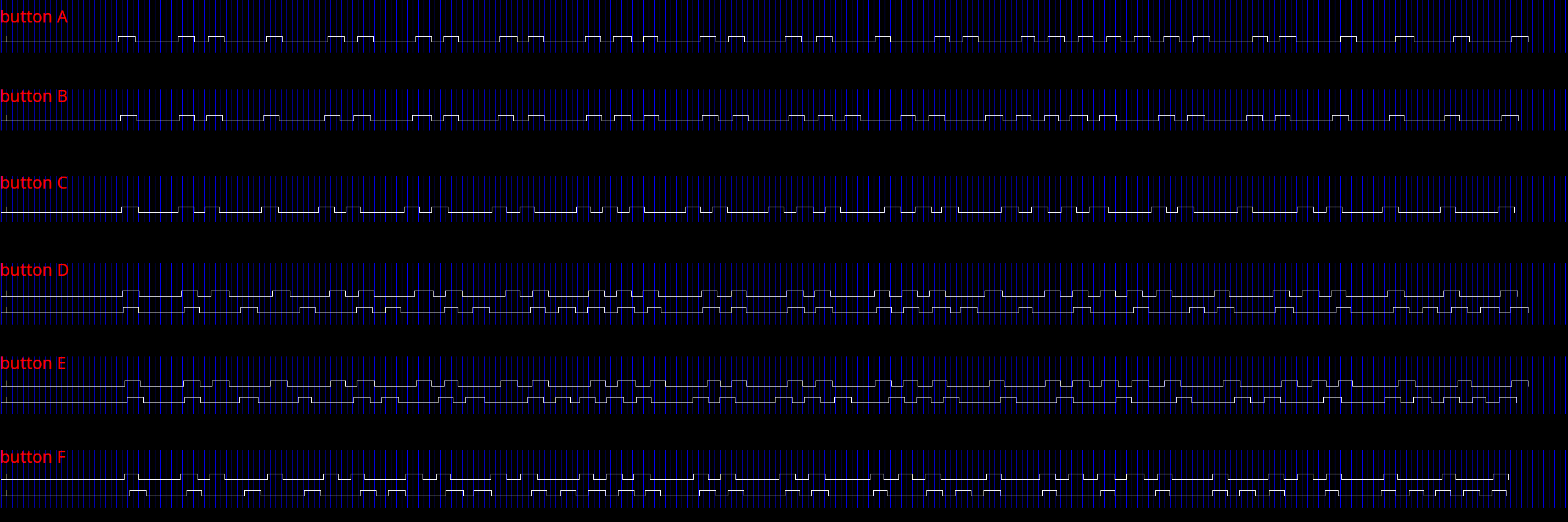
I'm trying to capture a new pioneer remote, but irrecord doesn't
distinguish some buttons. As I see on xmode2 there are two types of
buttons: the second ones are twice longer with same first half. And no
one of the have a fixed prefix. Something like UTF-8.
xmode2 screenshot:
https://sergio.outerface.net/misc/xmode2-pioneer.png
first tree buttons (named A, B, C on the screenshot) gives one line
last tree buttons (named D, E, F on the screenshot) gives two lines
Buttons of the first type are recorded and work fine.
Buttons of the second type are recorded the same button.
Trying to record only second type buttons fails with:
```
Now start pressing buttons on your remote control.
It is very important that you press many different buttons randomly
and hold them down for approximately one second. Each button should
generate at least one dot but never more than ten dots of output.
Don't stop pressing buttons until two lines of dots (2x80) have
been generated.
Press RETURN now to start recording.
................................................................................
Got gap (6463 us)}
Please keep on pressing buttons like described above.
...............................................................................
Checking for toggle bit mask.
Please press an arbitrary button repeatedly as fast as possible.
Make sure you keep pressing the SAME button and that you DON'T HOLD
the button down!.
If you can't see any dots appear, wait a bit between button presses.
Press RETURN to continue.
Cannot find any toggle mask.
But I know for sure that RC6 has a toggle bit!
zsh: exit 1 irrecord
```
Remotes are Pioneer CD-R320 (possible CXC3173 CXC5719 CXC9605 CXE9606 in
other countries) and CD-R510 (possible CXC2665 in other countries)
version 0.10.1, debian sid, TSOP31238 connected to FT232RL
--
sergio.
On Mon, Sep 25, 2023 at 10:08:59PM -0400, Joe Ferner wrote:
> The Sharp remote send timing appears to be off from what I can track down.
> I started investigating this because my Denon receiver I'm trying to send
> commands to appears to be more sensitive to IR command timing and doesn't
> always response where as my other devices appear to work just fine using
> LIRC.
>
> According to this page https://www.sbprojects.net/knowledge/ir/sharp.php a
> logical "1" should be 2ms in total length and "0" should be 1ms in total
> length. If I use ir-ctl to measure the raw values from my remote I can
> confirm this timing (also confirmed using my ocilloscope). If I try to
> transmit using this command "ir-ctl -d /dev/lirc0 -S sharp:0x2e1" and view
> the results on my oscilloscope I'm seeing 2.3ms and 1.3ms instead of the
> expected 2ms and 1ms. Not 100% sure where this code is hiding but I found a
> couple places on github that relate to this timing issue...
>
> This is the code I found in the Linux kernel
> https://github.com/torvalds/linux/blob/master/drivers/media/rc/ir-sharp-decoder.c#L17-L18
> sharp_unit = 40
> 40 * 8 = 320 for the pulse is correct. But then the space is either 40 * 50
> = 2,000 or 40 * 25 = 1,000 which I believe should be 40 * (50-8) = 1,680
> and 40 * (25-8) = 680 to account for the initial bit pulse.
You're right, there is a problem here.
I've submitted a patch:
https://patchwork.linuxtv.org/project/linux-media/patch/202...@me.../
> This is the code I could find for ir-ctl...
> https://github.com/cz172638/v4l-utils/blob/master/utils/ir-ctl/ir-encode.c#L149-L151
> It has a similar problem, it doesn't appear to be taking into account the
> initial bit pulse into the timing.
Looks like it has exactly the same problem, am I mistaken?
I'll write a patch for ir-ctl too.
Thanks for reporting.
Sean
The Sharp remote send timing appears to be off from what I can track down.
I started investigating this because my Denon receiver I'm trying to send
commands to appears to be more sensitive to IR command timing and doesn't
always response where as my other devices appear to work just fine using
LIRC.
According to this page https://www.sbprojects.net/knowledge/ir/sharp.php a
logical "1" should be 2ms in total length and "0" should be 1ms in total
length. If I use ir-ctl to measure the raw values from my remote I can
confirm this timing (also confirmed using my ocilloscope). If I try to
transmit using this command "ir-ctl -d /dev/lirc0 -S sharp:0x2e1" and view
the results on my oscilloscope I'm seeing 2.3ms and 1.3ms instead of the
expected 2ms and 1ms. Not 100% sure where this code is hiding but I found a
couple places on github that relate to this timing issue...
This is the code I found in the Linux kernel
https://github.com/torvalds/linux/blob/master/drivers/media/rc/ir-sharp-decoder.c#L17-L18
sharp_unit = 40
40 * 8 = 320 for the pulse is correct. But then the space is either 40 * 50
= 2,000 or 40 * 25 = 1,000 which I believe should be 40 * (50-8) = 1,680
and 40 * (25-8) = 680 to account for the initial bit pulse.
This is the code I could find for ir-ctl...
https://github.com/cz172638/v4l-utils/blob/master/utils/ir-ctl/ir-encode.c#L149-L151
It has a similar problem, it doesn't appear to be taking into account the
initial bit pulse into the timing.
What am I missing?
My Arduino nano board already has Flash. But no matter what I did, I could not bring the /dev/lirc* file to my system. Do you have any other solution suggestions or points I should pay attention to? Thank you.