cli
browsr command line interface
browsr(path, debug, max_lines, max_file_size, kwargs)
#
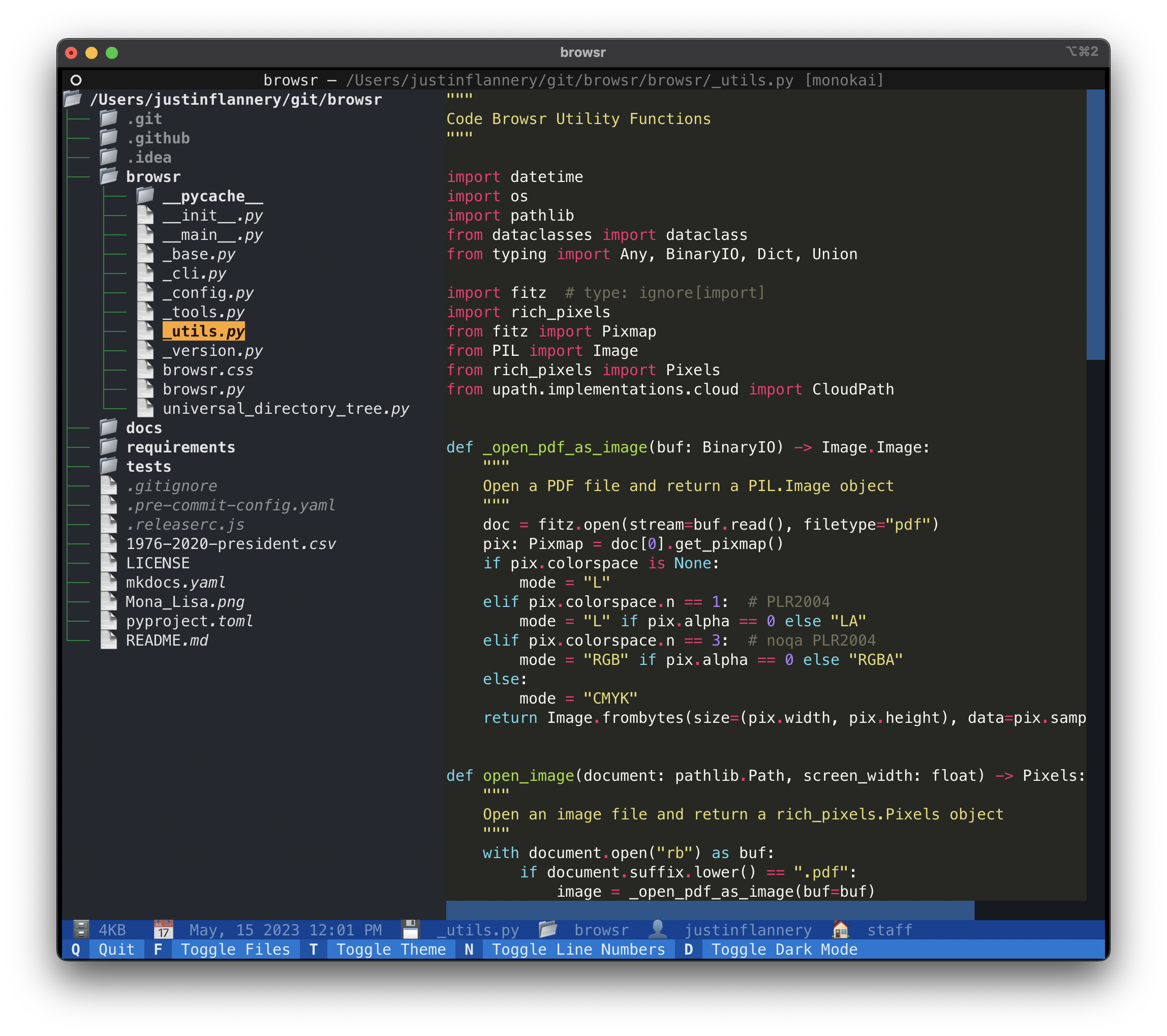
browsr 🗂️ a pleasant file explorer in your terminal
Navigate through directories and peek at files whether they're hosted locally, over SSH, in GitHub, AWS S3, Google Cloud Storage, or Azure Blob Storage. View code files with syntax highlighting, format JSON files, render images, convert data files to navigable datatables, and more.
browsr
Installation#
It's recommended to install browsr via pipx
with all optional dependencies, this enables browsr to access
remote cloud storage buckets and open parquet files.
Usage Examples#
Local#
Browse your current working directory#
Browse a local directory#
Cloud Storage#
Browse an S3 bucket#
Browse a GCS bucket#
Browse Azure Services#
Pass Extra Arguments to Cloud Storage#
Some cloud storage providers require extra arguments to be passed to the
filesystem. For example, to browse an anonymous S3 bucket, you need to pass
the anon=True argument to the filesystem. This can be done with the -k/--kwargs
argument.
GitHub#
Browse a GitHub repository#
Browse a GitHub Repository Branch#
Browse a Private GitHub Repository#
Browse a GitHub Repository Subdirectory#
Browse a GitHub URL#
Browse a Filesystem over SSH#
Browse a SFTP Server#
Key Bindings#
Q- Quit the applicationF- Toggle the file tree sidebarT- Toggle the rich theme for code formattingN- Toggle line numbers for code formattingD- Toggle dark mode for the application.- Parent Directory - go up one directoryR- Reload the current directoryC- Copy the current file or directory path to the clipboardX- Download the file from cloud storage
Source code in browsr/cli.py
 31
 32
 33
 34
 35
 36
 37
 38
 39
 40
 41
 42
 43
 44
 45
 46
 47
 48
 49
 50
 51
 52
 53
 54
 55
 56
 57
 58
 59
 60
 61
 62
 63
 64
 65
 66
 67
 68
 69
 70
 71
 72
 73
 74
 75
 76
 77
 78
 79
 80
 81
 82
 83
 84
 85
 86
 87
 88
 89
 90
 91
 92
 93
 94
 95
 96
 97
 98
 99
100
101
102
103
104
105
106
107
108
109
110
111
112
113
114
115
116
117
118
119
120
121
122
123
124
125
126
127
128
129
130
131
132
133
134
135
136
137
138
139
140
141
142
143
144
145
146
147
148
149
150
151
152
153
154
155
156
157
158
159
160
161
162
163
164
165
166
167
168
169
170
171
172
173
174
175
176
177
178
179
180
181
182
183
184
185
186
187
188
189
190
191
192
193
194
195
196
197
198
199
200
201
202
203
204
205
206
207
208
209
210
211
212
213
214
215
216
217
218
219
220
221
222
223
224
225
226
@click.command(name="browsr", cls=rich_click.rich_command.RichCommand)
@click.argument("path", default=None, required=False, metavar="PATH")
@click.option(
"-l",
"--max-lines",
default=1000,
show_default=True,
type=int,
help="Maximum number of lines to display in the code browser",
envvar="BROWSR_MAX_LINES",
show_envvar=True,
)
@click.option(
"-m",
"--max-file-size",
default=20,
show_default=True,
type=int,
help="Maximum file size in MB for the application to open",
envvar="BROWSR_MAX_FILE_SIZE",
show_envvar=True,
)
@click.version_option(version=__version__, prog_name=__application__)
@click.option(
"--debug/--no-debug",
default=False,
help="Enable extra debugging output",
type=click.BOOL,
envvar="BROWSR_DEBUG",
show_envvar=True,
)
@click.option(
"-k",
"--kwargs",
multiple=True,
help="Key=Value pairs to pass to the filesystem",
envvar="BROWSR_KWARGS",
show_envvar=True,
)
defbrowsr(
path: Optional[str],
debug: bool,
max_lines: int,
max_file_size: int,
kwargs: Tuple[str, ...],
) -> None:
"""
browsr 🗂️ a pleasant file explorer in your terminal
Navigate through directories and peek at files whether they're hosted locally,
over SSH, in GitHub, AWS S3, Google Cloud Storage, or Azure Blob Storage.
View code files with syntax highlighting, format JSON files, render images,
convert data files to navigable datatables, and more.
\f
## Installation
It's recommended to install **`browsr`** via [pipx](https://pypa.github.io/pipx/)
with **`all`** optional dependencies, this enables **`browsr`** to access
remote cloud storage buckets and open parquet files.
```shell
pipx install "browsr[all]"
```
## Usage Examples
### Local
#### Browse your current working directory
```shell
browsr
```
#### Browse a local directory
```shell
browsr/path/to/directory
```
### Cloud Storage
#### Browse an S3 bucket
```shell
browsr s3://bucket-name
```
#### Browse a GCS bucket
```shell
browsr gs://bucket-name
```
#### Browse Azure Services
```shell
browsr adl://bucket-name
browsr az://bucket-name
```
#### Pass Extra Arguments to Cloud Storage
Some cloud storage providers require extra arguments to be passed to the
filesystem. For example, to browse an anonymous S3 bucket, you need to pass
the `anon=True` argument to the filesystem. This can be done with the `-k/--kwargs`
argument.
```shell
browsr s3://anonymous-bucket -k anon=True
```
### GitHub
#### Browse a GitHub repository
```shell
browsr github://juftin:browsr
```
#### Browse a GitHub Repository Branch
```shell
browsr github://juftin:browsr@main
```
#### Browse a Private GitHub Repository
```shell
export GITHUB_TOKEN="ghp_1234567890"
browsr github://juftin:browsr-private@main
```
#### Browse a GitHub Repository Subdirectory
```shell
browsr github://juftin:browsr@main/tests
```
#### Browse a GitHub URL
```shell
browsr https://github.com/juftin/browsr
```
#### Browse a Filesystem over SSH
```
browsr ssh://user@host:22
```
#### Browse a SFTP Server
```
browsr sftp://user@host:22/path/to/directory
```
## Key Bindings
- **`Q`** - Quit the application
- **`F`** - Toggle the file tree sidebar
- **`T`** - Toggle the rich theme for code formatting
- **`N`** - Toggle line numbers for code formatting
- **`D`** - Toggle dark mode for the application
- **`.`** - Parent Directory - go up one directory
- **`R`** - Reload the current directory
- **`C`** - Copy the current file or directory path to the clipboard
- **`X`** - Download the file from cloud storage
"""
extra_kwargs = {}
if kwargs:
for kwarg in kwargs:
try:
key, value = kwarg.split("=")
extra_kwargs[key] = value
except ValueError as ve:
raise click.BadParameter(
message=(
f"Invalid Key/Value pair: `{kwarg}` "
"- must be in the format Key=Value"
),
param_hint="kwargs",
) fromve
file_path = path or os.getcwd()
config = TextualAppContext(
file_path=file_path,
debug=debug,
max_file_size=max_file_size,
max_lines=max_lines,
kwargs=extra_kwargs,
)
app = Browsr(config_object=config)
app.run()