Error while editing interactive activity display time in interactive video
Submitted by jasimp on Wed, 11/17/2021 - 09:32
Forums:
Hi
I am facing a error after updating the h5p to the new version
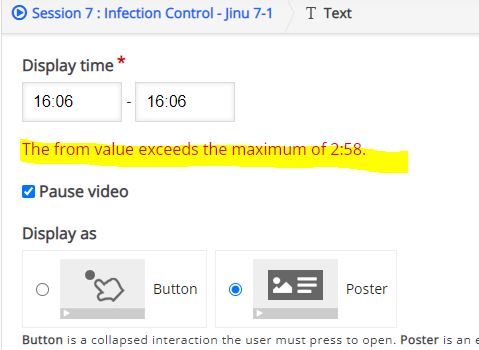
While editing interactive questions display time in interactive video , below error message is appearing always
The from value exceeds the maximum of 2:58.
But there is no error if we are adding a new interative aitem from tool bar
Is any one facing the same?
LMS: Moodle 3.10.7
H5p Version : 1.22.3 , 2021061100
Attachments:
Image icon h5p error.JPG
Content types:
BV52
Wed, 11/17/2021 - 17:18
Permalink
Hi jasimp,How long is the
Hi jasimp,
How long is the video? Also it would help if you can provide the content that is having the issue.
-BV
jasimp
Fri, 11/19/2021 - 22:25
Permalink
Hi The video only 20 minutes
Hi
The video only 20 minutes.
I tested with all type of videos including you tube videos and the issue is there
The issue that facing when we are re opening an interactive content and editing the interactive display time and this issue with the new version only
So what i am doing now is, if i want to edit the timing, just copy it and paste it again then edit the time. Newly created interactivve content doesnt have the time editing issue. Once we saved the entire h5p then reopen the interactive content for editing the timing, then there is the issue and the error messge same for all time.
One of my installation still works on old verion and there is no such issue.
BV52
Mon, 11/22/2021 - 17:44
Permalink
Hi jasimp,Just to isolate the
Hi jasimp,
Just to isolate the issue have you tried downloading the content that is having an issue and uploading it to the other installation? Also can you check if you have any errors in the browser console.
-BV