-
Notifications
You must be signed in to change notification settings - Fork 0
Description
zipkin 链路追踪
越来越多的微服务存在,他们之间也会有更加复杂的调用关系。
这个调用关系,仅仅通过观察代码,会越来越难以识别,就需要通过 zipkin 服务链路追踪服务器 这个东西来用图片进行识别各个服务的调用关系
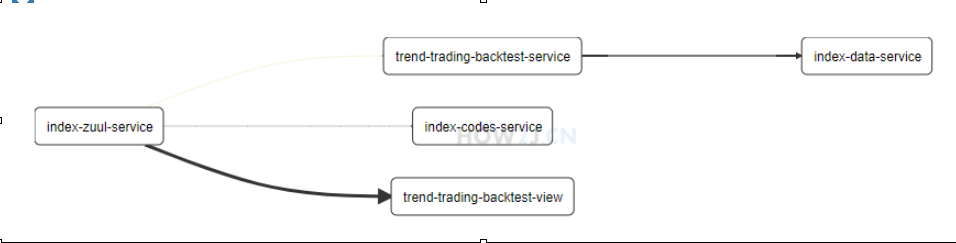
启动zipkin-server
java -jar zipkin-server-2.10.1-exec.jar
pom.xml 为各个服务增加
org.springframework.cloud
spring-cloud-starter-zipkin
application.yml 为各个需要追踪的服务增加
spring:
application:
name: index-codes-service
#增加 zipkin 地址
zipkin:
base-url: http://localhost:9411
eureka:
client:
serviceUrl:
defaultZone: http://localhost:8761/eureka/
eureka:
client:
serviceUrl:
defaultZone: http://localhost:8761/eureka/
spring:
application:
name: index-data-service
zipkin:
base-url: http://localhost:9411
Application增加 Sampler 的Bean
@SpringBootApplication
@EnableEurekaClient
@EnableCaching
public class IndexCodesApplication {
public static void main(String[] args) {
}
//增加Sampler的Bean
@bean
public Sampler defaultSampler() {
return Sampler.ALWAYS_SAMPLE;
}
}
链路追踪地址
http://localhost:9411/zipkin/dependency/
配置服务器 ConfigServer
创建子模块index-config-server
pom.xml
trendParentProject
cn.how2j.trend
0.0.1-SNAPSHOT
4.0.0
<artifactId>index-config-server</artifactId>
<dependencies>
 <dependency>
 <groupId>org.springframework.cloud</groupId>
 <artifactId>spring-cloud-starter-netflix-eureka-client</artifactId>
 </dependency>
 <dependency>
 <groupId>org.springframework.boot</groupId>
 <artifactId>spring-boot-starter-web</artifactId>
 </dependency>
#spring-cloud-config-server 的依赖
org.springframework.cloud
spring-cloud-config-server
</dependencies>
启动类 Application 增加 @EnableConfigServer
@SpringBootApplication
@EnableConfigServer
@EnableDiscoveryClient
@EnableEurekaClient
public class IndexConfigServerApplication {
public static void main(String[] args) {
new SpringApplicationBuilder(IndexConfigServerApplication.class).properties("server.port=" + port).run(args);
}
}
application.yml
spring:
application:
name: index-config-server
cloud:
config:
#label 表示 分支
label: master
server:
git:
#uri 表示 git 地址:
uri: https://github.com/how2j/trendConfig/
#searchPaths 表示目录
searchPaths: respo
eureka:
client:
serviceUrl:
defaultZone: http://localhost:8761/eureka/
image

更改所需要配置的服务
pom.xml 添加对spring-cloud-starter-config 的依赖
 <dependency>
 <groupId>org.springframework.cloud</groupId>
 <artifactId>spring-cloud-starter-config</artifactId>
 </dependency>
增加bootstrap.yml 把 eureka 地址信息移动到了 bootstrap.yml 里
bootstrap.yml 和 application.yml 的区别,简单说就是前者先启动,并且一些系统方面的配置需要在 bootstrap.yml 里进行配置
spring:
cloud:
config:
label: master
profile: dev
discovery:
enabled: true
#提供了 serviceId: index-config-server, 这个是配置服务器在 eureka server 里的服务名称,这样就可以定位 config-server了
serviceId: index-config-server
eureka:
client:
serviceUrl:
defaultZone: http://localhost:8761/eureka/
增加注解 @value("${version}")
@controller
public class ViewController {
#增加了个注解来获取版本信息
@value("${version}")
String version;
@GetMapping("/")
public String view(Model m) throws Exception {
m.addAttribute("version", version);
return "view";
}
}
rabbitMQ 数据广播
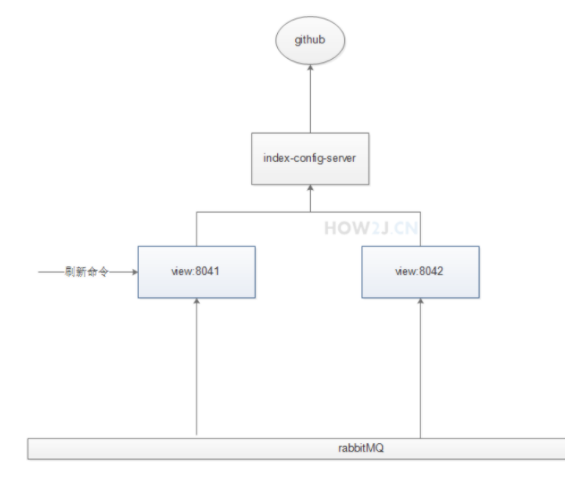
服务业务逻辑
-
通过运行FreshConfigUtil类, 以 post 方式访问地址 http://localhost:8041/actuator/bus-refresh,通知 view:8041 刷新配置。
-
view:8041 告诉 index-config-server 获取新的配置数据
-
index-config-server 从 git 拿到数据,返回给 view:8041
-
view:8041 拿到数据不仅自己用了,还发给了 rabbitMQ
-
rabbitMQ 拿到这个数据广播给其他的,比如 view:8042
启动RabbitMQ
为view服务添加pom.xml
trend-trading-backtest-view
#用于访问路径:/actuator/bus-refresh, 这个地址就用来通知它去更新配置服务器
org.springframework.boot
spring-boot-starter-actuator
#多了spring-cloud-starter-bus-amqp 用于支持 rabbitmq
org.springframework.cloud
spring-cloud-starter-bus-amqp
bootstrap.yml
spring:
cloud:
config:
label: master
profile: dev
discovery:
enabled: true
serviceId: index-config-server
#新增 but总线配置
bus:
enabled: true
trace:
enabled: true
#新增 rabbitMQ 配置
rabbitmq:
host: localhost
port: 5672
username: guest
password: guest
eureka:
client:
serviceUrl:
defaultZone: http://localhost:8761/eureka/
application.yml
spring:
application:
name: trend-trading-backtest-view
thymeleaf:
mode: LEGACYHTML5
encoding: UTF-8
content-type: text/html
cache: false
zipkin:
base-url: http://localhost:9411
#增加management
#其作用是允许访问:/actuator/bus-refresh
management:
endpoints:
web:
exposure:
include: ""
cors:
allowed-origins: ""
allowed-methods: "*"
增加 rabbitMQ 端口判断。5672 是 rabbitMQ 服务器的端口, 15672 是 rabbitMQ 自带的某个web工具的端口
 int rabbitMQPort = 5672;
 if(NetUtil.isUsableLocalPort(rabbitMQPort)) {
 System.err.printf("检查到端口%d 未启用,判断 rabbitMQ 服务器没有启动,本服务无法使用,故退出%n", rabbitMQPort );
 System.exit(1);
 }
为view增加注解 @RefreshScope 表示允许刷新
import org.springframework.beans.factory.annotation.Value;
import org.springframework.cloud.context.config.annotation.RefreshScope;
import org.springframework.stereotype.Controller;
import org.springframework.ui.Model;
import org.springframework.web.bind.annotation.GetMapping;
@controller
@RefreshScope
public class ViewController {
@value("${version}")
String version;
@GetMapping("/")
public String view(Model m) throws Exception {
m.addAttribute("version", version);
return "view";
}
}
post访问工具
import java.util.HashMap;
import cn.hutool.http.HttpUtil;
public class FreshConfigUtil {
public static void main(String[] args) {
HashMap<String,String> headers =new HashMap<>();
headers.put("Content-Type", "application/json; charset=utf-8");
System.out.println("因为要去git获取,还要刷新index-config-server, 会比较卡,所以一般会要好几秒才能完成,请耐心等待");
 String result = HttpUtil.createPost("http://localhost:8041/actuator/bus-refresh").addHeaders(headers).execute().body();
 System.out.println("result:"+result);
 System.out.println("refresh 完成");
}
}
对服务链路追踪的影响
因为视图服务进行了改造,支持了 rabbitMQ, 那么在默认情况下,它的信息就不会进入 Zipkin了。 在Zipkin 里看不到视图服务的资料了。
为了解决这个问题,在启动 Zipkin 的时候 带一个参数就好了:--zipkin.collector.rabbitmq.addresses=localhost
现在改成
java -jar zipkin-server-2.10.1-exec.jar --zipkin.collector.rabbitmq.addresses=localhost
断路器监控
新建子模块 index-hystrix-dashboard
pom.xml
trendParentProject
cn.how2j.trend
0.0.1-SNAPSHOT
4.0.0
<artifactId>index-hystrix-dashboard</artifactId>
<dependencies>
 <dependency>
 <groupId>org.springframework.cloud</groupId>
 <artifactId>spring-cloud-starter-netflix-eureka-client</artifactId>
 </dependency>
 <dependency>
 <groupId>org.springframework.boot</groupId>
 <artifactId>spring-boot-starter-web</artifactId>
 </dependency>
 <dependency>
 <groupId>org.springframework.boot</groupId>
 <artifactId>spring-boot-starter-actuator</artifactId>
 </dependency>
 <dependency>
 <groupId>org.springframework.cloud</groupId>
 <artifactId>spring-cloud-starter-netflix-hystrix</artifactId>
 </dependency>
 <dependency>
 <groupId>org.springframework.cloud</groupId>
 <artifactId>spring-cloud-starter-netflix-hystrix-dashboard</artifactId>
 </dependency>
</dependencies>
断路器监控启动器 IndexHystrixDashboardApplication
import org.springframework.boot.autoconfigure.SpringBootApplication;
import org.springframework.boot.builder.SpringApplicationBuilder;
import org.springframework.cloud.netflix.hystrix.dashboard.EnableHystrixDashboard;
import cn.hutool.core.util.NetUtil;
@SpringBootApplication
//使用 @EnableHystrixDashboard 来启动断路器监控台
@EnableHystrixDashboard
public class IndexHystrixDashboardApplication {
public static void main(String[] args) {
int port = 8070;
int eurekaServerPort = 8761;
if(NetUtil.isUsableLocalPort(eurekaServerPort)) {
System.err.printf("检查到端口%d 未启用,判断 eureka 服务器没有启动,本服务无法使用,故退出%n", eurekaServerPort );
System.exit(1);
}
if(!NetUtil.isUsableLocalPort(port)) {
System.err.printf("端口%d被占用了,无法启动%n", port );
System.exit(1);
}
new SpringApplicationBuilder(IndexHystrixDashboardApplication.class).properties("server.port=" + port).run(args);
}
}
application.yml
spring:
application:
name: index-hystrix-dashboard
对需要进行监控的服务进行修改
pom.xml 增加监控接口
 <dependency>
 <groupId>org.springframework.boot</groupId>
 <artifactId>spring-boot-starter-actuator</artifactId>
 </dependency>
为需要监控的服务的启动类增加注解: @EnableCircuitBreaker,用于把断路信息分享出来
@EnableCircuitBreaker
public class TrendTradingBackTestServiceApplication {
public static void main(String[] args) {
new SpringApplicationBuilder(TrendTradingBackTestServiceApplication.class).properties("server.port=" + port).run(args);
}
}
更改需要监控的服务的application.yml
spring:
application:
name: trend-trading-backtest-service
zipkin:
base-url: http://localhost:9411
feign.hystrix.enabled: true
#增加如下内容,使之可以访问
management:
endpoints:
web:
exposure:
include: ""
cors:
allowed-origins: ""
allowed-methods: "*"
监控地址
http://localhost:8070/hystrix
输入参数
http://localhost:8051/actuator/hystrix.stream