-
-
Notifications
You must be signed in to change notification settings - Fork 617
Theme Gallery (Share your theme) #1438
-
Share your themes
- If you made a theme, please share it with the community here.
- Screenshot + Download link (github, google drive, etc...)
How to save a theme
-
Navigate to the theme file, it should be a xaml file type on GitHub. Once you are viewing the file content click "Raw" on the top right corner and Ctrl +S to save the theme (make sure it's saved with .xaml extension).
-
Save the theme in your user data directory, usually in ~/AppData/Roaming/FlowLauncher/Themes directory. If not sure, from flow type
flow launcher userdatathen navigate to the Themes directory. -
Select your new theme via flow's theme section.
Additional
- We are planning a theme gallery menu on the website in the future, but is of low priority at this stage. If you've posted your themes here, they will be included when it's completed.
- Since I often modify the design, there may be changes/new additions to the theme structure, which I'll mention these details here.
Notice (2026年02月25日)
Starting with version 2.1.0, we have moved to a new UI framework, themes with namespaces pointing to http://schemas.modernwpf.com/2019 will no longer work. Please update your themes by following the steps in this PR comment
Notice (2025年06月04日)
- Starting from version 1.20.0, the acrylic implementation method has been changed. Theme authors are kindly requested to refer to the theme documentation or the built-in themes' acrylic settings and update their themes accordingly.
Known Issues:
-
Themes without a PendingLine style may cause errors. Please add the PendingLine key to your theme. This issue has been fixed and will be resolved in the version following 1.20.0. After that update, including this key will no longer be necessary.
-
The Glyph key generated by the website’s theme builder is incorrectly set. If the glyph icons appear strange, please check this setting. Change ItemGlyphStyle to ItemGlyph.
Beta Was this translation helpful? Give feedback.
All reactions
-
👍 1 -
🎉 7 -
❤️ 4
Replies: 63 comments 129 replies
-
Theme Collection
Current color palettes: Artic Nord, Solarized, Everforest, Dracula, Gruvbox
Each theme has two types of .xaml files. Files with "cln-" prefix in the name matches subtitles with the background.
How to use:
-
Visit the repo on the header
-
Click on the file with the theme and style of your choice in the name
-
Click "Raw"
-
'Ctrl +S' on the newly opened window to save the file as .xaml
-
put them in the "user-themes" folder in your Flowlauncher directory.
-
enjoy
cln-Gruvboxbyzurg.xamlGruvboxbyzurg.xaml : non cln- file (subtitles are visible)cln-Draculabyzurg.xamlEverforestbyzurg.xamlcln-Nordbyzurg.xamlcln-Solarized-Dark.xamlcln-Solarized-Darker.xamlcln-Solarized-light.xaml


Beta Was this translation helpful? Give feedback.
All reactions
-
🎉 2
-
@Rajbir98 Check out OnsetGlaze theme. I think it is what you would like.
Beta Was this translation helpful? Give feedback.
All reactions
-
Hi @drunkzurg, We found miss typo 'BaseItemHotkeySelecetedStyle'(It should be "selected") in our code and it fixed in prerelease. (after 1.110) Your theme will also be affected. You can reflect it after 1.110, but I think there will be no particular problem if you erase the line (based on part) below. (Regardless of the version,)
Sorry to bother you. 😂

Beta Was this translation helpful? Give feedback.
All reactions
-
Hey, your themes are awesome but I'm looking for a blur theme that matches my desktop's overall look can you make something like this?

@Rajbir98 Are you wanting the close box as well or just the blur effect similar to your screenshot?
Beta Was this translation helpful? Give feedback.
All reactions
-
okay, i'll update them soon. Thanks!
Beta Was this translation helpful? Give feedback.
All reactions
-
Hey, your themes are awesome but I'm looking for a blur theme that matches my desktop's overall look can you make something like this? image
This looks great, how did you make it?
Beta Was this translation helpful? Give feedback.
All reactions
-
🎨 onsetGlaze
onsetGlaze is a theme for FlowLauncher with Acrylic/Glass effect.
🖼️ Theme Dispaly
image

image

🪄 Features
- Acrylic background.
- Curved layout.
⚙️ Installation
- Copy and paste in pw/bash.
cd ~/AppData/Roaming/FlowLauncher/Themes && curl -o OnsetGlaze.xaml https://raw.githubusercontent.com/abhidahal/onsetGlaze.flow/main/OnsetGlaze.xaml
Use bash or powershell terminal.
or just follow the instructions on the repo.
Beta Was this translation helpful? Give feedback.
All reactions
-
👍 27 -
😄 3 -
🎉 4 -
❤️ 9 -
🚀 2 -
👀 3
-
is there a possibility that you create this one with a black coloured font (for light backgrounds)? 🙈
Check out macOS Light in the thread below.
Beta Was this translation helpful? Give feedback.
All reactions
-
Is there a way to make it more blurry or just darken the color a little bit? The theme is amazing on dark colors but doesnt work well on light ones
Beta Was this translation helpful? Give feedback.
All reactions
-
Is there a way to make it more blurry or just darken the color a little bit? The theme is amazing on dark colors but doesnt work well on light ones
@soeoeb @haslanz
Run :
cd ~/AppData/Roaming/FlowLauncher/Themes && curl -o OnsetGlaze-Max.xaml https://raw.githubusercontent.com/abhidahal/onsetGlaze.flow/lessBlur/OnsetGlaze.xaml
and select OnsetGlaze-Max Theme in your FlowLauncher Setting.
- PS: make sure to use latest Powershell(from MS.store) or git-bash while running the command.
Beta Was this translation helpful? Give feedback.
All reactions
-
❤️ 2
-
Is there a way to make it more blurry or just darken the color a little bit? The theme is amazing on dark colors but doesnt work well on light ones
@soeoeb @haslanz Run :
cd ~/AppData/Roaming/FlowLauncher/Themes && curl -o OnsetGlaze-Max.xaml https://raw.githubusercontent.com/abhidahal/onsetGlaze.flow/lessBlur/OnsetGlaze.xamland select OnsetGlaze-Max Theme in your FlowLauncher Setting.
That is perfect. Much appreciated, thanks for the help and for an amazing theme <3
Beta Was this translation helpful? Give feedback.
All reactions
-
❤️ 1
-
This is gorgeous!! I also love the mac inspired fork as well. Nicely done!
Beta Was this translation helpful? Give feedback.
All reactions
-
🟢 Updated to support Flow Launcher v1.20.0
🎨 CircleDarkBlur Theme
CircleDarkBlur is a theme for Flow Launcher with a blur effect. Inspired by the original Circle Light theme.
🖼️ Screenshots


🪶 Features
- Acrylic/Glass effect
- Rounded corners
- White colored pending bar
- Selected item bullet
⚙️ Installtion
- Click on the CircleDarkBlur.xaml then click on
Rawbutton. Then save the file usingCtrl + S. - Copy/Move the file to
C:\Users\[username]\AppData\Roaming\FlowLauncher\Themesfolder. - Select theme on the Theme tab on Flow Launcher.
- Enjoy the theme :)
Note: However, it currently appears better with the Acrylic backdrop type only
Image
Beta Was this translation helpful? Give feedback.
All reactions
-
👍 7 -
❤️ 6
-

hello sir, would it be possible to fix the rounded corners glitch, which can be seen on the right side (sometimes its on both sides)?Would it be possible to make it completely rounded, without the glitching corners? thanks in advance
Beta Was this translation helpful? Give feedback.
All reactions
-
Hello @ruchilharpal
I'm sorry, the issue you mentioned is unrelated to this theme file but an issue in WPF UI (AFAIK). Because all the inbuild themes also have this issue. You can check the previous replies. But I'll check again if this is solvable. Thank you for using my theme.
Beta Was this translation helpful? Give feedback.
All reactions
-
👍 1
-
i love this theme.
i edited it a little bit to match my system color themeing and make the the text bigger. ive a big tv as moniter.

Beta Was this translation helpful? Give feedback.
All reactions
-
🎉 1
-
Hello @ruchilharpal I'm sorry, the issue you mentioned is unrelated to this theme file but an issue in WPF UI (AFAIK). Because all the inbuild themes also have this issue. You can check the previous replies. But I'll check again if this is solvable. Thank you for using my theme.
no its not WPF issue, you need request radios corner via DWM.dll api but you can't on theme it's main app job.
Beta Was this translation helpful? Give feedback.
All reactions
-
Hello @ruchilharpal I'm sorry, the issue you mentioned is unrelated to this theme file but an issue in WPF UI (AFAIK). Because all the inbuild themes also have this issue. You can check the previous replies. But I'll check again if this is solvable. Thank you for using my theme.
no its not WPF issue, you need request radios corner via DWM.dll api but you can't on theme it's main app job.
Hi. I've usually described this as a WPF issue, so most people generally understand it that way. Technically, you're right that "making a window transparent" can be done via DWM. But if you look at our code (though it's changed a bit recently), you'll see that Flow doesn't behave like a typical WPF window.
For example, a window with AllowTransparency=True can't use drop shadows or DWM effects. We had to use that setting due to the way we handle show/hide logic. Also, due to the structure of our UI, we needed to apply acrylic brushes to specific regions only, which WPF doesn't support. We also needed things like tint color support in the theme and applying different colors to different parts of the window — again, not natively possible in WPF.
So yes — you're right that making a transparent window is possible with DWM and that it's not strictly a WPF limitation in itself. But in our project, it absolutely was a limitation due to the design and architectural requirements.
In fact, in the most recent versions, we had to change a lot of our architecture and even give up some existing features to make this work. That decision — and the cleanup that followed — took a huge amount of time. We eventually implemented a transparent window with rounded corners, but it was far from trivial.
I’m not lying or exaggerating. I'm a designer with no formal programming background, and I was the only one on the team really focused on this feature. I didn't even know what DWM was when I started. All I wanted was a transparent window with rounded corners — but getting there required a huge amount of trial and error, learning, and iteration over a long time. In other Windows apps, adding one DWM line might do the trick, but in Flow, it took years (not a joke) of PRs and rewrites. The proof is in our PR history — our team members can vouch for that.
Even if it looks easy to you, you haven’t actually implemented this within our project context. So please don’t comment in a way that makes it seem like we were lying or being misleading by saying "this isn’t a WPF limitation." That wasn’t fair.
Beta Was this translation helpful? Give feedback.
All reactions
-
❤️ 2
-

Beta Was this translation helpful? Give feedback.
All reactions
-
👍 1
-
macOS
Minic macOS Ventura Spotlight Search.
Forked from @abhidahal onsetGlaze
Download from GitHub
Download with PowerShell
cd ~/AppData/Roaming/FlowLauncher/Themes
# If you are using Flow Launcher Portable 1.14.1
# If not replace [1.14.1] with your version
cd ~/AppData/Local/FlowLauncher/app-1.14.1/UserData/Themes
# Dark Theme
curl -o macOS.xaml https://raw.githubusercontent.com/cc46808/macOS.flow/main/macOS.xaml
# Light Theme
curl -o macOS-Light.xaml https://raw.githubusercontent.com/cc46808/macOS.flow/main/macOS-Light.xaml


Beta Was this translation helpful? Give feedback.
All reactions
-
❤️ 7 -
🚀 5
-
image
Is it possible to show the "What's new" screen below the search bar just like in the real Mac OS as soon as you evoke flow launcher?

Beta Was this translation helpful? Give feedback.
All reactions
-
@GameBoyzGB Interesting. Standby and let me see if we can.
Beta Was this translation helpful? Give feedback.
All reactions
-
👍 7
-

Beta Was this translation helpful? Give feedback.
All reactions
-
👍 3
-
🎨 Violet
Violet is a theme for Flow Launcher.
🖼️ Theme Dispaly


Download from GitHub
Download with PowerShell
cd ~/AppData/Roaming/FlowLauncher/Themes
#If you are using Flow Launcher Portable
cd ~/AppData/Local/FlowLauncher/app-1.12.1/UserData/Themes
#Dark Theme
curl -o Violet.xaml https://raw.githubusercontent.com/eliaszon/Violet.flow/main/Violet.xaml
Beta Was this translation helpful? Give feedback.
All reactions
-
👍 6
-
How did you changed your font?
Beta Was this translation helpful? Give feedback.
All reactions
-
In flow launcher type s Fonts and click enter. This will take you to the fonts section of your windows device. Just add any new font that you want by drag and dropping the font files (usually .otf and .ttf files). You can get these for free from websites like fontspace. Now you can go to appearance section in Flow Launcher settings and click the marker icon at the topright to edit themes. In the fonts dropdown menu locate your desired font!
Beta Was this translation helpful? Give feedback.
All reactions
-
👍 2
-
Do we know what font is being used here?
Beta Was this translation helpful? Give feedback.
All reactions
-


Beta Was this translation helpful? Give feedback.
All reactions
-
👍 4 -
❤️ 2 -
🚀 2
-
🎨Bullet_Acrylic
Info and Links
cd ~/AppData/Roaming/FlowLauncher/Themes && curl -o Bullet_Acrylic.xaml https://raw.githubusercontent.com/KJH-x/FlowTheme/main/Bullet_Acrylic.xaml
Simple Acrylic With Bullet style.
Thanks:
🖼️

Beta Was this translation helpful? Give feedback.
All reactions
-
👍 4 -
🚀 4
-


Beta Was this translation helpful? Give feedback.
All reactions
-
🚀 6
-
Ah Thanks to this great guy @SoraTenshi I have finally used my github account to do something 😁
here's my theme. I modified SlimLight
oliveSlimLight
link to repo
It takes after my windows 10 theme where I have used as much olive green as possible. Shaken not stirred

Never done this before. Feel excited. 🐱👤Thanks @SoraTenshi
P.S. I have unsuccessfully used AHK to try to center the Flow.Launcher window. the default center is too far up top, like mac spotlight or whatever so I have to raise my eyes everytime I launch or press a hotkey. Any suggestions are gratefully welcomed.
P.P.S. I also failed to add blur to my theme. so much work! I am inspired by the Win 10 start menu. Windows 10 for life!!! Down with windoze 11! Also I want a live tile system tray clock, Now that would be cool.
Beta Was this translation helpful? Give feedback.
All reactions
-
❤️ 3
-
Hey there, you can set a custom search window location via flows settings, also display live time as well if I read your comment correctly.
Beta Was this translation helpful? Give feedback.
All reactions
-
Hello Guys. Just Themed My flow launcher. And i wanted to share it. I am a biginner though and i edited the my choice of color on sublime.xmal file. But before sharing it i wonder how can i change the query window shadow effect color (dark shadow anround the window). If anyone can help it will be appriciated.
here is my theme
Flow Launcher_VAQEFreI15

Beta Was this translation helpful? Give feedback.
All reactions
-
👍 4
-
Hey there, if I remember correctly, changing the shadow effect color is currently not possible as it's done via code.
Beta Was this translation helpful? Give feedback.
All reactions
-
share the .xaml file
Beta Was this translation helpful? Give feedback.
All reactions
-
My best theme is slim light. I was thinking sadly that the fonts for flow launcher were too big. And then came slim light with an air of perfection. However, also lurking nearby was avarice: how do I add a blur/mica effect to slimlight?
Beta Was this translation helpful? Give feedback.
All reactions
-
🎨 Raytrace
A Raycast theme for Flow Launcher.
Download from GitHub
🖼️ Theme Preview
253327320-ecb68417-2a05-48b0-925e-1032b4f354b0

🪪 Credits
Beta Was this translation helpful? Give feedback.
All reactions
-
Cartoon
Repo
Settings 28_11_2023 11_45_40 AM

Beta Was this translation helpful? Give feedback.
All reactions
-
That's really fancy😍
Beta Was this translation helpful? Give feedback.
All reactions
-
SlimDark
2024年01月02日 14_46_19-Theme Gallery (Share your theme) · Flow-Launcher_Flow Launcher · Discussion #143
Repository

Beta Was this translation helpful? Give feedback.
All reactions
-
🟠 DarcuboxBlur
Official release of Darcubox Flow Launcher theme!! based on darcubox-nvim palette.
📸 Screenshots


Beta Was this translation helpful? Give feedback.
All reactions
-
👀 MinFlow
My small changes to the onsetGlaze including dynamic light/dark theme
https://github.com/R0gue301/MinFlow/
🌙 Dark


☀️ Light


📃 How to install
-
Visit the repo
-
Click on the theme file (
MinFlow.xaml) -
Click "Raw"
-
Ctrl + S to save the file as .xaml
-
Put file in C:\Users\%USER%\AppData\Roaming\FlowLauncher\Themes
-
Select theme in FlowLauncher
Beta Was this translation helpful? Give feedback.
All reactions
-
❤️ 2
-
Tinted GlassMinimal theme that get things done. With flavours. Built with Flow Launcher's theme builder Please note that Blur settings are present in the .xaml files, but they simply stopped working for me after updating to 1.20.1 InstallationAll themes (.xaml) files are in the Theme directory in my GitHub repo here. Simply pick the one you'd like (or all of them) by downloading the file(s) or by copying their contents into .xaml files of your creation in Flow Launcher's User Theme directory. Tinted Glass - Standard Blur
Tinted Glass - Standard Blur - Accent
Tinted Glass - Pure Blur
Wallpaper CreditsImages from unsplash
|


Beta Was this translation helpful? Give feedback.
All reactions
-
🎉 3
-
Wow that's nice of a theme, I love this
Beta Was this translation helpful? Give feedback.
All reactions
-
I know how to fix the theme, just go to flow launcher's and find the theme documentation, and just follow the steps
Beta Was this translation helpful? Give feedback.
All reactions
-
The themes you shared do not look like the preview images. There is some kind of issue in their xaml files.
Beta Was this translation helpful? Give feedback.
All reactions
-
I created a version of the Solarized Osaka theme for Flow Launcher, inspired by Craftzdog (Devaslife).
You can find the theme file here:
👉 nxstynate/flow-theme-solarized-osaka
In the screenshot below, I'm using:
- WezTerm as my terminal emulator, with a custom-built Solarized Osaka theme applied to both the terminal and the status line.
- GlazeWM as my tiling window manager, paired with Zebar.
- A customized Zebar at the top of the screen, also styled to match the Solarized Osaka theme.

Beta Was this translation helpful? Give feedback.
All reactions
-
🎉 1 -
❤️ 1
-
I created a version of the Solarized Osaka theme for Flow Launcher, inspired by Craftzdog (Devaslife).
You can find the theme file here: 👉 nxstynate/flow-theme-solarized-osaka
In the screenshot below, I'm using:
- WezTerm as my terminal emulator, with a custom-built Solarized Osaka theme applied to both the terminal and the status line.
- GlazeWM as my tiling window manager, paired with Zebar.
- A customized Zebar at the top of the screen, also styled to match the Solarized Osaka theme.

@nxstynate
Thanks for the beautiful theme!
How can I reduce the width of the scroll bar on the right?
Beta Was this translation helpful? Give feedback.
All reactions
-
That's a good catch, I like to have my scroll bar minimized also. I will look at making this update if it is possible.
Beta Was this translation helpful? Give feedback.
All reactions
-
👍 1
-
I attempted to shrink the scroll bar but was having trouble for the time being I removed it, which is a much cleaner look.
Beta Was this translation helpful? Give feedback.
All reactions
-
Screenshot 2025年06月21日 090044
Screenshot 2025年06月21日 085956


to download this -> https://github.com/Babayoboy/GOODENOUGH
Beta Was this translation helpful? Give feedback.
All reactions
-
💧 TranslucentFlow
A Translucent theme for Flow Launcher
Today, we have translucent taskbar, translucent start menu, translucent notifications center... but not translucent Flow Launcher ! (we have, but not in the way I imagine)
This theme solves the problem by making your Flow Launcher translucent with an acrylic blur, inspired by other FL themes (see Credits) and other Windows editing applications (TranslucentTB, MicaForEveryone, ...).
Tip
To get a better experience, switch your Windows theme to dark ! The light theme is... ugly
Don't hesitate to make suggestions, or report any bugs to improve your experience with this theme. Thanks to use TranslucentFlow !!!
How to install
- Download the .xaml file HERE
- Put it in your Flow Launcher directory (
C:\Users\$USER\AppData\Roaming\FlowLauncher\Themes\) - Restart Flow Launcher to load the theme
- Apply it in Flow Launcher settings
Theme preview


Credits
To make this theme, I took my inspiration from Raytrace theme and Acrylic for Flow Launcher. Thanks to them !!!
Beta Was this translation helpful? Give feedback.
All reactions
-
❤️ 7
-
A Warrior's Dream!
Updated to orange instead of hot pink
I finally decided to create my own Flow Launcher theme using Flow Launcher's theme maker. I call it A Warrior's Dream because it's both bright and dark at the same time. Also, this is my first time I've ever added a repo to my GitHub page and it wasn't that hard.
How To Install
- Download the .xaml file here.
- Put it in your Flow Launcher directory.
- Easiest way to find directory is to open Flow Launcher Settings, Appearance, scroll to the very bottom of the menu. On the bottom right click Open Theme Folder.
- Copy and paste the downloaded .xaml file in the Theme Folder.
- Restart Flow Launcher. Quit and open it back up.
Enjoy!!
PS background in screenshots is wallpapers from Digital Blasphemy.
Screenshots
Screenshot 2025年09月24日 223529 Screenshot 2025年09月24日 223549

Beta Was this translation helpful? Give feedback.
All reactions
-
Created Gruvbox Dark and Gruvbox Light themes based on the Gruvbox color scheme by morhetz.
🌆 Gruvbox Dark
Gruvbox Dark
🌇 Gruvbox Light
Gruvbox Light
📥 Download and Instructions:
Beta Was this translation helpful? Give feedback.
All reactions
-
👍 1
-
macOS
🌟Features
- iOS-style glass effect (tint + highlight + vignette + subtle noise) for a more "liquid" look.
- Transparent blurred background effect (requires blur enabled / supported by your system).
- Rounded edges and soft shadow for a floating panel feel.
- macOS-like layout and typography.
- Custom search icon to mimic Spotlight.
- Hotkey (Alt KeyTip) text visible (fixes "only squares show" issue).
📸Screenshots
dark-mode light-mode

Beta Was this translation helpful? Give feedback.
All reactions
-
👍 1 -
😄 1 -
🚀 1
-
Hi everyone,
Starting with version 2.1.0, we have moved to a new UI framework, themes with namespaces pointing to http://schemas.modernwpf.com/2019 will no longer work. Please update your themes by following the steps in this PR comment
Cheers
Beta Was this translation helpful? Give feedback.
All reactions
-
Spotless
🖼️ Previews
Spotless Dark
Spotless Dark
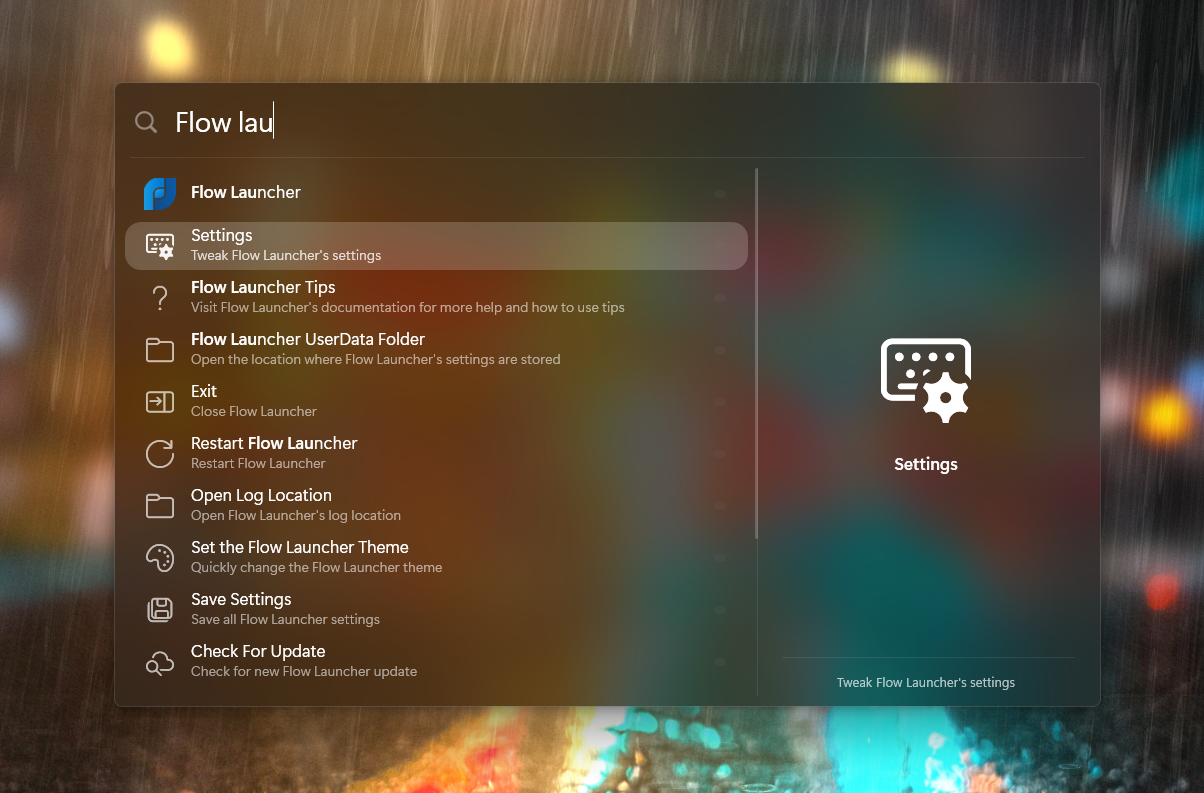
Spotless Dark Clean
Spotless Dark Clean
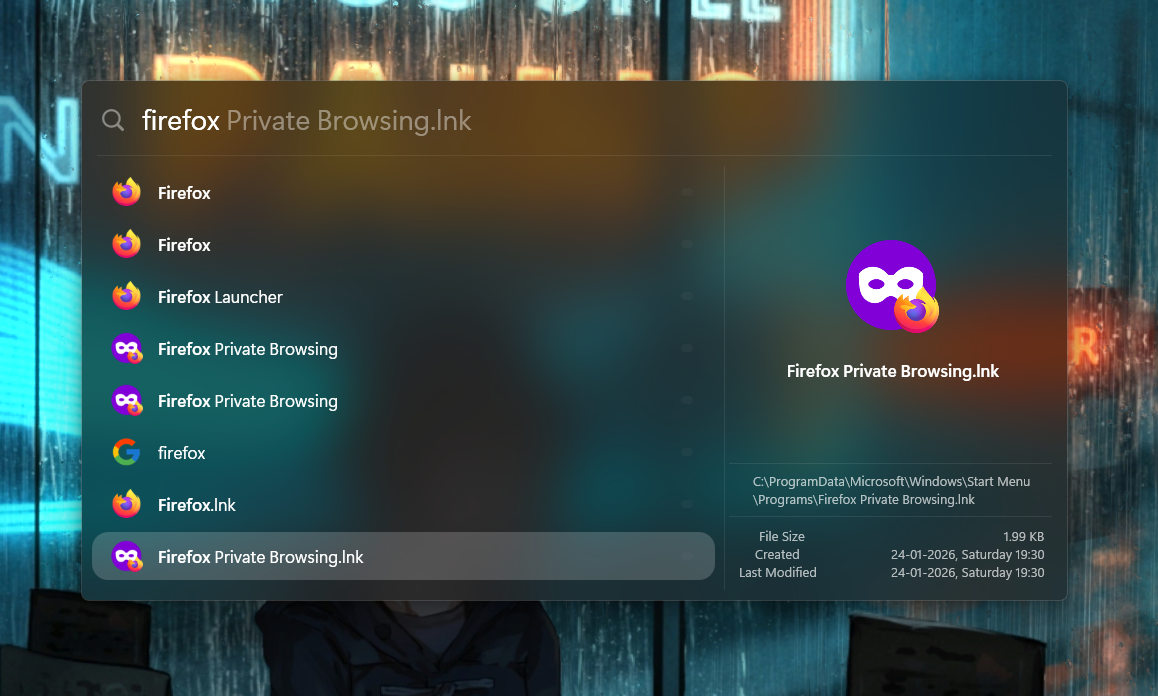
Spotless Light
Spotless Light
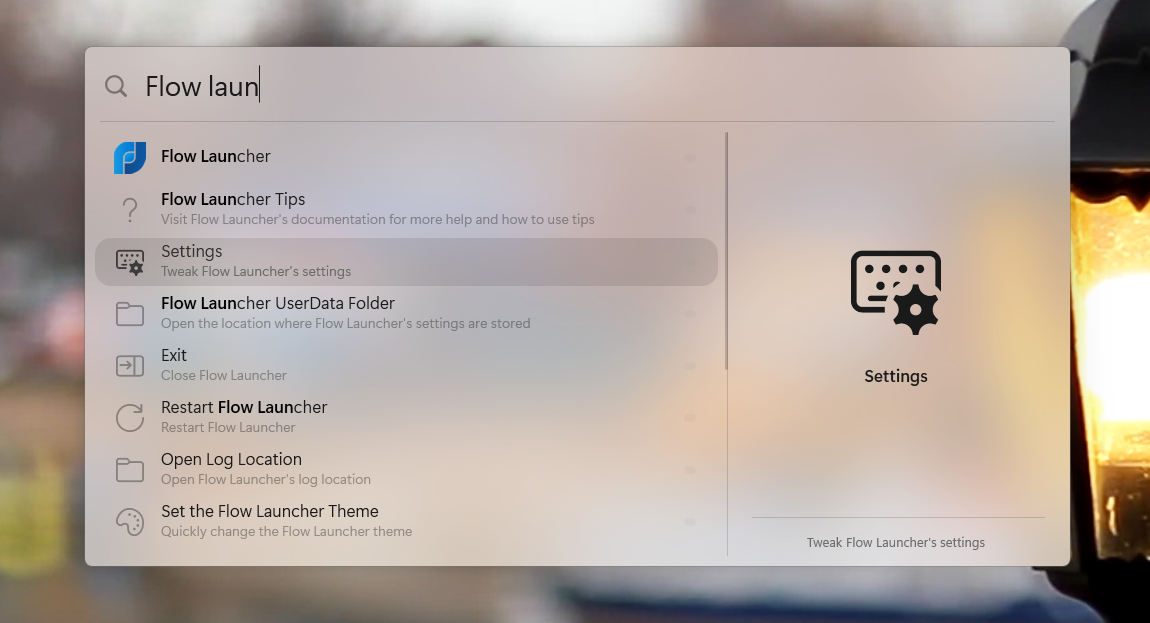
Spotless Light Clean
Spotless Light Clean
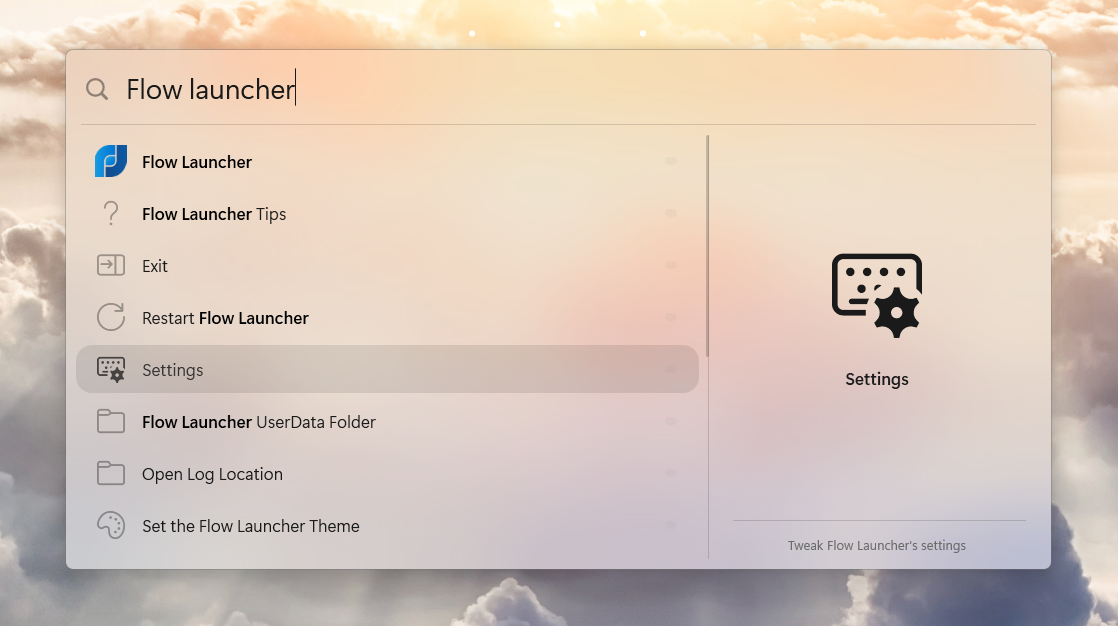
📥 Download
⚙️ Installation
Check the Main Repository for setup instructions.
Beta Was this translation helpful? Give feedback.
All reactions
-
Thank you for your kind words. The issue is limited to the preview screen in settings. Once you select the theme and begin using it, it should display normally. Could you please try using the theme to see if the issue resolves itself?
Beta Was this translation helpful? Give feedback.
All reactions
-
Thank you for your kind words. The issue is limited to the preview screen in settings. Once you select the theme and begin using it, it should display normally. Could you please try using the theme to see if the issue resolves itself?
Actually, the selected entry is cut off on the right and the bullet points are not visible - presumably because they extend beyond the right boundary of the search box as shown in the preview window. I took a look at the .xaml file and I can't see what would be causing this
image
Beta Was this translation helpful? Give feedback.
All reactions
-
I designed the theme mainly to work with preview. To test it, can you try changing the line in the .xaml file from Thickness x:Key="ResultMargin">0 0 -245 18</Thickness to Thickness x:Key="ResultMargin">0 0 0 18</Thickness and let me know if it works?
I don't currently have Flow Launcher installed on my computer, but if this solution doesn't work, I will install it to resolve the issue.
Beta Was this translation helpful? Give feedback.
All reactions
-
I designed the theme mainly to work with preview. To test it, can you try changing the line in the .xaml file from Thickness x:Key="ResultMargin">0 0 -245 18</Thickness to Thickness x:Key="ResultMargin">0 0 0 18</Thickness and let me know if it works?
I don't currently have Flow Launcher installed on my computer, but if this solution doesn't work, I will install it to resolve the issue.
Great - that worked perfectly. Thank you.
image

Beta Was this translation helpful? Give feedback.
All reactions
-
Glad it worked. Enjoy!
Beta Was this translation helpful? Give feedback.
All reactions
-
🌊 Flow Tahoe
A beautiful dark mode theme meticulously crafted to replicate the macOS Tahoe Spotlight experience.
🖼️Preview
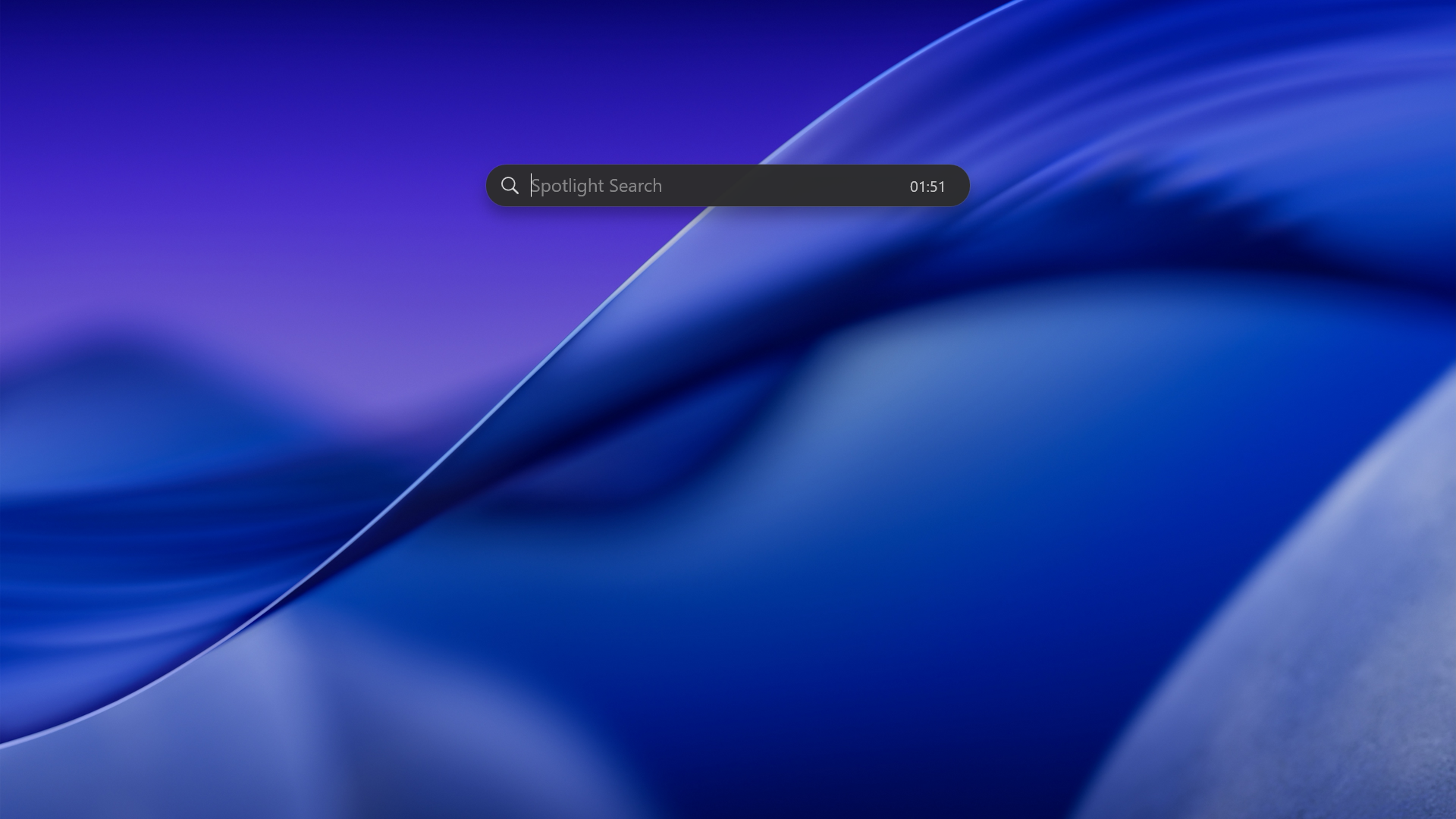
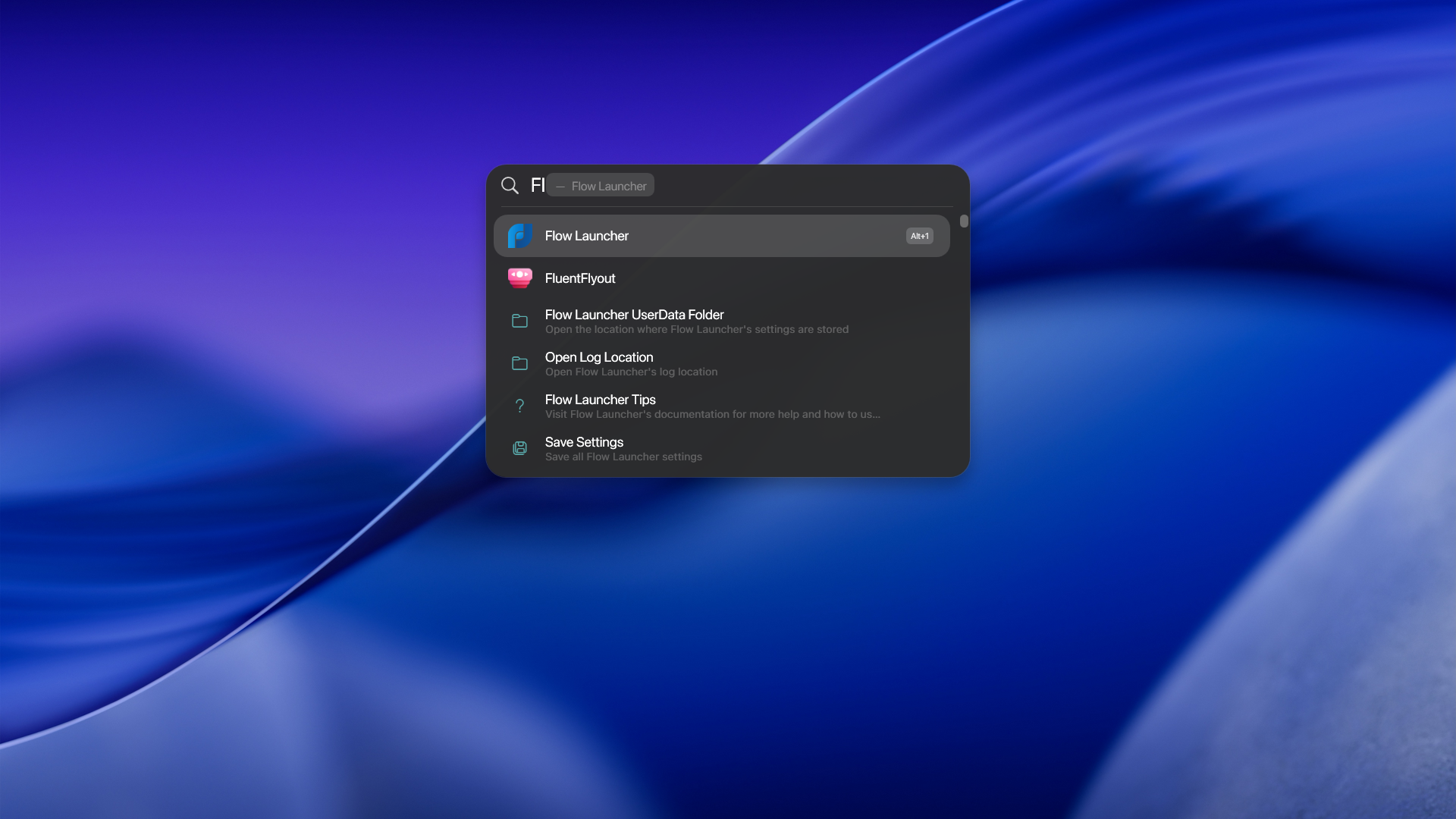
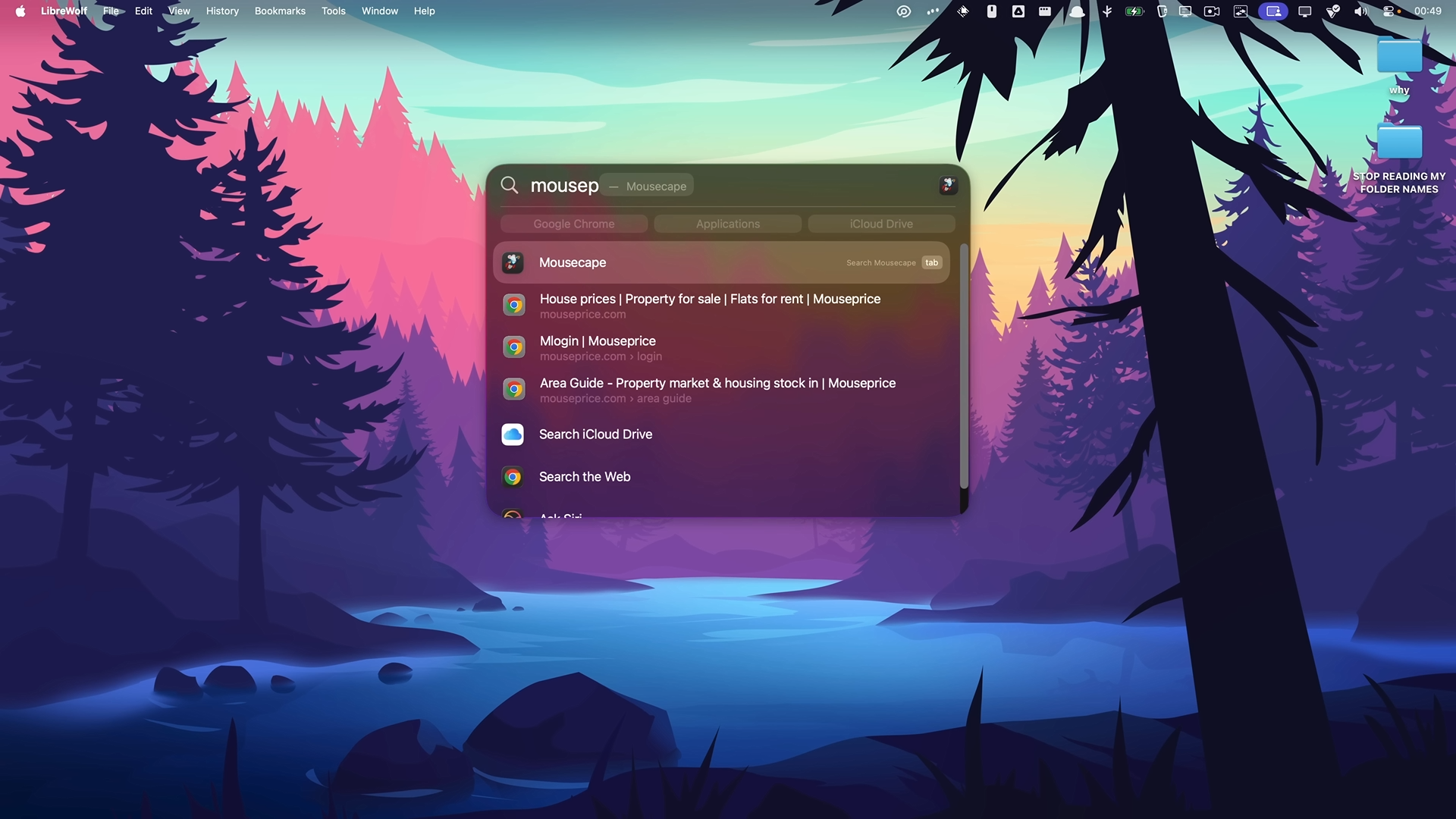
Actual macOS Tahoe Spotlight for reference:
macOS Tahoe Spotlight Reference
Blur version:
Preview 1 (Blur)
.png)
.png)
Download
The theme can be downloaded here
Installation
Check the Main Repository for setup instructions.
Beta Was this translation helpful? Give feedback.
All reactions
-
🚀 1
-
Hi!! I tried installing your theme with the blur effect, but I don't see any blur at all and the edges are jagged.
If you have any idea what the problem might be, I'd appreciate your help.
изображение

Beta Was this translation helpful? Give feedback.
All reactions
-
Hey! Just tried myself, indeed there seems to be an issue with the blur version. I also tested it on Flow Launcher v2.1.1 and it works fine, so it appears the latest version (v2.1.2, released 20h ago) broke the blur effect.
I opened an issue about it. In the meantime you can either stick to v2.1.1 or use the non-blur version which still works as intended.
EDIT: The blur issue is now fixed, but corners are still jagged. I updated the issue about it.
EDIT 2: The corners are now fixed.
Beta Was this translation helpful? Give feedback.
All reactions
-
@LucasM314
Thank you so much for the wonderful themes!
The blur doesn't look like in your screenshot, maybe because in your definition,Setter Property="Background" Value="#2c2c2c" is missing a transparency value?
And it seems to me that there is also a duplication with this definition <Color x:Key="DarkBG">#50050505</Color>
Do you know how to do this MICA ALT?
Beta Was this translation helpful? Give feedback.
All reactions
-
Hey, thanks for the kind words!
Good catch, I updated the blur theme to make the Background Transparent which fixes the blur issue. There is still an issue with the corners, which doesn't seem to occur on v2.1.1; I've updated the issue on the Flow Launcher repo.
No idea how Mica or Mica Alt transparency works. According to the docs it shouldn't require any specific code in the theme file, but selecting those options in Flow Launcher's settings doesn't seem to have any effect for me. If anyone reading this can enlighten us, it would be greatly appreciated!
Beta Was this translation helpful? Give feedback.
All reactions
-
👍 1
-
Update: The corners issue is fixed.
Beta Was this translation helpful? Give feedback.
All reactions
-
but selecting those options in Flow Launcher's settings doesn't seem to have any effect for me. If anyone reading this can enlighten us, it would be greatly appreciated!
It does work, as you can see in the screenshot. I'm attaching the theme here, and I'd really appreciate it if you could adapt it to your Tahoe Spotlight theme, but leave it as a light theme.
תמונה
<!--
 Name: Blur White MY
 IsDark: False
 HasBlur: True
-->
<ResourceDictionary
 xmlns="http://schemas.microsoft.com/winfx/2006/xaml/presentation"
 xmlns:x="http://schemas.microsoft.com/winfx/2006/xaml"
 xmlns:system="clr-namespace:System;assembly=mscorlib">
 <ResourceDictionary.MergedDictionaries>
 <ResourceDictionary Source="pack://application:,,,/Themes/Base.xaml" />
 </ResourceDictionary.MergedDictionaries>
 <system:Boolean x:Key="ThemeBlurEnabled">True</system:Boolean>
 <system:String x:Key="SystemBG">Light</system:String>
 <Color x:Key="LightBG">#28FAFAFA</Color>
 <Color x:Key="DarkBG">#28FAFAFA</Color>
 <Thickness x:Key="ResultMargin">0 0 0 8</Thickness>
 <Style
 x:Key="ItemGlyph"
 BasedOn="{StaticResource BaseGlyphStyle}"
 TargetType="{x:Type TextBlock}">
 <Setter Property="Foreground" Value="#FF000000" />
 </Style>
 <Style x:Key="ItemGlyphSelectedStyle" TargetType="{x:Type TextBlock}">
 <Setter Property="Foreground" Value="#FF000000" />
 <Setter Property="VerticalAlignment" Value="Center" />
 <Setter Property="HorizontalAlignment" Value="Center" />
 <Setter Property="Width" Value="25" />
 <Setter Property="Height" Value="25" />
 <Setter Property="FontSize" Value="25" />
 </Style>
 <Style x:Key="WindowRadius" TargetType="{x:Type Border}">
 <Setter Property="CornerRadius" Value="0" />
 </Style>
 <Style
 x:Key="QueryBoxStyle"
 BasedOn="{StaticResource BaseQueryBoxStyle}"
 TargetType="{x:Type TextBox}">
 <Setter Property="Foreground" Value="#FF211910" />
 <Setter Property="CaretBrush" Value="#000000" />
 <Setter Property="Margin" Value="57 0 0 1" />
 <Setter Property="Background" Value="Transparent" />
 </Style>
 <Style
 x:Key="QuerySuggestionBoxStyle"
 BasedOn="{StaticResource BaseQuerySuggestionBoxStyle}"
 TargetType="{x:Type TextBox}">
 <Setter Property="Foreground" Value="#39000000" />
 <Setter Property="Padding" Value="0" />
 <Setter Property="Margin" Value="57 0 0 0" />
 </Style>
 <Style
 x:Key="WindowBorderStyle"
 BasedOn="{StaticResource BaseWindowBorderStyle}"
 TargetType="{x:Type Border}">
 <Setter Property="Background">
 <Setter.Value>
 <SolidColorBrush Opacity="0.1" Color="White" />
 </Setter.Value>
 </Setter>
 <Setter Property="BorderThickness" Value="1" />
 <Setter Property="BorderBrush" Value="#aaaaaa" />
 <Setter Property="CornerRadius" Value="0" />
 </Style>
 <Style
 x:Key="WindowStyle"
 BasedOn="{StaticResource BaseWindowStyle}"
 TargetType="{x:Type Window}">
 <Setter Property="Background">
 <Setter.Value>
 <SolidColorBrush Opacity="0.5" Color="White" />
 </Setter.Value>
 </Setter>
 </Style>
 <Style
 x:Key="PendingLineStyle"
 BasedOn="{StaticResource BasePendingLineStyle}"
 TargetType="{x:Type Line}" />
 <!-- Item Style -->
 <Style
 x:Key="ItemTitleStyle"
 BasedOn="{StaticResource BaseItemTitleStyle}"
 TargetType="{x:Type TextBlock}">
 <Setter Property="Foreground" Value="#FF211910" />
 </Style>
 <Style
 x:Key="ItemSubTitleStyle"
 BasedOn="{StaticResource BaseItemSubTitleStyle}"
 TargetType="{x:Type TextBlock}">
 <Setter Property="Foreground" Value="#85000000" />
 </Style>
 <Style
 x:Key="ItemTitleSelectedStyle"
 BasedOn="{StaticResource BaseItemTitleSelectedStyle}"
 TargetType="{x:Type TextBlock}">
 <Setter Property="Foreground" Value="#ff000000" />
 </Style>
 <Style
 x:Key="ItemSubTitleSelectedStyle"
 BasedOn="{StaticResource BaseItemSubTitleSelectedStyle}"
 TargetType="{x:Type TextBlock}">
 <Setter Property="Foreground" Value="#85000000" />
 </Style>
 <SolidColorBrush
 x:Key="ItemSelectedBackgroundColor"
 Opacity="0.6"
 Color="#33000000" />
 <CornerRadius x:Key="ItemRadius">10</CornerRadius>
 <Thickness x:Key="ItemMargin">10 0 24 0</Thickness>
 <Style
 x:Key="SeparatorStyle"
 BasedOn="{StaticResource BaseSeparatorStyle}"
 TargetType="{x:Type Rectangle}">
 <Setter Property="Fill" Value="#22000000" />
 <Setter Property="Height" Value="1" />
 <Setter Property="Margin" Value="12 0 12 8" />
 </Style>
 <!-- button style in the middle of the scrollbar -->
 <Style
 x:Key="ThumbStyle"
 BasedOn="{StaticResource BaseThumbStyle}"
 TargetType="{x:Type Thumb}">
 <Setter Property="Template">
 <Setter.Value>
 <ControlTemplate TargetType="{x:Type Thumb}">
 <Border
 Background="#3C000000"
 BorderBrush="Transparent"
 BorderThickness="0"
 CornerRadius="2"
 DockPanel.Dock="Right" />
 </ControlTemplate>
 </Setter.Value>
 </Setter>
 </Style>
 <Style
 x:Key="ScrollBarStyle"
 BasedOn="{StaticResource BaseScrollBarStyle}"
 TargetType="{x:Type ScrollBar}">
 <Setter Property="Background" Value="#a0a0a0" />
 </Style>
 <!-- Official Apple Search Icon, pulled from Apple's website -->
 <PathGeometry
 x:Key="SearchIconImg"
 Figures="m16.2294 29.9556-4.1755-4.0821a6.4711 6.4711 0 1 0 -1.2839 1.2625l4.2005 4.1066a.9.9 0 1 0 1.2588-1.287zm-14.5294-8.0017a5.2455 5.2455 0 1 1 5.2455 5.2527 5.2549 5.2549 0 0 1 -5.2455-5.2527z" />
 <!-- Icon to the right of the query text box -->
 <Style
 x:Key="SearchIconStyle"
 BasedOn="{StaticResource BaseSearchIconStyle}"
 TargetType="{x:Type Path}">

 <!-- The geometry is a solid shape, so we fill it -->
 <Setter Property="Fill" Value="#CCffffff" />
 <Setter Property="Stroke" Value="Transparent" />
 <Setter Property="StrokeThickness" Value="0" />

 <Setter Property="Width" Value="23" />
 <Setter Property="Height" Value="23" />
 <!-- <Setter Property="Stretch" Value="Uniform" /> -->
 </Style>
 <Style x:Key="SearchIconPosition" TargetType="{x:Type Canvas}">
 <Setter Property="Width" Value="32" />
 <Setter Property="Height" Value="32" />
 <Setter Property="Margin" Value="20 8 0 0" />
 <Setter Property="HorizontalAlignment" Value="Left" />
 </Style>
 <Style
 x:Key="ClockBox"
 BasedOn="{StaticResource BaseClockBox}"
 TargetType="{x:Type TextBlock}">
 <Setter Property="Foreground" Value="#000000" />
 <Setter Property="Opacity" Value="0.2" />
 </Style>
 <Style
 x:Key="DateBox"
 BasedOn="{StaticResource BaseDateBox}"
 TargetType="{x:Type TextBlock}">
 <Setter Property="Foreground" Value="#000000" />
 <Setter Property="Opacity" Value="0.2" />
 </Style>
 <Style
 x:Key="PreviewBorderStyle"
 BasedOn="{StaticResource BasePreviewBorderStyle}"
 TargetType="{x:Type Border}">
 <Setter Property="BorderBrush" Value="#c6c6c6" />
 </Style>
 <Style
 x:Key="PreviewItemTitleStyle"
 BasedOn="{StaticResource BasePreviewItemTitleStyle}"
 TargetType="{x:Type TextBlock}">
 <Setter Property="Foreground" Value="#FF000000" />
 </Style>
 <Style
 x:Key="PreviewItemSubTitleStyle"
 BasedOn="{StaticResource BasePreviewItemSubTitleStyle}"
 TargetType="{x:Type TextBlock}">
 <Setter Property="Foreground" Value="#818181" />
 </Style>
 <Style
 x:Key="PreviewGlyph"
 BasedOn="{StaticResource BasePreviewGlyph}"
 TargetType="{x:Type TextBlock}">
 <Setter Property="Foreground" Value="#FF000000" />
 </Style>
</ResourceDictionary>
Beta Was this translation helpful? Give feedback.
All reactions
-
I don't plan on making it a light theme, sorry, but I'm glad it works for you!
Beta Was this translation helpful? Give feedback.
All reactions
-

Beta Was this translation helpful? Give feedback.