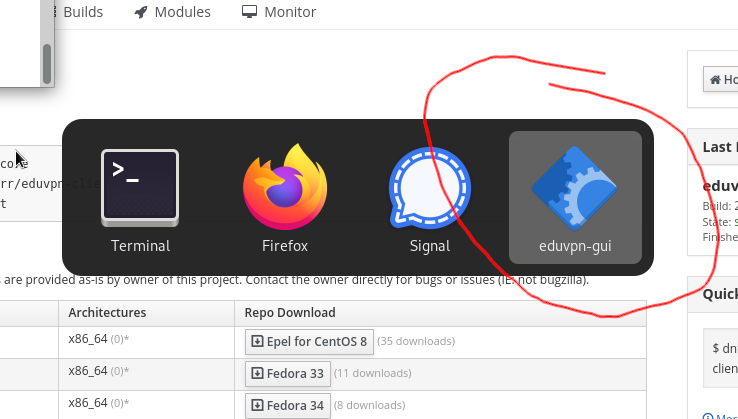
the eduVPN gtk icon is not properly set, which is used in some edge cases like task switching in window manager.
the eduVPN gtk icon is not properly set, which is used in some edge cases like task switching in window manager.
the eduVPN gtk icon is not properly set, which is used in some edge cases like task switching in window manager.
I'm seeing the icon correctly in the task switcher (alt-tab). Unfortunately I'm unable to create a screenshot of this as I need to keep pressing the alt key.
Please update the issue with details on where this problem occurs or how to reproduce it, so I can investigate.
@fkooman did you experience this issue? if so, in what case?
Yes. On Fedora 34 with GNOME using the COPR repo
maybe the icon path is different for Fedora.
Perhaps this offers some clue: https://docs.fedoraproject.org/en-US/packaging-guidelines/#_desktop_file_install_usage
i hope this change:
github.com/eduvpn/python-eduvpn-client@5dd81ce223 (diff-6aa174e4f7)
fixes the problem. I don't have a RPM system/vm available at the moment, @fkooman can you verify if the 2.1.0 package in the new edupvn copr account solve this issue:
https://copr.fedorainfracloud.org/coprs/g/eduvpn/eduvpn-client/
I tested it again on a freshly installed Fedora 34 VM with the latest 2.1 packages. Issue persists. I was looking in to it, but I really can't find any solution. It is very weird.
See also https://blogs.gnome.org/mclasen/2016/11/15/help-my-app-icon-is-missing/
@fkooman I'm also seeing this issue in Fedora 34 and tried the steps in your link, but "r(...).app_info" is undefined. In the comments it says "Click on the application, not on the window" but eduvpn does not have a Gtk Application, only a Window.
Btw, this is the same as on Ubuntu except that the icon does show there, so something seems to be different on Fedora.
my guess is that the icons are not installed in the right location for Fedora. it might help to examine the anatomy of another rpm package that also contains an icon used by an GTK application. A good example is terminator, since it is a popular UI app that is written in Python:
https://terminator-gtk3.readthedocs.io/en/latest/
it could also be related to how GTK figures out the (relative) path to the icon from the UI (XML) file.
On Ubuntu it does work running it directly without installation (python -m eduvpn.ui), so apparently it is not caused by anything related to the install.
In this case, the only other place we define an icon is in 'mainwindow.ui' window property so there is probably something wrong there.
Ok looks like the issue is probably related to Wayland, it is explained in more detail here:
https://wiki.gnome.org/Projects/GnomeShell/ApplicationBased
The application ID supplied to Gtk.Application needs to match the application ID (in our gnome domain case we decided eduvpn-client). This is currently incorrectly set to the app ID in the context of eduVPN:
https://github.com/eduvpn/python-eduvpn-client/blob/master/eduvpn/ui/app.py#L38
Problem is, we can't set this to eduvpn-client, because then we get a gtk error:
(eduvpn-gui:27031): GLib-GIO-CRITICAL **: 11:03:38.495: g_application_set_application_id: assertion 'application_id == NULL || g_application_id_is_valid (application_id)' failed
If we look up what means we get:
so we violate:
Application identifiers must contain only the ASCII characters "[A-Z][a-z][0-9]_-." and must not begin with a digit.
Application identifiers must contain at least one '.' (period) character (and thus at least three elements).
Which is silly (most fedora apps contain a - but not a .) but it is what it is. So after trying to rename all desktop and icon files to something like org.surf.EduvpnClient and regenerating the icon cache it seems to work
Can confirm it works properly in 1dfc5bed28 👍
No due date set.
No dependencies set.
Deleting a branch is permanent. Although the deleted branch may continue to exist for a short time before it actually gets removed, it CANNOT be undone in most cases. Continue?