3
3
Fork
You've already forked main
2

Unable to make Bumblebee work on Optimus system #39

Closed
opened 2017年09月09日 12:13:01 +02:00 by EQLucky · 24 comments
EQLucky commented 2017年09月09日 12:13:01 +02:00 (Migrated from github.com)
Copy link

Submission type

  • Bug report
  • Feature Request

Package name & version you are having issues with or have a request for

nvidia-settings, nvidia-xconfig, nvidia-bumblebee

Used repositories

main

Expected behaviour

Launch nvidia-settings and nvidia card be recognized by the system.

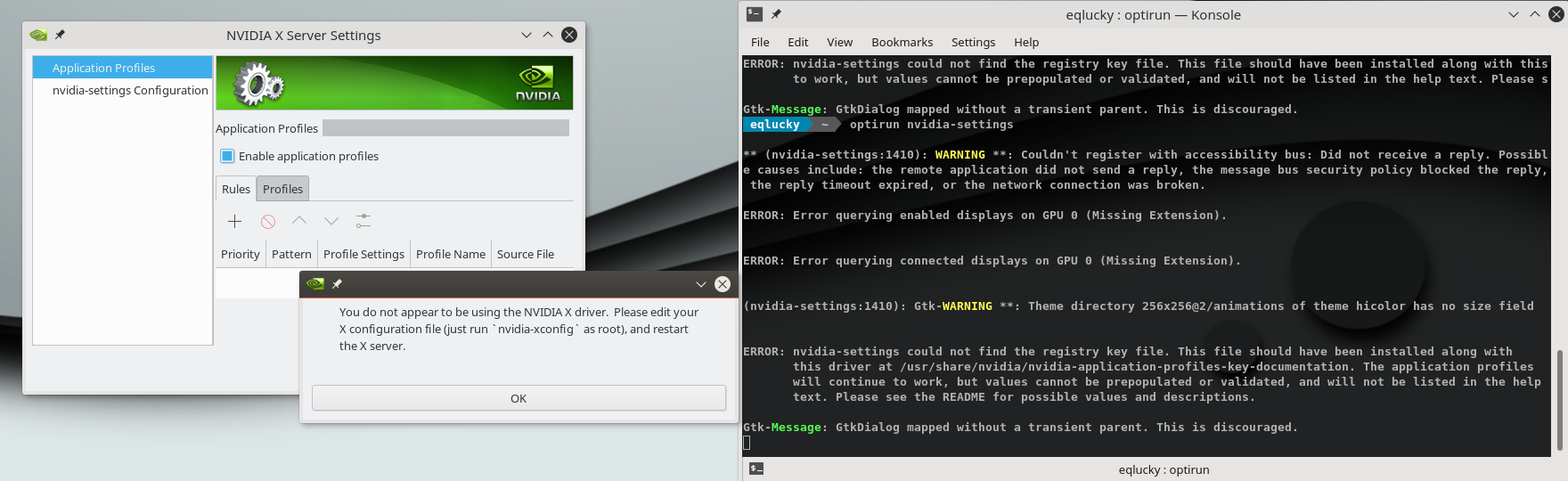
Actual behaviour

https://pastebin.com/UcTCp2Tq
screenshot_20170909_120152
screenshot_20170909_120228

Steps to reproduce the problem

Followed the steps from https://kaosx.us/docs/hybrid_gfx/#bumblebee-for-nvidia-cards
Also, had to run nvidia-xconfig as sudo to make the system create a proper /etc/X11/xorg.conf file, but always gives the same error: https://pastebin.com/RtKfRe4a

https://gist.github.com/64f5a376fa75b6df07ddf98295b44ee3

[EDIT]
I've just noticed the system recognize the 970M: https://pastebin.com/mjwW8ZHC, https://pastebin.com/FyyF3uxK), but the nvidia-settings issue persists.

#### Submission type - [x] Bug report - [ ] Feature Request #### Package name & version you are having issues with or have a request for > nvidia-settings, nvidia-xconfig, nvidia-bumblebee #### Used repositories > main #### Expected behaviour > Launch nvidia-settings and nvidia card be recognized by the system. #### Actual behaviour > [https://pastebin.com/UcTCp2Tq](https://pastebin.com/UcTCp2Tq) ![screenshot_20170909_120152](https://user-images.githubusercontent.com/3908056/30239183-40a180fe-9557-11e7-9a63-b245a4ba01b1.png) ![screenshot_20170909_120228](https://user-images.githubusercontent.com/3908056/30239184-4414bcba-9557-11e7-899b-243123e5d92e.png) #### Steps to reproduce the problem > Followed the steps from [https://kaosx.us/docs/hybrid_gfx/#bumblebee-for-nvidia-cards](https://kaosx.us/docs/hybrid_gfx/#bumblebee-for-nvidia-cards) Also, had to run `nvidia-xconfig` as sudo to make the system create a proper /etc/X11/xorg.conf file, but always gives the same error: [https://pastebin.com/RtKfRe4a](https://pastebin.com/RtKfRe4a) #### System info link created by Octopi > Tools > SysInfo > [https://gist.github.com/64f5a376fa75b6df07ddf98295b44ee3](https://gist.github.com/64f5a376fa75b6df07ddf98295b44ee3) [EDIT] I've just noticed the system recognize the 970M: [https://pastebin.com/mjwW8ZHC](https://pastebin.com/mjwW8ZHC), [https://pastebin.com/FyyF3uxK](https://pastebin.com/FyyF3uxK)), but the nvidia-settings issue persists.
EQLucky commented 2017年09月09日 12:15:18 +02:00 (Migrated from github.com)
Copy link

On a side note, this is the first time my laptop fans go mad on KaOS. Never had this issued, but with Bumblebee installed, they go full throttle and never stop until I shutdown the computer. Restarting the computer don't make them stop.

On a side note, this is the first time my laptop fans go mad on KaOS. Never had this issued, but with Bumblebee installed, they go full throttle and never stop until I shutdown the computer. Restarting the computer don't make them stop.
demmm commented 2017年09月09日 20:25:58 +02:00 (Migrated from github.com)
Copy link

Please also post the output of sudo systemctl status bumblebeed.service and optirun --status
Inxi shows no nvidia driver is loaded at all......

Have you ever tried to only use the nvidia card and completely leave the intel out?
https://forum.kaosx.us/d/1380-error-switching-between-free-to-non-free-nvidia-drivers/8

Another output needed:

lspci -nn | grep 0300

this is for trying to fix the installer.

Please also post the output of `sudo systemctl status bumblebeed.service` and `optirun --status` Inxi shows no nvidia driver is loaded at all...... Have you ever tried to only use the nvidia card and completely leave the intel out? https://forum.kaosx.us/d/1380-error-switching-between-free-to-non-free-nvidia-drivers/8 Another output needed: ``` lspci -nn | grep 0300 ``` this is for trying to fix the installer.
EQLucky commented 2017年09月09日 23:27:39 +02:00 (Migrated from github.com)
Copy link

Hi there, Demm

When I started the laptop some minutes ago, I faced the typical (I mean, there are tons of entries with this issue when you google it) blinking cursor. I am not even able to reach ttyX, since the screen will blink and I won't be able to type my user/pass.
I've tried several solutions from https://wiki.archlinux.org/index.php/NVIDIA/Troubleshooting, but there was no luck. Not a single kernel parameter will let me reach X or tty.
http://tinypic.com/r/mjq0ox/9

About the needed output, this is from the live session:
live  ~  lspci -nn | grep 0300
00:02.0 VGA compatible controller [0300]: Intel Corporation HD Graphics 530 [8086:191b] (rev 06)
01:00.0 VGA compatible controller [0300]: NVIDIA Corporation GM204M [GeForce GTX 970M] [10de:13d8] (rev a1)

I hope you find it useful.

Hi there, Demm When I started the laptop some minutes ago, I faced the typical (I mean, there are tons of entries with this issue when you google it) blinking cursor. I am not even able to reach ttyX, since the screen will blink and I won't be able to type my user/pass. I've tried several solutions from [https://wiki.archlinux.org/index.php/NVIDIA/Troubleshooting](https://wiki.archlinux.org/index.php/NVIDIA/Troubleshooting), but there was no luck. Not a single kernel parameter will let me reach X or tty. [http://tinypic.com/r/mjq0ox/9](http://tinypic.com/r/mjq0ox/9) About the needed output, this is from the live session: live  ~  lspci -nn | grep 0300 00:02.0 VGA compatible controller [0300]: Intel Corporation HD Graphics 530 [8086:191b] (rev 06) 01:00.0 VGA compatible controller [0300]: NVIDIA Corporation GM204M [GeForce GTX 970M] [10de:13d8] (rev a1) I hope you find it useful.
demmm commented 2017年09月09日 23:57:28 +02:00 (Migrated from github.com)
Copy link

Impossible to debug bumblebee....
Might be best to just remove it from the repo, there is no upstream support for it either anymore.

Does your system work with PRIME and free drivers?

lspci output, is what I needed to fix the installer/hardware detection scripts, next ISO won't try to install nvidia non-free anymore on hybrid systems.

Impossible to debug bumblebee.... Might be best to just remove it from the repo, there is no upstream support for it either anymore. Does your system work with PRIME and free drivers? lspci output, is what I needed to fix the installer/hardware detection scripts, next ISO won't try to install nvidia non-free anymore on hybrid systems.
demmm commented 2017年09月10日 00:31:44 +02:00 (Migrated from github.com)
Copy link
Fix for next ISO: https://github.com/KaOSx/hardware-detection/commit/19ef3d8e4051964ee30013d3388d376a68f821ba
EQLucky commented 2017年09月10日 02:02:13 +02:00 (Migrated from github.com)
Copy link

Yeah, it already works on PRIME and free drivers, so I don't really mind about using the non-free ones, I have Mint already installed for -the very casual - Steam and Wine gaming .
I just hope it will be fixed anytime to be able to use the Nvidia card on its full potential on KaOS.

About bumblebee, I agree. The project seems to be dead, at least on github.

And thanks for tips about using leaving the intel out. I will try it next weekend.

Yeah, it already works on PRIME and free drivers, so I don't **really** mind about using the non-free ones, I have Mint already installed for -the very casual - Steam and Wine gaming . I just hope it will be fixed anytime to be able to use the Nvidia card on its full potential on KaOS. About bumblebee, I agree. The project seems to be dead, at least on github. And thanks for tips about using leaving the intel out. I will try it next weekend.
demmm commented 2019年08月31日 13:35:08 +02:00 (Migrated from github.com)
Copy link

It could be that this issue will finally be resolved, Nvidia 435 introduced PRIME support:
http://download.nvidia.com/XFree86/Linux-x86_64/435.21/README/primerenderoffload.html
To make it work, xorg-server 1.20.6 will be needed (or trying to add all needed patches to 1.20.5).
Hopefully you can test as soon as a compatible xorg-server is in the repos.

It could be that this issue will finally be resolved, Nvidia 435 introduced PRIME support: http://download.nvidia.com/XFree86/Linux-x86_64/435.21/README/primerenderoffload.html To make it work, xorg-server 1.20.6 will be needed (or trying to add all needed patches to 1.20.5). Hopefully you can test as soon as a compatible xorg-server is in the repos.
EQLucky commented 2019年08月31日 20:59:21 +02:00 (Migrated from github.com)
Copy link

Thanks, demmm! I'll check as soon as I get my hands on the laptop (this week, hopefully), and I'll come back with the results.

Thanks, demmm! I'll check as soon as I get my hands on the laptop (this week, hopefully), and I'll come back with the results.
demmm commented 2019年08月31日 21:07:30 +02:00 (Migrated from github.com)
Copy link

@EQLucky Probably not possible yet this week, new xorg-server won't be up (unless you are planning to build it with the listed patches).

@EQLucky Probably not possible yet this week, new xorg-server won't be up (unless you are planning to build it with the listed patches).
demmm commented 2019年11月23日 11:31:10 +01:00 (Migrated from github.com)
Copy link

Xorg-server 1.20.6, with the needed patches included to make PRIME work on non-free without the need for Bumblebee, please test if possible, for needed settings:
http://download.nvidia.com/XFree86/Linux-x86_64/435.21/README/primerenderoffload.html
If this works then Bumblebee packages will be removed (and most probably xf86-video-intel will be removed from live mode when hybrid graphics are found).

Xorg-server 1.20.6, with the needed patches included to make PRIME work on non-free without the need for Bumblebee, please test if possible, for needed settings: http://download.nvidia.com/XFree86/Linux-x86_64/435.21/README/primerenderoffload.html If this works then Bumblebee packages will be removed (and most probably xf86-video-intel will be removed from live mode when hybrid graphics are found).
EQLucky commented 2019年11月30日 19:44:03 +01:00 (Migrated from github.com)
Copy link

Xorg-server 1.20.6, with the needed patches included to make PRIME work on non-free without the need for Bumblebee, please test if possible, for needed settings:
http://download.nvidia.com/XFree86/Linux-x86_64/435.21/README/primerenderoffload.html
If this works then Bumblebee packages will be removed (and most probably xf86-video-intel will be removed from live mode when hybrid graphics are found).

Hey, demm, for replying SO late.
Well, iit is definately improving, but I've found some issues.
I want to share the steps if anyone else read it:

  1. Installed the Nvidia drivers the Kaosx.us documentation way.
  2. Before rebooting, I edited /etc/X11/xorg.conf.d/nvidia.conf, with only this content:
 Section "ServerLayout"
 Identifier "layout"
 Option "AllowNVIDIAGPUScreens"
 EndSection
  1. Rebooted with sudo reboot --force (I wasn't able to do it via the menu).

It is working and it shows both providers, but I am not able to make the Nvidia run on Xorg.
Here are the logs: https://pastebin.com/Mrhuz3sW
Maybe you can shed some light here.

And thanks so much for everything.

> Xorg-server 1.20.6, with the needed patches included to make PRIME work on non-free without the need for Bumblebee, please test if possible, for needed settings: > http://download.nvidia.com/XFree86/Linux-x86_64/435.21/README/primerenderoffload.html > If this works then Bumblebee packages will be removed (and most probably xf86-video-intel will be removed from live mode when hybrid graphics are found). Hey, demm, for replying SO late. Well, iit is definately improving, but I've found some issues. I want to share the steps if anyone else read it: 1) Installed the Nvidia drivers the Kaosx.us documentation way. 2) Before rebooting, I edited `/etc/X11/xorg.conf.d/nvidia.conf`, with only this content: ``` Section "ServerLayout" Identifier "layout" Option "AllowNVIDIAGPUScreens" EndSection ``` 3) Rebooted with `sudo reboot --force` (I wasn't able to do it via the menu). It is working and it shows both providers, but I am not able to make the Nvidia run on Xorg. Here are the logs: [https://pastebin.com/Mrhuz3sW](https://pastebin.com/Mrhuz3sW) Maybe you can shed some light here. And thanks so much for everything.
demmm commented 2019年11月30日 20:44:19 +01:00 (Migrated from github.com)
Copy link

Did you follow the instructions for a graphics application to be offloaded to the NVIDIA GPU screen from http://download.nvidia.com/XFree86/Linux-x86_64/435.21/README/primerenderoffload.html ?

To configure a graphics application to be offloaded to the NVIDIA GPU screen, set the environment variable __NV_PRIME_RENDER_OFFLOAD to 1. If the graphics application uses Vulkan, that should be all that is needed. If the graphics application uses GLX, then also set the environment variable __GLX_VENDOR_LIBRARY_NAME to nvidia, so that GLVND loads the NVIDIA GLX driver. NVIDIA's EGL implementation does not yet support PRIME render offload.

Did you follow the instructions for a graphics application to be offloaded to the NVIDIA GPU screen from http://download.nvidia.com/XFree86/Linux-x86_64/435.21/README/primerenderoffload.html ? >To configure a graphics application to be offloaded to the NVIDIA GPU screen, set the environment variable __NV_PRIME_RENDER_OFFLOAD to 1. If the graphics application uses Vulkan, that should be all that is needed. If the graphics application uses GLX, then also set the environment variable __GLX_VENDOR_LIBRARY_NAME to nvidia, so that GLVND loads the NVIDIA GLX driver. NVIDIA's EGL implementation does not yet support PRIME render offload.
demmm commented 2019年11月30日 20:47:29 +01:00 (Migrated from github.com)
Copy link

And here are some things others have tried https://bbs.archlinux.org/viewtopic.php?id=248796

And here are some things others have tried https://bbs.archlinux.org/viewtopic.php?id=248796
demmm commented 2019年12月11日 13:09:16 +01:00 (Migrated from github.com)
Copy link

Please test the new Prime package (and remove your nvidia.conf):

sudo pacman -U http://kaosx.tk/repo/build/prime-1-1-x86_64.pkg.tar.xz

It will conflict with the Intel driver, this is intended since this will only work with the modesetting driver, so make sure xf86-video-intel gets removed.
Work is done to add automated detection for this on next ISO, so testers are really needed.
github.com/KaOSx/hardware-detection@7214fbe509

Please test the new Prime package (and remove your nvidia.conf): ``` sudo pacman -U http://kaosx.tk/repo/build/prime-1-1-x86_64.pkg.tar.xz ``` It will conflict with the Intel driver, this is intended since this will only work with the modesetting driver, so make sure xf86-video-intel gets removed. Work is done to add automated detection for this on next ISO, so testers are really needed. https://github.com/KaOSx/hardware-detection/commit/7214fbe509a9beeec306da0cebe67be331e806ae
EQLucky commented 2019年12月14日 21:16:32 +01:00 (Migrated from github.com)
Copy link

Did you follow the instructions for a graphics application to be offloaded to the NVIDIA GPU screen from http://download.nvidia.com/XFree86/Linux-x86_64/435.21/README/primerenderoffload.html ?

To configure a graphics application to be offloaded to the NVIDIA GPU screen, set the environment variable __NV_PRIME_RENDER_OFFLOAD to 1. If the graphics application uses Vulkan, that should be all that is needed. If the graphics application uses GLX, then also set the environment variable __GLX_VENDOR_LIBRARY_NAME to nvidia, so that GLVND loads the NVIDIA GLX driver. NVIDIA's EGL implementation does not yet support PRIME render offload.

Yeah, I've set both environment variables, without success.
I always get:

Xlib: extension "GLX" missing on display ":0".
Error: couldn't get an RGB, Double-buffered visual

Also tried both contents to apply in nvidia.conf and offload in both scenarios. inxi keeps telling me there is no OpenGL renderer.

nvidia-drm-outputclass shows the default output, so I don't know what to do next.

> Did you follow the instructions for a graphics application to be offloaded to the NVIDIA GPU screen from http://download.nvidia.com/XFree86/Linux-x86_64/435.21/README/primerenderoffload.html ? > > > To configure a graphics application to be offloaded to the NVIDIA GPU screen, set the environment variable __NV_PRIME_RENDER_OFFLOAD to 1. If the graphics application uses Vulkan, that should be all that is needed. If the graphics application uses GLX, then also set the environment variable __GLX_VENDOR_LIBRARY_NAME to nvidia, so that GLVND loads the NVIDIA GLX driver. NVIDIA's EGL implementation does not yet support PRIME render offload. Yeah, I've set both environment variables, without success. I always get: ``` Xlib: extension "GLX" missing on display ":0". Error: couldn't get an RGB, Double-buffered visual ``` Also tried both contents to apply in nvidia.conf and offload in both scenarios. inxi keeps telling me there is no OpenGL renderer. nvidia-drm-outputclass shows the default output, so I don't know what to do next.
EQLucky commented 2019年12月14日 21:21:46 +01:00 (Migrated from github.com)
Copy link

Please test the new Prime package (and remove your nvidia.conf):

sudo pacman -U http://kaosx.tk/repo/build/prime-1-1-x86_64.pkg.tar.xz

It will conflict with the Intel driver, this is intended since this will only work with the modesetting driver, so make sure xf86-video-intel gets removed.
Work is done to add automated detection for this on next ISO, so testers are really needed.
KaOSx/hardware-detection@7214fbe

Just installed it, uninstalled the intel driver and remove nvidia.conf in /etc/X11/xorg.conf.d/.
Same results, no renderer and GLX missing on display.

> Please test the new Prime package (and remove your nvidia.conf): > > ``` > sudo pacman -U http://kaosx.tk/repo/build/prime-1-1-x86_64.pkg.tar.xz > ``` > > It will conflict with the Intel driver, this is intended since this will only work with the modesetting driver, so make sure xf86-video-intel gets removed. > Work is done to add automated detection for this on next ISO, so testers are really needed. > [KaOSx/hardware-detection@7214fbe](https://github.com/KaOSx/hardware-detection/commit/7214fbe509a9beeec306da0cebe67be331e806ae) Just installed it, uninstalled the intel driver and remove nvidia.conf in /etc/X11/xorg.conf.d/. Same results, no renderer and GLX missing on display.
demmm commented 2019年12月14日 21:38:25 +01:00 (Migrated from github.com)
Copy link

So all works on the intel card, just Nvidia is missing GLX?

So all works on the intel card, just Nvidia is missing GLX?
EQLucky commented 2019年12月14日 21:47:03 +01:00 (Migrated from github.com)
Copy link

So all works on the intel card, just Nvidia is missing GLX?

Yep, it looks like that.
I bet these lines are the ones providing some useful feedback, from Xorg.0.log:

[ 5.602] (II) NVIDIA(G0): Validated MetaModes:
[ 5.602] (II) NVIDIA(G0): "NULL"
[ 5.602] (**) NVIDIA(G0): Virtual screen size configured to be 1920 x 1080
[ 5.602] (WW) NVIDIA(G0): Unable to get display device for DPI computation.
[ 5.602] (==) NVIDIA(G0): DPI set to (75, 75); computed from built-in default
[ 5.670] (II) NVIDIA: Using 6144.00 MB of virtual memory for indirect memory
[ 5.670] (II) NVIDIA: access.
[ 5.682] (II) NVIDIA(G0): ACPI: failed to connect to the ACPI event daemon; the daemon
[ 5.682] (II) NVIDIA(G0): may not be running or the "AcpidSocketPath" X
[ 5.682] (II) NVIDIA(G0): configuration option may not be set correctly. When the
[ 5.682] (II) NVIDIA(G0): ACPI event daemon is available, the NVIDIA X driver will
[ 5.682] (II) NVIDIA(G0): try to use it to receive ACPI event notifications. For
[ 5.682] (II) NVIDIA(G0): details, please see the "ConnectToAcpid" and
[ 5.682] (II) NVIDIA(G0): "AcpidSocketPath" X configuration options in Appendix B: X
[ 5.682] (II) NVIDIA(G0): Config Options in the README.
[ 5.754] (II) NVIDIA(G0): Setting mode "NULL"
[ 5.759] (==) NVIDIA(G0): Disabling shared memory pixmaps
[ 5.759] (==) NVIDIA(G0): Backing store enabled
[ 5.759] (==) NVIDIA(G0): Silken mouse enabled
[ 5.759] (==) NVIDIA(G0): DPMS enabled
[ 5.759] (II) NVIDIA(G0): [DRI2] Setup complete
[ 5.759] (II) NVIDIA(G0): [DRI2] VDPAU driver: nvidia
> So all works on the intel card, just Nvidia is missing GLX? Yep, it looks like that. I bet these lines are the ones providing some useful feedback, from Xorg.0.log: ``` [ 5.602] (II) NVIDIA(G0): Validated MetaModes: [ 5.602] (II) NVIDIA(G0): "NULL" [ 5.602] (**) NVIDIA(G0): Virtual screen size configured to be 1920 x 1080 [ 5.602] (WW) NVIDIA(G0): Unable to get display device for DPI computation. [ 5.602] (==) NVIDIA(G0): DPI set to (75, 75); computed from built-in default [ 5.670] (II) NVIDIA: Using 6144.00 MB of virtual memory for indirect memory [ 5.670] (II) NVIDIA: access. [ 5.682] (II) NVIDIA(G0): ACPI: failed to connect to the ACPI event daemon; the daemon [ 5.682] (II) NVIDIA(G0): may not be running or the "AcpidSocketPath" X [ 5.682] (II) NVIDIA(G0): configuration option may not be set correctly. When the [ 5.682] (II) NVIDIA(G0): ACPI event daemon is available, the NVIDIA X driver will [ 5.682] (II) NVIDIA(G0): try to use it to receive ACPI event notifications. For [ 5.682] (II) NVIDIA(G0): details, please see the "ConnectToAcpid" and [ 5.682] (II) NVIDIA(G0): "AcpidSocketPath" X configuration options in Appendix B: X [ 5.682] (II) NVIDIA(G0): Config Options in the README. [ 5.754] (II) NVIDIA(G0): Setting mode "NULL" [ 5.759] (==) NVIDIA(G0): Disabling shared memory pixmaps [ 5.759] (==) NVIDIA(G0): Backing store enabled [ 5.759] (==) NVIDIA(G0): Silken mouse enabled [ 5.759] (==) NVIDIA(G0): DPMS enabled [ 5.759] (II) NVIDIA(G0): [DRI2] Setup complete [ 5.759] (II) NVIDIA(G0): [DRI2] VDPAU driver: nvidia ```
demmm commented 2019年12月15日 15:15:30 +01:00 (Migrated from github.com)
Copy link

github.com/KaOSx/main@ab587af69f
Maybe you don't mind enabling the build repo?

https://github.com/KaOSx/main/commit/ab587af69fb1af9db907c984d6e056e7114228c0 Maybe you don't mind enabling the build repo?
EQLucky commented 2019年12月17日 00:01:16 +01:00 (Migrated from github.com)
Copy link

ab587af
Maybe you don't mind enabling the build repo?

Build was already enabled. In fact, it's always there, just to test things if needed.
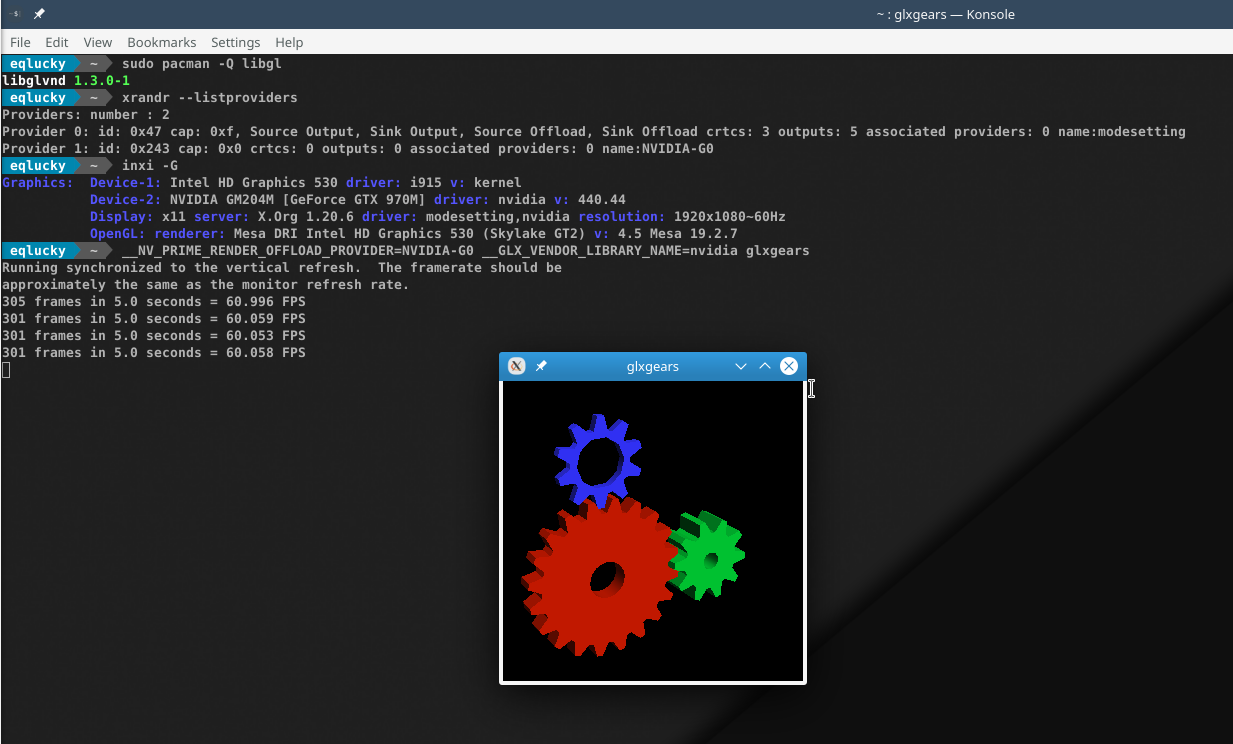
I just ran a system update, guess what:
image

It just works!
If you need anything else, just ask here and I will provide more info, logs, whatever you need.

> [ab587af](https://github.com/KaOSx/main/commit/ab587af69fb1af9db907c984d6e056e7114228c0) > Maybe you don't mind enabling the build repo? Build was already enabled. In fact, it's always there, just to test things if needed. I just ran a system update, guess what: ![image](https://user-images.githubusercontent.com/3908056/70950203-3668ab80-2060-11ea-8101-e75536729e22.png) It just works! If you need anything else, just ask here and I will provide more info, logs, whatever you need.
demmm commented 2019年12月17日 12:42:59 +01:00 (Migrated from github.com)
Copy link

Just to make sure, you still have the prime package too? Seems the biggest change to make this work is no longer removing libglx from the xorg-server build......Splitting packages, removing things, because they seem duplicate, just not what upstream intends.
I have build one ISO with the massive changes from the last 6 weeks, hopefully you can test Live mode for hybryd systems this week on such an ISO (having to figure a few bugs before I will upload an ISO for you test).

Just to make sure, you still have the prime package too? Seems the biggest change to make this work is no longer removing libglx from the xorg-server build......Splitting packages, removing things, because they seem duplicate, just not what upstream intends. I have build one ISO with the massive changes from the last 6 weeks, hopefully you can test Live mode for hybryd systems this week on such an ISO (having to figure a few bugs before I will upload an ISO for you test).
EQLucky commented 2019年12月18日 00:23:40 +01:00 (Migrated from github.com)
Copy link

Just to make sure, you still have the prime package too? Seems the biggest change to make this work is no longer removing libglx from the xorg-server build......Splitting packages, removing things, because they seem duplicate, just not what upstream intends.
I have build one ISO with the massive changes from the last 6 weeks, hopefully you can test Live mode for hybryd systems this week on such an ISO (having to figure a few bugs before I will upload an ISO for you test).

Yeah, it's there:
imagen

I will check the forums to get the ISO and test it.

> > > Just to make sure, you still have the prime package too? Seems the biggest change to make this work is no longer removing libglx from the xorg-server build......Splitting packages, removing things, because they seem duplicate, just not what upstream intends. > I have build one ISO with the massive changes from the last 6 weeks, hopefully you can test Live mode for hybryd systems this week on such an ISO (having to figure a few bugs before I will upload an ISO for you test). Yeah, it's there: ![imagen](https://user-images.githubusercontent.com/3908056/71042608-83b24f00-212c-11ea-8a93-3ca2a1631baa.png) I will check the forums to get the ISO and test it.
demmm commented 2019年12月19日 21:47:56 +01:00 (Migrated from github.com)
Copy link
https://forum.kaosx.us/d/2526-test-cycle-2019-12-iso
demmm commented 2019年12月19日 21:49:25 +01:00 (Migrated from github.com)
Copy link

Closing this issue now, since it is resolved and adjusting the ISO for the new hybrid graphics way is not part of this bug.

Closing this issue now, since it is resolved and adjusting the ISO for the new hybrid graphics way is not part of this bug.
Sign in to join this conversation.
No Branch/Tag specified
master
master-recovery
No results found.
Milestone
Clear milestone
No items
No milestone
Projects
Clear projects
No items
No project
Assignees
Clear assignees
No assignees
1 participant
Notifications
Due date
The due date is invalid or out of range. Please use the format "yyyy-mm-dd".

No due date set.

Dependencies

No dependencies set.

Reference
KaOS/main#39
Reference in a new issue
KaOS/main
No description provided.
Delete branch "%!s()"

Deleting a branch is permanent. Although the deleted branch may continue to exist for a short time before it actually gets removed, it CANNOT be undone in most cases. Continue?