Cursor position markers are not cleared from rulers
| Affects | Status | Importance | Assigned to | Milestone | |
|---|---|---|---|---|---|
| Inkscape |
Fix Released
|
Medium
|
Krzysztof Kosinski | ||
| inkscape (Arch Linux) |
Fix Released
|
Undecided
|
Unassigned | ||
| inkscape (Fedora) |
Fix Released
|
Medium
|
|||
| inkscape (Ubuntu) |
Fix Released
|
Medium
|
Unassigned | ||
| Maverick |
Fix Released
|
Medium
|
Unassigned | ||
Bug Description
Binary package hint: inkscape
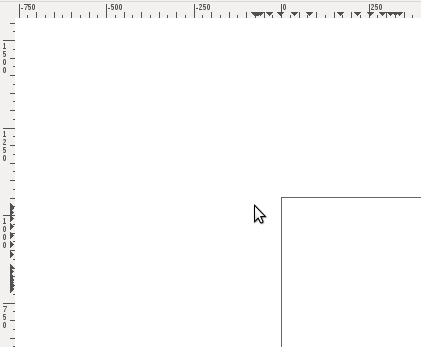
Since upgrade to Maverick, rulers sometimes forget to refresh. It happens only on plain pointer move over canvas area. Middle mouse button panning triggers proper ruler repainting, for example. Image is attached to illustrate the problem.
Probably not inkscape's fault directly, this bug, but so far, I've only experienced problems there. Please reassign at will.
Regards,
Vlada
== Ubuntu stable release update (SRU) notes ==
* IMPACT/
* DETAILS OF FIX: The bug is fixed in the latest upstream version of Inkscape (0.48.1), which is a bug-fix only release. This version has been released in Natty as inkscape_
* PATCH DETAILS: The upstream patch has been attached to this report (see 9725_9724.diff). This patch fixes the single issue described in this report, and introduces no additional changes.
* TEST CASE: Start Inkscape; move mouse across canvas. Black triangular cursor marks are splattered across both rulers. [Expected result: A single cursor moves smoothly across each ruler to match the position of the mouse pointer]
* REGRESSION POTENTIAL: As far as I know, no new bugs have been reported concerning the rulers in Inkscape 0.48.1 since this patch was applied.
-- Alex Valavanis
Does it happen with different themes too?
There is an old report about a similar issue with the rulers: Bug #165711 "Ruller bar messed up (Industrial theme)" seems to have been related to some GTK+ themes and solved by updating the theme engine(s).
Happens with every theme I can test here. By "here" I mean - in Ubuntu Maverick. Clearlooks, Dust, High contrast theme and Ambience all behave the same.
The same here with the Nodoka theme. Since this kind of issue loads of times is caused by the X server: lspci for my video card gives me the following line:
00:02.0 VGA compatible controller: Intel Corporation Mobile 945GME Express Integrated Graphics Controller (rev 03)
Killing compiz or setting the desktop effects to "none" doesn't make the triangles inside the ruler indicating the pointer's position to be removed before being moved to a new place, though. Refreshing the window or minimizing it won't help, either.
Same bug on my system Ubuntu 10.10 (black coordination triangles on rulers). My videocard is Nvidia 7900GTS. I changed driver from Noveau to proprietary - there is a same problem.
Confirmed in Ubuntu 10.10 beta. Inkscape 0.48 from repositories.
However, the problem doesn't show up in Ubuntu 10.04 (I'm using a build from Nightly Builders PPA)
@Saul - sorry my ignorance, but I don't understand why this report was marked as private?
Changing visibility back to 'public' since no reason was given for making it private, and duplicate reports get filed for the same issue.
It's probably not related at all, but I encounter another "refresh" issue in Maverick, with the stars (rating) column in Rhythmbox.
I'm not sure if it's related or not. In any case, I also experience problems with rythmbox on Maverick. For reference, this was reported as bug #649738
I can confirm this on my Asus K72JR, running 64-bit Ubuntu 10.10 (up-to-date). I run the proprietary ATI video driver, but disabled it and this ruler problem still appears.
jr@brett-laptop:~$ apt-cache policy inkscape
inkscape:
Installed: 0.48.0-1ubuntu1
Candidate: 0.48.0-1ubuntu1
Version table:
*** 0.48.0-1ubuntu1 0
500 http://
100 /var/lib/
jr@brett-laptop:~$ lspci
{snip}
01:00.0 VGA compatible controller: ATI Technologies Inc Manhattan [Mobility Radeon HD 5000 Series]
{snip}
jr@brett-laptop:~$ uname -a
Linux brett-laptop 2.6.35-22-generic #33-Ubuntu SMP Sun Sep 19 20:32:27 UTC 2010 x86_64 GNU/Linux
Affects me too on two very different hardware setups (nVidia, ATi). Currently running an up-to-date Maverick 10.10 RC
Unfortunately, this bug is affecting me too! It's very annoying! In fact, I'm using Linux to do a lot of graphics work in my company.. and I can't update my pcs before this bug has been fixed. It's not showing up on Lucid though...
Seeing it here also, after a successful upgrade from lucid to a freshly released maverick just now.
- Error in rulers Edit (120.1 KiB, image/png)
Hello,
I installed the new version of Ubuntu (10.10 - 32 bits, Maverick Meerkat). Also, I installed the Inkscape.
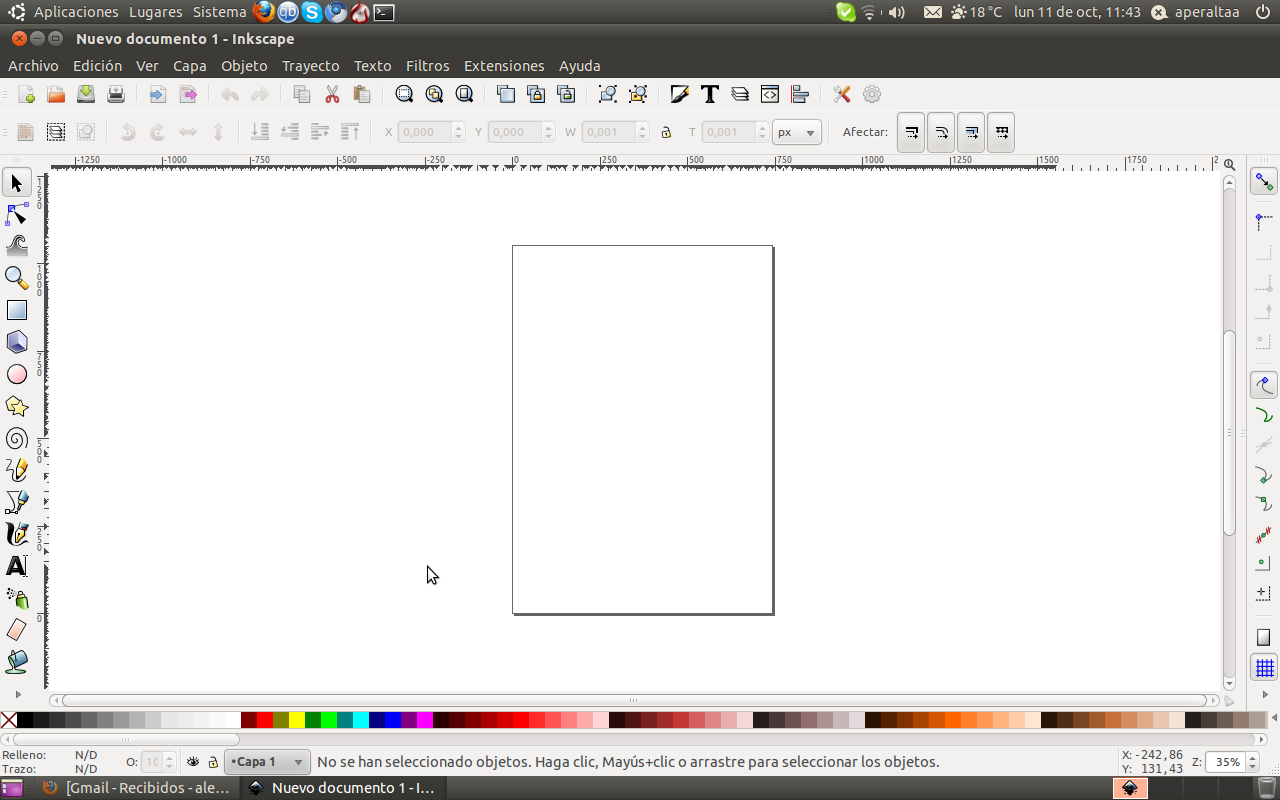
Something wrong with the rulers with inkscape. Appear little black triangles along the horizontal and vertical rulers, not one for a ruler... many and more. This little triangle show the pointer position in the space area (See the attachment file).
I installed the Inkscape from the ubuntu center software.
Version of Inkscape: Inkscape 0.48.0 r9654
Thanks regards.
Alex
;-)
Hello,
I have installed Maverick Meerkat with mac4lin theme. Mobile Intel Graphic Media (X3100) 1280*800
I see triangles in ruler, and tollbars are out of size.
I experience this exact issue with a custom build of Inkscape 0.48.
Platform : Solaris 10 and OpenSolaris x86
GTK+-2.22.0 with gdk-pixbuf-2.22.0
glib 2.26.0
Since it was ok before I assume it's an issue created or uncovered by GTK or related library.
I am also seeing the little black triangles fill in along the horizontal and vertical rulers. I just installed Ubuntu 10.10 last night for the first time and am running it in Virtual Box on a Dell laptop. I don't see this same behavior happening when I run Inkscape in Windows 7 on the same laptop.
I upgraded to Maverick from Lucid and I'm having this problem. I'm using 32-bit Ubuntu Desktop with a beta Nvidia graphics driver (I guess that's good to know since Brett's is ATI - maybe it's not related to graphics drivers, then?).
Glad it's been reported and is known about, means I'm not just special :D
I doubt it's Inkscape's fault though if it's happening in Rhythmbox too.
Sorry for the double post! :)
Zooming in/out gets rid of the leftover arrows.
Ya this bug afftects me to after upgrading to 10.10
+ Cursor position markers are not cleared from rulers
I also experience this bug in 10.10. I'm using a nvidia GeForce 8600 GT graphics card.
@Alex
What graphics card you use shouldn't matter here since inkscape doesn't take use of the GPU yet (although they plan to).
ATI radeon HD 5650
this bug also afftects me to after upgrading to 10.10
Nvidia 8500GT, Nvidia 260.19.06, Maverick up to date.
Coming to increase the herd.
I get the same issue with a new installation of Maverick (not an update from Lucid to Maverick).
Inkscape 0.48 works fine with windows XP on the same computer.
This didn't affect me on 0.48 on Ubuntu 10.04, but after clean install on the same system to Ubuntu 10.10.
Ubuntu 10.04 NVidia driver: 256.44 (no problem)
Ubuntu 10.10 NVidia driver: 260.19.06 beta (problem exists)
It's probably completely unrelated to video drivers -- it even happens with the "nouveau" nvidia driver, for instance.
same problem here also... i am using
Installed: 0.48.0-1ubuntu1
Candidate: 0.48.0-1ubuntu1
Version table:
*** 0.48.0-1ubuntu1 0
500 http://
100 /var/lib/
2.6.35-
00:00.0 Host bridge: Intel Corporation Mobile 4 Series Chipset Memory Controller Hub (rev 07)
00:02.0 VGA compatible controller: Intel Corporation Mobile 4 Series Chipset Integrated Graphics Controller (rev 07)
00:02.1 Display controller: Intel Corporation Mobile 4 Series Chipset Integrated Graphics Controller (rev 07)
GTK+-2.22.0 with gdk-pixbuf-2.22.0
glib 2.26.0
I have the same problem
i am using
ubuntu 10.10
Inkscape 0.48
Kernel 2.6.35-22-generic
I also noticed this problem after upgrading to ubuntu 10.10.
I have an ATI Mobility Radeon HD 5870.
I also found this bug.
Ubuntu 10.10, Inkscape 0.48.
Various display adapters.
Worked OK on 10.04.
I installed the new driver Ati Catalyst 10.10 ( ubuntu 10.10)
But I always found this bug !
I can not draw some objects (circle, rectangle, star)
Worked OK on 10.04.
It Worked with Wine ( Windows version ) on 10.10 !!!!!!!!
I am sorry : It Works with Wine ( Windows version ) on 10.10 !
If you include my Intel Mobile 915GM/GMS/910GML, we're looking at a good range of video hardware this appears on, ATI, NVidia and Intel, so I don't think a video driver issue.
@ Will : yes
This is not a video driver issue, it is a library related issue.
Also affected by this bug after upgrading to 10.10.
This problem is NOT Ubuntu specific, I've recently upgraded inkscape from package 0.48.0-1 to 0.48.0-3 (Now 0.48.0-4) and there where also some libraries in the upgrade, since then this bug appears, tried to return to 0.48.0-1 but I can't because of some library incompatibility
So no... It is NOT a video driver issue, it is definitively a bug somewhere else
Created attachment 457324
Example of artifacts
Description of problem:
When I move the mouse around in inscape, it leaves artifact 'arrows' in the ruler bar.
Version-Release number of selected component (if applicable):
inkscape-
How reproducible:
very
See attachment for more information, looking specifically at the ruler bars.
I'm also encountering this bug
Linux 2.6.35.
Gnome 2.32.0
Memory 3GiB
inkscape-
Nouveau Video driver
Seems to be a problem with gtk 2.22 (tested with gentoo), see also https:/
Seems the problem is solved in Inkscape 0.48.1. According to the latest Inkscape news (January 5), they are waiting for "Ted" to cut the release so that packagers can start packaging.
Same problem using Kubuntu 10.10.
While the:
<quote>
** IMPORTANT: Please do not add any more "Me too" comments to this
report. They are unnecessary and they make the report very
difficult to read. The bug will be fixed in Inkscape 0.48.1.
If you experience this bug, please just use the "Does this bug
affect you?" link above.
</quote>
seems appropriate in most cases, I think it might be worthwhile to report if Tobais' ppa version (https:/
Ubuntu 10.10, 64bit & 32bit, 2.6.35-24-generic (GNOME).
~$ apt-cache policy inkscape
inkscape:
Installed: 0.49-pre-
Candidate: 0.49-pre-
Version table:
*** 0.49-pre-
500 http://
100 /var/lib/
0.
500 http://
and
$ apt-cache policy inkscape
inkscape:
Installed: 0.49-pre-
Candidate: 0.49-pre-
Version table:
*** 0.49-pre-
500 http://
100 /var/lib/
0.
500 http://
Without the ppa, inkscape is not usable on Ubuntu 10.10 & it will be appreciated if the importance be marked as 'high' rather than low, et al. Just asking if 'others' had similar problems on the inkscape users list brought immediate responses of 'me to', so IMHO this fix is critical to the usability of Inkscape in Ubuntu 10.10. Note: as others report, I do not experience the problem in Inkscape 10.04 Ubuntu 10.04 (Installed: 0.48.0-
As others in this bug report have noted; the bug does not appear to be graphics driver related.
The 64bit machine above uses:
*-display:0
and the 32bit machine uses:
*-display
These are vastly different graphics controllers/drivers and machines.
Please upgrade the importance & if at all possible integrate Tobais' modifications. Thanks.
The importance field refers to Ubuntu as a whole, not just to the Inkscape package. Please see https:/
There's not much point in patching the existing Ubuntu package right now. Inkscape 0.48.1 is due to be released very shortly, and this will fix numerous bugs. As soon as it is released, we can package it for Ubuntu.
> "There's not much point in patching the existing Ubuntu package right now. Inkscape 0.48.1 is due to be released very shortly"
Do you think we're going to be able to get a Stable Release Update granted for 0.48.1?
AfC
Andrew: I think it should be possible. 0.48.1 is exclusively a bugfix / regression fix release.
- bug_nkscape.log Edit (5.6 KiB, text/plain)
I have this problem in Ubuntu 10.10 amd 64.
For more information see attachment
Same here (both on F14 and rawhide, listing only rawhide config):
2.6.38-
Intel Corporation Mobile 945GM/GMS/GME
xorg-x11-
gtk2-2.
inkscape-
This bug was fixed in the package inkscape - 0.48.1-0ubuntu1
---------------
inkscape (0.48.1-0ubuntu1) natty; urgency=low
* New upstream version (LP: #710619). Fixes several Ubuntu bugs:
- Node editing causes segmentation fault (LP: #544599)
- Cursor position markers are not cleared from rulers (LP: #627134)
- Crashes when opening document properties (LP: #658055)
- Export to XCF error with default template (LP: #485032)
- Editing a connector in a transformed group returns it to original
position (LP: #533897)
- Ungrouping objects changes position of arrow lines (LP: #552289)
- Will not save XCF file (LP: #642417)
- XCF export fails when exporting from unsaved document (LP: #650890)
* Drop all patches: Applied upstream
* debian/rules: Disable chmod on debian/patches/* in clean rule (no patches used)
-- Alexander Valavanis <email address hidden> 2011年2月01日 12:53:34 +0000
inkscape (0.48.1-0ubuntu1) natty
Still not fixed in Maverick or Lucid LTS.
https:/
Natty (11.04) is still Alpha:
https:/
Please fix/resolve for Ubuntu Maverick (10.10) & Lucid (10.04).
if you need the solution: inkscape 0.48.1!!!!!
im build srpm and rpms works !!!!
Im build the inkscape 0.48.1 ( inkscape-
inkscape-
any packages 0.48.1 . even fedora 15 ..... how do I upload packages?
http://
where is the maintainer? does not work .......
*** Bug 675043 has been marked as a duplicate of this bug. ***
inkscape-
https:/
@NoOp - Now that the bug has been fixed in Natty, we can look at applying a stable release update in Maverick/Lucid as described at https:/
@NoOp - It just dawned on me... this bug does not affect the Lucid (inkscape_
As for Maverick (inkscape_
...
> As for Maverick (inkscape_
> can look at an SRU. I will try building a patched version of the
> package.
>
Thanks Alex. Appreciate that & will keep watch of
https:/
inkscape-
If you want to test the update, you can install it with
su -c 'yum --enablerepo=
small bug inkscape : slow start program ,the window is very small.
but thanks. works very good .
Debdiff attached for maverick-proposed SRU
(Running a test build in a local Maverick pbuilder chroot)
- inkscape_0.48.0-1ubuntu1.1.debdiff Edit (30.4 KiB, text/plain)
Oops - forgot to add the patch to 00list!
Corrected debdiff attached.
Local test build in progress
Successful local pbuilder build for amd64. I'm subscribing sponsors to check it out.
I have now tested the amd64 deb. It fixes the bug for me.
Alex is there someplace where I can download the .deb? I'll be happy to test on both 32/64bit in Maverick.
Hi NoOp,
If a sponsor agrees to upload my updated package, it will appear in the maverick-proposed repository, so it can be tested by users. In the meantime, you can try the (unofficial and unsupported!) version in ppa:valavanisal
https:/
The binary packages are still currently being built in the PPA, so you will probably have a short wait before you can download them.
Alex:
$ apt-cache policy inkscape
inkscape:
Installed: 0.48.0-
Candidate: 0.48.0-
Version table:
*** 0.48.0-
100 /var/lib/
0.
500 http://
works for me. Thanks!
Downloading
inkscape_
now.
And inkscape_
$ apt-cache policy inkscape
inkscape:
Installed: 0.48.0-
Candidate: 0.48.0-
Version table:
*** 0.48.0-
100 /var/lib/
0.
500 http://
is working for me as well. Thanks Alex!
inkscape-
- inkscape_0.48.0-1ubuntu1.1.debdiff Edit (30.5 KiB, text/plain)
I uploaded inkscape 0.48.0-1ubuntu1.1 with an improved changelog entry (attached) to maverick-proposed.
Great - thanks for your help!
Accepted inkscape into maverick-proposed, the package will build now and be available in a few hours. Please test and give feedback here. See https:/
A quick test showed that the bug is fixed. No obvious regressions were visible, but I only tested it briefly.
removed: verification-needed
Works for me. Tested on 64bit and 32bit machines (3 machines tested). As in comment #67:
The 64bit machine uses:
*-display:0
$ apt-cache policy inkscape
inkscape:
Installed: 0.48.0-1ubuntu1.1
Candidate: 0.48.0-1ubuntu1.1
Version table:
*** 0.48.0-1ubuntu1.1 0
500 http://
100 /var/lib/
0.
500 http://
and the 32bit machines use:
*-display
$ apt-cache policy inkscape
inkscape:
Installed: 0.48.0-1ubuntu1.1
Candidate: 0.48.0-1ubuntu1.1
Version table:
*** 0.48.0-1ubuntu1.1 0
500 http://
100 /var/lib/
0.
500 http://
Tested by opening & modifying several complex svg.
Thanks!
This bug was fixed in the package inkscape - 0.48.0-1ubuntu1.1
---------------
inkscape (0.48.0-1ubuntu1.1) maverick-proposed; urgency=low
* Backport upstream patch 02-fix-
redraw in rulers (LP: #627134)
-- Alex Valavanis <email address hidden> 2011年2月15日 00:16:43 +0100
Just upgraded it the standard way, bug is GONE.
Thank you thank you thank you!!!
Fix