System Settings - Not obvious which settings in "Displays" panel are display-specific
| Affects | Status | Importance | Assigned to | Milestone | |
|---|---|---|---|---|---|
| Ayatana Design |
Fix Committed
|
Low
|
John Lea | ||
| gnome-control-center |
New
|
Undecided
|
Unassigned | ||
| gnome-control-center (Ubuntu) |
Triaged
|
Low
|
Unassigned | ||
Bug Description
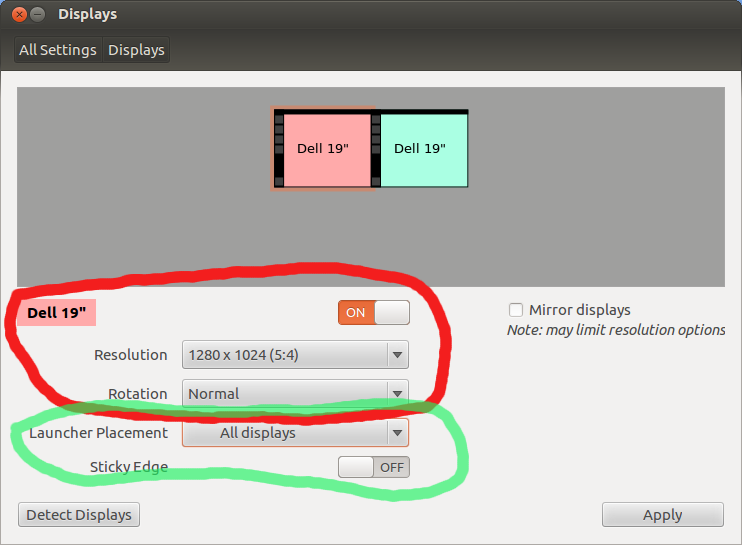
Please see the attached screenshot.
The top options are monitor specific (they depend on which monitor you have clicked on in the preview image at the top).
The bottom two options (launcher placement and sticky edge) apply to all monitors. These were introduced when fixing Bug #950136.
This distinction is not at all clear in the interface.
I wonder if one way to fix this might be to put some of the options above the monitor preview image thing.
-------
Desired solution:
- Implement System Settings "display preferences" panel as specified in section "2.4 Displays settings" of the Gnome 3 System Settings spec ( https:/
- Dependencies.txt Edit (7.7 KiB, text/plain; charset="utf-8")
- usr_lib_gnome-control-center.txt Edit (101 bytes, text/plain; charset="utf-8")
Status changed to 'Confirmed' because the bug affects multiple users.
Another idea would be to move the options to the appearance settings. That's where I would have looked for it first.
In Appearance > Behaviour it would be in the same place as whether to hide the launcher, so all launcher config would be in the same place. On the other hand Displays is where the positioning of the displays is setup and there is the picture showing the layout, so in that case it is better there. Perhaps Appearance > Behaviour would be better in Displays.
Due to Bug #963976, I would lean towards moving Appearance > Behaviour to Displays (and potentially renaming Displays, although I can't think of a better name).
I admit that Appearance-
It may save time to fix bug 965076 and/or bug 965080 at the same time as this bug.
I have to apologize for my previous post. I didn't know that it is possible to select the monitor (by monitor name) in the Launcher placement. On my system I can only select "Unknown" or "All displays" (Nvidia driver). So sure it makes sense to have this setting in the Displays settings.
thanks for your bug, it's late in precise to do shuffling around about what controls are in what ui, setting the ubuntu gnome-control-
+ Not obvious which settings in "Displays" panel are display-specific
+ System Settings - Not obvious which settings in "Displays" panel are
+ display-specific
Currently, selecting System Settings -> Displays on systems with multiple monitors and the NVidia drivers produces an error dialog that says "RANDR extension is not present" - as a result, at least one of my users is unable even to access the sticky edge setting (they worked around it via CCSM, but that's not a path to resolution that I'd want to generally encourage).
Between this being NVidia specific and the addition of XRandR support to 304 drivers and later, I'm not filing a bug for that, but just as Chris Schmidt suggested earlier, I first looked for the setting under Appearance > Behavior.
I can understand the the reasoning for locating the options in one place or another, but I do find it bothersome that an error related to the display specifically should prevent access to other settings that aren't actually dependent on a display-level feature.