window sizes not correcly calculated
| Affects | Status | Importance | Assigned to | Milestone | |
|---|---|---|---|---|---|
| Unity |
Fix Released
|
Medium
|
Jason Smith | ||
| compiz (Ubuntu) |
Fix Released
|
Medium
|
Unassigned | ||
| unity (Ubuntu) |
Fix Released
|
Undecided
|
Unassigned | ||
Bug Description
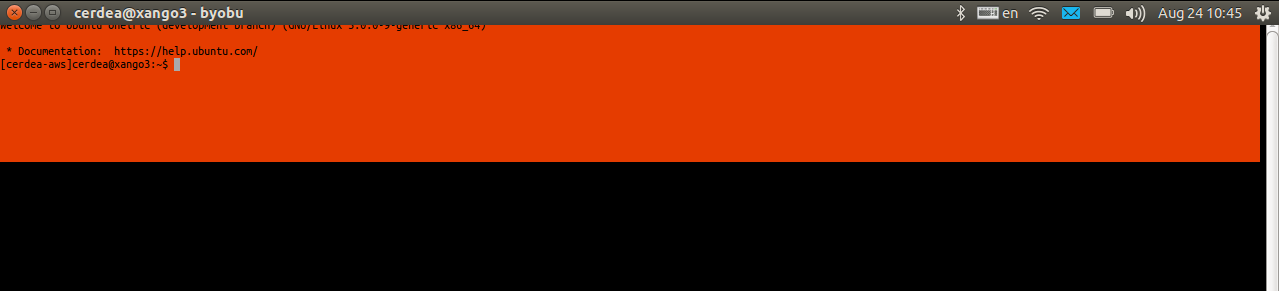
If I open a window (tested with roxterm, terminator, and gnome-terminal), the newly-created window is positioned wrong -- the top of the window is under the unity-panel overlay.
As a result, sometimes the first line(s) of the new window are hidden under the unity-panel, or the window controls are hidden (or a mix of both).
I am attaching screenshots.
ProblemType: Bug
DistroRelease: Ubuntu 11.10
Package: compiz 1:0.9.5.
ProcVersionSign
Uname: Linux 3.0.0-9-generic x86_64
NonfreeKernelMo
Architecture: amd64
CompizPlugins: [core,bailer,
CompositorRunning: compiz
Date: Wed Aug 24 11:06:02 2011
DistUpgraded: Log time: 2011年08月22日 15:21:46.012830
DistroCodename: oneiric
DistroVariant: ubuntu
DkmsStatus:
bcmwl, 5.100.82.38+bdcom, 3.0.0-9-generic, x86_64: installed
virtualbox, 4.1.0, 3.0.0-9-generic, x86_64: installed
GraphicsCard:
nVidia Corporation GT218 [NVS 3100M] [10de:0a6c] (rev a2) (prog-if 00 [VGA controller])
Subsystem: Dell Device [1028:040a]
MachineType: Dell Inc. Latitude E6410
PackageArchitec
ProcEnviron:
LC_TIME=en_DK.utf8
PATH=(custom, user)
LANG=en_US.UTF-8
SHELL=/bin/bash
ProcKernelCmdLine: BOOT_IMAGE=
SourcePackage: compiz
UpgradeStatus: Upgraded to oneiric on 2011年08月22日 (1 days ago)
dmi.bios.date: 05/26/2011
dmi.bios.vendor: Dell Inc.
dmi.bios.version: A09
dmi.board.name: 0K42JR
dmi.board.vendor: Dell Inc.
dmi.board.version: A01
dmi.chassis.type: 9
dmi.chassis.vendor: Dell Inc.
dmi.modalias: dmi:bvnDellInc.
dmi.product.name: Latitude E6410
dmi.product.
dmi.sys.vendor: Dell Inc.
version.compiz: compiz 1:0.9.5.
version.ia32-libs: ia32-libs 20090808ubuntu16
version.libdrm2: libdrm2 2.4.26-1ubuntu1
version.
version.
version.
version.
version.
version.
version.
version.
- BootDmesg.txt Edit (69.3 KiB, text/plain; charset="utf-8")
- BootLog.gz Edit (1.0 KiB, application/x-gzip)
- CurrentDmesg.txt Edit (10.0 KiB, text/plain; charset="utf-8")
- Dependencies.txt Edit (4.7 KiB, text/plain; charset="utf-8")
- DpkgLog.txt Edit (1.9 MiB, text/plain; charset="utf-8")
- GconfCompiz.txt Edit (36.9 KiB, text/plain; charset="utf-8")
- GdmLog.txt Edit (47.9 KiB, text/plain; charset="utf-8")
- GdmLog1.txt Edit (44.7 KiB, text/plain; charset="utf-8")
- GdmLog2.txt Edit (52.6 KiB, text/plain; charset="utf-8")
- LightdmDisplayLog.txt Edit (1.1 KiB, text/plain; charset="utf-8")
- LightdmGreeterLog.txt Edit (7.6 KiB, text/plain; charset="utf-8")
- LightdmLog.txt Edit (5.1 KiB, text/plain; charset="utf-8")
- Lspci.txt Edit (15.1 KiB, text/plain; charset="utf-8")
- Lsusb.txt Edit (959 bytes, text/plain; charset="utf-8")
- ProcCpuinfo.txt Edit (3.3 KiB, text/plain; charset="utf-8")
- ProcInterrupts.txt Edit (2.0 KiB, text/plain; charset="utf-8")
- ProcModules.txt Edit (5.3 KiB, text/plain; charset="utf-8")
- UdevDb.txt Edit (163.5 KiB, text/plain; charset="utf-8")
- UdevLog.txt Edit (349.4 KiB, text/plain; charset="utf-8")
- UnitySupportTest.txt Edit (566 bytes, text/plain; charset="utf-8")
- XorgLog.txt Edit (37.6 KiB, text/plain; charset="utf-8")
- XorgLogOld.txt Edit (55.2 KiB, text/plain; charset="utf-8")
- Xrandr.txt Edit (7.7 KiB, text/plain; charset="utf-8")
- locale.txt Edit (324 bytes, text/plain; charset="utf-8")
- monitors.xml.txt Edit (1017 bytes, text/plain; charset="utf-8")
- peripherals.txt Edit (946 bytes, text/plain; charset="utf-8")
- setxkbmap.txt Edit (248 bytes, text/plain; charset="utf-8")
- xdpyinfo.txt Edit (25.0 KiB, text/plain; charset="utf-8")
- xinput.txt Edit (1.0 KiB, text/plain; charset="utf-8")
- xkbcomp.txt Edit (56.9 KiB, text/plain; charset="utf-8")

Could you please run unity --reset to ensure that your compiz options are the default, and that the window placement options did not get fudged with in upgrade?
Tried it. Immediate crash (see bug 778470), every time I run it. So, not possible to test.
Please note the issue on this bug seems to only happen on a dual-monitor setup. If I am running only with the laptop monitor, I do not see it.
Status changed to 'Confirmed' because the bug affects multiple users.