Window maximizes and semi-maximizes on the wrong workspace
| Affects | Status | Importance | Assigned to | Milestone | |
|---|---|---|---|---|---|
| Compiz |
Fix Released
|
Medium
|
Sami Jaktholm | ||
| 0.9.8 |
Won't Fix
|
Medium
|
Unassigned | ||
| Compiz Core |
Triaged
|
Medium
|
Unassigned | ||
| compiz (Ubuntu) |
Fix Released
|
Medium
|
Unassigned | ||
Bug Description
For windows maximizing on the wrong monitor, see bug 751605.
Binary package hint: unity
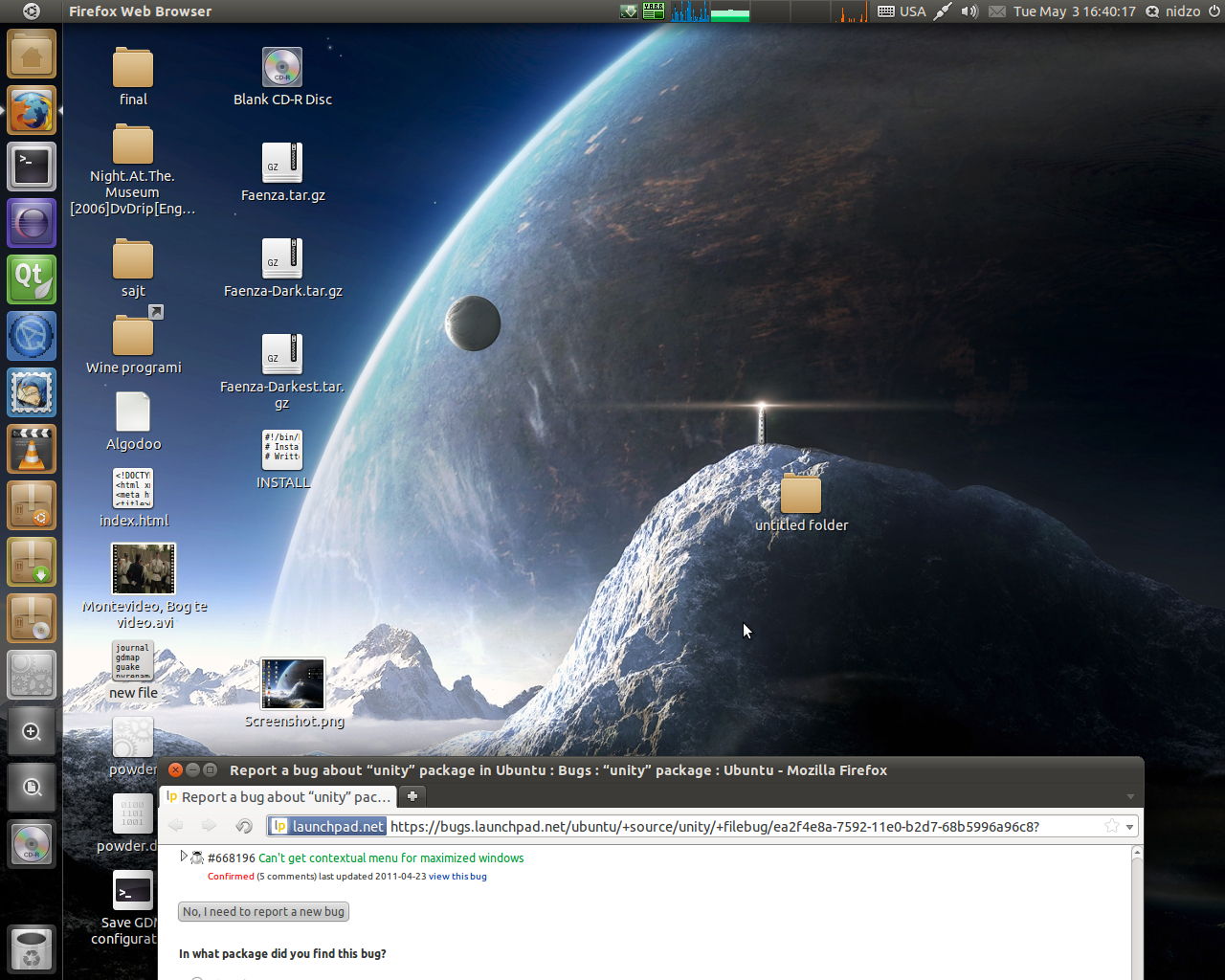
Windows get maximized on another workspace when they are near the screen edge(see the screenshot below)
How to replicate:
1. move the window on the edge of the screen like on the screenshot below
2. click "maximize" button
3. window will be maximized on a workspace below
video demonstration: https:/
ProblemType: Bug
DistroRelease: Ubuntu 11.04
Package: unity 3.8.10-0ubuntu2
ProcVersionSign
Uname: Linux 2.6.38-8-generic i686
NonfreeKernelMo
Architecture: i386
CompizPlugins: [core,bailer,
Date: Tue May 3 16:37:23 2011
InstallationMedia: Ubuntu 11.04 "Natty Narwhal" - Release i386 (20110427.1)
ProcEnviron:
LANGUAGE=en_US:en
LANG=en_US.UTF-8
SHELL=/bin/bash
SourcePackage: unity
UpgradeStatus: No upgrade log present (probably fresh install)
Related branches
- Daniel van Vugt: Approve
- jenkins (community): Approve (continuous-integration)
- Sam Spilsbury: Needs Information
-
Diff: 84 lines (+9/-15) 1 file modifiedapisrc/window.cpp (+9/-15)
- Daniel van Vugt: Needs Resubmitting
- jenkins (community): Approve (continuous-integration)
- Compiz Maintainers: Pending requested
-
Diff: 84 lines (+9/-15) 1 file modifiedapisrc/window.cpp (+9/-15)
- PS Jenkins bot (community): Approve (continuous-integration)
- Brandon Schaefer (community): Approve
- Sam Spilsbury: Approve
-
Diff: 15 lines (+4/-1) 1 file modifiedapisrc/window.cpp (+4/-1)
- Here's a screenshot Edit (1.3 MiB, image/png)
- Dependencies.txt Edit (5.6 KiB, text/plain; charset="utf-8")
- GconfCompiz.txt Edit (36.7 KiB, text/plain; charset="utf-8")
?
The window on your screenshot doesn't appear to be "near the edge", but actually located on the lower workspace for the most part. It makes perfect sense that it would maximise on that workspace.
I know this is the intended behaviour. But this really annoys me. Somebody a workaround ?
Thanks.
please give me a workaround.
I can reproduce this bug in Oneiric.
it seems when over the half of the window is "overlapping" to another workspace, the bug appears.
I made some research:
- using Ubuntu 10.04 with desktop effects enabled, I can reproduce this bug.
so I think, this particular bug is older than unity. (compiz only)
I have not found any old bug reports referring to this issue (yet), so I think nobody ran into this issue in the past (before unity).
WHY? 2 theories: In pre-Unity Ubuntu releases,
- The default window placement (for new opened windows) was better, so no one had to maximize overlapping windows, because the windows opened non-overlapping.
- The "typical" usage of windows changed with unity (e.g. new users, not familiar with unity features, "push" windows to the side of the screen to get to the program below, instead of using unity launcher to do that.
In natty I can say that the window placement is not ideal and this bug appears very often.
I have not tried oneiric for intensive use yet, eventually the window placement is better.
I finally found a compiz bug, ( Bug #774986 ) which I think makes the user running into this bug.
Hope getting help.
The only "hard" workaround I found:
- Install unity 2d:
> sudo apt-get install unity-2d
- Select Unity 2D at login
Another is to change the workspaces from 4 to 1.
I can reproduce this behavior in Precise. Whether it's by design or not will be revealed in due time.
On duplicate bug #948151, there was a request for a video demonstrating this behaviour. ian-berke posted one at https:/
I can't reproduce this any longer on the latest precise.
Sorry, that last comment was a bit meaningless, without the following:
Compiz 0.9.7.0 (1:0.9.
unity 5.6.0 (5.6.0-0ubuntu3)
Linux 3.2.0-18-generic #29-Ubuntu SMP Fri Mar 9 21:36:08 UTC 2012 x86_64
I still have this problem with:
Compiz 0.9.7.0 (1:0.9.
unity 5.6.0 (5.6.0-0ubuntu4)
Linux ubuntu 3.2.0-18-generic #29-Ubuntu SMP Fri Mar 9 21:36:08 UTC 2012 x86_64 x86_64 x86_64 GNU/Linux
Both the maximize bug to wrong monitor on multi-monitor displays and the maximize to wrong workspace occur.
BTW, is the maximize to wrong monitor on mulit-monitor displays really related to the maximize to wrong workspace? I don't need the window size to be half on the wrong monitor (in fact it doesn't even need to be on the monitor it ends up maximizing to). It seems like a separate issue to me and I don't understand why it's been marked a duplicate of this bug.
+ Window maximizes on the wrong workspace/monitor
+ Window maximizes on the wrong workspace
A temporary workaround is to reduce the number of desktops to one(1), with software like myunity which can be downloaded at the ubuntu software store.
Why nobody is able to fix this big bug? It is over a year after reporting it now. Why should we report bugs if they won't be fixed? Can not somebody assign himself to this bug and fix it then?
Thanks for your involvement with this bug report. We're trying to work hard in getting issues resolved; however, we can't get everything done all at once. I know this bug is pretty old but it's not the only one out there. That isn't to say that this one won't get solved. This bug has been tagged for a milestone that should be coming up soon enough.
In the meantime it would be most helpful if comments could be added only if they add to the discussion. Launchpad is not a place for unhelpful queries and remarks. That only provides extra mail for those that have to sift through multitudes of it.
Thank you for your cooperation.
I run into this behaviour quite often as I like to have a console window 'always on top' that I put on the side when not needed.
IMO windows should always maximise into the workspace containing the mouse cursor.
Hello,
This is unpossible. Why can't you get this bug fixed? I always see you changing status from confirmed to triaged and the description. But this doesn't help. You need somebody who assigns himself to fix this bug. And it's a bug where a lot of users are involved and a big bug. It existed in 11.04, 11.10, 12.04 an 12.10. I'm really wondering me why this bug can't be the next step for the Compiz team.
Greetings,
Lars
Compiz has roughly 1000 open bugs and a tiny development team. Sometimes fixing a single bug can take days or even weeks. Please be patient.
Fix committed into lp:compiz at revision 3417, scheduled for release in Compiz 0.9.9.0.
I'm sure this fix will go into compiz 0.9.8 and 0.9.7 eventually. However I recommend we give the initial fix in 0.9.9 more time to mature. It's in the middle of some very sensitive code so I want to make sure there are no regressions before the fix gets backported.
Fix reverted in lp:compiz r3443 due to a more serious regression it caused: bug 1071791
Nooo....why reverted again?!
Yes, I saw Daniel's new bug report...but...his bug isn't as bad as this bug here...so it would be not perfect, but better then now.
beyond, his bug is only reproduced by himself...here are more than 30 assigners.
Lars,
I was not about to wait for bug 1071791 to hit a wider audience. I'm sure more than 28 people would complain about that one.
On a dual monitor setup (Monitor 1: 1920x1200, Monitor 2: 1280x1024) a window will maximize correctly via grid on the small monitor if it's x-size is lower than 2459 pixel, but larger than the bigger monitor's x-resolution (1920).
-> see also bug 751605 and the proposed solution https:/
Once the window is resized to 2460 pixel and maximized on the smaller resolution monitor (2) via grid on viewport 1 it will jump to monitor 2 on viewport 2.
Resizing the window to x>2461 pixel and repeating the maximizing via grid on viewport 1 it will jump to Monitor 1 (the large-resolution one) on viewport 2.
This is 100% reproducable every time.
Solution:
We should never move windows across viewports when we maximize a window. Any objections ?
Hmm, I think the simple answer for workspaces is that a window should only ever maximize on a visible one, at least :)
Why triaged?!?
The solution is and must be:
Workspaces NEVER switch during start, stop, maximize or minimize a window. If you want to change the workspace for a programm, then you have to go for example to the expo view and there you can move a window from workspace to workspace. Or you do a right-click and then you can say, move to workspace 1, 2, 3, 4.
But I think it's absolutely not good if you only want to maximize a window (if the window is more on the other inactive workspace than on the active workspace) and it flipps away. That is STUPID. It nerves many people and I think we can't let it as it is now.
Lars: Please read https:/
+ Window maximizes and semi-maximizes on the wrong workspace
The current system already acts quite intelligent:
It will choose the workspace to maximize on that holds the biggest part of the window...
But this system could be improved, my idea:
We could ensure that off-screen positions are not taken into account, when calculating the target position
(if no other grabs exist to avoid problems with other plugins using maximize ?)
Potentially this could be the best solution, but I have to check the code to be sure.
There were already some attempts made to fix this problem, which caused regressions, so let's hope...
We could also upgrade the logic to not only take the window's position, but also the mousepointer's position
into account, but probably this would be overkill.
We should probably change the logic to simply always maximize and semi-maximize on the active desktop only.
2 MC Return (mc-return) :
Yep! That is how it should work.
I don't see any use case to maximize it on a different desktop, like it does now.
@gneeot:
The problem is that obvious things often get very complicated inside the code ;) and we have
to be very careful to not introduce regressions...
A ton of other functions calls PrivateWindow:
happens - th real responsibility for this behaviour is to be found in src/screen.cpp, where
this code can be found:
/* Returns default viewport for some window geometry. If the window spans
* more than one viewport the most appropriate viewport is returned. How the
* most appropriate viewport is computed can be made optional if necessary. It
* is currently computed as the viewport where the center of the window is
* located.
*
* XXX: It is possible for this function to return a negative viewport, which
* definitely feels wrong, however it seems that some plugins depend on this behaviour
* so they need to be fixed first
*/
void
compiz:
CompPoint &viewport,
const CompSize & screenSize)
^^ this function is then responsible for returning the wrong workspace, wrong in the sense that
it can be offscreen also...
I see multiple possible solutions, but maybe someone else has some input as well, ideas are welcome...
One thing is clear: This needs to finally get fixed ;)
Please also see Bug #1165695, as it might be closely related.
Another brainstorm:
This bug can also be triggered by Grid and needs to be finally fixed in 0.9.10.
Unfortunately this involves manipulating the core, which makes testing the fix properly a bit harder without fully installing the self-compiled Compiz...
Nevertheless the fix itself should not be hard to implement -> the logic just needs to be changed to always semi-maximize/
For plugins using this function this change could be problematic, maybe the best solution would be to create a new function with the old behaviour and make all plugins call that instead, so the behaviour for them won't change, while maximizing and semimaximizing would use the new function...
Fix committed into lp:compiz at revision 3766, scheduled for release in compiz, milestone 0.9.10.0
This bug was fixed in the package compiz - 1:0.9.10+
---------------
compiz (1:0.9.
[ Sam Spilsbury ]
* Bump version to 0.9.10
[ Łukasz 'sil2100' Zemczak ]
* Remove debian/
- Running the support test from compiz has bad side effects, from now
on we run it from Xsession.d
* Automatic snapshot from revision 3644
[ Iven Hsu ]
* Opacify: Only dim the windows above the active window.(LP:
#1189374). (LP: #1189374)
* KWD: Fix compile errors with KDE 4.11. The KWin developers made
kdecoration
http://
(LP: #1193792). (LP: #1193792)
[ Nikolay Martynov ]
* When static switcher is enabled and has an option to show
application icon turned on the icons are expected to be ~1/3 of a
thumbnail (48px). Instead they are displayed in 512px size and
completely cover everything. This change addresses this issue. See
LP #1173914. (LP: #1173914, #1186426)
[ BryanFRitt ]
* Fixed the non-working Annotate 'Clear' Button. Moved this option's
CCSM position upwards to keep the button shortcuts together. (LP:
#1202907). (LP: #1202907)
[ Mehrdad Afshari ]
* Added "move window to previous monitor" feature to compiz Put
plugin. (LP: #1178581)
[ Hu Kang ]
* gtk-window-
min, max) buttons on the title bar is pressed. (LP: #1101648)
* Remove redundant src/logmessage/
#1067246). (LP: #1067246)
[ Steve Langasek ]
* Fix for bug #763148 (with added test cases): when the desktop is
resized, windows should stay on their original workspace. (LP:
#763148)
[ Brandon Schaefer ]
* Unrevert 3728, fix failing tests. Change the behaviour of
undecorating windows. Previously when a window was undecorated, we
would shift it back to an appropriate position according to its
gravity member. That behaviour was problematic because in the
StaticGravity case the window has to just stay in the same place.
But then if you had a window with StaticGravity which then did get a
decoration and later removed it, it would be placed as though it was
decorated and appear to be in the wrong place. The correct behaviour
is to place all windows as though they have decorations, and then
when decorations are removed, to move the window back to the corner
as indicated in its gravity and then expand its size to cover the
obscured regions no longer hidden because the decorations went away.
(LP: #1165343). 1. Completely remove decorOffsetMove and other
related code from decor.cpp. Put the logic to handle the
window->input () - window->border () placement offset inside of
setWindowFr
offset from its original non-decorated position to the new
decorated position, rather than having to guess between
decoration sizes. 2. Make saveGeometry and restoreGeometry work
relative to window->border () a...
This does not appear to be completely fixed in my version of Compiz ( 0.9.11.3) in Ubuntu. Please see the video that demonstrates the bug: https:/
ping?
Please consider reopening.