Tuesday, October 23, 2012

13" Retina MacBook Pro 2560x1600

So here I am working and watching the Apple keynote live event of the unveiling of the new Retina 13 MacBook on my 30" WQXGA screen.

I've been running 2560x1600 for over four years and it blows my mind that a 13" laptop has the same resolution as my (once) 2ドル-3,000 monitors.

Just for reference, this is what you can fit on with a WQXGA display- Full page browser, a MySQL client, a text editor., a terminal console, a Firebug debugger, a File Manager, and a music player.


Another screenshot of WQXGA real estate.


Monday, October 22, 2012

NextStep on Modern Mac

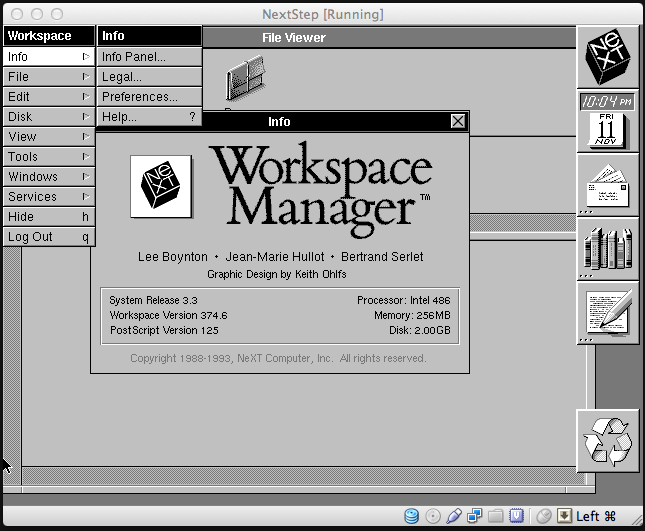
Today, I decided to kill some time by installing and running NextStep in VirtualBox. Here it is, version 3.3

NextStep is the father of Mac OS X. It was interesting to see OSX (and OpenStep) evolved from NextStep.

It is surprisingly fast.


Now, if there was only a SGI Irix 6.5 image that could run on new X86 hardware.

Friday, October 19, 2012

Mk802 40ドル Android stick

Interesting impulse gadget buy. A mini PC the size of a big USB stick.

And it is running Classic MacOS 7.5 via minivmac!

Tuesday, October 16, 2012

Windows RT Surface RT 13 years ago. The IBM z50


13 years ago, I got myself an IBM z50 Workpad. It is the grand-daddy of the upcoming Microsoft Surface RT.


In the picture above, it is the device on the left next to the first netbook, the Asus EEEPC 701.

I bought it because I wanted something to compliment my Thinkpad 600E and 701 of that era.

Windows CE promised to do many of the great things Windows 8 RT intends to do: provide portable productivity with the option of a desktop UI and the ability to run Microsoft Office in a thin-n-light form factor.


(Does this image look familar?)


And this is why I think Windows RT will fail. It is the same promises from Microsoft re-hashed for this generation.

I am a long time Windows CE user. I started with the Philips Velo 1, NEC Mobile Pro, Toshiba E-Series, HP Jornadas, and lastly the Dell Axims at the dawn of the iPhone era.
I still call it Windows CE and never took to the gussied up name changes like Pocket PC or Windows Mobile.

Windows 8 RT is no different. It may have a new set of API and a more focused intent but it isn't true Windows. You can't run legacy apps.

RT's app selection is pitifully lacking. Metro apps pretty much suck. There are about 100 apps and the major ones like Ebay doesn't even work correctly; launching a web browser for every interaction.

Windows RT (ARM edition, aka Windows CE 2012) promises to have a dekstop mode but only Microsoft blessed apps like Office runs on it. I guess the Office code is so old and cruddy they didn't have time to port it to Windows RT.

The name is also confusing. Many of my friends and relatives have no idea that RT will not run their old Corel Draw. I wonder how many people who pick these up during Christmas will be surprised to know it won't run their old apps. Simply, Microsoft is not doing a good job of informing the consumer.

There will be no third party desktop apps. All apps must be delivered in the Microsoft app store. According to Microsoft's own words, there will be no porting or virtualization of legacy apps from x86 to ARM. So forget running VLC, Photoshop, Open Office, or even FireFox.

Running Windows on alternative architecture is a gamble I prefer not to do again. I am one of those old guys who bought DEC Alpha NT Workstations because it was RISC and suppose to blow the pants off the Pentium Pros. Unfortunately, those DEC Alpha boxes pretty much sat and did nothing because of the lack of apps.

Without a vibrant app ecosystem, Windows RT is late to the game.

The z50 had the following specs:
Introduced in 1999
Microsoft Handheld PC 3.0 Professional Edition
HPC 3.0 (Code Name: Jupiter)
16MB
NEC VR4121 131MHZ (MIPS based CPU)
PCMCIA/CF and RS-232 serial (via dongle)
Microsoft Office : Excel, Word, PowerPoint, Explorer.

More info: http://pdadb.net/index.php?m=specs&id=163&c=ibm_workpad_z50

In fact, I have used the z50 for the past 12-13 years. It has a DB9 serial port and I use a pocket hyperterminal app in cases where I need to serial console into a router, switch or old firewall. Battery is shot and the app runs off a 256MB Compact Flash card.


Lastly, the z50, back then cost around 600ドル. I think I spent around 3ドル-4,000 on the latest and greatest Windows CE HPC, Tablets, and pocket pcs. I won't do that again. Over ten years of Windows CE ownership, I am glad to skip this. I might change my mind if there is a 200ドル RT device that can boot a *NIX operating system like Ubuntu, Fedora, Debian, or ArchLinux.

I definitely won't be getting any RT device.

I am also surprised by the fact people are still confused about RT
Here is a sampling of comments on the internet from Gizmodo, Engadget and the Verge.


I expect to see a lot of returns after Christmas. Consumer confusion on this is deafening.

The Surface Pro, is a different subject altogether. It has the ability to run x86 legacy apps.
I would at least hold out for the Pro models coming out later in the year. For now, I will have to see how the ecosystem matures for RT.

Finally, there is one guy that I agree with. From a CNET thread.


Monday, October 15, 2012

Portable hard drive recommendation: Seagate Go-Flex

People often ask me for an opinion on what hard drive to get. They need something simple, portable and good enough to carry their music collection.


My blog pretty much covers fast drive setups such as SSDs and Thunderbolt but for most people, they want something with more storage at a reasonable price.

My recommendation would be the portable Seagate Go-Flex hard drives.

They come in 5400 rpm so they aren't blazing fast but they offer great flexibility and they often go on sale. 1TB normally goes for 70ドル and can be as low as 60ドル (discounted at Target). Why do I like them?
Well, I like the detachable end-piece that allows me to connect drives to a variety of different computers.

Picture below is an illustration of what I mean.
You can get end piece connectors that swap out for any computer configuration.

  • Firewire 800 adapter
  • USB 3 & 2
  • Thunderbolt
  • and even eSATA

I have an old Mac Mini and FW800 is the way to go. Some of my PC's have USB 3 so the USB 3 adapter comes in handy. The end pieces are easy to replace and there are even 3rd party docks and adapters that work with the Go Flex drives. You can even park them in and convert them into NAS drives as well. The great thing about Go-Flex is that you can use the adapters on other 2.5" laptop drives. Hence, you don't have to worry about future proofing your investment.


I have 8 of these drives and so far, they work great for storing music and files.


Friday, October 12, 2012

Fast small 2.5" USB3 - SSD enclosure : Oyen Mini Pro


Not all USB enclosures are built the same.
Chipset controllers make a big difference. In the firewire days, you'd search out Oxford 911 chipsets enclosures because you knew they were the fastest. The same applies for USB enclosures.

Today, I got myself an OYEN DIGITAL Mini Pro USB 3.0 2.5" case. It currently retails for 30ドル.


It has the following:
ASMedia 1051E chipset.
This chipset supports a full SATA III 6GBps drives at full speed. Most of the USB 2 and 3 enclosures support only SATA I & II. Depending on firmware, some 1051E controllers support UAS (USB Attach SCSI) protocol. I don't if that is the case here so I can comment.

So if you plan to find an enclosure/dock, look for one with a ASMedia controllers. The 1051E is currently the best USB 3.0 controller on the market. I've used Gensys Logic GL3310 controller cases and they tend to run 20% slower.

Overall, here are my impressions:
It is a great enclosure reminiscent of older G-Technology aluminum G-Drive.
This one has a black matte aluminum PVD like finish. It is very high quality.

It is surprisingly good and pushes the limites of current USB 3.0 to SSD enclosures.
Using a Samsung 830, I've exceeded the BOT (Bulk Only Transport) bottlenecks going over 260 MB/sec.

I do not know if this firmware has UAS but it is definitely fast.

Most importantly, this case is cheap compared to its nearest competitor at 75,ドル Mercury Elite Pro mini which also has the same ASMedia 1051E controller. (http://eshop.macsales.com/item/Other+World+Computing/MEPMU3ESK/)
The Mercury Elite does have an additional eSATA connection but I don't know if that justifies the 45ドル premium.

Furthermore, in my experience, eSATA has been capped at 200 MB/seconds. You will need a special eSATA 6Gbps card that supposedly takes more bandwidth but I have not yet seen it to be proven in any tests. Most likely, your standard eSATA port on your existing computer is limited to 1.5-3Gbps.


In short, if you are looking for something around 20ドル-30, definitely look at the Oyen.

Here are some quick speed test using a SSD to test its full potential.


Here is a quick youtube benchmark video. You can see it peaking over 230 MB/sec write and 270 MB/sec reads.


Tuesday, October 9, 2012

LaCie 2big Thunderbolt Review


Last week, I blogged about getting a LaCie 2big Thunderbolt drive.

Original post can be read here. It was a quick test using them with SSDs instead of the included 7200 rpm Seagate drives.

Today, I will give you my layman unprofessional review.

My unit is a 4TB model and replacing the drives is pretty easy. LaCie's claim of 320 MB/s is pretty accurate in my testing and that claim has been confirmed by various reviews. In fact, when I replaced the drives with SSDs, I was getting 400/475 MB/s.

For some people (mostly Mac users with Thunderbolt before June 2012), this may be the best bang for your buck. Solid State drives (SSDs) will give better raw speed but at the cost of disk size. This unit cost me as much as a 256GB Crucial M4 or Samsung 830 SSD. Instead of 256GB, I get 4TB. You can try an e-Sata RAID box but you'll be topped out at 200 MB/s which is e-Sata's theoretical ceiling.

So, there is no denying that units like this can be appealing to a certain audience. I can see that target audience being video and sound editors who need a big fast scratch drive. Note, I said "scratch" drive because this unit is a striped RAID 0 array. If one drive goes, the entire array is gone. So if you intend to use this drive, I suggest you keep regular backups.

Next, in terms of usage,I had no problems with daisy chaining drives (see picture above) or monitors. Nor did I have any problem with computers going to sleep.

Now, there are only two (maybe three) complaints:

1) This is not a true hardware RAID. The RAID is done via OSX Disk Utility RAID tools. This is buried in the specifications if you care to read. I didn't.

2) By not being a hardware RAID, this is not a bootable drive. I tried and tried installing a clean OS. Apparently, with Lion (and Mountain Lion), there is no recovery partition on a software RAID volume.

3) This in turn means you can't have multiple partitions. You can't split the drive up into multiple partitions (one for time machine, another for scratch, another media).

Are these criticism worth demoting the product? That is up to you to decide.

Overall, I can't complain considering it is a big drive to shuttle files around.

You will get 300MB/second consistently which is pretty great for most people.


Subscribe to: Comments (Atom)

AltStyle によって変換されたページ (->オリジナル) /