


-
Recent Posts
Recent Comments
hugs on Bitbeambot – The Complet…hugs on Bitbeam Robots Invade PyC…Renato on Bitbeam Robots Invade PyC…Dew on Bitbeambot – The Complet…hugs on A Robot on Every DeskArchives
Categories
Meta
A Robot on Every Desk
Last week, I led a robot workshop in New York City. A huge thank you to Sauce Labs for sponsoring and Crowdtap for hosting the event at their office. Thank you specifically to Ashley Wilson at Sauce Labs and Arjun Anand at Crowdtap for setting everything up. In particular, I owe a massive thank you to my lovely wife, Kelly, for taking the day off work the day before the workshop to help me put all the kits together!
So, the workshop was glorious. Crazy dancing robots everywhere.
[フレーム]
Two days later, Tapsterbot got TechCrunched. Several of the workshop attendees work at R/GA and are now using Tapsterbot to test apps for Nike. Nike! Robots get you paid!
Last year, I wrote a piece for Wired explaining my belief that as mobile apps get more sophisticated, robots are going to be an important part of the future of test automation:
A robot tester is the best of both worlds – it’s a real-world test on a real device – and because it’s a robot, it also performs the task precisely and quickly.
Bill Gates used to talk about “A computer on every desk”. My dream for the Tapsterbot project is “A robot on every desk.” I’m excited to see R/GA is starting to make that dream a reality!
There are many improvements coming to Tapsterbot in the future, for example, adding a second arm so it can “double-tap”, pinch, and zoom, and integrating more tightly with Appium to automate mobile app testing end-to-end. But along the way, the robot is learning lots of new tricks.
[フレーム]
Later in the day, Jonathan Lipps (also from Sauce Labs) gave an excellent overview of Appium and how Tapsterbot and Appium will work together closer in the future.
I’m looking forward to doing more workshops. I’m spending more and more of my time now on robots, and figuring out how to mass produce more Bitbeam.
If you’ll be in the San Francisco Bay Area on May 18 & 19, come check out Tapsterbot and Bitbeam at Maker Faire Bay Area. (I’ll be hanging out at the Gridbeam booth again.)
Until then, grab the Tapsterbot source code (and all the CNC-able/3D-printable Bitbeam parts) and start hacking the future of test automation!
Printing Bitbeams
It’s been a busy few months in Bitbeam land. For lots of reasons, I’m now the proud owner of a Lulzbot AO-101 3D Printer. I ordered it on Tuesday, received it today, and I’m already printing beams. Here’s a quick peak at the results!
I used the “Bitbeam RP Printable” version of Bitbeam by Wildseyed.
Smoke Tests for Bitbeambot
[フレーム]
Some tests to verify that bitbeambot is working well — mechanically, electronically, and software-ly.
Bitbeambot – The Complete Kit
I’m finally getting around to cleaning up and documenting the Bitbeambot. I just posted detailed assembly instructions to Flickr.
Key technical improvements:
* Upgraded to brand new Hitec HS-311 standard servos
* Upgraded the servo mount point – it now locks very tight
into place. Previous version was very delicate and prone to slipping.
* 2 new mounting plates:
– Bitbeam leg connector plate
– Arduino mounting plate
* Upgraded all arm joints
– Removed all LEGO Technic axles and bushing
– Added 6-32 nylon rods, custom aluminum standoffs, and zinc nuts
Next up: post the final bill of materials included in the kit, publishing the OpenSCAD design files to Thingiverse and GitHub, posting instructions on how to update the bot’s Arduino sketch, and documenting how to control the robot with Python or Node.JS.
Open Hardware Summit: Bitbeam Talk Proposal
I just barely got the talk proposal in on time for the Open Hardware Summit coming up in September.
Here’s an excerpt from what I submitted. Wish me luck!
What you intend to talk about:
Bitbeam is a LEGO Technic-compatible building technology. Bitbeam can be printed on a 3D-printer or cut with a CNC router or laser-cutter, which means it can be made out of plastic, wood, or aluminum.
Bitbeam is also inspired by another project called “grid beam”. Grid beam is an open system similar to Erector Sets, but can be used to create life size objects like desks, tables, chairs, shelves, lamps, and even electric vehicles.
This talk will cover:
- The history of bitbeam and grid beam
- The history of the building toy market
- How to make bitbeam with a 3d-printers or laser-cutters
- The future of the project (more robots, more kits)
An explanation of the importance of your submission to the open-hardware community:
The toy industry as a whole, and building toy companies, in particular, are traditionally secretive and closed. The parts in these systems are often very expensive to source. That has to change. Open source needs to extend into the construction toy market. Toy companies should encourage users to create building toy parts with 3d-printers and CNC machines. Bitbeam is a project that assumes open manufacturing and open participation will be the future of the toy industry.
The Bitbeam project has been featured on the MakerBot and Make blogs, Popular Science, O’Reilly Radar, and CNET News.
Photo samples:
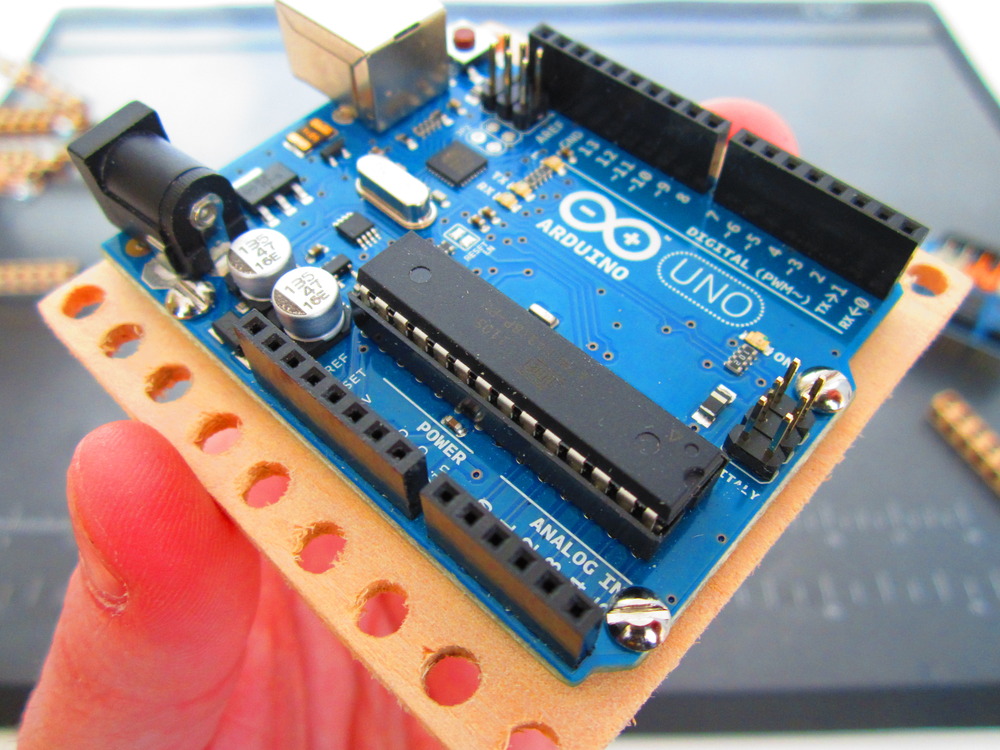
Arduino mounting plate
A common problem when playing with Arduino is deciding how to secure the circuit board to the rest of your project. Use this laser cuttable mounting plate to attach an Arduino to your LEGO Technic or Bitbeam creations.
You can check out the OpenSCAD source or DXF files in the Bitbeam repo on GitHub.
Or admire it on Thingiverse!
Or watch a slideshow on Flickr!
I manually cut the mounting plate in the above photo at home with my jewelers drill press and jigsaw. Here’s a fun little technique when you don’t have a laser cutter nearby: Print out the design on sticker paper. Then attach the sticker to the wood. Finally, use your drill and saw to cut out the final design.
When I get back to TechShop I’ll do a proper laser cut, and post more photos.
Here’s the completed assembly connected to other beams:
Enjoy!
Bitbeam Robots Invade PyCon!
Here’s the video of the talk I gave at PyCon 2012 about my Angry Birds playing robot.
[フレーム]Sorry for all the “ums”. I’m really going to try to remove those from my vocabulary. Here’s a some good advice on how to remove “ums” from your speech.
Who Has Two Thumbs and Made O’Reilly’s Radar?
Okay, that tweet will probably be on my Top 10 Awesome Moments of 2011 list. But let’s back up for a second. How’d we get here?
On October 2nd, I presented my Angry Birds playing robot at the Jenkins User Conference in San Francisco. You can watch the video on YouTube, fast forwarded to the roboty bits at 14:25.
[フレーム][The conference video doesn’t cut away from me while I narrate the two robot demo videos. But all is not lost! You can enjoy the two demo links here and here. Oh, and the slides, here.]
Weeks before the conference, I announced that I would unveil the bitbeam robot in my talk. Not satisfied with a mere Worldwide Premiere, I decided BitbeamBot deserved a Galactic Premiere . I used this as motivation to actually finish building the robot. I call this “Embarrassment Driven Development — make a big public promise to deliver on a deadline or risk embarrassment. Let me tell you, EDD works. Just a few hours before my conference talk, I was still furiously testing circuits and writing code, trying to get it all to work. But I pulled it off. I got the demo working, recorded a quick video of it working on my desk, then sprinted over to the conference to give my talk.
The talk went well. A good time was had by all. Okay, so the next day, I was scheduled to talk with Tim O’Brien from O’Reilly about Selenium. Still fired up by the success at JenkinsConf, I convinced Tim to let me talk about my robot. (He really had no choice, though. I was talkin’ robots with or without him.)
The interview is up on YouTube, and Tim posted his summary on O’Reilly Radar.
A few day’s later, Mr. O’Reilly himself posted that tweet.
And he lived happily ever after. The End!
bitPad – Open Source iPad Stand
bitPad is an inexpensive and easy to build iPad stand made with Bitbeam. Although it’s very simple, it shows you some of the fun things you can do with Bitbeam.
[フレーム]Here are the parts you need:
- 3 27U Bitbeam beams
- 2 13U Bitbeam beams
- 6 1-inch long 10-32 machine screws (phillips pan-head, fine thread, zinc)
- 6 10-32 machine screw hex nuts (fine thread, zinc)
It’s popular with the kids!
I posted more detailed assembly pictures to the bitPad photo set on Flickr.
When I started the Bitbeam project in July, I didn’t focus on how to make money from it. It was more of an art project that had to get out of my head and into the real world. However, people keep asking me when I’m going to start selling kits. I’m pretty busy these days with my awesome startup, but I think it might be fun to make a few Bitbeam kits, get ’em out in the world, and start growing the Bitbeam community. So, if you’re interested in buying a bitPad kit, please provide your email address in the form below. Kits are 6ドル. Shipping for up to 4 kits is 5ドル to anywhere in the USA. (It would make an excellent stocking stuffer!) I’ll probably keep the first batch limited to about 25 kits. So act now! 🙂
Angry Bots
My robot plays Angry Birds. Does yours?
I created this robot for my “Extreme Testing with Selenium and Jenkins” talk at the Jenkins User Conference, on October 2, 2011.
[フレーム] [フレーム]Oh, and it looks like Bitbeambot is now #1 on the Robots That Play Angry Birds leaderboard, too!